tencent cloud

Elastic MapReduce

Release Notes and Announcements
Release Notes
Announcements
Security Announcements
Product Introduction
Overview
Strengths
Architecture
Features
Use Cases
Constraints and Limits
Technical Support Scope
Product release
Purchase Guide
EMR on CVM Billing Instructions
EMR on TKE Billing Instructions
EMR Serverless HBase Billing Instructions
Getting Started
EMR on CVM Quick Start
EMR on TKE Quick Start
EMR on CVM Operation Guide
Planning Cluster
Administrative rights
Configuring Cluster
Managing Cluster
Managing Service
Monitoring and Alarms
TCInsight
EMR on TKE Operation Guide
Introduction to EMR on TKE
Configuring Cluster
Cluster Management
Service Management
Monitoring and Ops
Application Analysis
EMR Serverless HBase Operation Guide
EMR Serverless HBase Product Introduction
Quotas and Limits
Planning an Instance
Managing an Instance
Monitoring and Alarms
Development Guide
EMR Development Guide
Hadoop Development Guide
Spark Development Guide
Hbase Development Guide
Phoenix on Hbase Development Guide
Hive Development Guide
Presto Development Guide
Sqoop Development Guide
Hue Development Guide
Oozie Development Guide
Flume Development Guide
Kerberos Development Guide
Knox Development Guide
Alluxio Development Guide
Kylin Development Guide
Livy Development Guide
Kyuubi Development Guide
Zeppelin Development Guide
Hudi Development Guide
Superset Development Guide
Impala Development Guide
Druid Development Guide
TensorFlow Development Guide
Kudu Development Guide
Ranger Development Guide
Kafka Development Guide
Iceberg Development Guide
StarRocks Development Guide
Flink Development Guide
JupyterLab Development Guide
MLflow Development Guide
Practical Tutorial
Practice of EMR on CVM Ops
Data Migration
Practical Tutorial on Custom Scaling
API Documentation
History
Introduction
API Category
Cluster Resource Management APIs
Cluster Services APIs
User Management APIs
Data Inquiry APIs
Scaling APIs
Configuration APIs
Other APIs
Serverless HBase APIs
YARN Resource Scheduling APIs
Making API Requests
Data Types
Error Codes
FAQs
EMR on CVM
Service Level Agreement
Contact Us
문서Elastic MapReducePractical TutorialPractice of EMR on CVM OpsPractice Tutorial on Switching HDFS DataNode Maintenance Status

Practice Tutorial on Switching HDFS DataNode Maintenance Status

PDF
포커스 모드
폰트 크기
마지막 업데이트 시간: 2025-01-03 15:05:10
The DataNode maintenance status (IN_MAINTENANCE) is applicable for scenes where the DataNode is temporarily offline but does not require data migration, such as quick service repairs or disk replacement. In the DataNode maintenance mode, the operation entry is not enabled by default in the console and requires manual configuration by the user for support.
Note:
1. This operation is only supported for Hadoop 3.x and later versions.
2. DataNodes in a paused status do not support maintenance operations.

Enabling Console Switching Management Status Operation Entry

1. Modify the contents of hdfshosts to JSON format.
Use the console cluster script feature to execute the script files hdfshosts_txt_to_json.sh and hdfshosts_txt_to_json_rollback.sh on the Master node. The contents of the script files are as follows:
#!/bin/bash

cd /usr/local/service/hadoop/etc/hadoop
file=hdfshosts
if [ ! -f "$file" ];then
echo "$file not exists"
exit -1
fi

bak_file="$file.txt.bak"
if [ ! -f "$bak_file" ];then
cp -f $file $file.txt.bak
fi

output_file="$file.tmp"
## Generate JSON File
echo '[' > "$output_file"
first_record=true
while IFS= read -r line
do
if [ "$first_record" = false ]; then
echo ',' >> "$output_file"
fi

echo " {\\"hostName\\": \\"$line\\"}" >> "$output_file"

first_record=false
done < "$file"
echo ']' >> "$output_file"
mv -f $output_file $file
chown hadoop:hadoop $file
chmod 755 $file
cat $file
#!/bin/bash

cd /usr/local/service/hadoop/etc/hadoop
file=hdfshosts
bak_file="$file.txt.bak"
cp -f $bak_file $file
chown hadoop:hadoop $file
chmod 755 $file
cat $file
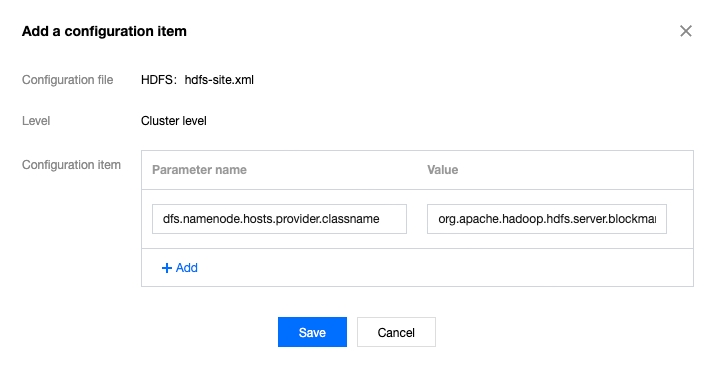
2. Add a configuration item to hdfs-site.xml.
Add the configuration parameter dfs.namenode.hosts.provider.classname with the value org.apache.hadoop.hdfs.server.blockmanagement.CombinedHostFileManager.


3. After the configuration is saved and applied, restart NameNode.
4. Check via WebUI or by running hdfs dfsadmin -report.
5. (Recommended) Perform a scale-in and scale-out operation on the core nodes once, as the above operations will modify the hdfshosts file, preventing potential issues in the future.
6.The Switch Management Status button will appear in the HDFS Role Management section.

DataNode Entering Maintenance Status

1. Log in to the EMR console and click the corresponding Cluster ID/Nam in the cluster list to enter the cluster details page.
2. On the cluster details page, click Cluster Services, and then select HDFS component and go to Operations > Role Management in the top right corner.
3. After checking the DataNode role whose operation status is started in role management, switch the status and put DataNode into maintenance status operation.
4. When you choose to enter maintenance status, you can set the maintenance duration. During the ma4.intenance period, the DataNode will cease to provide external services and no data migration will occur. If the service is not recovered after the configured maintenance period expires, data migration will start.

DataNode Exiting Maintenance Status

1. If the node repair is completed within the maintenance period, the DataNode will automatically resume providing external services after the timeout. However, the maintenance status should be manually exited by the user via the console.
2. Log in to the EMR console and click the corresponding Cluster ID/Name in the cluster list to enter the cluster details page.
3. After selecting the DataNode role with the operation status set to Started (Under Maintenance) in Role Management, change the status to take DataNode out of maintenance mode operation.
도움말 및 지원

문제 해결에 도움이 되었나요?

피드백