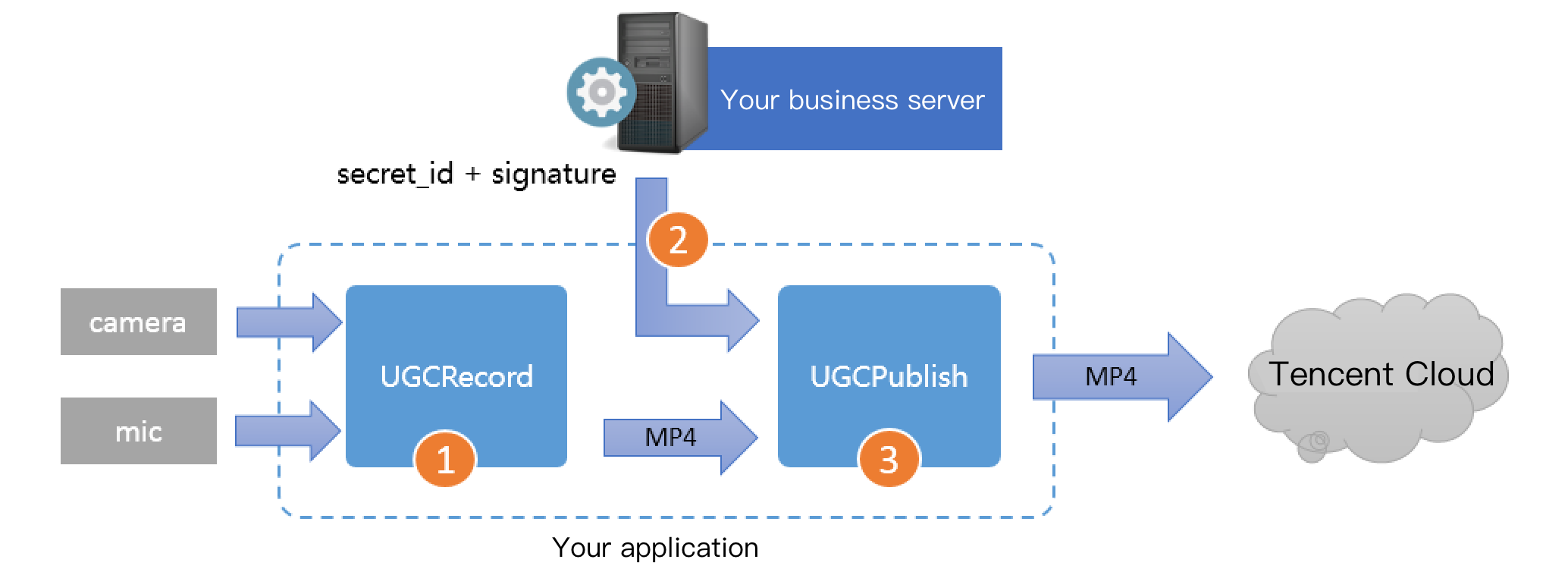
Short video release: upload a .mp4 file to Tencent Video Cloud and get the online watch URL. Tencent Video Cloud can meet various video watch needs such as nearby scheduling, instant live streaming and playback, dynamic acceleration, and global connection, delivering a smooth watch experience.
Step 1. Use the TXUGCRecord API to shoot a short video, and a .mp4 short video file will be generated after the shoot ends and be called back.
Step 2. Your application applies for an upload signature ("credential" for the application to upload the .mp4 file to VOD) to your business server. To ensure the security, upload signatures should be distributed by your business server but not generated by the client application.
Step 3. Use the TXUGCPublish API to publish the video. After the video is successfully published, the SDK will call back the watch URL to you.
Notes
You should never write the SecretID or SecretKey for upload signature calculation into the client code of the application, as their disclosure will cause security risks. If attackers get such information by cracking the application, they can misappropriate your traffic and storage service.
The correct practice is to generate a one-time upload signature by using the SecretID and SecretKey on your server and send the signature to the application.
When publishing a short video, please make sure that the Signature field is correctly passed in; otherwise, the release will fail.
h the generated .mp4 file to Tencent Cloud. The application needs to get the upload signature with a short validity period for file upload as instructed in Signature Distribution. TXUGCPublish (in TXUGCPublish.java) is used to publish .mp4 files to VOD so as to meet various video watch needs such as nearby scheduling, instant live streaming and playback, dynamic acceleration, and global connection.
param.signature = mCosSignature;// Enter the upload signature calculated in step 4
// Video file path generated by shoot, which can be obtained through the `onRecordComplete` callback of `ITXVideoRecordListener`
param.videoPath = mVideoPath;
// First-frame video preview generated by shoot, which can be obtained through the `onRecordComplete` callback of `ITXVideoRecordListener`
param.coverPath = mCoverPath;
mVideoPublish.publishVideo(param);
The release process and result will be returned through the TXRecordCommon.ITXVideoPublishListener API (in the TXRecordCommon.java header file):
onPublishProgress is used to return the release progress, the uploadBytes parameter indicates the number of uploaded bytes, and the totalBytes parameter indicates the total number of bytes that need to be uploaded.
onPublishComplete is used to return the release result.
voidonPublishComplete(TXPublishResult result);
The fields in the TXPublishResult parameter and their descriptions are as detailed below:
Field
Description
errCode
Error code.
descMsg
Error message.
videoURL
VOD address of short video.
coverURL
Cloud storage address of video cover.
videoId
Cloud storage ID of video file, through which you can call VOD's server APIs.
You can check the short video release result against the error code table.
4. Play back the video
After
the video is successfully uploaded in step 3, the video fileId, playback URL, and cover URL will be returned. You can directly pass in the fileId or playback URL to the VOD player for video playback.