Release Notes
The “startPlay” API of the UGSV SDK Renamed
activity_video_record.xml of the shoot page TCVideoRecordActivity, create two views: the left one is the shoot page, and the right one is the playback page.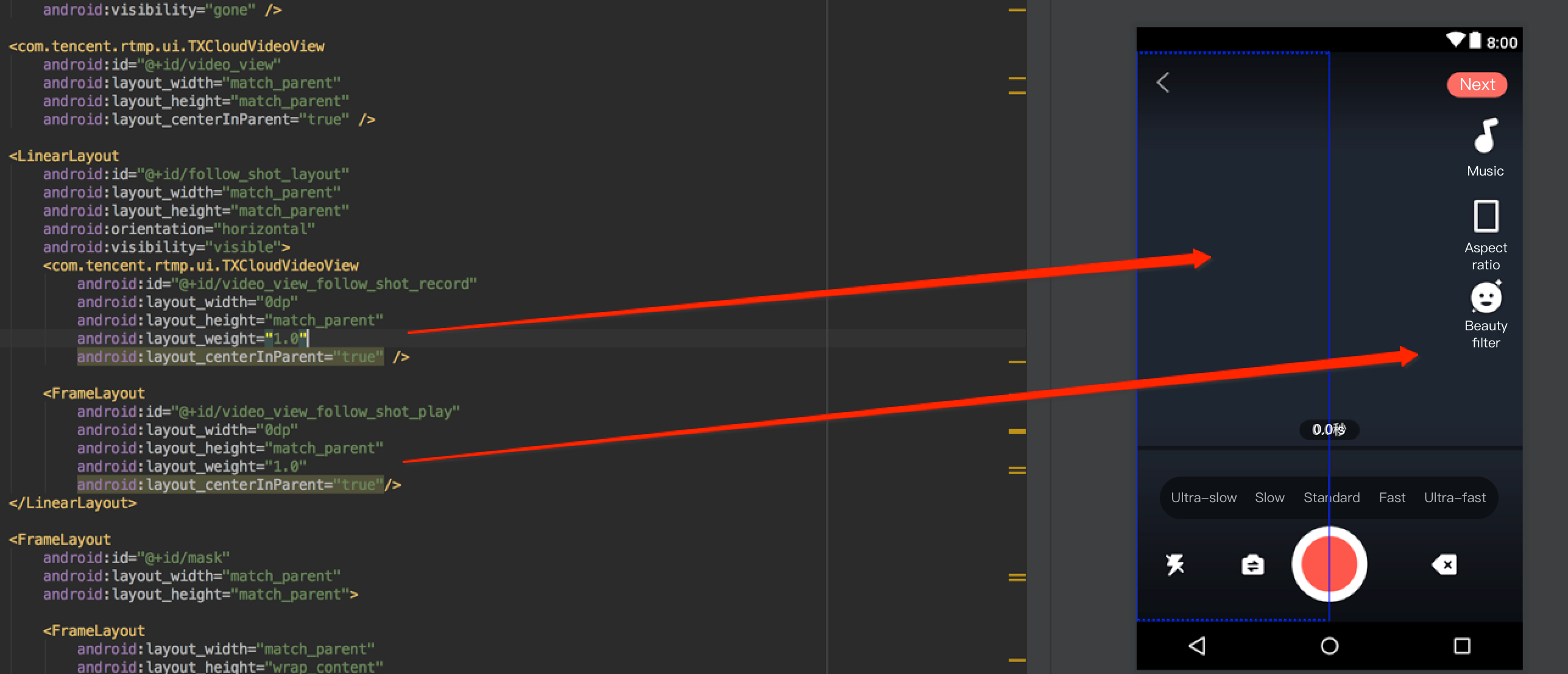
TXVideoEditer, TXUGCRecord, and TXVideoJoiner SDK classes, respectively. You can also use TXVodPlayer for playback.TCVodPlayerActivity. Then, click "Duet" in the bottom-right corner.
The video will be first downloaded onto the local SD card, the video information such as audio sample rate and frame rate (in fps) will be obtained, and then the shoot page will be displayed.TCVideoRecordActivity for duet. Please pay attention to the following:// Shoot pagemVideoView = mVideoViewFollowShotRecord;// Played back videomFollowShotVideoPath = intent.getStringExtra(TCConstants.VIDEO_EDITER_PATH);mFollowShotVideoDuration = (int)(intent.getFloatExtra(TCConstants.VIDEO_RECORD_DURATION, 0) * 1000);initPlayer();// The maximum length of the shoot progress bar should be the length of the source video. The frame rate (`fps`) of the source video should also be used for the shot videomMaxDuration = (int)mFollowShotVideoDuration;mFollowShotVideoFps = intent.getIntExtra(TCConstants.RECORD_CONFIG_FPS, 20);mFollowShotAudioSampleRateType = intent.getIntExtra(TCConstants.VIDEO_RECORD_AUDIO_SAMPLE_RATE_TYPE, TXRecordCommon.AUDIO_SAMPLERATE_48000);// Initialize the duet APImTXVideoJoiner = new TXVideoJoiner(this);mTXVideoJoiner.setVideoJoinerListener(this);
// Initialize the player. Here, `TXVideoEditer` is used. You can also use `TXVodPlayer`mTXVideoEditer = new TXVideoEditer(this);mTXVideoEditer.setVideoPath(mFollowShotVideoPath);TXVideoEditConstants.TXPreviewParam param = new TXVideoEditConstants.TXPreviewParam();param.videoView = mVideoViewPlay;param.renderMode = TXVideoEditConstants.PREVIEW_RENDER_MODE_FILL_EDGE;mTXVideoEditer.initWithPreview(param);
customConfig.videoFps = mFollowShotVideoFps;customConfig.audioSampleRate = mFollowShotAudioSampleRateType; // The audio sample rate of the shot video must be the same as that of the source videocustomConfig.needEdit = false;mTXCameraRecord.setVideoRenderMode(TXRecordCommon.VIDEO_RENDER_MODE_ADJUST_RESOLUTION); // Set the rendering mode to fit modemTXCameraRecord.setMute(true); // The duet audio played back by the speaker will not be recorded, because if it is recorded by mic, the source and shot videos' audios will be mixed
onRecordComplete callback will be returned to proceed with the composition. Here, you need to specify the positions of the two videos in the result.private void prepareToJoiner(){List<String> videoSourceList = new ArrayList<>();videoSourceList.add(mRecordVideoPath);videoSourceList.add(mFollowShotVideoPath);mTXVideoJoiner.setVideoPathList(videoSourceList);mFollowShotVideoOutputPath = getCustomVideoOutputPath("Follow_Shot_");// Proportionally scale the video on the right by the width and height of the shot video on the leftint followVideoWidth;int followVideoHeight;if ((float) followVideoInfo.width / followVideoInfo.height >= (float)recordVideoInfo.width / recordVideoInfo.height) {followVideoWidth = recordVideoInfo.width;followVideoHeight = (int) ((float)recordVideoInfo.width * followVideoInfo.height / followVideoInfo.width);} else {followVideoWidth = (int) ((float)recordVideoInfo.height * followVideoInfo.width / followVideoInfo.height);followVideoHeight = recordVideoInfo.height;}TXVideoEditConstants.TXAbsoluteRect rect1 = new TXVideoEditConstants.TXAbsoluteRect();rect1.x = 0; // Top-left point position of the first videorect1.y = 0;rect1.width = recordVideoInfo.width; // Width and height of the first videorect1.height = recordVideoInfo.height;TXVideoEditConstants.TXAbsoluteRect rect2 = new TXVideoEditConstants.TXAbsoluteRect();rect2.x = rect1.x + rect1.width; // Top-left point position of the second videorect2.y = (recordVideoInfo.height - followVideoHeight) / 2;rect2.width = followVideoWidth; // Width and height of the second videorect2.height = followVideoHeight;List<TXVideoEditConstants.TXAbsoluteRect> list = new ArrayList<>();list.add(rect1);list.add(rect2);mTXVideoJoiner.setSplitScreenList(list, recordVideoInfo.width + followVideoWidth, recordVideoInfo.height); // The second and third parameters: width and height of the video composition canvasmTXVideoJoiner.splitJoinVideo(TXVideoEditConstants.VIDEO_COMPRESSED_540P, mFollowShotVideoOutputPath);}
onJoinComplete, redirect to the preview page for playback.@Overridepublic void onJoinComplete(TXVideoEditConstants.TXJoinerResult result) {mCompleteProgressDialog.dismiss();if(result.retCode == TXVideoEditConstants.JOIN_RESULT_OK){runOnUiThread(new Runnable() {@Overridepublic void run() {isReadyJoin = true;startEditerPreview(mFollowShotVideoOutputPath);if(mTXVideoEditer != null){mTXVideoEditer.release();mTXVideoEditer = null;}}});}else{runOnUiThread(new Runnable() {@Overridepublic void run() {Toast.makeText(TCVideoRecordActivity.this, "Composition failed", Toast.LENGTH_SHORT).show();}});}}
피드백