Release Notes
The “startPlay” API of the UGSV SDK Renamed
UGCKit allows you to freely modify the preset text, colors, and icons.UGCKit offers two language packages by default: Simplified Chinese and American English. All their localized strings are stored in the default standard localized string format in UGCKit/UGCKitResources/Localizable.strings. You can replace the text to change the default strings or add new languages.UGCKit/UGCKitResources/zh-Hans.lproj/Localizable.strings."UGCKit.Edit.VideoEffect.DynamicLightWave" = "Rock light";"UGCKit.Edit.VideoEffect.DarkFantasy" = "Dark dream";"UGCKit.Edit.VideoEffect.SoulOut" = "Soul out";"UGCKit.Edit.VideoEffect.ScreenSplit" = "Split screen";"UGCKit.Edit.VideoEffect.Shutter" = "Blinds";"UGCKit.Edit.VideoEffect.GhostShadow" = "Shadow";"UGCKit.Edit.VideoEffect.Phantom" = "Phantom";"UGCKit.Edit.VideoEffect.Ghost" = "Ghost";"UGCKit.Edit.VideoEffect.Lightning" = "Lightning";"UGCKit.Edit.VideoEffect.Mirror" = "Mirror";"UGCKit.Edit.VideoEffect.Illusion" = "Illusion";
"UGCKit.Edit.VideoEffect.Illusion" = "Phantasm";
UGCKit are defined in the UGCKitTheme class. You can modify the attribute values to change colors. For the specific resource names, see the comments in UGCKitTheme.h.UGCKitTheme *theme = [[UGCKitTheme alloc] init];theme.backgroundColor = [UIColor whiteColor]; // Change the background color to whiteUGCKitEditViewController *editViewController = [[UKEditViewController alloc] initWithMedia:media config:nil theme:theme]; // Use the custom theme to create a controller
UGCKit are in the UGCKit.xcassets resource file and can be replaced as needed. The specific icon filenames can be viewed in UGCKitTheme.h. An icon's resource name is the same as its attribute/method name, and all icons are defined in UGCKitTheme.h. Taking the recording UI as an example, the following names are the icons' attribute names in UGCKitTheme as well as the resource names in UGCKit.xcassets.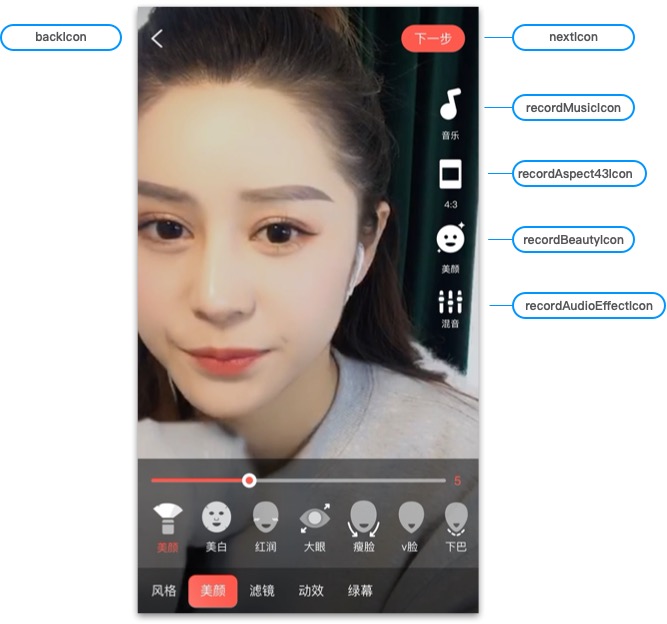
UGCKit in two ways:UGCKitTheme.xcassets.UGCKitTheme to change icons.UGCKitTheme *theme = [[UGCKitTheme alloc] init];theme.nextIcon = [UIImage imageName:@"myConfirmIcon"]; // Set the icon used to complete recordingtheme.recordMusicIcon = [UIImage imageName:@"myMusicIcon"]; // Set the icon of the music featuretheme.beautyPanelWhitnessIcon = [UIImage imageNamed:@"beauty_whitness"]; // Set the icon of the brightening filterUGCKitRecordViewController *viewController = [[UGCKitRecordViewController alloc] initWithConfig:nil theme:theme]; // Use the custom theme to create a controller
피드백