Release Notes
The “startPlay” API of the UGSV SDK Renamed
UGCKit is a set of encapsulated interactive UIs, which is the UGSV demo app's theme by default. With simple modifications, you can customize your own theme and replace the icons, text, and colors.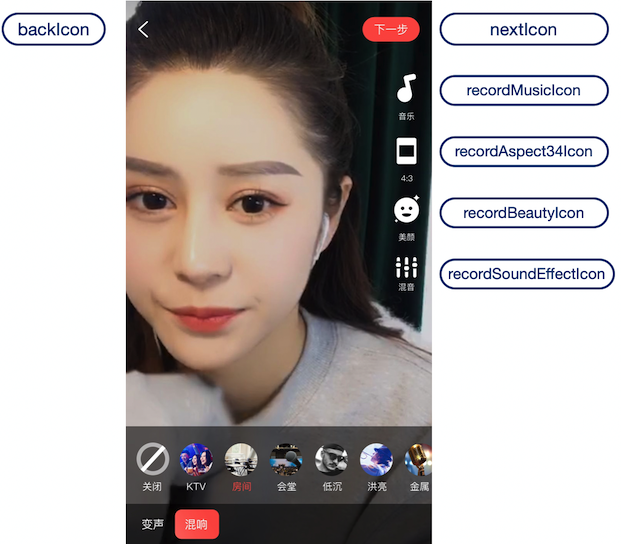
<style> in app/res/values/style.xml, specify its parent theme as RecordStyle, and change the theme to the target theme. You can find all available themes in app/ugckit/res/values.theme_style.xml.<style name="RecordActivityTheme" parent="RecordStyle"><item name="recordMusicIcon">@drawable/ic_music</item><item name="recordBeautyIcon">@drawable/ic_beauty</item></style>
AndroidManifest.xml:<activityandroid:name="com.tencent.qcloud.xiaoshipin.videorecord.TCVideoRecordActivity"android:launchMode="singleTop"android:screenOrientation="portrait"android:theme="@style/RecordActivityTheme"android:windowSoftInputMode="adjustNothing" />
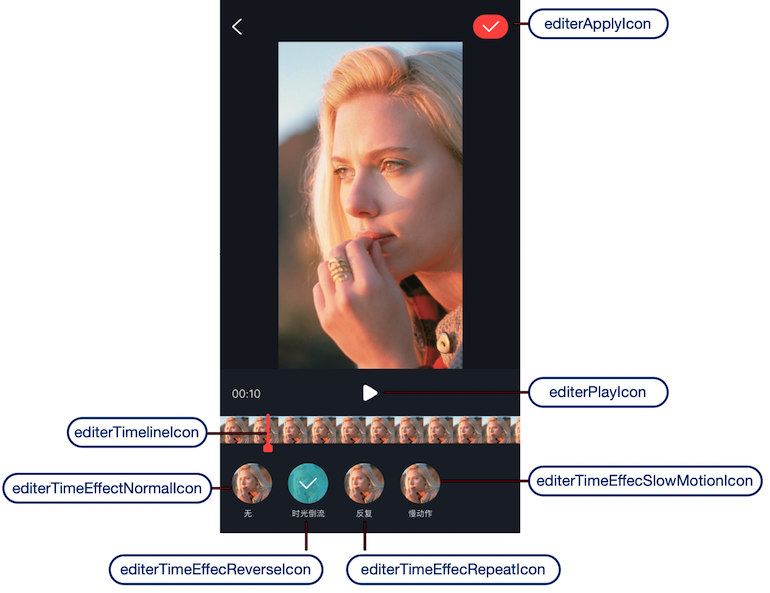
<style> in app/res/values/style.xml, specify its parent theme as EditerStyle, and change the theme to the target theme. You can find all available themes in app/ugckit/res/values.theme_style.xml.<style name="EditerActivityTheme" parent="EditerStyle"><item name="editorPlayIcon">@drawable/ic_play</item><item name="editorPauseIcon">@drawable/ic_pause</item></style>
AndroidManifest.xml:<activityandroid:name=".videoeditor.TCVideoEffectActivity"android:screenOrientation="portrait"android:theme="@style/EditerActivityTheme" />
피드백