If you are unable to watch a live stream and do not know where the problem lies, follow the steps below to locate the problem. This usually takes less than a minute.
1. Check your playback URL
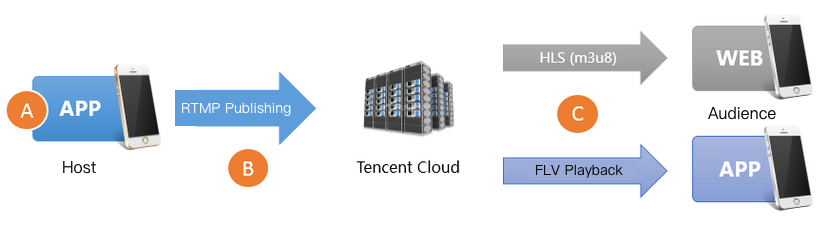
First, check whether your playback URL is correct. Incorrect URLs are the most common cause of playback failure. Tencent Cloud uses publishing and playback URLs for live streaming. Make sure that you are not using a publishing URL for playback.
domain is the domain name for publish/playback. AppName and StreamName are custom values, and the default value for AppName is live. If you do not enable publishing or playback authentication, a URL ends before “?”. For example, if the publishing domain name is www.push.com, the application name live, and the stream name test01, and publishing authentication is not enabled, the publishing URL would be rtmp://www.push.com/live/test01.
2. Check video streams
A correct playback URL does not guarantee successful playback. You need to check the video stream as well.
In live streaming, a playback URL becomes unavailable once the host stops publishing streams.
In VOD, you cannot watch a video if the video file has been removed from the cloud.
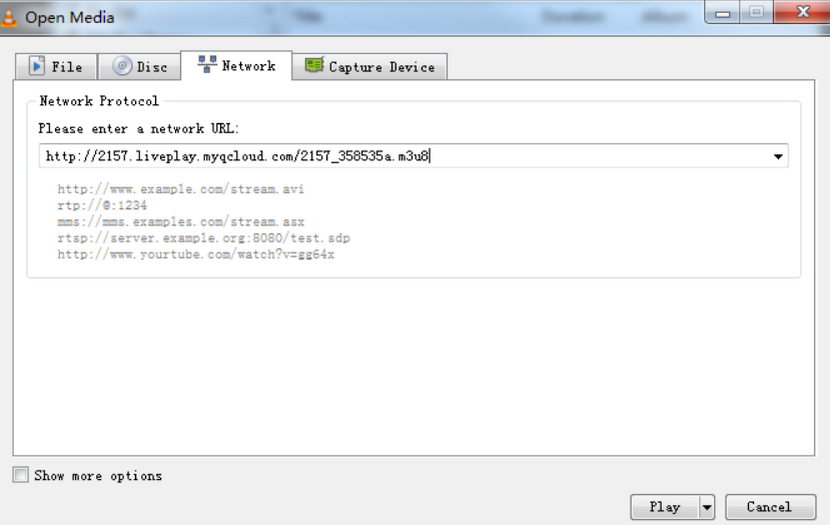
A common solution is to run a check using VLC, which is an open-source player for PC that supports a wide range of protocols. If you use Tencent Cloud’s private WebRTC protocol, you can run a check using the trial demo.
3. Check the playback end
If there's no problem with the video stream, the next step is checking whether the player is normal.
Web browser
Format: Mobile browsers support only playback URLs in HLS (M3U8) or MP4 format.
HLS (M3U8): Tencent Cloud adopts a lazy start mechanism for HLS transcoding. That is to say, it starts transcoding video to the HLS format only after a viewer requests playback via an HLS URL. This is to prevent the waste of resources, but it also brings a problem: playback via an HLS URL is possible only 30 seconds after the first user requests the playback worldwide.
Tencent Cloud web player: Tencent Cloud’s web player supports playback URLs of different protocols and can select the best playback strategy for a platform (PC/Android/iOS). Its selective retry logic also offers a solution to the lazy start issue of the HLS (M3U8) protocol.
RTMP SDK
If playback is possible with the RTMP SDK demo, we recommend that you check your integration logic against the playback documents iOS and Android.
4. Check firewall restrictions
Firewall restrictions are a common cause of playback failure. Many companies’ office networks set restrictions against video streaming. This is achieved by having the firewall check whether an HTTP request involves streaming media. If you can watch live streams using 4G networks but not using your company’s office Wi-Fi, then the problem lies in firewall restrictions. Contact your company’s IT department and see if they can lift the restrictions for your IP address.
5. Check the publishing end
If your playback URL is not playable and the firewall restrictions described in step 4 are nonexistent, the problem probably lies in publishing failure. To troubleshoot the issue, see Troubleshooting Push Failure.