UserSig is a security signature designed by Tencent Cloud to prevent attackers from accessing your Tencent Cloud account.
Currently, Tencent Cloud services including MLVB, TRTC, and IM all use this security mechanism. Whenever you want to use these services, you must provide three key pieces of information, i.e., SDKAppID, UserID, and UserSig in the initialization or login function of the corresponding SDK.
SDKAppID is used to identify your application, and UserID your user. UserSig is a security signature calculated based on the two parameters using the HMAC SHA256 encryption algorithm. Attackers cannot use your Tencent Cloud traffic without authorization as long as they cannot forge a UserSig.
See below for how UserSig is calculated. Basically, it involves hashing crucial information including SDKAppID, UserID, and ExpireTime.
// UserSig formula, in which `secretkey` is the key used to calculate UserSig
Log in to the CSS console and go to Application Management to view the key required to calculate UserSig.
1. Click your application to enter the details page. If there isn’t an application yet, create one.
2. Select the Application Management tab and click View Key.
How do I calculate UserSig on the client?
We provide an open-source module called GenerateTestUserSig in the MLVB SDK sample code. Set the three member variables of SDKAPPID, EXPIRETIME, and SECRETKEY, and call genTestUserSig() to generate a UserSig and get started quickly with the SDK.
This method is only applicable for debugging. It’s not recommended for official launch because SECRETKEY of the client code (especially on the web) may be easily decompiled and reversed. If your key is leaked, attackers can steal your Tencent Cloud traffic.
The correct method is to deploy the UserSig calculation code on your project server so that your application can request from your server a UserSig that is calculated whenever one is needed.
How do I calculate UserSig on the server?
Using the server to calculate UserSig offers the utmost protection against key leakage, for it is more difficult to hack a server than it is to reverse engineer an application. See below for the specific method.
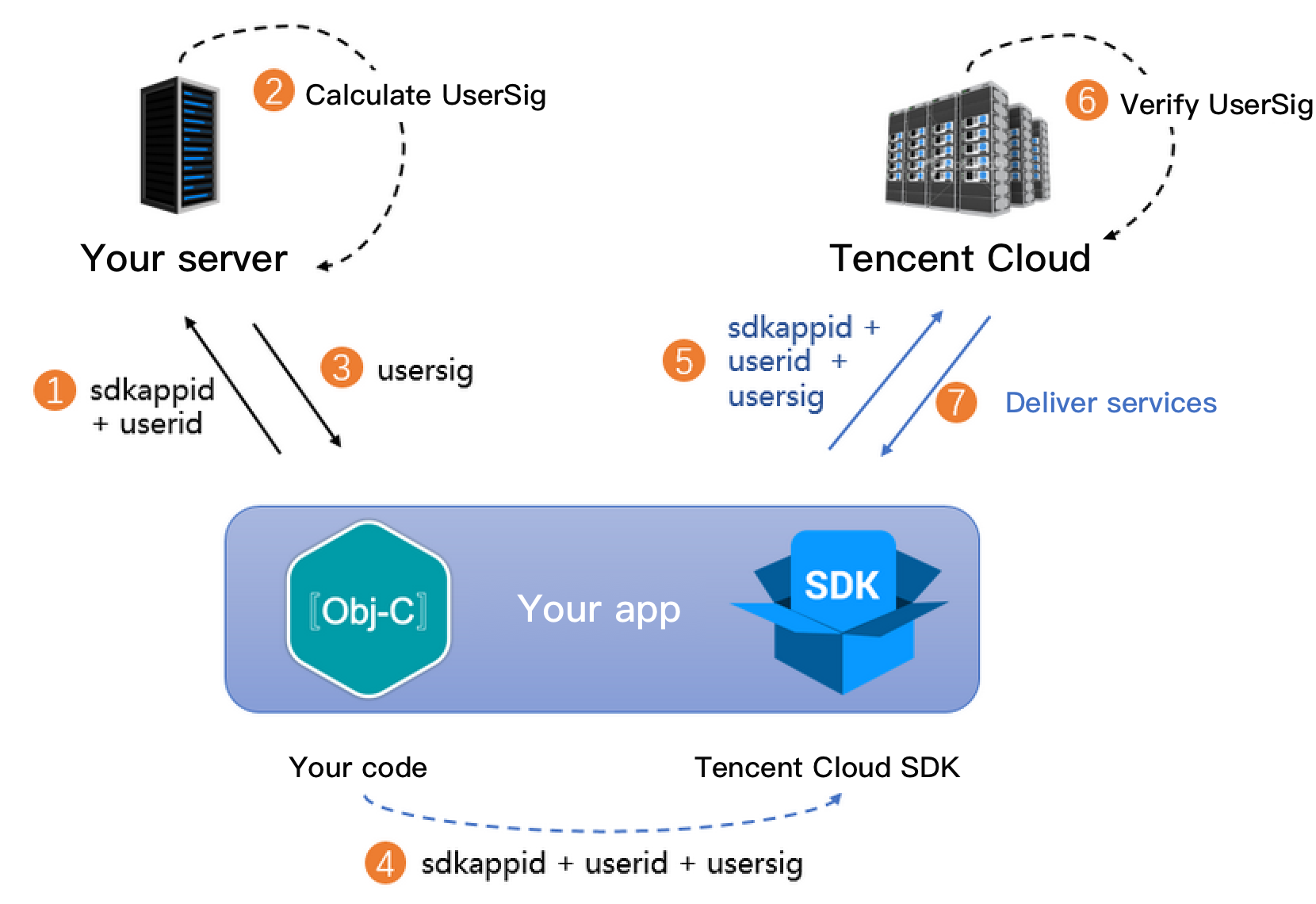
1. Before your application calls the SDK initialization function, request UserSig from your server.
2. Your server will calculate a UserSig based on the SDKAppID and UserID. The calculation source code is provided above.
3. The sever returns the UserSig to your application.
4. Your application sends the UserSig to the SDK through a specific API.
5. The SDK submits the SDKAppID + UserID + UserSig to the Tencent Cloud server for verification.
6. Tencent Cloud verifies the validity of the UserSig.
7. If the UserSig is valid, real time audio/video services will be provided to the TRTC SDK.
To simplify your implementation process, we provide UserSig calculation source code in multiple languages.
To simplify signature calculation and facilitate your use of Tencent Cloud services, on August 6, 2019, IM switched from the legacy algorithm ECDSA-SHA256 to the new algorithm HMAC-SHA256. This means that all applications created on and after August 6, 2019 will use the HMAC-SHA256 algorithm.
If your application was created before July 19, 2019, you can continue to use the old signature algorithm, whose source code can be downloaded at the links below.