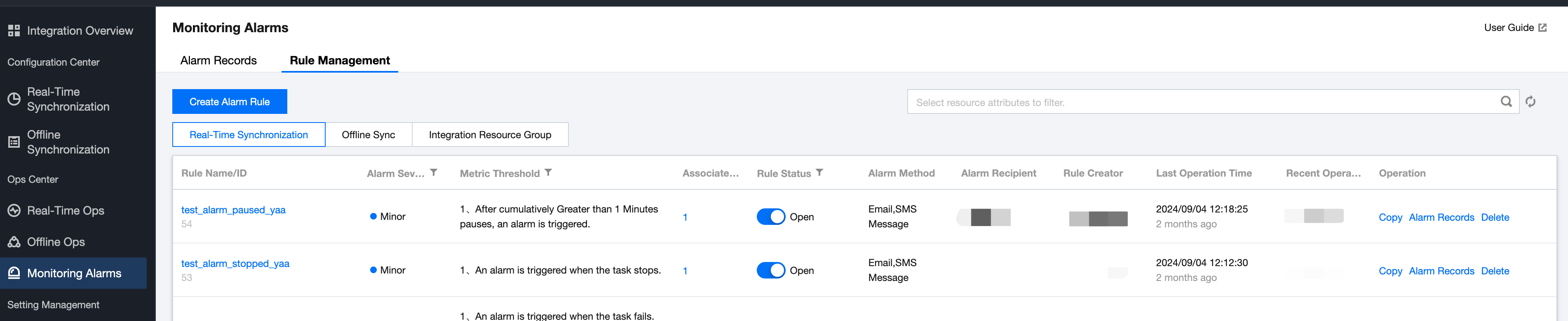
After an alert rule is created, it will be displayed in the alert rule list. The list shows the rule name/ID, alert level, metric threshold, associated tasks, and provides features such as rule switch, alert history, etc., to help users manage and maintain alert rules.
Parameter
Description
Rule Name/ID
The alarm rule name configured by the user or the system default generated current alarm rule ID.
Alarm Severity
The level corresponding to the triggered alarm rule.
Metric Threshold
Real-time sync tasks currently support configuring task exceptions, task detection exceptions, cumulative restart times within 10 minutes, write latency during runtime, cumulative restart times within 20 minutes, and a total of 17 metric alerts.
Associated Tasks
Displays the current number of associated rules for the task.
Rule Status
Enable: Activate the current alarm rule. Alerts will be triggered based on the alarm rule and threshold during task execution.
Disable: Turn off alarm verification.
Alarm Method
The method of reaching the alarm information configured in the current alarm rule.
Alarm Recipient
The recipient of the alarm information configured in the current alarm rule.
Rule Creator
The name of the creator of the current rule.
Last Operation Time
Displays the most recent operation time of the rule. Operations include creating, updating, and starting/stopping the rule's attributes.
Recent Operator
The name of the most recent operator of the current rule.
Operation
Copy: Copies the specified rule. All attributes of the new rule generated by the copy will be consistent with those of the original rule.
Alarm Records: Allows viewing all alarm history information based on the current rule name.
Delete: Deletes the alarm rule and stops all associated tasks' alarms.
Note:
Copy: Modifying the Associated Task Types in the newly copied rule is not supported.
2. Click the Project List in the left menu to find the target project that needs alert rule configuration.
3. After selecting a project, click to enter the Data Integration module.
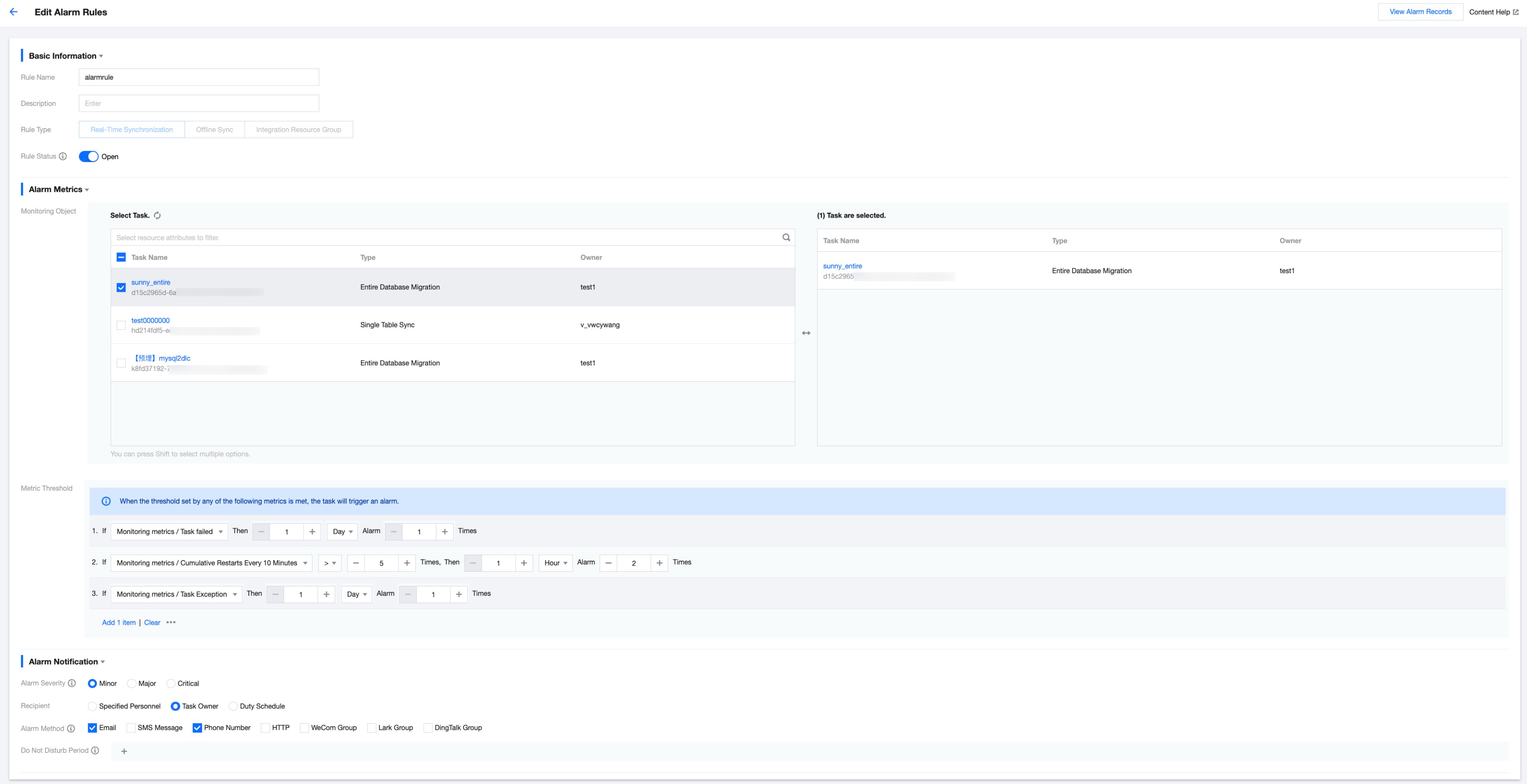
4. Click Monitoring Alarms > Rule Management in the left menu to enter the alert rule management page. Click Create new alert rule and fill in the rule information.
Description
Parameter
Description
Basic Information
Rule Name
Alert Rule Name: Start with a letter or Chinese character and can contain letters, Chinese characters, numbers, and underscores.
Description
A detailed description of the rule.
Rule Type
Supports configuring three types of rule types: real-time synchronization, offline synchronization, and integrated resource group.
Rule Status
After enabling/disabling, the configured rule takes effect/invalid.
Alarm Metrics
Monitoring Object
Supports selecting multiple tasks as monitoring objects for the current rule.
Metric Threshold
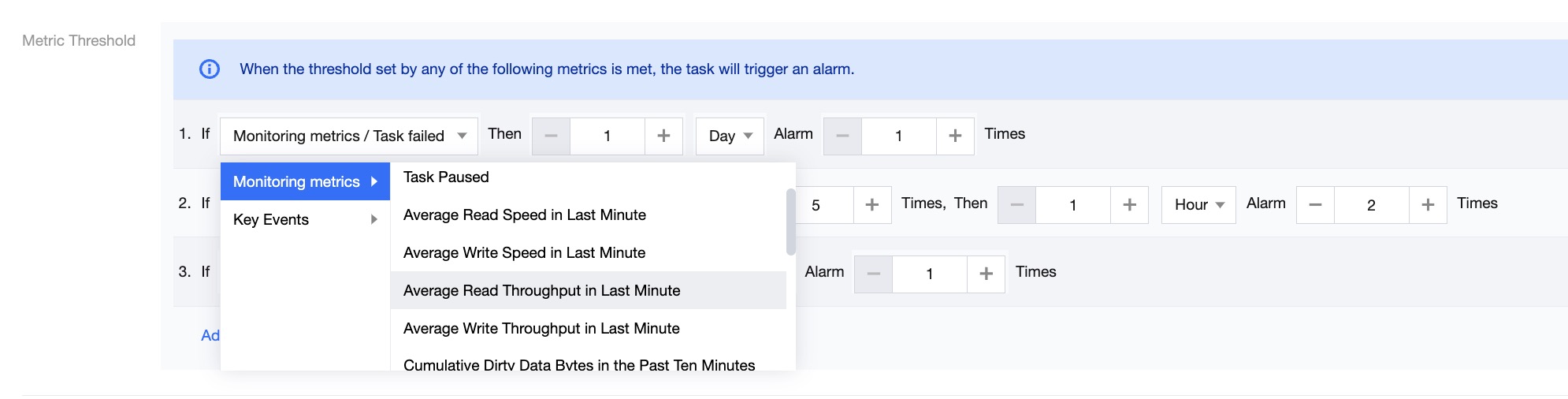
Real-time Synchronization Task supports two types of alert metrics: monitoring indicators and key events.
Monitoring indicators support configuring alerts such as task failure, cumulative restart times within 10 minutes, job business delay, and 17 other metrics.
Key events currently only support the Source Table Schema Change Event alert
Alarm Notification
Alarm Severity
Distinguish the content of alert messages based on different alert levels of various metrics. Currently, three alert types are provided: General, Important, and Critical.
Recipient
After the alarm rule is triggered, an alarm message will be sent to the recipient. Currently, three methods are supported for setting alarm message recipients: "Designated Personnel", "Task Owner", and "On-duty Schedule".
Designated Users: You can specify one or multiple users as alert message recipients.
Task Owner: The owner of the task is set as the alert message recipient.
Duty Schedule: The pre-scheduled duty roster is set as the recipient, and alert messages will be sent to the duty users.
Alarm Method
Currently, alert notifications can be sent via Email, SMS, WeChat, Telephone, WeCom, HTTP, Enterprise WeChat group, FeiShu Group, and DingTalk Group.
Note:
Mobile, WeChat, and Email accounts can be configured in Tencent Cloud User Management.
WeCom accounts can be configured in Tencent Cloud Joint Account.
Do Not Disturb Period
You can configure Do-Not-Disturb time, during which alert messages will not be sent to alert recipients. Alert events generated during Do-Not-Disturb time can be viewed in the alarm history list.