tencent cloud

Tencent Cloud WeData

Release Notes
Dynamic Release Record (2026)
Product Introduction
Product Overview
Product Advantages
Product Architecture
Product Features
Application Scenarios
Purchase Guide
Billing Overview
Product Version Purchase Instructions
Execute Resource Purchase Description
Billing Modes
Overdue Policy
Refund
Preparations
Overview of Account and Permission Management
Add allowlist /security groups (Optional)
Sign in to WeData with Microsoft Entra ID (Azure AD) Single Sign-On (SSO)
Operation Guide
Console Operation
Project Management
Data Integration
Studio
Data Development
Data Analysis
Data Science
Data Governance (with Unity Semantics)
API Documentation
History
Introduction
API Category
Making API Requests
Smart Ops Related Interfaces
Project Management APIs
Resource Group APIs
Data Development APIs
Data Asset - Data Dictionary APIs
Data Development APIs
Ops Center APIs
Data Operations Related Interfaces
Data Exploration APIs
Asset APIs
Metadata Related Interfaces
Task Operations APIs
Data Security APIs
Instance Operation and Maintenance Related Interfaces
Data Map and Data Dictionary APIs
Data Quality Related Interfaces
DataInLong APIs
Platform Management APIs
Data Source Management APIs
Data Quality APIs
Platform Management APIs
Asset Data APIs
Data Source Management APIs
Data Types
Error Codes
WeData API 2025-08-06
Service Level Agreements
Related Agreement
Privacy Policy
Data Processing And Security Agreement
Contact Us
Glossary

Operation History

PDF
포커스 모드
폰트 크기
마지막 업데이트 시간: 2024-11-01 17:19:59
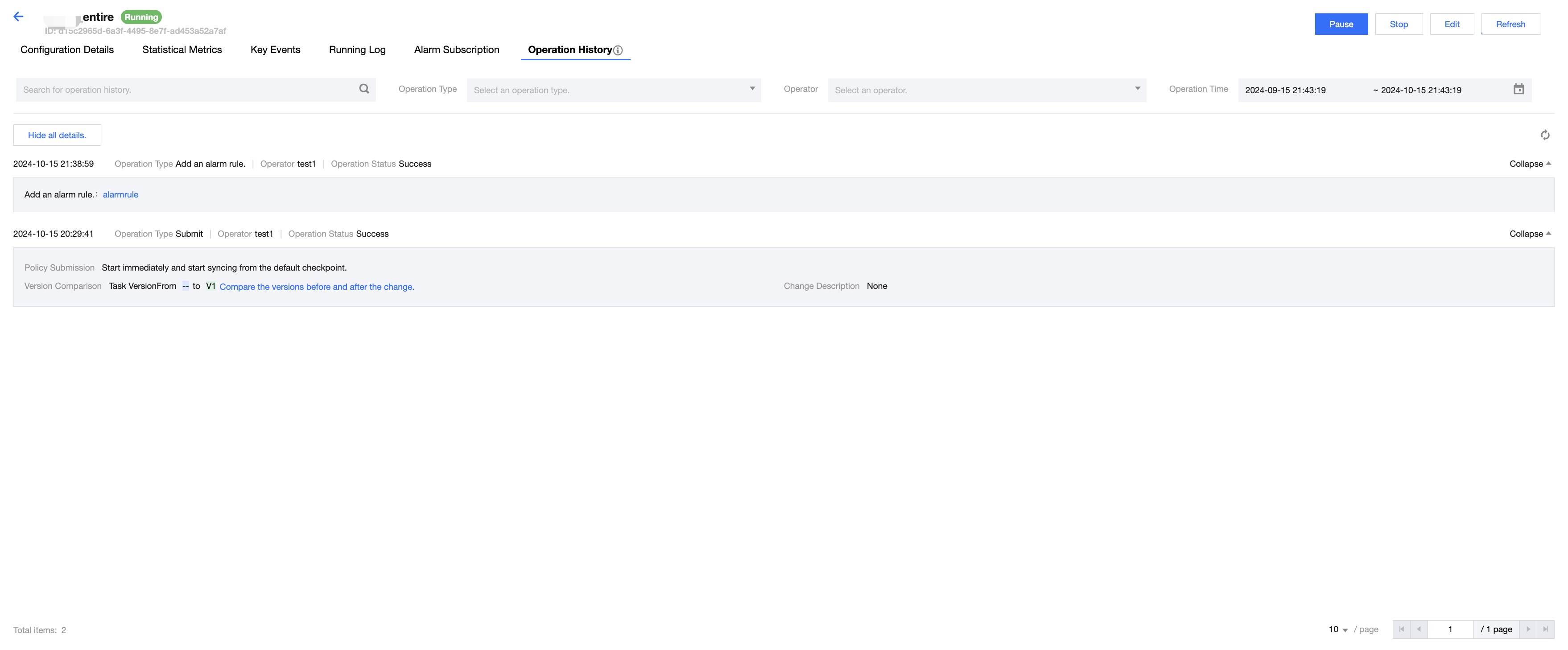
In Operation History, you can view all non-query page operations on the Real-time Operation and Maintenance page. The Real-time Operation and Maintenance interface supports accessing Operation History from the Task Record List by clicking Task Name > Operation History, to enter the Operation History interface.
Note:
Only page operations are recorded, OpenAPI operations are not.


Parameters
Description
Searching
Operation History supports keyword search
Operation Type
Supports selecting options such as Select All, Submit, Run, Stop, Pause, Force Pause, Continue, Delete, Add Alert Rule, Remove Alert Rule, Modify Responsible Person
Operator
Supports selecting all members under the project
Operation Time
Supports filtering operation records by time
Display List
Operation Time: displays the start time of the operation, accurate to the second.
Operator: displays the login account that executed the operation.
Operational Status: displays the execution result of the operation, Success/ Failure
Expand: click to display detailed content based on the operation type.
도움말 및 지원

문제 해결에 도움이 되었나요?

피드백