Real-Time Task Ops
Download
포커스 모드
폰트 크기
After users complete the configuration of real-time tasks such as DLC Spark Streaming in the orchestration space and submit them, they can manage and operate DLC Spark Streaming in the real-time task ops interface. This includes performing operations such as executing, decommissioning, deleting, and modifying the owner of tasks, as well as features like viewing instances and details.
Prerequisites
After real-time task submission, you can view and operate in real-time task ops.
Operation Steps
Entering the Real-Time Task Operation and Maintenance Page
1. Log in to WeData console.
2. Click Project List on the left menu and find the target project requiring maintenance operations.
3. After selecting a project, click Ops Center at the top to enter the module.
4. Click Real-Time Task Ops on the left menu.
Real-Time Task Ops
Real-Time Task Ops List


Feature description:
Information | Description(Optional) |
Task name/ID | Copying the task name and ID is supported. Click the task name to navigate to the real-time task details page> execution history. |
Owner | Owner of the computing task, clarifying the maintenance responsibility attribution, defaulting to the creator of the computing task. |
State | The running state of a computing task includes two statuses: scheduling in progress and offline. Scheduling in progress: The computing task has been submitted to the Ops center and is in normal "scheduling in progress" status in production environments. Offline: The computing task is decommissioned and is in "Offline" status. Offline tasks do not support row operations to generate new running instances. To reschedule, resubmit in the orchestration space. |
folder | The folder directory of the computing task in the orchestration space facilitates the identification of task ownership and enables unified management. |
Task type | Task type of the computing task. |
Execution Resource Group | Execution resource group configured for the computing task. |
Last Submission Time | Display the date and time of the last update submitted for operations for the computing task, format: yyyy-MM-dd HH:mm:ss. |
First execution time | Display the time when the computing task first runs the Generation Instance, format: yyyy-MM-dd HH:mm:ss. |
Creation time. | Display the date and time when the computing task is first submitted for operations, format: yyyy-MM-dd HH:mm:ss. |
Real-Time Task Operation and Maintenance
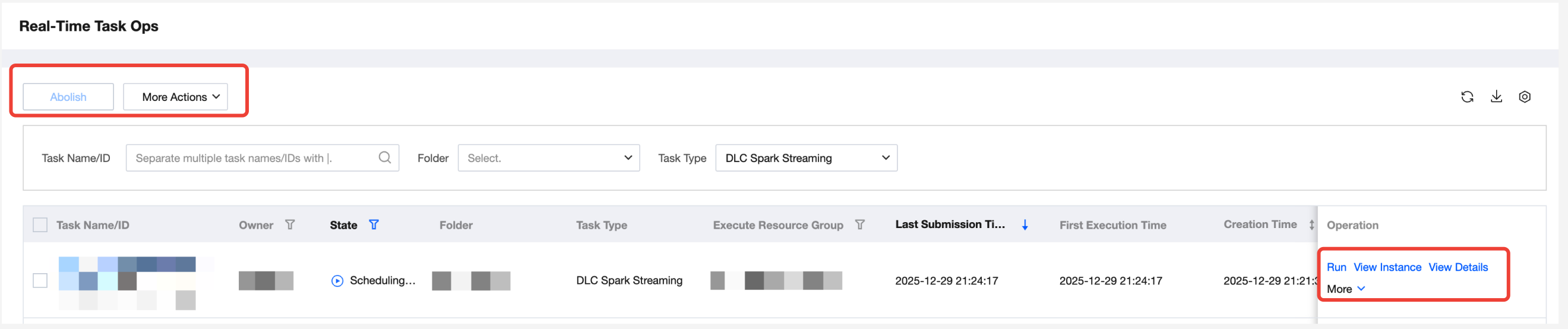
Feature description:
Operation | Description(Optional) |
Running | Single task operation is only applicable to tasks in scheduling. After running, the task will generate running instances, which can be viewed on the real-time instance Ops page. A task supports running multiple instances concurrently. |
Abolish | Batch operations and single task operations are supported. For batch operations, check the task names and reuse the feature buttons at the top. For single task operations, click the operation item in the Operation column of the task list. Deactivation is only valid for tasks "in scheduling". After deactivating a task, its status will be set to "Offline" and it will no longer support Generation Instance Execution. To re-execute, resubmit in the orchestration space. |
Delete | Batch operations and single task operations are supported. For batch operations, check the task names and reuse the feature buttons at the top. For single task operations, click the operation item in the Operation column of the task list. Deletion is only applicable to "Offline" tasks. The delete operation removes this task from both the Ops center and orchestration space. |
Change the owner | Modify responsible person: Target a task to modify its responsible person, clarify computing task operation and maintenance responsibility attribution, and add multiple responsible persons to the same task once. |
Setting Alarms | Setting Alarms: Set alarm monitoring for task running status so that O&M personnel can quickly detect task execution exceptions and respond promptly. For details, see Task Alarm. |
Developing Tasks | Navigate to the corresponding compute node configuration interface in the orchestration space. This is a quick access channel for task operations to edit compute task nodes. For details, see Task Development. |
View Instance | Navigate to the List Interface of the corresponding computing task's generated instance. You can view the running state, running time, etc. of the instance and perform feature operations on it. |
View Details | Navigate to the real-time task details page, support basic task operations, and view task basic information. For the introduction of the task details page, see below. |
Real-Time Task Filter

Feature description:
Operation | Description(Optional) |
Filter by task name/ID | Supports fuzzy matching by task name or task ID. |
Filter by folder | Filter tasks in operations based on folder name in the orchestration space. Supports unfolding multi-level directory and multiple selections. |
Filter by task type | Support by task type, the real-time task list currently contains only DLC Spark Streaming tasks, chosen by default. |
Real-Time Task Quick Actions

Feature description:
Operation | Description(Optional) |
Refreshing | Click the  |
Download | Click the  |
Display column adjustment | Click the  |
Real-Time Task Details Page
Real-time task details are a collection of task information and operations, including the execution history and task info tabs.
Tab Page | Description(Optional) |
Execution History | Show real-time task history instance basic information: Filter: Support by instance data time and start time to filter instances. Statistics: Total number of instances in the filter range, including running, successful, and failed instances. Instance list: Show basic information of instance and perform operations. 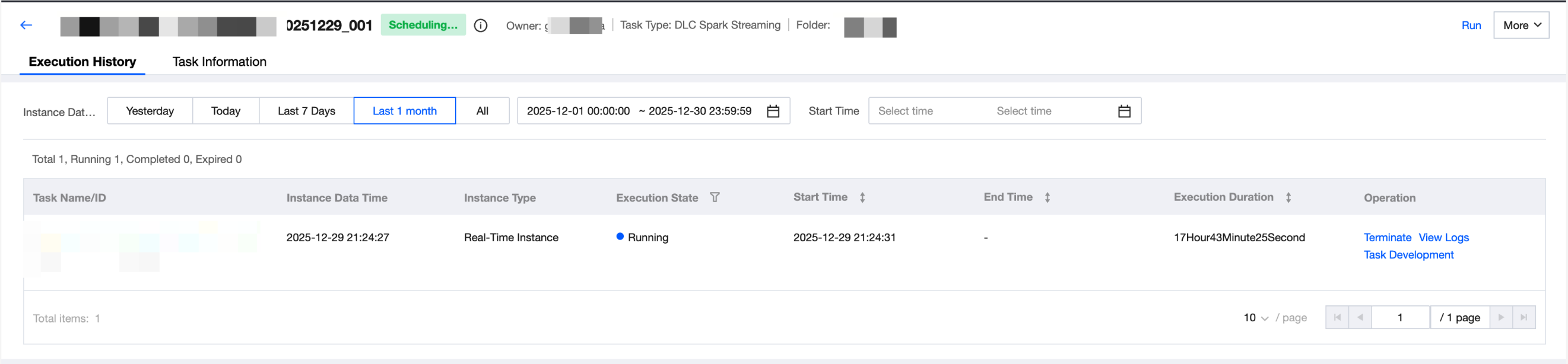 |
Task Information | Show real-time task submission configuration information in the Ops center, including basic information, dependency resources, and resource configuration information. 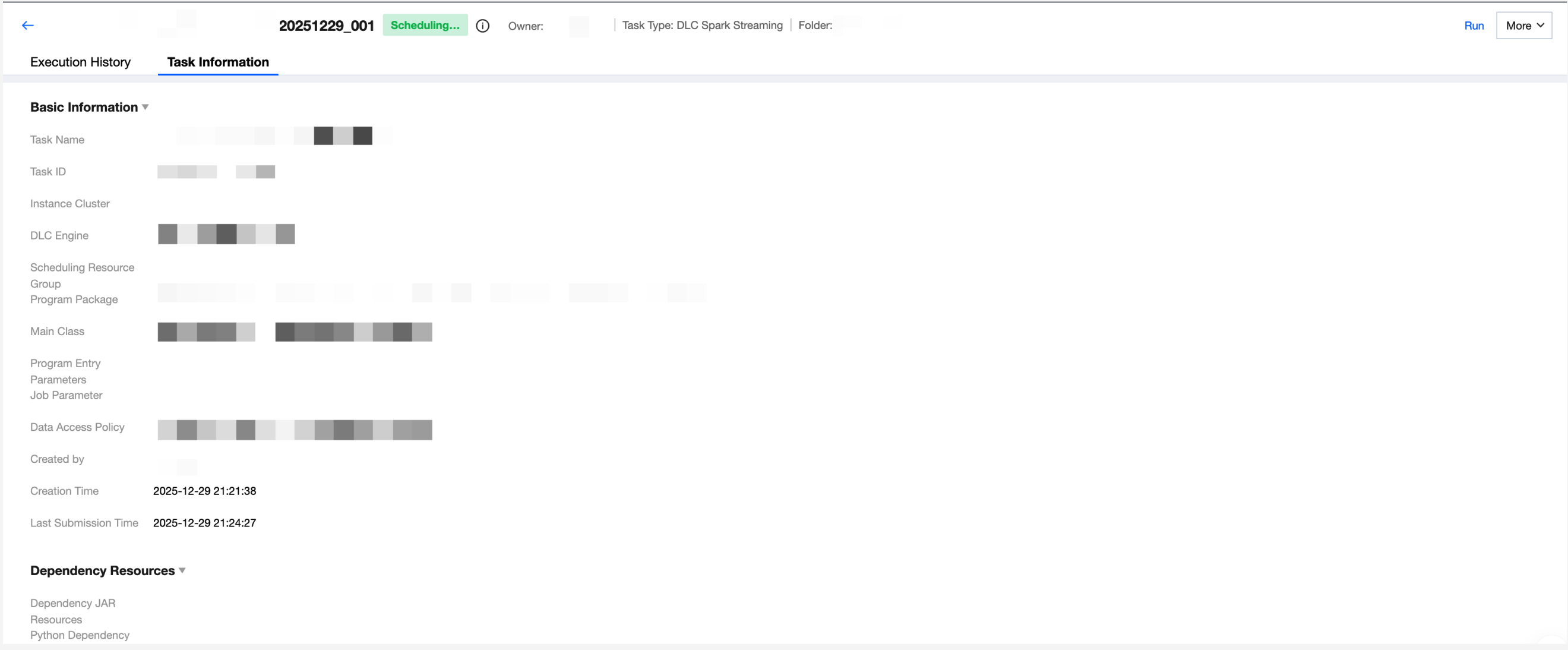 |
피드백