Overview of Scenario-Based Solutions
소셜 엔터테인먼트
이커머스 라이브 방송
Audio/Video Call
원거리 실시간 조작
스마트 고객 서비스
AI 인터뷰
<!-- 앱이 포그라운드 서비스를 사용하는 것을 허용합니다 --><uses-permission android:name="android.permission.FOREGROUND_SERVICE" /><!-- 앱이 포그라운드 서비스에서 카메라를 사용해야 하는 경우 --><uses-permission android:name="android.permission.FOREGROUND_SERVICE_CAMERA" /><!-- 앱이 포그라운드 서비스에서 마이크를 사용해야 하는 경우 --><uses-permission android:name="android.permission.FOREGROUND_SERVICE_MICROPHONE" /><!-- 포그라운드 서비스가 알림을 보내는 것을 허용합니다 --><uses-permission android:name="android.permission.POST_NOTIFICATIONS"/>
FOREGROUND_SERVICE_CAMERA 및 FOREGROUND_SERVICE_MICROPHONE 권한 선언이 필수입니다.POST_NOTIFICATIONS 권한을 선언해야 합니다.public class MyForegroundService extends Service {@Nullable@Overridepublic IBinder onBind(Intent intent) {return null;}@Overridepublic void onCreate() {super.onCreate();// 알림 채널의 생성Notification notification = createNotification();// 서비스 시작 로직의 처리if (Build.VERSION.SDK_INT >= Build.VERSION_CODES.Q) {startForeground(1024, notification, ServiceInfo.FOREGROUND_SERVICE_TYPE_MICROPHONE);} else {startForeground(1024, notification);}}private Notification createNotification() {String CHANNEL_ONE_ID = "CHANNEL_ONE_ID";String CHANNEL_ONE_NAME = "CHANNEL_ONE_ID";NotificationChannel notificationChannel;//8.0 판단의 수행if (Build.VERSION.SDK_INT >= Build.VERSION_CODES.O) {notificationChannel = new NotificationChannel(CHANNEL_ONE_ID,CHANNEL_ONE_NAME, NotificationManager.IMPORTANCE_HIGH);notificationChannel.enableLights(true);notificationChannel.setLightColor(Color.RED);notificationChannel.setShowBadge(true);notificationChannel.setLockscreenVisibility(Notification.VISIBILITY_PUBLIC);NotificationManager manager = (NotificationManager) getSystemService(NOTIFICATION_SERVICE);if (manager != null) {manager.createNotificationChannel(notificationChannel);}}// 알림 표시줄 클릭 시 앱으로 돌아가도록 설정합니다(선택 가능 사항)Intent intent = new Intent(this, MainActivity.class);ActivityOptions options = null;if (android.os.Build.VERSION.SDK_INT >= android.os.Build.VERSION_CODES.M) {options = ActivityOptions.makeBasic();}if (Build.VERSION.SDK_INT >= Build.VERSION_CODES.UPSIDE_DOWN_CAKE) {options.setPendingIntentBackgroundActivityStartMode(ActivityOptions.MODE_BACKGROUND_ACTIVITY_START_ALLOWED);}PendingIntent pendingIntent;if (options != null) {pendingIntent = PendingIntent.getActivity(this, 0, intent, PendingIntent.FLAG_IMMUTABLE, options.toBundle());} else {pendingIntent = PendingIntent.getActivity(this, 0, intent, PendingIntent.FLAG_IMMUTABLE);}if (Build.VERSION.SDK_INT >= Build.VERSION_CODES.O) {Notification notification = new Notification.Builder(this, CHANNEL_ONE_ID).setChannelId(CHANNEL_ONE_ID).setSmallIcon(R.mipmap.videocall_float_logo).setContentTitle("이것은 테스트 제목입니다").setContentIntent(pendingIntent).setContentText("이것은 테스트 내용입니다").build();notification.flags |= Notification.FLAG_NO_CLEAR;return notification;}else {NotificationCompat.Builder builder = new NotificationCompat.Builder(this, CHANNEL_ONE_ID).setSmallIcon(R.mipmap.videocall_float_logo).setContentTitle("이것은 테스트 제목입니다").setContentText("이것은 테스트 내용입니다").setContentIntent(pendingIntent).setPriority(NotificationCompat.PRIORITY_DEFAULT);return builder.build();}}@Overridepublic void onDestroy() {super.onDestroy();// 포그라운드 서비스의 중지stopForeground(true);}}
<serviceandroid:name=".MyForegroundService"android:enabled="true"android:exported="false"android:foregroundServiceType="mediaPlayback|mediaProjection|microphone|camera" />
android:foregroundServiceType 속성을 통해 포그라운드 서비스가 필요한 서비스 유형을 지정하여 백그라운드에서 정상적인 서비스 기능을 유지할 수 있습니다.mediaPlayback 서비스는 미디어 재생을 위해 사용됩니다.mediaProjection 서비스는 미디어 프로젝션을 위해 사용됩니다.microphone 서비스는 마이크 사용을 위해 사용됩니다.camera 서비스는 카메라 사용을 위해 사용됩니다.NotificationManagerCompat notificationManager = NotificationManagerCompat.from(this);boolean areNotificationsEnabled = notificationManager.areNotificationsEnabled();if (!areNotificationsEnabled) {// 사용자에게 알림 권한의 활성화를 알려줍니다Toast.makeText(this, "서비스 정상 작동을 위해 알림 권한을 활성화하세요", Toast.LENGTH_LONG).show();// 사용자를 설정 페이지로 안내합니다.Intent intent = new Intent(Settings.ACTION_APP_NOTIFICATION_SETTINGS).putExtra(Settings.EXTRA_APP_PACKAGE, getPackageName());startActivity(intent);} else {// 포그라운드 서비스의 활성화Intent serviceIntent = new Intent(this, MyForegroundService.class);ContextCompat.startForegroundService(this, serviceIntent);}
// 서비스의 Intent 생성합니다Intent serviceIntent = new Intent(this, MyForegroundService.class);// 서비스 중지stopService(serviceIntent);
android:stopWithTask="true" 속성 값을 추가하면 서비스는 작업이 제거될 때 즉시 중지됩니다.<serviceandroid:name=".MyForegroundService"android:enabled="true"android:exported="false"android:stopWithTask="true"android:foregroundServiceType="mediaPlayback|microphone" />
@Overridepublic void onTaskRemoved(Intent rootIntent) {super.onTaskRemoved(rootIntent);// 예를 들어 오디오의 수집 및 재생을 계속하지 않기 위해 여기에서 Real-Time Communication Engine (RTC Engine) 퇴장을 실행할 수 있습니다.TRTCCloud mTRTCCloud = TRTCCloud.sharedInstance(this);mTRTCCloud.exitRoom();}
android:stopWithTask="true"로 설정한 후에는 onTaskRemoved 메서드가 콜백되지 않습니다.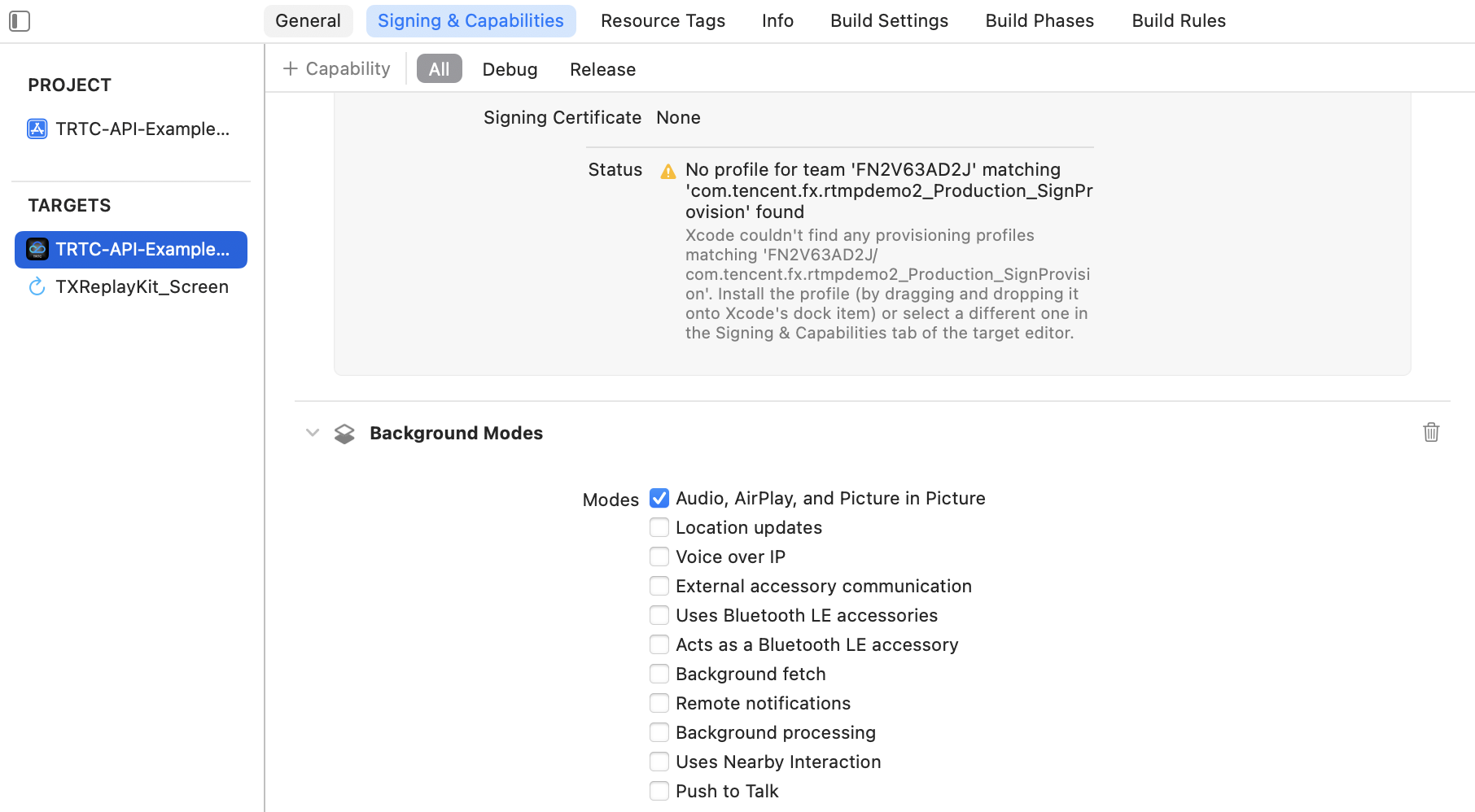
// 전체 통화 볼륨의 지정[self.trtcCloud setSystemVolumeType:TRTCSystemVolumeTypeVOIP];// 전체 미디어 볼륨의 지정[self.trtcCloud setSystemVolumeType:TRTCSystemVolumeTypeMedia];
// 방 입장 후 자체 정의 오디오 트랙을 활성화합니다[self.trtcCloud enableMixExternalAudioFrame:NO playout:YES];// 방 퇴장 전 자체 정의 오디오 트랙을 비활성화합니다[self.trtcCloud enableMixExternalAudioFrame:NO playout:NO];
피드백