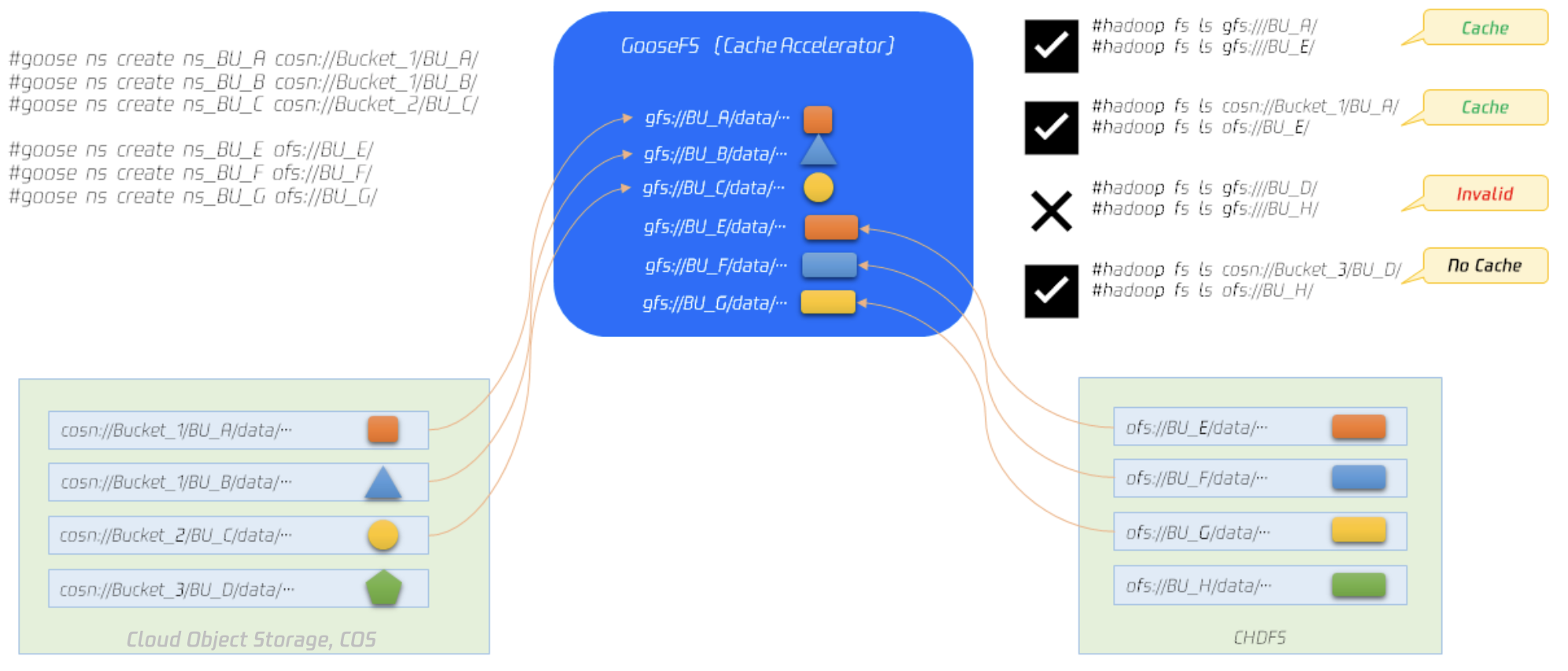
GooseFS unified NameSpace capability, through its transparent naming mechanism, can fuse access semantics from multiple different underlying storage systems, providing users with a unified data management interaction view.
GooseFS integrates different underlying Storage systems through its unified NameSpace capability, such as local file systems, Tencent Cloud Object Storage (COS), and Tencent Cloud Cloud HDFS (CHDFS). It communicates with these underlying Storage systems and provides the upper-layer business with unified access APIs and file protocols. The business side only needs to use GooseFS's access API to access data stored in different underlying Storage systems.
The above diagram shows how the unified namespace works. You can use the GooseFS command create ns to mount specified directories from COS and Cloud HDFS into GooseFS, then access data through the unified schema gfs://. Details are as follows:
COS has a total of 3 buckets, namely bucket-1, bucket-2, and bucket-3. Among them, bucket-1 has two directories: BU_A and BU_B. Both bucket-1 and bucket-2 are mounted in GooseFS.
CHDFS has 4 directories: BU_E, BU_F, BU_G, and BU_H. Except for BU_H, the rest are mounted on GooseFS.
In file operations of GooseFS, if you access the two directories BU_A and BU_E using the unified schema gfs://, you can access them normally, and files are cached in the local file system of GooseFS.
The two directories BU_A and BU_E stored in the underlying file systems (COS, CHDFS) have been mounted in GooseFS. If files are already cached in GooseFS, they can be accessed through the unified schema gfs:// (for example, hadoop fs ls gfs://BU_A); they can also be accessed through the namespaces of various remote file systems (for example, hadoop fs ls cosn://bucket-1/BU_A).
If a file is not cached in GooseFS, accessing it through the gfs:// format will fail because the file is not cached in the local file system, but it can still be accessed through the namespace of the underlying storage system.
Using Unified Namespace Capability
You can use the ns operation to create a namespace in GooseFS and map the underlying storage system to GooseFS. Currently supported underlying storage systems include COS, Cloud HDFS, and Local HDFS. Creating a namespace is similar to mounting a file volume in a Linux file system. After creating a namespace, GooseFS can provide clients with a file system that has unified access semantics. Currently, GooseFS namespace operation instructions are as follows:
Note:
Recommend users to try to avoid using permanent keys in configuration. Configuring sub-account keys or temporary keys helps improve business security. When authorizing sub-accounts, recommend on-demand authorization of executable operations and resources for sub-accounts to avoid unexpected data leakage.
If you must use a permanent key, it is advisable to limit its permission scope. You can enhance usage security by limiting the executable operations, resource scope, and conditions (such as access IP) of the permanent key.
[setTtl [--action delete|free] <namespace> <time to live>]
[stat <namespace>]
[unsetPolicy <namespace>]
[unsetTtl <namespace>]
The abilities of each instruction in the above instruction set are summarized as follows:
Instruction
Description
create
Used to create a namespace, mapping a remote storage system (UFS) into the namespace; supports setting a read-write cache policy during namespace creation; requires the input of authorized key information (secretId, secretKey).
delete
Used to delete a specified namespace.
ls
Used to list detailed information of a specified namespace, such as mount point, UFS path, creation time, cache policy, TTL information, etc.
setPolicy
Used to set the cache policy of a specified namespace.
setTtl
Used to set the TTL of a specified namespace.
stat
Used to provide descriptive information of a specified namespace, such as mount point, UFS path, creation time, cache policy, TTL information, persistence status, user group, ACL, last access time, modification time, etc.
unsetPolicy
Used to reset the cache policy of a specified namespace.
unsetTtl
Used to reset the TTL of a specified namespace.
Create and Delete Namespaces
The operation of creating a namespace through GooseFS can cache frequently accessed hot data from a remote storage system into local high-performance storage nodes, providing high-performance data access for local computing services. The following instructions show how to map the bucket example-bucket in COS, the example-prefix directory in the bucket, and the CHDFS filesystem to namespaces named test_cos, test_cos_prefix, and test_chdfs, respectively.
# Map the COS bucket example-bucket to the test_cos namespace
After successful creation, you can use the goosefs fs ls command to view directory details:
$ goosefs fs ls /test_cos
For namespaces that are not needed, you can use the delete command to remove them:
$ goosefs ns delete test_cos
Delete the namespace: test_cos
Set Cache Policy
Users can set the cache policy of a specified namespace using setPolicy and unsetPolicy. The instruction set for setting the cache policy is as follows:
Currently, GooseFS supports the following read-write caching strategies:
Write Cache Policy
Policy Name
Behavior
Write Type
Data Security
Write Efficiency
MUST_CACHE(1)
Data is only stored in GooseFS and will not be written to the remote storage system.
MUST_CACHE
Unreliable
High
TRY_CACHE(2)
Write to GooseFS when there is space in the cache; if the cache has no space, write directly to the underlying storage.
TRY_CACHE
Unreliable
Medium
CACHE_THROUGH(3)
Cache data as much as possible, while synchronously writing to the remote storage system.
CACHE_THROUGH
Reliable
Low
THROUGH(4)
Data is not stored in GooseFS and is written directly to the remote storage system.
THROUGH
Reliable
Medium
ASYNC_THROUGH(5)
Data is written into GooseFS and asynchronously refreshed to the remote storage system.
ASYNC_THROUGH
Weak reliability
High
Notes:
Write_Type: Refers to the file cache policy specified when a user invokes the SDK or API to write data to GooseFS, which takes effect for a single file.
When adjusting the write cache policy after configuration, it is necessary to carefully evaluate the importance of cached data. If the data is important, it is recommended to ensure that the cached data has been persisted first; otherwise, the cached data may be lost. For example, after changing the write cache from MUST_CACHE to CACHE_THROUGH, if the persist command is not called to persist the data, the data that is about to be eliminated cannot be written to the underlying layer, resulting in data loss.
Read Cache Policy
Policy Name
Behavior
Metadata Synchronization
Corresponding Read_Type
Data Consistency
Read Efficiency
Whether to Cache Data
NO_CACHE(1)
Do not cache data, read data directly from the remote storage system.
NO
NO_CACHE
Strong consistency
Low
No
CACHE(2)
Metadata access behavior: If a cache hit occurs, the metadata is based on that in the Master and will not actively synchronize metadata from the underlying layer.
Data stream access behavior: The ReadType of the data stream adopts the CACHE policy.
Once
CACHE
Weak consistency
High hit rate
Low miss rate
Yes
CACHE_PROMOTE(3)
Metadata access behavior: Same as CACHE mode.
Data stream access behavior: The ReadType of the data stream adopts the CACHE_PROMOTE policy.
Once
CACHE_PROMOTE
Weak consistency
Hit: high
Low miss rate
Yes
CACHE_CONSISTENT_PROMOTE(4)
Metadata behavior: Synchronize the metadata on the remote storage system UFS before every read operation. If the metadata does not exist in UFS, throw a Not Exists exception.
Data stream access behavior: The ReadType of the data stream adopts the CACHE_PROMOTE policy. After a hit, it is cached in the hottest cache media.
Always
CACHE
Strong consistency
Cache hit: Medium
Low miss rate
Yes
CACHE_CONSISTENT(5)
Metadata behavior: Same as CACHE_CONSISTENT_PROMOTE.
Data stream access behavior: The ReadType of the data stream adopts the CACHE policy. That is, when there is a CACHE hit, data will not be moved across different media layers.
Always
CACHE_PROMOTE
Strong consistency
Cache hit: Medium
Low miss rate
Yes
Note:
Read_Type: Refers to the file cache policy specified when a user invokes the SDK or API to read data from GooseFS, which takes effect on a single file.
Combining current big data business practices, we recommend the following combination of read-write caching strategies:
Write Cache Policy
Read Cache Policy
Policy Group Performance
CACHE_THROUGH(3)
CACHE_CONSISTENT(5)
Cache and remote storage system data are strongly consistent.
The following example shows setting the read-write caching strategy for the specified namespace test_cos to CACHE_THROUGH and CACHE_CONSISTENT, respectively.
Except when specifying a cache policy during namespace creation, users can also configure a global cache policy by setting ReadType or Write_Type for specified files during read/write operations, or through a properties configuration file. When multiple policies coexist, the priority is user-customized priority > Namespace read/write policy > global cache policy configuration in the configuration file. For read policies, the combination of user-customized ReadType and Namespace's DirReadPolicy takes effect, meaning data stream read policies use user-customized ReadType while metadata uses the Namespace's policy.
For example, there is a COSN namespace in GooseFS with a read policy of CACHE_CONSISTENT; assume there is a file named test.txt in this namespace. When the client reads test.txt, the ReadType specifies CACHE_PROMOTE. Then the entire read behavior is to synchronize metadata and perform CACHE_PROMOTE.
If you need to reset the read-write caching strategy, it can be achieved through the unsetPolicy command. The following policy demonstrates resetting the read-write caching strategy for the test_cos namespace.
$ goosefs ns unsetPolicy test_cos
Set TTL
TTL is used to manage cached data on GooseFS local nodes. Configuring the TTL parameter allows cached data to perform specified operations after a designated time, such as delete or free operations. The current operation commands for setting TTL are as follows:
$ goosefs ns setTtl [--action delete|free] <namespace> <time to live>
The meanings of each parameter are as follows:
action: The operation executed after the cache time expires. Currently supports two operations: delete and free. The delete operation removes data from both the cache and UFS, while the free operation only removes data from the cache.
namespace: specified namespace
Time to live: Data caching time, in milliseconds.
The following example shows setting the policy for the specified namespace test_cos to delete after 60 seconds of expiration.
$ goosefs ns setTtl --action free test_cos 60000
Metadata Management
This section introduces how GooseFS manages metadata, including metadata synchronization and updates. GooseFS provides users with unified namespace capabilities. Users can access files on different underlying storage systems through the unified gfs:// path by simply specifying the underlying storage system's path. We recommend using GooseFS as a unified data access layer, performing data read/write operations uniformly from GooseFS to ensure metadata information consistency.
Metadata Synchronization Overview
You can manage the metadata synchronization cycle by modifying the metadata synchronization cycle in the conf/goosefs-site.properties configuration file. The configuration parameters are as follows:
The synchronization cycle supports the following three input parameters:
Parameter value is -1: indicates that the metadata will not be updated after it is initially loaded into GooseFS.
Parameter value 0: metadata is updated after every read-write operation.
Parameter value is a positive integer: indicates that GooseFS will periodically update metadata at the specified time interval.
You can comprehensively consider factors such as your number of nodes, the I/O distance between the GooseFS cluster and underlying storage, and the underlying storage type to choose an appropriate synchronization cycle. Normally:
The greater the number of nodes in a GooseFS cluster, the greater the metadata synchronization delay.
The farther the physical distance between the GooseFS cluster's IDC and the underlying storage, the greater the metadata synchronization delay.
The impact of the underlying storage system on metadata synchronization delay mainly depends on the system request QPS load condition; the higher the QPS load, the relatively lower the synchronization delay.
Metadata Synchronization Management Method
Configuration Method
1. Configure via command line
2. You can set the metadata information synchronization cycle via command line.
goosefs fs ls -R -Dgoosefs.user.file.metadata.sync.interval=0 <path to sync>
3. Configure through configuration files
4. For large-scale Goosefs clusters, you can batch configure the metadata information synchronization cycle of Master nodes in the cluster through the Goosefs-site.properties configuration file. The synchronization cycle of other nodes will default to this value.
goosefs.user.file.metadata.sync.interval=1m
Note:
Many businesses choose to distinguish data purposes by directory. Data access frequencies vary across different directories. The metadata synchronization cycle can be set differently for each directory. For frequently changing directories, the synchronization cycle can be set to a shorter duration (e.g., 5 minutes). For rarely or never-changing directories, the cycle can be set to -1, so GooseFS will not automatically synchronize the metadata of these directories.
Recommended Configuration
Based on variations in business access modes, you can configure different metadata synchronization periods:
Access Mode
Metadata Synchronization Period
Description
All file requests transit through GooseFS
-1
-
Most file requests transit through GooseFS
Use HDFS as UFS
Hot update or update by path is recommended
If HDFS updates are particularly frequent, it is recommended to set the update cycle to -1 to prohibit updates.
COS is used as UFS
Recommended to configure the update cycle by path
Configure different update cycles for different directories to alleviate the pressure of metadata synchronization.
Upload file requests generally do not pass through GooseFS