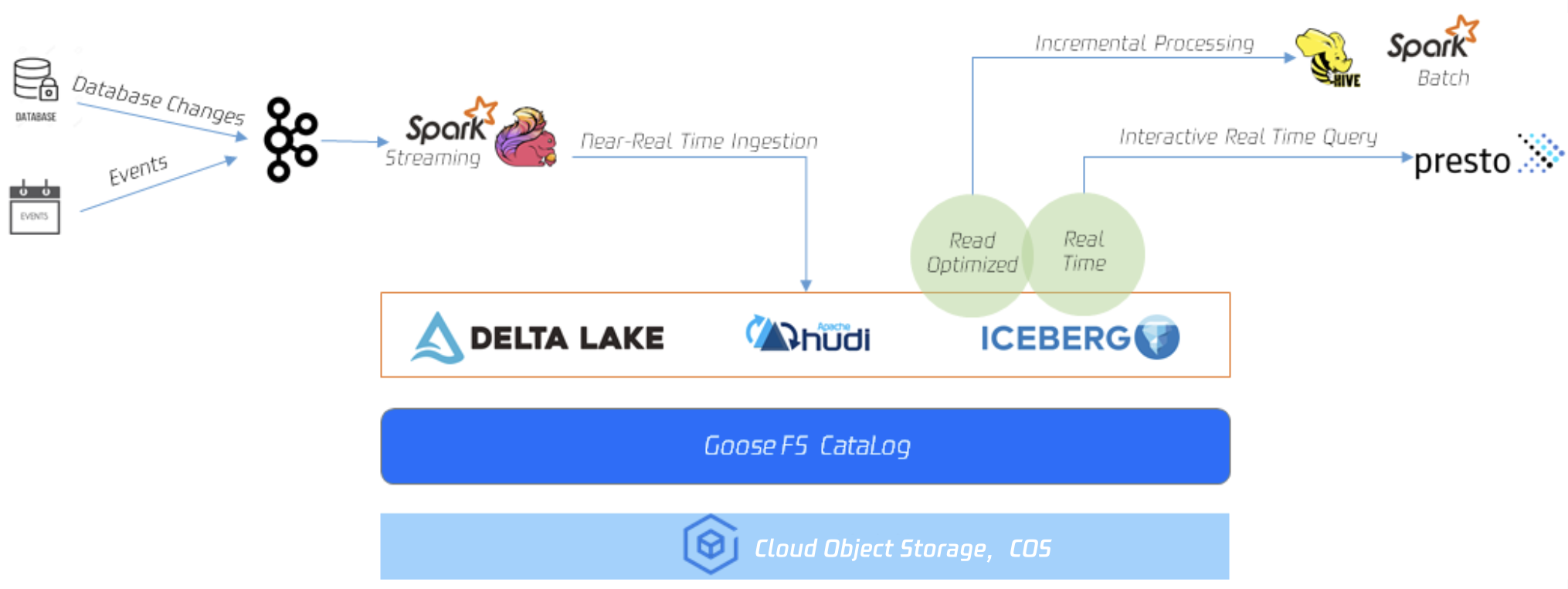
GooseFS Table management capability is used to manage structured data, providing database table management capabilities for upper-layer computing applications such as SparkSQL, Hive, and Presto. Currently, the underlying layer supports integration with Hive MetaStore. The Table management capability enables various SQL engines to read specified data content and effectively improves data access efficiency in big data scenarios.
GooseFS Table management capability currently mainly supports the following features:
Metadata-level description capability. GooseFS Catalog provides a metadata caching service sourced from a remote metadata service (Hive MetaStore). When querying with SQL engines such as SparkSQL, Hive, and SQL Presto, it can determine data read size, target data location, and data structure based on the metadata caching service in GooseFS Catalog, offering the same performance as Hive MetaStore.
Table-level data pre-caching capability. GooseFS Catalog can perceive the mapping between data tables and data storage paths, thereby providing cache preheating capabilities at both Table level and Table Partition level. It helps users cache data in advance according to table structure, greatly improving access performance.
Unified metadata service across storage services. By running upper-layer computing applications through GooseFS Catalog, it can simultaneously provide access acceleration capability for different underlying storage systems. Meanwhile, GooseFS Catalog can offer unified metadata query capability across storage services. Only requires enabling the Catalog feature with a GooseFS client to query data from different storage systems, such as HDFS, COS, and CHDFS.
Using GooseFS Table Management Capability
GooseFS Table management capability is implemented through the goosefs table instruction set, providing capabilities such as binding and unbinding DBs, querying DB information, querying table information, data loading, and data removal. The GooseFS Table management instruction set is as follows:
$ goosefs table
Usage: goosefs table [generic options]
[attachdb [-o|--option <key=value>] [--db <goosefs db name>] [--ignore-sync-errors] <udb type> <udb connection uri> <udb db name>]
The capabilities of each instruction in the above instruction set are summarized as follows:
attachdb: Attach a database, bind a remote database to GooseFS. Currently only supports Hive MetaStore.
detachdb: Uninstall a database, unbind a database bound to GooseFS.
free: Clear the data cache of a specified DB.Table, supporting Partition granularity.
load: Cache the data of a specified DB.Table, supporting partition granularity and allowing the number of replicas for caching to be set via replication.
ls: List metadata information of a specified DB or DB.Table.
stat: Query the file count, total size, and percentage cached of a specified DB.Table.
sync: Synchronize the content of a specified DB.
transform: Convert the Table associated with a specified DB to a new Table.
transformStatus: The progress status of Table conversion.
Mount a DB
Preheat the data of the specified Table into GooseFS. Before that, the corresponding DB needs to be mounted onto GooseFS. The following instructions show how to mount the database goosefs_db_demo from the specified address metastore_host:port into GooseFS and name this DB as test_db in GooseFS:
metastore_host:port can be replaced with any valid and connectable Hive MetaStore address.
Viewing Table Information
After binding the database, you can use the ls command to view the mounted DB and Table information. The following command shows how to query the web_page Table in the test_DB:
The command to preheat a Table will initiate an async job in the backend. GooseFS will return a job ID after starting the job. You can use the job stat <ID> command to query the task running status and use the table stat command to view the preheating percentage. The preheat command is as follows:
You can use the job stat command to view the execution progress of the preheat Table job. When the status is COMPLETED, the entire preheating process is finished. If the status is FAILED, you can check the log records in the master.log file to troubleshoot the reasons for the preheat error.
$ goosefs job stat 1615966078836
COMPLETED
After the Table is preheated, you can use the stat command to view the overview of the specified Table.
$ goosefs table stat test_db web_page
detail
5. Releasing a Table
Use the following commands to release the data cache of a specified Table from GooseFS:
$ goosefs table free test_db web_page
detail
Uninstalling DB
Use the following commands to uninstall a specified DB from GooseFS: