Managing Read-Only Instance
Download
포커스 모드
폰트 크기
You can create, view, and terminate read-only instances in the TencentDB for SQL Server console.
Note:
Single-node (cloud disk) instances do not support adding read-only instances.
Multi-node (cloud disk) instances can achieve the read-only instance features through the replica node read-only capability.
Single-node (cloud disk) and multi-node (cloud disk) instances do not support the addition of read-only instances.
Read-only instances cannot be purchased and used separately. They should be bound to a primary instance (Two-Node Edition, formerly High-Availability Edition/Cluster Edition) for use.
An RO group containing only 1 read-only instance has a risk of single point of failure, and this RO group will not be included in the overall availability calculation for the TencentDB for SQL Server. A single read-only instance does not provide availability SLA guarantees. It is recommended to purchase at least 2 read-only instances for an RO group to ensure its availability.
Feature Limits
Up to 5 read-only instances can be created for a primary instance.
Currently, read-only instances are not supported for Standard Edition.
Currently, instances in finance zones do not support scaling of read-only instances. If scaling is needed, see Publish-Subscribe.
Read-Only instances do not support backup and rollback.
Data cannot be migrated to read-only instances.
Read-Only instances do not support database creation/deletion. If needed, please operate on a primary instance.
Read-Only instances do not support account creation/deletion/authorization and account name/password change. If needed, please operate on a primary instance.
Differences Between Read-Only Instances of Different Versions
The read-only instances of different versions have differences. If the business requires using read-only instances, it is recommended to use database instances of the 2017 version or later.
For versions earlier than 2017, the publish-subscribe method is used to build read-only instances, with an object-level synchronization delay of 3 to 5 seconds. If you need to use the read-only instance feature, it is recommended to upgrade the primary instance to the 2017 version or later, to ensure efficient and stable data synchronization.
The 2017 version of Enterprise two-node (formerly High-Availability Edition/Cluster Edition) architecture and later versions use the Always-On method to build read-only instances, with a synchronization delay of 1 to 2 seconds, achieving more efficient and stable data synchronization.
Regions Supported by Read-Only Instances
Region | Availability Zone | Cloud Disk Edition RO | Local Disk RO |
Guangzhou ap-guangzhou | Guangzhou Zone 3 ap-guangzhou-3 | × | ✓ |
| Guangzhou Zone 6 ap-guangzhou-6 | ✓ | × |
| Guangzhou Zone 7 ap-guangzhou-7 | ✓ | × |
Shanghai ap-shanghai | Shanghai Zone 2 ap-shanghai-2 | ✓ | ✓ |
| Shanghai Zone 3 ap-shanghai-3 | × | ✓ |
| Shanghai Zone 4 ap-shanghai-4 | ✓ | ✓ |
| Shanghai Zone 5 ap-shanghai-4 | ✓ | × |
Nanjing ap-nanjing | Nanjing Zone 1 ap-nanjing-1 | ✓ | ✓ |
| Nanjing Zone 2 ap-nanjing-2 | ✓ | ✓ |
Beijing ap-beijing | Beijing Zone 1 ap-beijing-1 | × | ✓ |
| Beijing Zone 3 ap-beijing-3 | ✓ | ✓ |
| Beijing Zone 4 ap-beijing-4 | × | × |
| Beijing Zone 5 ap-beijing-5 | × | ✓ |
| Beijing Zone 6 ap-beijing-6 | ✓ | × |
| Beijing Zone 7 ap-beijing-7 | ✓ | × |
Chengdu ap-chengdu | Chengdu Zone 1 ap-chengdu-1 | ✓ | × |
| Chengdu Zone 2 ap-chengdu-2 | ✓ | × |
Chongqing ap-chongqing | Chongqing Zone 1 ap-chongqing-1 | ✓ | × |
Hong Kong (China) ap-hongkong | Hong Kong (China) Zone 1 ap-hongkong-1 | × | ✓ |
| Hong Kong (China) Zone 2 ap-hongkong-2 | ✓ | ✓ |
| Hong Kong (China) Zone 3 ap-hongkong-3 | ✓ | × |
Region | Availability Zone | Cloud Disk Edition RO | Local Disk RO |
Singapore ap-singapore | Singapore Zone 1 ap-singapore-1 | × | × |
| Singapore Zone 2 ap-singapore-2 | × | × |
| Singapore Zone 3 ap-singapore-3 | ✓ | × |
| Singapore Zone 4 ap-singapore-4 | ✓ | × |
Jakarta ap-jakarta | Jakarta Zone 1 ap-jakarta-1 | ✓ | × |
| Jakarta Zone 2 ap-jakarta-2 | ✓ | × |
Bangkok ap-bangkok | Bangkok Zone 1 ap-bangkok-1 | ✓ | × |
| Bangkok Zone 2 ap-bangkok-2 | ✓ | × |
Seoul ap-seoul | Seoul Zone 1 ap-seoul-1 | ✓ | × |
| Seoul Zone 2 ap-seoul-2 | ✓ | × |
Tokyo ap-tokyo | Tokyo Zone 1 ap-tokyo-1 | ✓ | × |
| Tokyo Zone 2 ap-tokyo-2 | ✓ | × |
Region | Availability Zone | Cloud Disk Edition RO | Local Disk RO |
Virginia na-ashburn | Virginia Zone 1 na-ashburn-1 | ✓ | × |
| Virginia Zone 2 na-ashburn-2 | ✓ | × |
Frankfurt eu-frankfurt | Frankfurt Zone 1 eu-frankfurt-1 | ✓ | × |
| Frankfurt Zone 2 eu-frankfurt-2 | ✓ | × |
Silicon Valley na-siliconvalley | Silicon Valley Zone 1 na-siliconvalley-1 | ✓ | × |
| Silicon Valley Zone 2 na-siliconvalley-2 | ✓ | × |
Sao Paulo sa-saopaulo | São Paulo Zone 1 sa-saopaulo-1 | ✓ | × |
Read-Only Instance Details Page
The Instance Details page of read-only instances is shown below:
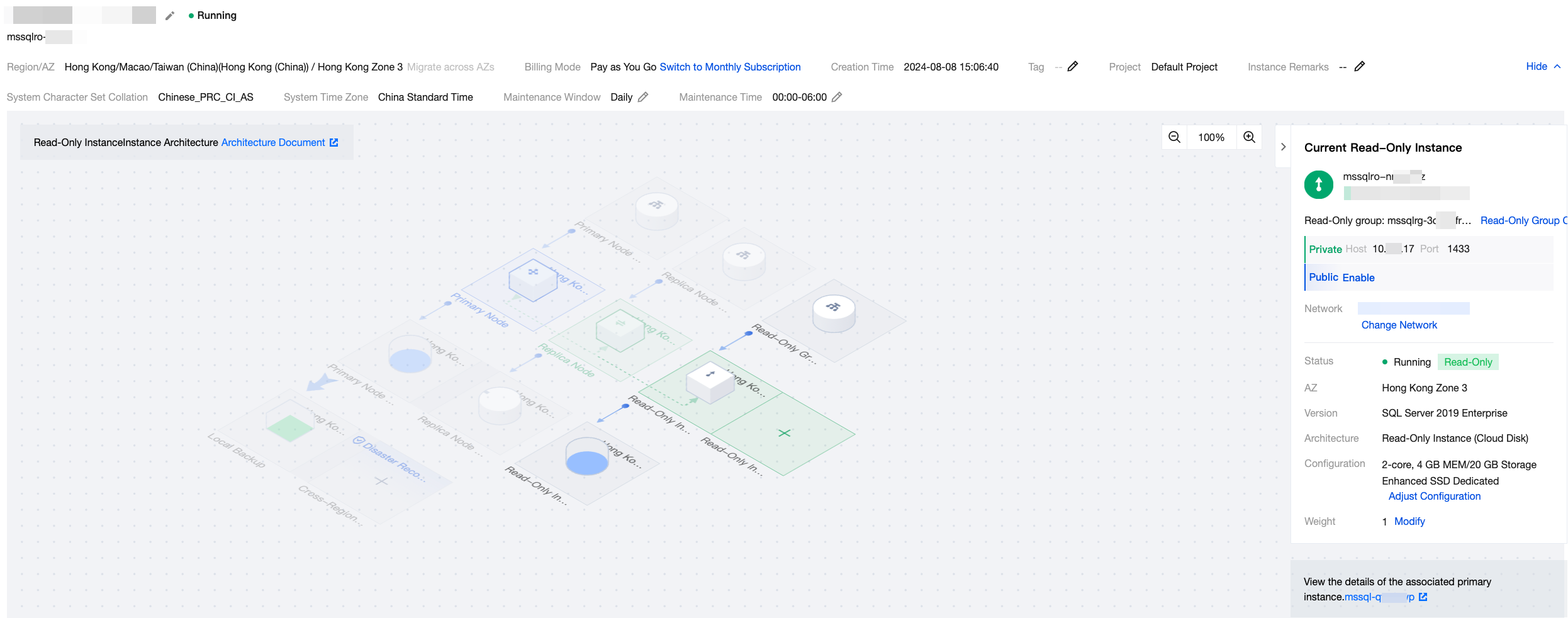
Feature Area | Illustration | Feature | Description |
Topology diagram (architecture diagram) | 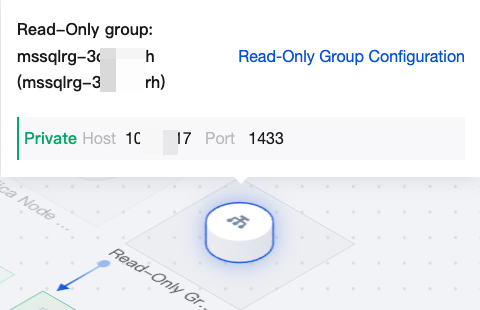 | Read-only group address | You can hover the mouse over the read-only group address in the topology diagram to quickly view the read-only group address and configure the read-only group. For details, see Read-Only Group. |
| 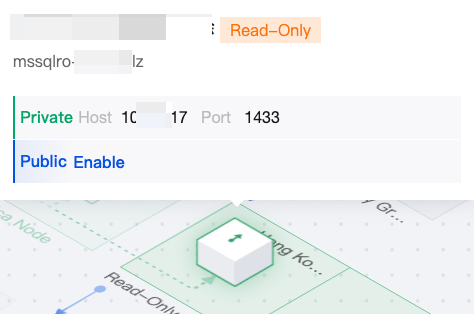 | Read-only instance | You can hover the mouse over the read-only instance in the topology diagram to quickly view the private network address and public network address of the read-only instance. Click the + icon on the read-only instance in the topology diagram to create a read-only instance. |
| 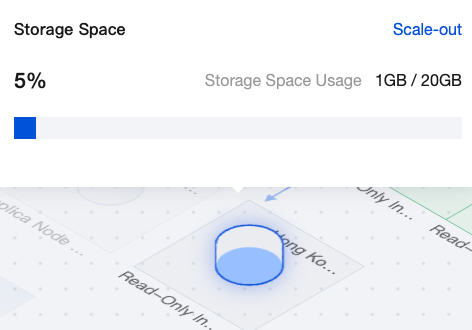 | Read-only instance storage | You can hover the mouse over the read-only instance storage in the topology diagram to view the usage of the read-only instance storage space. Click Scale-out to enter the configuration adjustment page for setup. |
|  | Topology diagram view scale | You can adjust the display scale of the topology diagram. |
| - | Gray area in the topology diagram | The gray area in the topology diagram indicates the deployment architecture of the primary instance to which this read-only instance belongs. Click operations are not supported in the gray area. |
Instance information (on the right side) |  | Hiding/Showing instance information | You can hide or show the instance information section. |
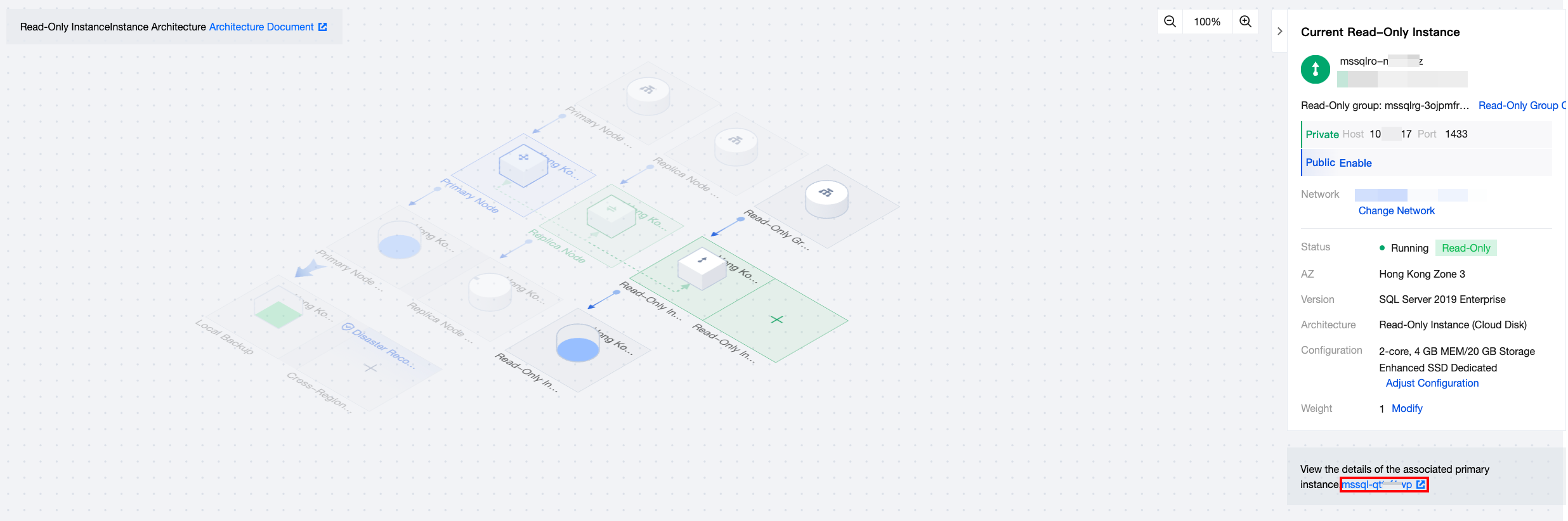
| 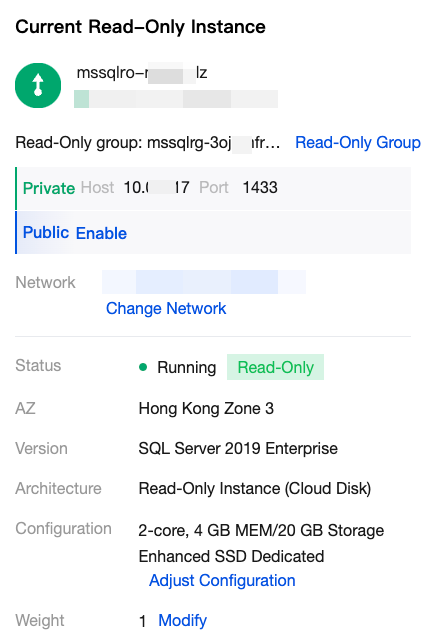 | Current Read-Only Instance | Under the current read-only instance on the right side, you can view the read-only instance information such as private network address, public network address, network, instance status, availability zone, edition, architecture, configuration, and weight. Available operations include read-only group configuration, changing network, enabling public network address, and adjusting configuration. |
| 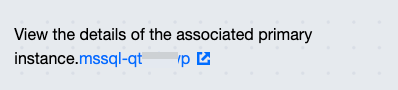 | View the details of the associated primary instance | After viewing the details of the associated primary instance on the right side, you can click the primary instance ID to enter the details page of the primary instance to which this read-only instance belongs. |
Creating Read-Only Instances
1. Log in to the TencentDB for SQL Server console. In the instance list, click the Instance ID or Manage in the Operation column to enter the details page.
2. On the Instance Details page, click the + icon in the read-only instance area of the topology diagram, or select the Read-Only Instance tab and click Create to enter the purchase page.
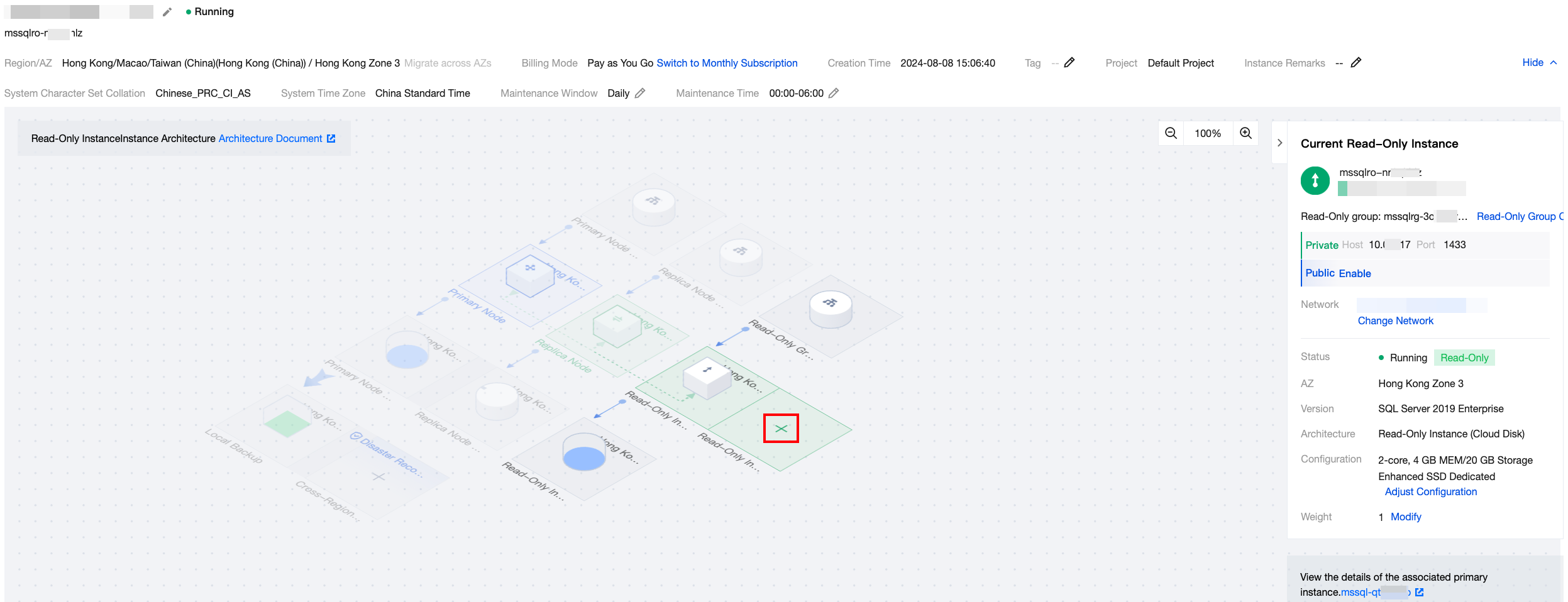
3. On the purchase page, select the corresponding configurations for the read-only instance. After confirming no errors, click Buy Now to purchase the read-only instance.
Note:
If you need to align the expiration date of the read-only instance with that of the primary instance, you can set a unified expiration date in the Renewal Management console. For detailed operation steps, see Unified Expiration Date.
Viewing Read-Only Instance
1. Log in to the TencentDB for SQL Server console. In the instance list, instances with an R flag are read-only instances. Click an instance ID or Manage in the Operation column to enter the read-only instance details page.
2. In the instance information on the right side of the Instance Details page, you can view the bound primary instance. Click the Instance ID to enter the details page of the primary instance. You can also enter the details page of the read-only instance from the topology diagram of the primary instance.
Note:
Some features on the Instance Details page of the read-only instance are consistent with the configurations of the primary instance and cannot be modified. If necessary, you can modify them on the Instance Details page of the primary instance.
Terminating Read-Only Instance
An read-only instance can be terminated in the same way as a primary instance as instructed in Terminating Instance.
Related APIs
API | Description |
This API is used to create read-only instances (local disk). | |
This API is used to create read-only instances (cloud disk). | |
This API is used to query read-only group details. | |
This API is used to query the read-only group list. | |
This API is used to query the read-only group where the read-only instance is located by its ID. | |
This API is used to modify read-only group details. | |
This API is used to query the automatic weight assignment result of the read-only group. The BalanceReadOnlyGroup API is used to perform routing weight assignment according to the automatic weight assignment result. | |
This API is used to balance the routing weight of each read-only instance according to the predefined weights. | |
This API is used to reclaim resources of read-only groups immediately. The resources, such as VIP, occupied by the read-only group will be released immediately and cannot be recovered. |
피드백