Upgrading Instance Version
Download
포커스 모드
폰트 크기
Note:
This document contains important notes, and ignoring these notes may affect your business. Read it carefully.
TencentDB for SQL Server versions provided by Tencent Cloud follow the Major Version Lifecycle Description. To achieve better performance and security, you can adjust the configuration in the console and upgrade the instance to a later database version based on your actual needs. This document introduces how to upgrade the database version of the instance through the TencentDB for SQL Server console.
Supported versions
Version upgrade is supported for the single-node edition (formerly Basic Edition), two-node edition (formerly HA/Cluster Edition), and multi-node edition of TencentDB for SQL Server.
Prerequisites
You can adjust the configuration of a TencentDB for SQL Server instance and its associated instances only when they are in running status and are not executing any tasks.
Note
In TencentDB for SQL Server, the database compatibility level is a key setting that allows you to configure certain behaviors of the database to be compatible with specific versions of SQL Server. If your database is currently running stably at a lower compatibility level and your application does not require features that are only supported at higher compatibility levels, you can maintain the current compatibility level to preserve experiences of the existing business logic and features, avoiding the adaptation costs that may arise from changing the compatibility level and ensuring stable business operations. If existing applications need to use new features or new Transact-SQL versions, you can also upgrade the database compatibility level to the latest available version. For more details, see Microsoft Official Database (Transact-SQL) Compatibility Level.
Warning:
Discontinued features in specific SQL Server versions, which are removed from the SQL Server database engine, are not protected by the compatibility level.
Breaking changes in specific SQL Server versions (behavior changes between different database engine versions of SQL Server) may not be protected by the compatibility level. Though Transact-SQL behaviors are generally protected by the compatibility level, system objects that have been modified or removed are not protected by the compatibility level.
When the database version of an instance is upgraded, the compatibility level of the system database is upgraded automatically by default. For business databases (databases created through TencentDB for SQL Server), you can choose whether to automatically upgrade the database compatibility level to the latest version during the upgrade process and specify the specific time for the upgrade.
Before the upgrade, you can also see the Microsoft official documentation in the following table to assess discontinued features, breaking changes, and version feature changes that are not protected by the compatibility level. To ensure a smooth cross-version upgrade, it is recommended that you focus on intermediate version differences and prepare response measures in advance to ensure business continuity and stability.
Database Version | 2012 Enterprise | 2014 Enterprise | 2016 Enterprise | 2017 Enterprise | 2019 Enterprise | 2022 Enterprise |
Microsoft official documentation | No discontinued features No breaking changes | No discontinued features | No breaking changes | No breaking changes |
After the database version is upgraded, rollback is not supported temporarily. It is recommended that you create a pay-as-you-go instance to test compatibility before the upgrade.
Impact of configuration adjustment
Data migration will be involved during the instance configuration adjustment, and the larger the data volume, the longer the data migration time. Access to the instance will not be affected during this period.
A switch will be performed after migration is completed, which causes a momentary disconnection from the database for a few seconds. Make sure that your business has a reconnection mechanism.
Most database, account, and network operations are unavailable during the momentary disconnection. Therefore, we recommend that you perform the switch during off-peak hours.
Fee Instructions
Upgrading the database version does not incur additional fees.
Directions
1. Log in to the TencentDB for SQL Server console, select the region and target instance in the instance list, and click Adjust Configuration in the Operation column.

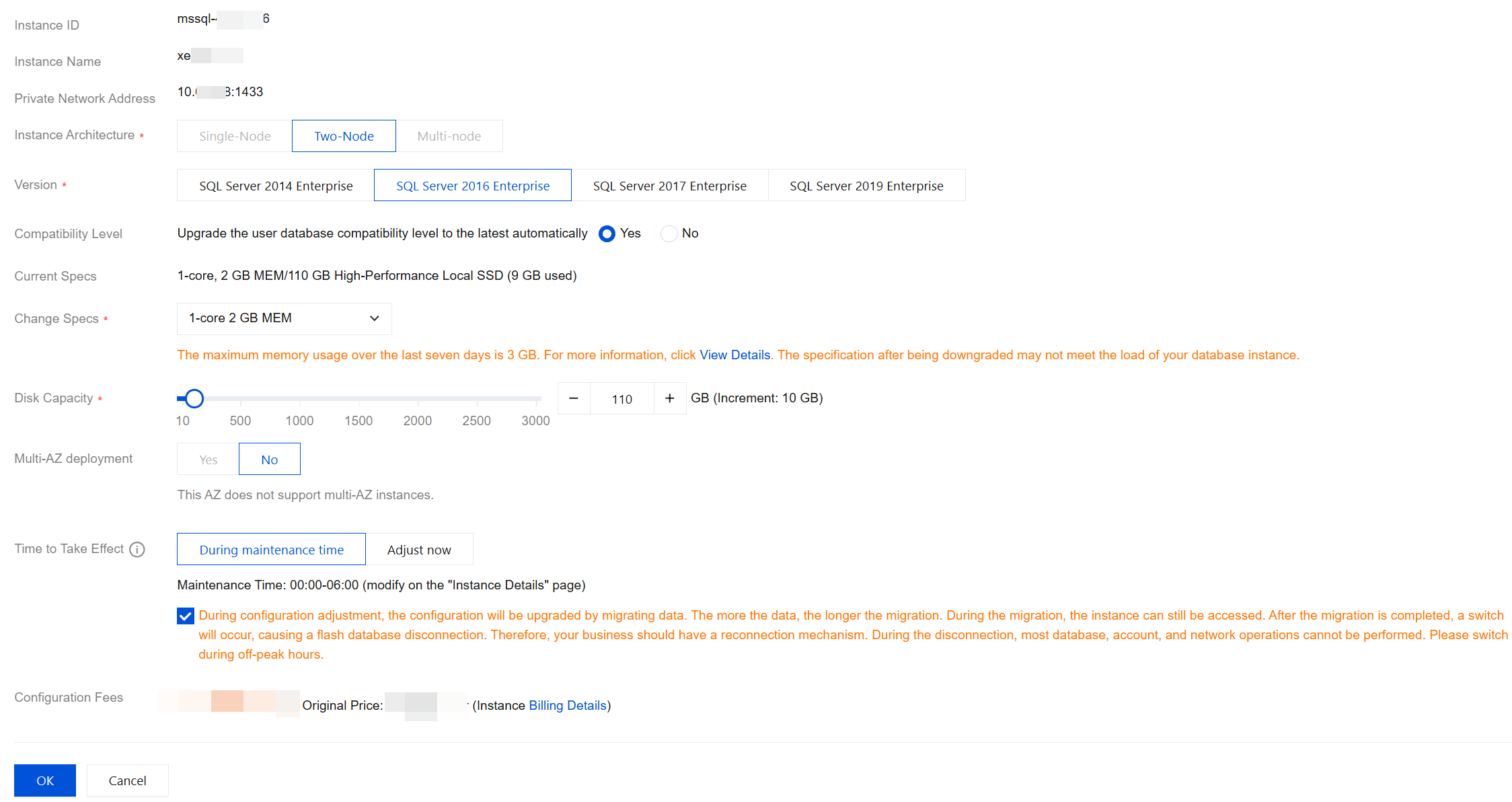
2. In the pop-up configuration adjustment window, select the database version to be changed, and choose whether to Upgrade the user database compatibility level to the latest automatically. After checking that the settings are correct, click OK.
Note:
Select the Time to Take Effect of the configuration adjustment and click the orange note.
During maintenance time: You can modify the maintenance time on the instance details page.
Adjust now: The configuration adjustment will be performed immediately.
Due to business security and risk control requirements, the system may prompt you to restart the instance to lift the feature limitations when you perform the version upgrade operation on instances. At this point, follow the prompt in the console to complete the instance restart before you perform the instance version upgrade operation.
If the option Upgrade the user database compatibility level to the latest automatically is set to Yes, the system will upgrade the database compatibility level automatically within the specified time period following the instance database version upgrade; if the option is set to No, the system will not upgrade the database compatibility level automatically.
3. For yearly/monthly subscription instances, confirm the configuration information and fees in the payment window after redirection, and click Submit Order. For pay-as-you-go instances, confirm the configuration information and fees in the payment window after redirection, and click Adjust.
4. You will be redirected to the instance list. When the instance status changes from Adjusting instance configuration to Running, the version upgrade is completed. You can query and check the new version on the Instance List or Instance Details page.
Related APIs
API | Description |
This API is used to upgrade instances. |
피드백