For more information on instance specifications supported by TencentDB for SQL Server and their prices, see Product Pricing.
Prerequisites
You can adjust the configuration of a TencentDB for SQL Server instance and its associated instances only when they are in running status and are not executing any tasks.
Specification Adjustment Process
Scaling
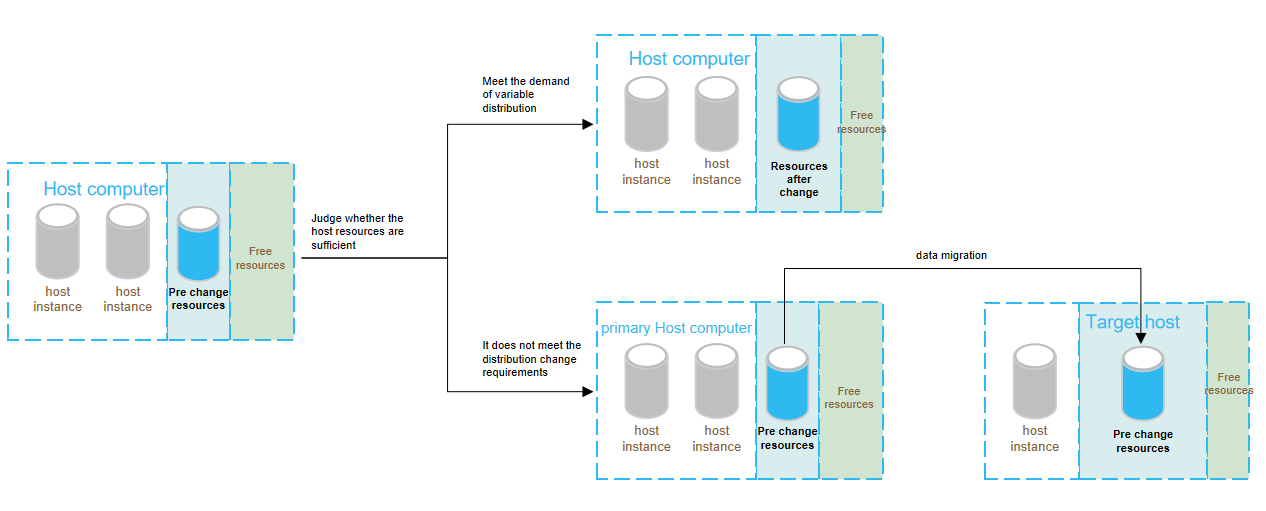
After you adjust the configuration in the console, the system will determine whether to complete the adjustment by in-place scaling or data migration. The configuration adjustment process is as follows:
Impact of Configuration Adjustment
Note:
TencentDB for SQL Server cloud disk edition instances do not support capacity expansion of disks.
Single-item adjustment
Single-item adjustment refers to the adjustment of either the specification or disk, which has the following impact:
Instance Architecture
Disk Type
Adjustment Item
Adjustment Decision
Adjustment Impact
Time
Single-node instance (formerly basic edition)
Cloud disk
Specification upgrade or disk capacity expansion or specification downgrade
Upgrade and downgrade
Disk capacity expansion:
1. The instance will perform in-place capacity expansion during the configuration adjustment.
2. During this period, no instance restart or momentary disconnection will occur, and the business will not be affected.
3. You can set the effective time, which will not affect businesses. The time is the actual configuration change time.
Upgrade or downgrade of the instance specifications:
1. The instance will be restarted during configuration adjustment.
2. The service will be unavailable for about 1 to 3 minutes.
1. The instance disk capacity will be reduced during the configuration adjustment.
2. Data migration and instance restart will not be performed, and no momentary disconnections will occur.
3. You can custom the effective time that is also the adjustment time without affecting the business.
You need to select the time for the new configuration to take effect
Specification downgrade
Downgrade
1. The instance specification will be downgraded during configuration adjustment.
2. The service will become unavailable for around 1 minute.
3. Perform the adjustment during off-peak hours.
You need to select the time to take effect.
Specification upgradeordisk capacity expansion
Migration and upgrade
1. Data migration will be involved during the instance configuration adjustment, and the larger the data volume, the longer the data migration time. Access to the instance will not be affected during this period.
2. A switch will be performed after migration is completed, which causes a momentary disconnection from the database for few seconds. Make sure that your business has a reconnection mechanism.
3. Most database, account, and network operations are unavailable during the momentary disconnection. Therefore, we recommend that you perform the switch during off-peak hours.
You need to select the time to take effect.
Specification upgrade or disk capacity expansion
Upgrade
1. The instance specification or disk capacity will be upgraded or expanded during configuration adjustment.
2. Data migration and instance restart will not be performed, and no momentary disconnections will occur.
3. You can customize the effective time that is also the adjustment time without affecting the business.
You need to select the time for the new configuration to take effect
1. The instance specification or disk capacity will be upgraded or expanded during configuration adjustment.
2. Data migration and instance restart will not be performed, and no momentary disconnections will occur.
3. You can custom the effective time that is also the adjustment time without affecting the business.
You need to select the time for the new configuration to take effect
Specification upgrade + disk capacity expansion
Migration and upgrade
1. Data migration will be involved during the instance configuration adjustment, and the larger the data volume, the longer the data migration time. Access to the instance will not be affected during this period.
2. A switch will be performed after migration is completed, which causes a momentary disconnection from the database for few seconds. Make sure that your business has a reconnection mechanism.
3. Most database, account, and network operations are unavailable during the momentary disconnection. Therefore, we recommend you perform the switch during off-peak hours.
You need to select the time to take effect.
Specification upgrade + disk capacity reduction
Upgrade and downgrade
1. The instance specification will be upgraded and the disk capacity will be reduced during configuration adjustment.
2. Data migration and instance restart will not be performed, and no momentary disconnections will occur.
3. The time to take effect (i.e., the time when the configuration adjustment will occur) can be customized without affecting the business.
The time to take effect can be customized.
Specification upgrade + disk capacity reduction
Migration, upgrade, and downgrade
1. Data migration will be involved during the instance configuration adjustment, and the larger the data volume, the longer the data migration time. Access to the instance will not be affected during this period.
2. A switch will be performed after migration is completed, which causes a momentary disconnection from the database for few seconds. Make sure that your business has a reconnection mechanism.
3. Most database, account, and network operations are unavailable during the momentary disconnection. Therefore, we recommend you perform the switch during off-peak hours.
You need to select the time to take effect.
Specification downgrade + disk capacity expansion
Upgrade and downgrade, or migration, upgrade, and downgrade
1. The service may become unavailable for around 1 minute, and data migration may be involved during the instance configuration adjustment, and the larger the data volume, the longer the data migration time. Access to the instance will not be affected during this period.
2. A switch will be performed after migration is completed, which causes a momentary disconnection from the database for few seconds. Make sure that your business has a reconnection mechanism.
3. Most database, account, and network operations are unavailable during the momentary disconnection. Therefore, we recommend you perform the switch during off-peak hours.
You need to select the time to take effect.
Specification downgrade + disk capacity reduction
Downgrade
1. The instance specification will be downgraded during configuration adjustment.
2. The service will become unavailable for around 1 minute.
Disk capacity expansion + specification upgrade or downgrade
Upgrade, expand, or downgrade
1. The instance will be restarted during configuration adjustment.
2. The service will be unavailable for about 1 to 3 minutes.
3. Perform the adjustment during off-peak hours allowed by the business.
You need to select the time to take effect.
Multi-node
Cloud disk
Disk capacity expansion + specification upgrade or downgrade
Upgrade, expand, or downgrade
1. The instance will be restarted during configuration adjustment.
2. The service will be unavailable for about 1 to 3 minutes.
3. Perform the adjustment during off-peak hours allowed by the business.
You need to select the time for the new configuration to take effect.
Directions
When you perform configuration adjustments on an instance, the prompts and notes differ between instances with cloud disk and local disk architectures. For details, see the description below.
Local Disk
Cloud Disk
If an instance switch is involved, second-level database disconnection occurs during the instance switch, and most operations related to databases, accounts, and networks cannot be performed during this period. Ensure that the business has a reconnection mechanism.
If an instance switch is involved, you can initiate the switch within the maintenance time or immediately after migration. Ensure that the switch is performed in off-peak hours.
If the instance deployed on a local disk involves disk scale-in, the disk space after scale-in should be greater than or equal to 2 times the maximum disk space used in the past 7 days to prevent scale-in failures. For example, if an instance used 5 GB of disk space in the past 7 days, the disk space after instance scale-in should be greater than or equal to 10 GB.
If the instance deployed on a local disk involves memory scale-in, the service will be unavailable for about 1 minute. You can initiate the scale-in during the maintenance time or immediately. Operate during off-peak hours allowed by the business.
If the instance to be upgraded is associated with other instances (read-only instances), submit a ticket to contact us for solutions.
For the single-node, two-node, or multi-node instances of the TencentDB for SQL Server cloud disk architecture, the instance will be restarted after specification scale-in/out, resulting in service unavailability for approximately 1 to 3 minutes. You can initiate the adjustment immediately or within the maintenance time. Operate during off-peak hours allowed by the business.
During disk scale-out in the single-node, two-node, or multi-node instances of the TencentDB for SQL Server cloud disk architecture, no instance restart or momentary disconnection will occur, and the business will not be affected. You can select the effective time, which is the actual configuration change time.
The single-node, two-node, or multi-node instances of the TencentDB for SQL Server cloud disk architecture do not support disk scale-in.
1. Log in to the TencentDB for SQL Server console, select the region and target instance in the instance list, and click Adjust Configuration in the Operation column.
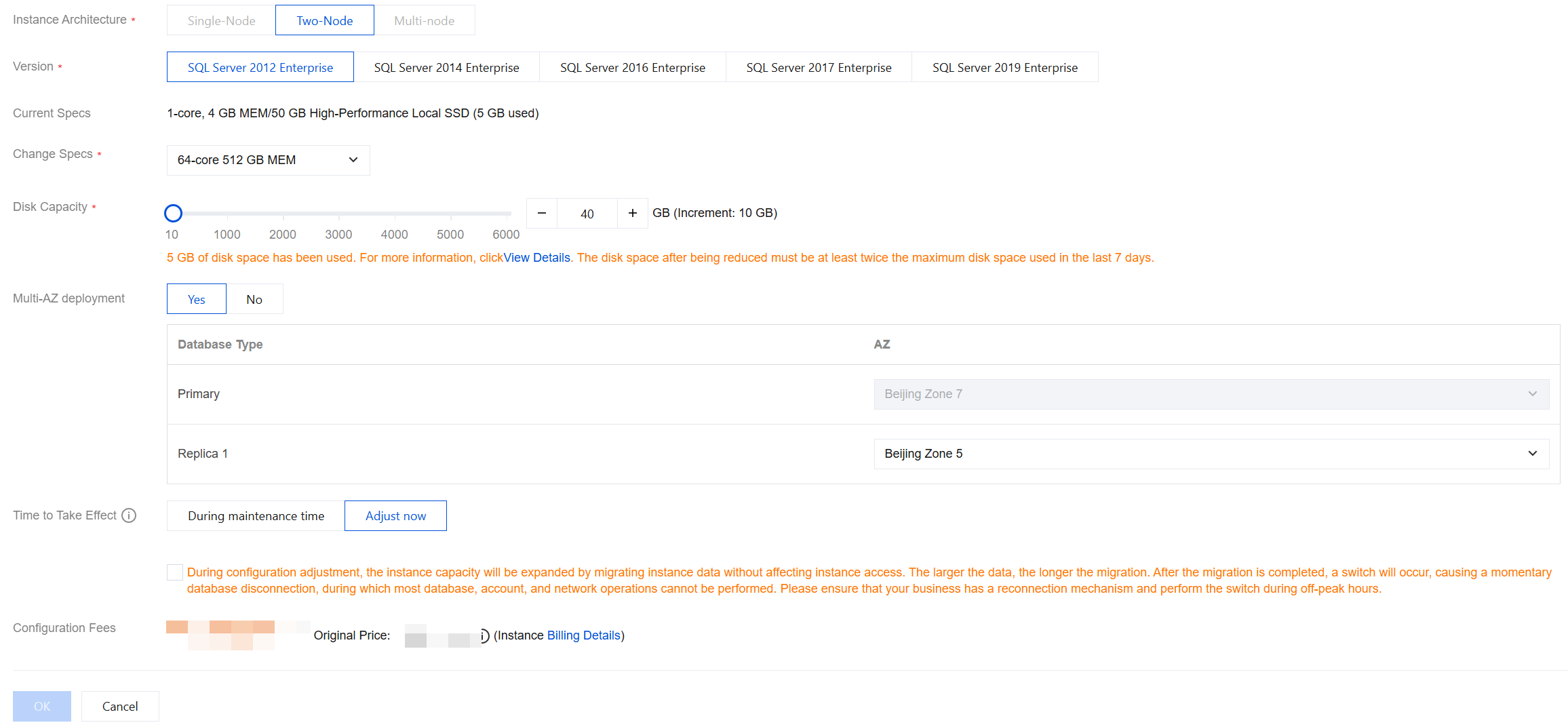
2. In the Adjust Configuration window that pops up, select the desired CPU, memory, and disk capacity, and click OK.
Note:
Select the Effective Time for the configuration change and check the orange prompt. Only migration and upgrade/downgrade scenarios require checking.
Within maintenance time: Indicates that the change will take effect within the maintenance time. You can modify the maintenance time on the instance details page.
Adjust now: Indicates that the change will take effect immediately after submission.
Due to business security and risk control requirements, the system may prompt you to restart the instance to lift the feature limitations when you perform the instance specification adjustment operation and data migration is involved. At this point, follow the prompt in the console to complete the instance restart before you perform the instance specification adjustment operation.
3. In the redirected payment window for yearly/monthly subscription instances, confirm the configuration details and fees, and then click Submit Order. For pay-as-you-go instances, click Adjust in the window.
4. You will be redirected to the instance list. When the instance status changes from Switching (after configuration adjustment) to Running, the specification upgrade is completed. You can query and check the new specification on the Instance List or Instance Details page.
This API is used to complete the instance upgrade and switch immediately without waiting for the maintenance window when the instance status is "upgrade pending switch" after scale-out is initiated. This API needs to be called during off-peak hours of the instance. Some databases cannot be accessed before the switch is completed.