Restarting Instance
Download
포커스 모드
폰트 크기
This document describes how to restart an instance in the console.
Scenario
Instance restart is a common maintenance method for TencentDB for SQL Server. It is similar to restarting a local database. You can choose to restart an instance during the maintenance period or restart it immediately according to your business needs.
Note:
Due to business security and risk control requirements, the system may prompt you to restart the instance in certain scenarios, such as cross-AZ migration and configuration adjustment, to lift corresponding feature limitations. At this point, follow the prompt in the console to complete the instance restart before you perform the corresponding operation.
Instructions for Sensitive Operations with MFA Integrated
To enhance the security of the cloud account, TencentDB for SQL Server supports MFA (Multi-Factor Authentication), which brings an extra layer of protection in addition to the username and password. After the MFA device verification is enabled, when you perform operations such as destroying instances/changing network/modifying IP addresses/resetting passwords/deleting accounts/resetting instances/performing primary-replica switch, a second identity verification based on the MFA dynamic code will be conducted. Such operations can be executed only after successful verification. For an introduction to MFA and how to enable the operation protection, see MFA Devices.
Limits
During the restart, the TencentDB for SQL Server instance cannot provide services. Therefore, make sure that an instance has stopped accepting business requests before restarting it. During the restart, if the business write volume is high, the restart may fail.
Restarting an instance does not change its physical attributes, so the private IP and any data stored in the instance will remain unchanged.
After the restart, reconnection to the database is needed. Make sure your business has a reconnection mechanism.
Restart the instance during off-peak hours to ensure success and minimize the impact on your business.
Directions
1. Log in to the TencentDB for SQL Server console.
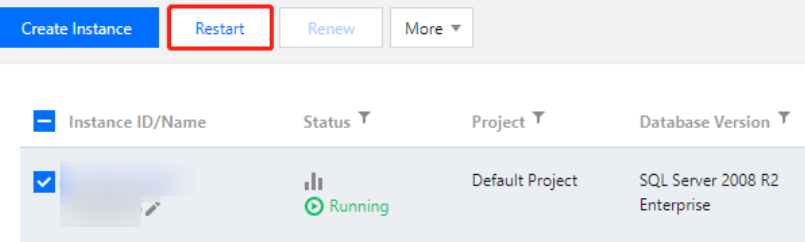
2. Select a region at the top, select one or multiple instances to be restarted, and click Restart at the top.
3. In the pop-up dialog box, set Time to Take Effect, select "I acknowledge the impact of instance restart", and click OK.
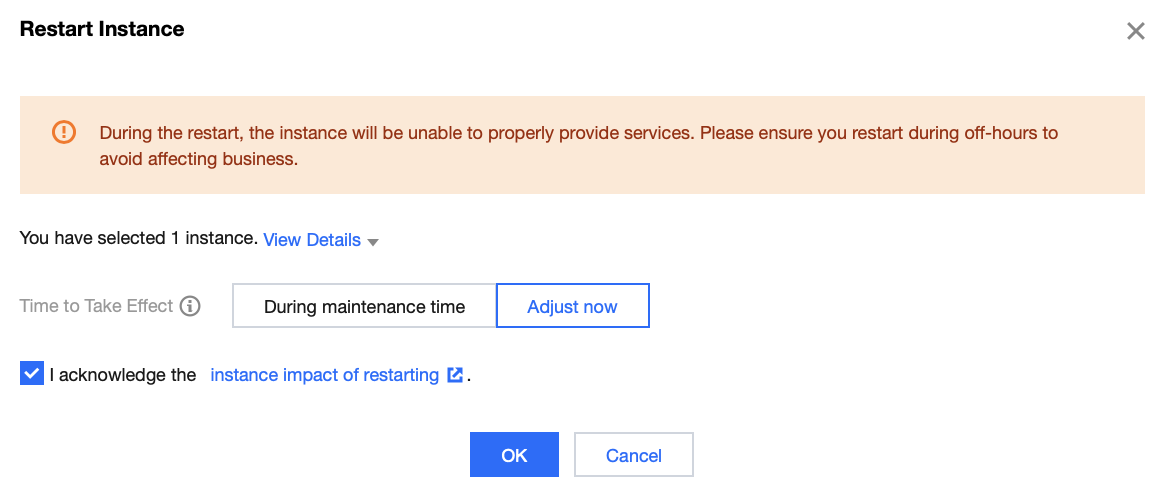
Immediate adjustment is selected by default. You can set Time to Take Effect as needed.
During maintenance time: Indicates that the current restart will only occur within the last maintenance period and will not restart multiple times according to the maintenance cycle. To modify the instance maintenance time, see Setting Instance Maintenance Information.
Adjust now: Indicates restarting the selected instance immediately.
4. Once the instance status changes from Restarting to Running, the restart is completed.
Related APIs
API | Description |
This API is used to restart a database instance. |
피드백