SSIS is an important component for SQL Server to implement BI. It provides enterprise-grade data integration and conversion solutions to extract, transform, and load (ETL) data from various sources.
This document describes how to purchase a business intelligence server in the console before you can use the SSIS feature.
Billing
Currently, the business intelligence server feature is in beta test and can be used free of charge. During the beta test, you can purchase only one business intelligence server with the 2-core 4 GB MEM specification in each region and up to three under each root account. Billing will start in pay-as-you-go mode after the beta test ends.
2. On the instance list page, click Create Business Intelligence Server.
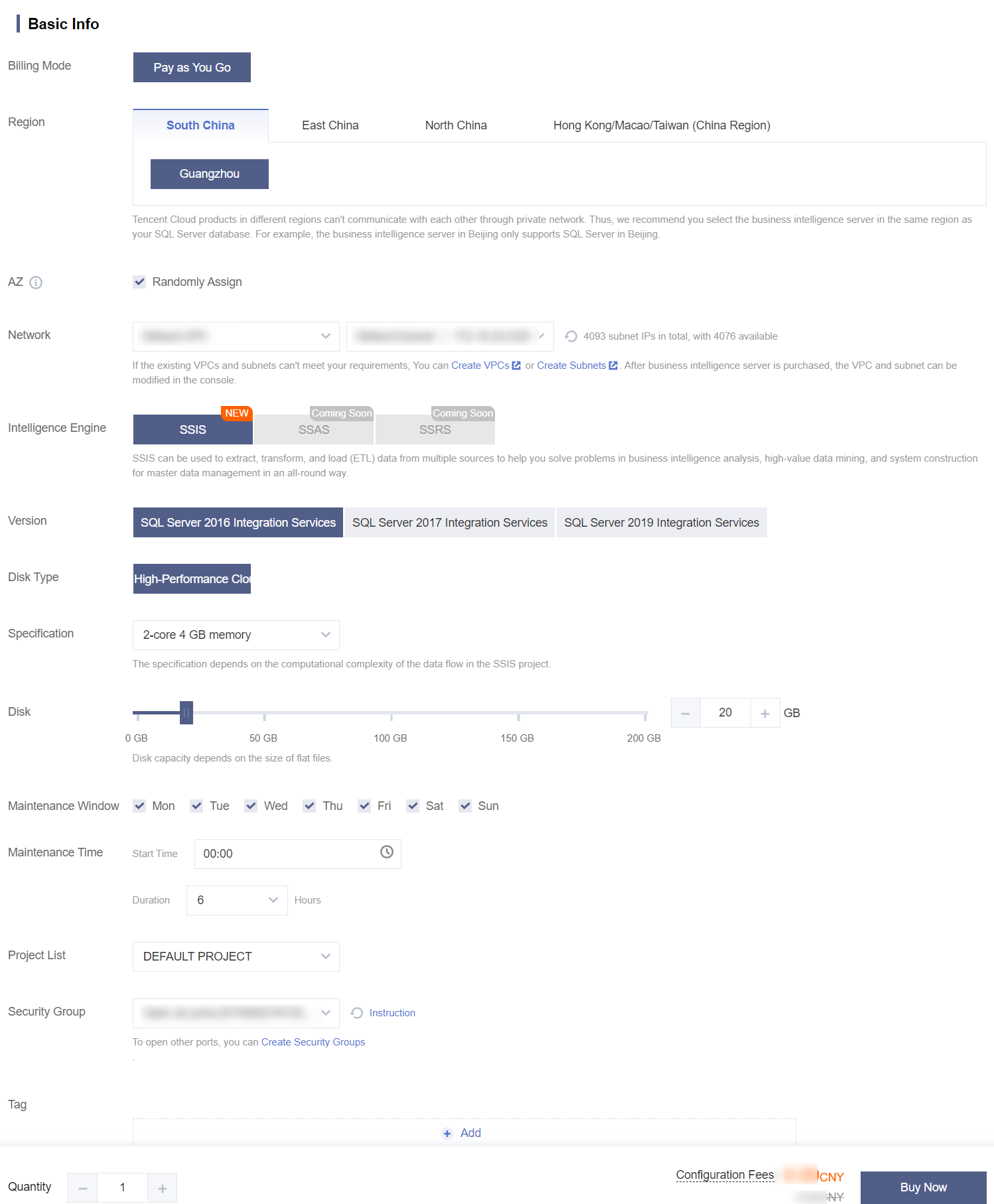
3. On the business intelligence server purchase page, complete the following configuration item, carefully read and indicate your content to the Terms of Service, and click Buy Now.
Billing Mode: Pay-as-you-go mode is used by default.
Region: Tencent Cloud products in different regions can't communicate with each other through private network. Thus, we recommend you select the business intelligence server in the same region as your SQL Server database. For example, the business intelligence server in Beijing only supports SQL Server in Beijing.
AZ: You can select Randomly Assign or manually select one.
Randomly Assign: Randomly Assign is selected by default. The system will select an AZ automatically. AZs in the same region are connected through low-latency private network linkages. We recommend you select Randomly Assign.
Manual selection: You can deselect Randomly Assign and manually select an AZ supported in the region.
Note:
SQL Server database instances can communicate with business intelligence servers in different AZs in the same region.
Network: You can select a VPC containing the subnet and subnet IP. If the existing VPCs and subnets can't meet your requirements, you can create VPCs or create subnets.
Intelligence Engine: Currently, you can select only the SSIS intelligence engine. SSAS and SSRS intelligence engines will be available in the future.
Version: Currently, three SSIS versions are supported: SQL Server 2016 Integration Services, SQL Server 2017 Integration Services, and SQL Server 2019 Integration Services.
Disk Type: High-performance cloud disk is used by default.
Specification: Currently, only the 2-core 4GB MEM specification is supported. The specification is subject to the project complexity in the SSIS package.
Disk: Currently, you can select a storage space between 20 and 200 GB. The disk size is subject to the size of flat files to be added.
Maintenance Window and Maintenance Time: To ensure the stability of the business intelligence server, the backend system performs maintenance operations on the instance during the maintenance window from time to time. We recommend you set an acceptable maintenance time for your business instance, usually during off-peak hours, so as to minimize the potential impact on your business. You can manually set the maintenance date and maintenance duration.
Project List: You can assign the instance to different projects for management.
Security Group: It serves as a stateful virtual firewall with filtering feature for configuring network access control for one or more TencentDB instances. It is an important network security isolation tool provided by Tencent Cloud. You can select a security group for the business intelligence server.
Tag: You can set tags for the business intelligence server to categorize and manage resources more easily.
Terms of Service: Read and indicate your consent to the Terms of Service.
4. Return to the instance list after purchase. When the status of the purchased business intelligence server becomes Running, the instance is purchased successfully.
Viewing the Purchased Business Intelligence Server
After purchasing the business intelligence server successfully, you can view its information in the instance list in the TencentDB for SQL Server console.
Instance ID/Name: It must start with mssqlbi, such as mssqlbi-xxxxxxx. When you hover over the instance ID, the quick copy button
will be displayed. You can modify the instance name, which can contain up to 60 letters, digits, or underscores.
Status: Status of the business intelligence server, which can be filtered.
Project: Project of the business intelligence server, which can be copied and filtered.
Version: Version of the business intelligence server, which can be filtered.
Configuration: Configuration information of the business intelligence server.
Network: Network of the business intelligence server.
AZ: AZ of the business intelligence server, which can be filtered.
Private Network Address: Private IP and port number of the business intelligence server.
Billing Mode: Billing mode of the business intelligence server.
Tag: Tag keys and values of the business intelligence server.
Operation: Operations that can be performed on the business intelligence server, including Manage, Terminate, and Edit Tag.
You can perform the following operations on the purchased business intelligence server (i.e., SSIS instance) in the instance list:
Feature
Operation
Modify instance name
You can rename a purchased SSIS instance in the console as instructed in Renaming Instance.
Restart instance
You can restart a purchased SSIS instance in the console as instructed in Restarting Instance.
Terminate instance
You can terminate a purchased SSIS instance in the console as instructed in Terminating Instance.
Edit tag
You can modify the tags of a purchased SSIS instance as instructed in Setting Instance Tag.