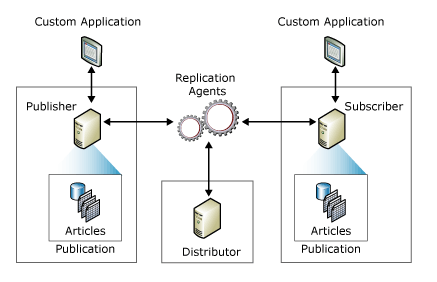
TencentDB for SQL Server supports the native Publish/Subscribe replication function of Microsoft SQL Server. Users can create, modify, and delete publishing and subscription servers on the TencentDB for SQL Server console, meeting the business requirements for data replication and synchronization.
Note:
The TencentDB for SQL Server single-node (formerly Basic Edition) and multi-node editions do not support publishing/subscription.
Concepts
SQL Server employs terminology from the publishing industry to represent elements of a replication topology, which includes the publishing server, distributing server, subscribing server, publications, projects, and subscriptions. The Microsoft SQL Server replication can be understood based on the perception of the concepts of magzines:
The magazine publisher (Publishing Server) creates one or more publications (Publication).
The publications (Publication) comprise articles (Project).
The publisher (Publishing Server) may directly distribute the magazines or resort to a distributor (Distributing Server).
The subscriber (Subscribing Server) receives the subscibed publications (Publication).
Architecture
The replication topology defines the relationships between servers and data replicas, and illustrates the logic that determines how data flows between servers. Various replication processes, termed as agents, are devoted to copying and moving data between publishing and subscribing servers. The components and processes involved in replication are as follows:.
Publishing Server
A Publishing Server is a type of database instance that provides data to other locations via replication. A Publishing Server can have one or multiple publications, each defining a set of objects and data to be replicated with logical relationships.
Distributing Server
A Distributing Server is another type of database instance, functioning as a storage hub. It is used for the replication of the pecific data associated with one or multiple publishing servers. Each Publishing Server is associated with a single database (distributing database) in the Distributing Server.
The distributing database can store replication state data and metadata regarding publication. In certain scenarios, it queues the data moving from the Publishing Server to the Subscribing Server.
In many scenarios, a single database server instance serves as the two roles of both the Publishing Server and the Distributing Server, which is called Local Distributing Server. When the Publishing Server and Distributing Server are configured according to their respective database server instances, the Distributing Server is named Remote Distributing Server.
Subscribing Server
The Subscription Server is a database instance that receives replicated data. This server can receive the published data from multiple Publishing Servers. Depending on the selected replication type, the Subscribing Server can either transmit data alterations back to the Publishing Server or republish data to other Subscribing Servers.
Project
A project identifies the database objects included in a publication. A single publication can encompass various types of projects.
Publication
Publication is a collection of one or more projects within a database. Grouping multiple projects into a publication facilitates the designation of a set of database objects and data to be replicated as a unit with logical relationships.
Subscription
A subscription is a request to deliver a publication replica to a Subscribing Server. It defines the publication to be received and the time as well as the location to be received.
Feature Overview
1. The SQL Server Publish/Subscribe function typically utilizes transaction replication by default.
Transaction replication usually begins with a snapshot of the published database objects and data. After the initial snapshot is created, data changes and schema modifications made on the Publishing Server are usually delivered to the Subscribing Server as the changes occur, providing an almost real-time replication service. Data modifications are applied to the Subscribing Server in the order they occurred on the Publishing Server and within their transaction boundaries, thereby ensuring transactional consistency within the publication.
Transaction replication is typically used in server-to-server environments and proves appropriate in the following scenarios:
When there is a incremental change, it can be delivered to the Subscribing Server.
The application requires a minimal latency period between changes occurring on the Publishing Server and those changes arriving at the Subscribing Server.
The application needs access to intermediate data states. For instance, if a row changes five times, transaction replication would allow the application to respond to each change (such as invoking triggers) rather than simply responding to the final data state of the row.
There's a high volume of insertion, update, and deletion activities in the Publishing Server.
2. SQL Server Publish/Subscribe configuration uses a remote Distributing Server to ensure that after a failure switch of the Publishing Server, the Publish/Subscribe link automatically recovers, making the process imperceptible to the Subscribing Server. However, after a failure of the Subscribing Server, the link requires manual rectification.
Feature Limits
This feature is available only when the publishing instances and subscribing instances are TencentDB for SQL Server instances.
A read-only instance cannot serve as a publishing or subscribing server.
The publishing and subscribing instances must have the same version and situate in the same region, though they can be in different availability zones.
Data tables without a primary key cannot be subscribed to. The following code can be employed to examine whether the database to be published contains tables not equipped with a primary key.
use dbname
select name from sys.sysobjects where xtype='U' and id not in(select parent_obj from sys.sysobjects where xtype='PK')
When a database with the same name exists in both the publishing and subscribing instances, such a database cannot be subscribed to.
Once a Publish/Subscribe link is established, if a database in the link is deleted, the established Publish/Subscribe link will accordingly be deleted.
If either the publishing or subscribing instance is terminated, the corresponding Publish/Subscribe link will also be deleted.