Manual Primary-Secondary Switching
Download
포커스 모드
폰트 크기
SQL Server supports the switch between primary database and secondary database of instances. When a malfunction occurs, the system switches the secondary database to the primary to ensure system availability and data integrity. This represents the automatic switch the system performs under special circumstances such as failures. Additionally, you can manually perform the switch through the console.
Background
In enterprise-level applications, the database often forms a critical component of the business system. Any failure or downtime can have serious implications on business operations. To safeguard system availability and data integrity, high-availability solutions such as primary-secondary replication are implemented. Primary-secondary switch is a crucial technical method within the replication scheme, which enables a quick transition to the backup database when the main database encounters a problem, averting business interruptions and data losses.
Instructions for Sensitive Operations with MFA Integrated
To enhance the security of the cloud account, TencentDB for SQL Server supports MFA (Multi-Factor Authentication), which brings an extra layer of protection in addition to the username and password. After the MFA device verification is enabled, when you perform operations such as destroying instances/changing network/modifying IP addresses/resetting passwords/deleting accounts/resetting instances/performing primary-replica switch, a second identity verification based on the MFA dynamic code will be conducted. Such operations can be executed only after successful verification. For an introduction to MFA and how to enable the operation protection, see MFA Devices.
Prerequisites
The instance is a two-node (cloud disk) or multi-node (cloud disk) instance.
Note:
If a two-node local disk architectural instance requires a manual primary-secondary switch, please submit a ticket for assistance.
The instance is in running status, with no ongoing tasks.
Points of Attention
During the primary-secondary database switch, a momentary disconnection occurs. We recommend that you run the switch during off-peak business hours and ensure your application possesses a reconnection mechanism.
After the primary-secondary database switch, the instance connection address remains the same. The original primary instance converts into a secondary instance, and the application connects automatically to the new primary instance (namely, the original secondary instance).
By default, the data replication mode between the primary and secondary databases is set to asynchronous replication.
Use Limits
If there are read-only instances under the primary instance or if the primary instance employs the publish-subscribe feature, then the primary-secondary switch is not supported.
The steps are as follows:
1. Log in to the TencentDB for SQL Server console. In the instance list, click an instance ID or Manage in the operation column to access the instance details page.

2. In the Instance Info on the right side of the Instance Details page, click Primary-Replica Switch.
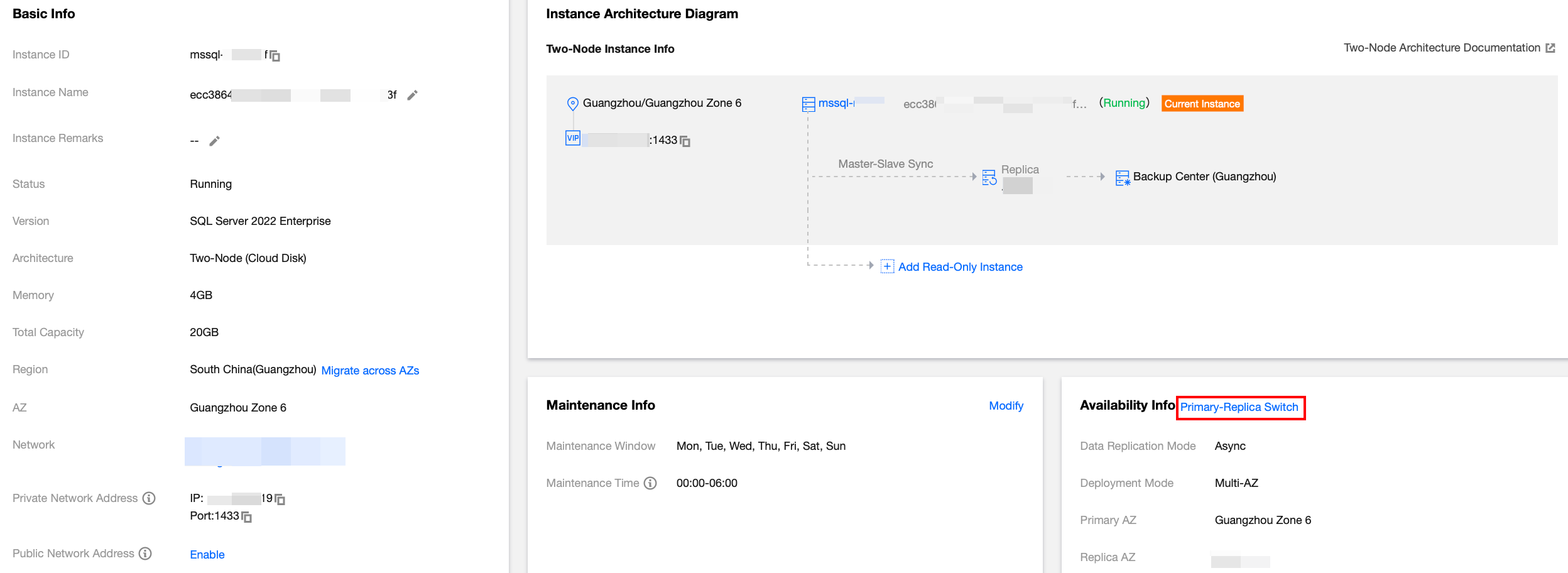
3. In the Primary/Secondary switch pop-up window, select the switch time. A momentary disconnection will occur when AZs are switched. Ensure your business possesses a reconnection mechanism checkbox, and then click Confirm.
Switch Immediately: The switch will occur immediately upon the completion of data synchronization between the primary and secondary AZs.
During Maintenance Time: The switch will occur during the next maintenance window once the data synchronization between the primary and secondary AZs is complete. If the switch is scheduled for within the maintenance window, but urgent switch is needed due to unforeseen circumstances, click Switch Now in the Operation column for the corresponding instance in the TencentDB for SQL Server console. For operations related to setting the instance maintenance time, see Setting Instance Maintenance Information.
Primary/Secondary Switch Log
SQL Server supports viewing primary/secondary switch logs, assisting you in understanding the detailed time and switch method, determining whether the switch is successful, and optimizing the switch strategy. For detailed operational guidance, please refer to Querying Primary/Secondary Switch Logs.
Hotspot Issues
Will an instance address change after the successful switch of the primary and secondary databases of the instance?
The instance address remains the same after the switch. The original primary instance acts as a secondary one, with applications automatically connecting to the new primary instance (namely, the original secondary instance).
After a manual switch, if an upgrade or the upgrade of configurations is performed on an instance, will this affect or reset the information of the primary and secondary availability zones?
The switch will not affect or reset the information of the primary and secondary availability zones.
How can the primary and secondary databases of the primary instance be switched when read-only instances are mounted under the primary instance?
The primary instance with read-only instances does not support primary-secondary switch. If you still need to switch the primary and secondary databases, you need to release the read-only instances first, then switch the primary and secondary databases. After that, you can repurchase read-only instances.
Related APIs
API | Description |
This API is used to manually switch between primary and secondary. |
피드백