Upgrading Instance Version
Download
포커스 모드
폰트 크기
Overview
Distributed Cache provides flexible version upgrade capabilities, allowing you to upgrade instances to later versions for richer features and better performance. Version upgrades are categorized into the following two types:
Major version upgrade: upgrades instances from the current version to a later major version. For example, you can upgrade Redis 4.0 to Redis 5.0 or Redis 6.2.
Minor version upgrade: upgrades to the latest minor version based on the current major version. Minor versions typically include improvements such as performance optimizations and bug fixes.
Support Notes
Distributed Cache provides two storage engines, Redis Engine and Valkey Engine, both compatible with the Redis protocol. The supported scope and limitations for version upgrades are as follows:
Storage Engine | Supported Version | Upgrade Rules |
Redis Edition | 4.0, 5.0, 6.2, and 7.0 | Major version upgrade: Supports upgrading from an early version to a later version: An instance can be upgraded from the current version to the next later version. For example, Redis 4.0 to Redis 5.0, Redis 5.0 to Redis 6.2, and Redis 6.2 to Redis 7.0. Supports cross-version upgrade: An instance can be directly upgraded to a later target version by skipping the intermediate versions. For example, Redis 4.0 to Redis 6.2 (skipping 5.0), Redis 4.0 to Redis 7.0 (skipping 5.0 and 6.2), and Redis 5.0 to Redis 7.0 (skipping 6.2). Does not support version downgrade: Version upgrade is a one-way operation. Once completed, the version cannot be rolled back to an earlier version. For example, Redis 6.2 cannot be downgraded to Redis 5.0, and Redis 7.0 cannot be downgraded to Redis 6.2 or earlier versions. To use an early version, create an instance of the corresponding version. Minor version upgrade: The system automatically detects available minor versions for upgrades and does not support custom target versions. |
Valkey Edition | 8.0 | Major version upgrade: Currently, only Valkey 8.0 is supported. No later versions are available for upgrade. Redis 7.0 and earlier versions cannot be upgraded to Valkey 8.0. Minor version upgrade: The system automatically detects available minor versions for upgrades and does not support custom target versions. |
Upgrade Process and Impact

Note:
During major version upgrades, the instance will experience brief read/write unavailability (lasting approximately 1 minute) accompanied by client connection interruptions lasting seconds. To ensure business continuity, be sure to perform this operation during off-peak hours.
During minor version upgrades, client connections may experience seconds-level interruptions. To minimize the impact on business operations, it is recommended to perform this operation during off-peak hours.
No. | Stage | Major Version Upgrade | Minor Version Upgrade |
1 | Request resources | Request resources for the new major-version instance, including Proxy and Redis node (primary node and replica node) resources. | Request resources for the new minor-version Redis nodes (primary node and replica nodes). |
2 | Synchronize data | Synchronize full and incremental data to the new nodes. | Synchronize full and incremental data to the new nodes. |
3 | Wait for switchover | Depending on the switchover policy you selected, perform immediate switchover or perform the switchover during the maintenance window. | Depending on the switchover policy you selected, perform immediate switchover or perform the switchover during the maintenance window. |
4 | Switch between versions | Once the switchover conditions are met, the system performs version changes and routing switchover on the Proxy, replica nodes, and primary node. This process refreshes the cluster's routing information and handles existing connections, resulting in the instance being temporarily unable to read or write (for approximately one minute) and brief disconnections of client connections. After the switchover is completed, the old-version nodes are automatically taken offline and recycled. | The system will trigger a master-replica switchover, promoting the new node to the master role and isolating the old node. Brief disconnections may occur during the node switchover. Upon completion, the system will update the Proxy routing and recycle the old-version resources. |
5 | Upgrade completed | After the upgrade is completed, the system updates the instance version information. The instance is changed to the new version and resumes external services. | After the upgrade is completed, the system updates the instance version information. The instance is changed to the new version and resumes external services. |
Pre-Upgrade Preparations
Before the version upgrade is performed, ensure that the following conditions are met:
The target instance is currently in the Running state, and no other tasks are being executed (such as capacity expansion, backup, and parameter modification).
The target version for this upgrade has been clearly identified, and its new features and compatibility requirements are understood.
The business application has automatic database reconnection capabilities and can handle brief connection interruptions during the upgrade switchover.
A manual backup of the instance is recommended before the upgrade to facilitate data recovery when necessary.
Version Upgrade
1. Log in to the Distributed Cache console.
2. Above the instance list, select the region.
3. In the instance list, find the target instance.
4. Click the target Instance ID to enter the Instance Details page.
5. In the Specs Info section on the Instance Details page, click Upgrade Version after Compatible Version.
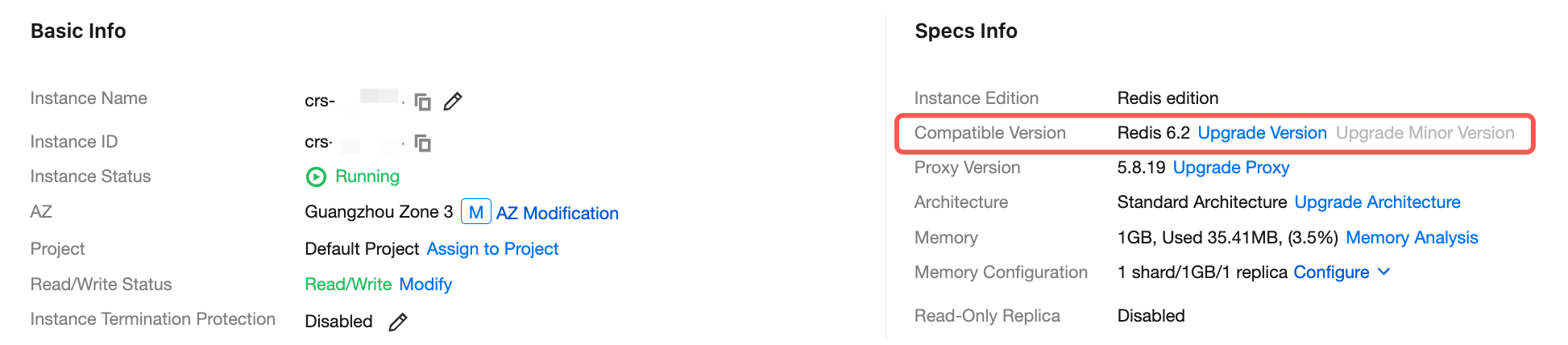
6. In the pop-up Upgrade Version dialog, confirm the information of the instance to be upgraded according to the table below, configure the target version for the upgrade, click OK, and pay the fee as prompted by the interface.
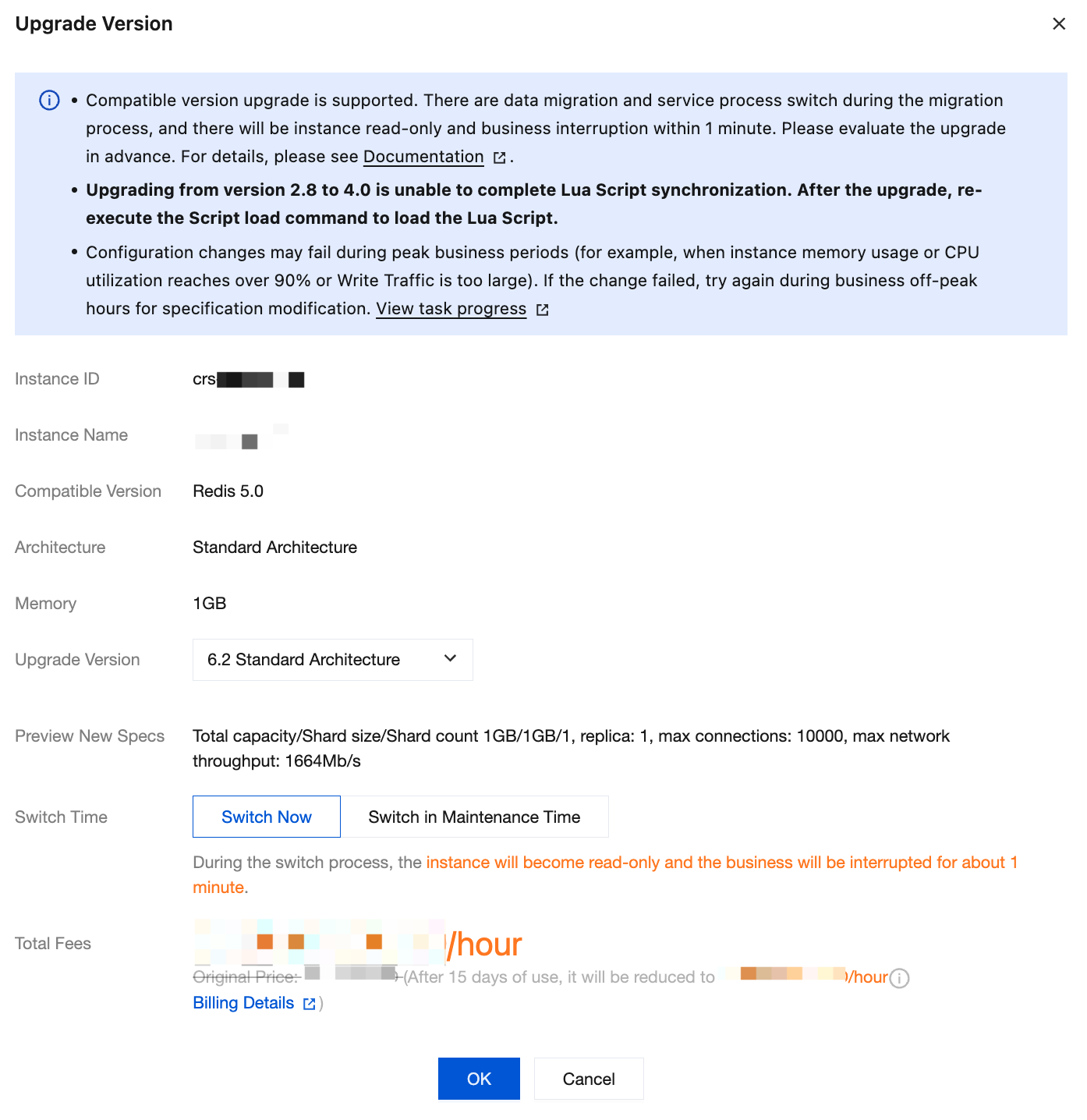
Parameter Name | Parameter Description |
Instance ID | ID of the instance to be upgraded. |
Instance Name | Instance Name to Be Upgraded. |
Compatible Version | The current compatible Redis version of the instance to be upgraded. |
Architecture | Architecture information of the instance to be upgraded. Currently, version upgrade is supported only for standard architecture instances. |
Memory | Memory size of the instance to be upgraded. |
Upgrade Version | Select the target version in the drop-down list. You can upgrade from an earlier version to a later version or across versions. |
Preview New Specs | Preview information of the instance specifications after upgrade. |
Switch Time | Switch Now: The switch will be performed when the data sync is almost completed (the data left to be synced is less than 10 MB). Switch in Maintenance Time: The switch will be performed during the instance maintenance time. If the switch conditions cannot be met in the current maintenance time, the switch will be attempted in the next maintenance time. You can modify the Maintenance Window on the instance details page. |
Total Fees | Upgrading the instance does not involve billing changes. |
7. On the left sidebar, select Task Management, wait for the task to complete, and you can see that the version of the instance has been upgraded in the instance list.
Upgrading the minor version
1. Log in to the Distributed Cache console.
2. Above the instance list, select the region.
3. In the instance list, find the target instance.
4. Click the target Instance ID to enter the Instance Details page.
5. In the Specs Info section on the Instance Details page, click Upgrade Minor Version after Compatible Version.
Note:
The system automatically detects the minor version. If the Upgrade Minor Version button is grayed out, the instance is already on the latest minor version.
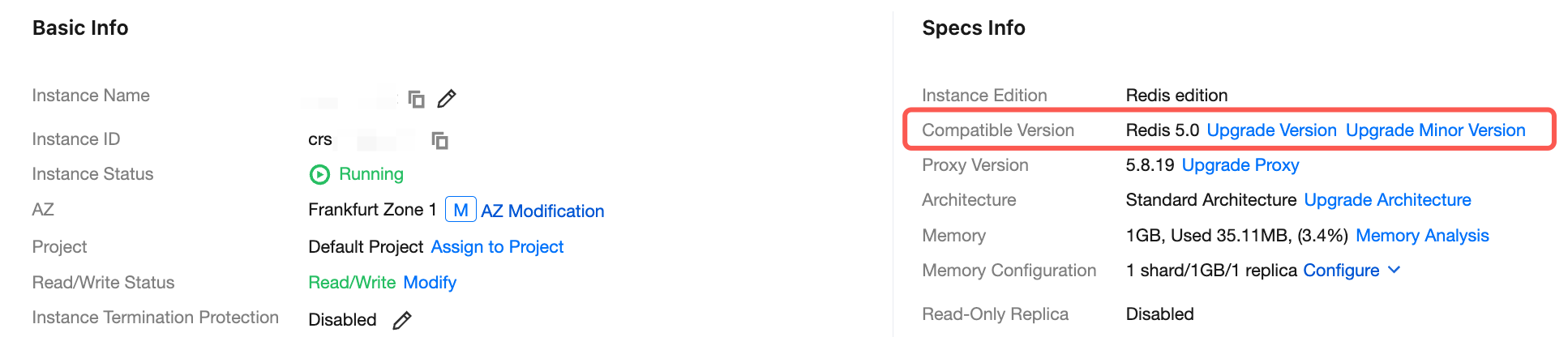
6. In the Upgrade Minor Version dialog box, confirm the instance information and the target version for upgrade, then select the switchover time.
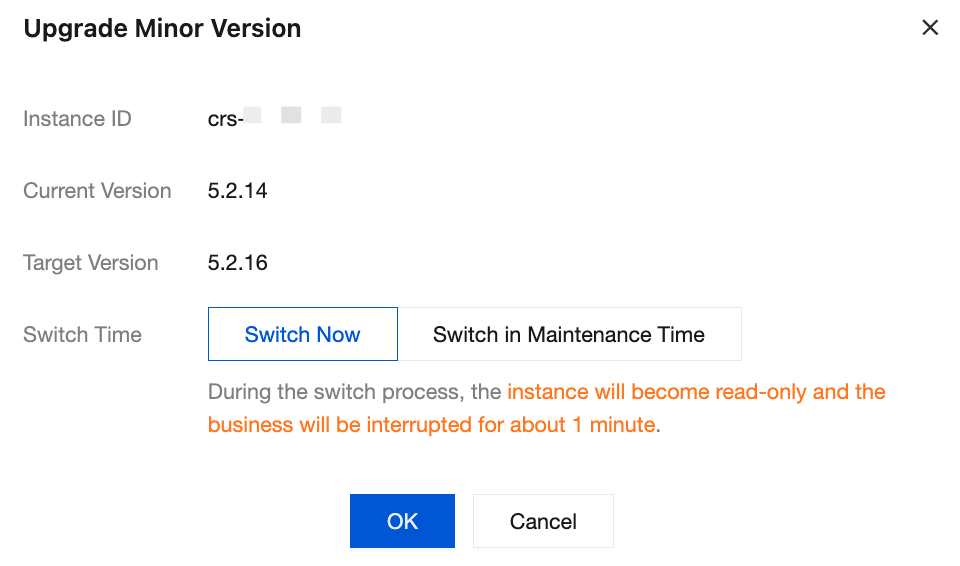
Switch Now: The switch will be performed when the data sync is almost completed (the data left to be synced is less than 10 MB).
Switch in Maintenance Time: The switch will be performed during the instance maintenance time. If the switch conditions cannot be met in the current maintenance time, the switch will be attempted in the next maintenance time. You can modify the Maintenance Window on the instance details page.
7. On the left sidebar, select Task Management, wait for the task to complete, and you can see that the minor version of the instance has been upgraded in the instance list.
Related APIs
API Name | Feature Description |
Upgrades the version of an instance | |
Upgrades the minor version of an instance |
피드백