Sentinel Mode
Download
포커스 모드
폰트 크기
Overview
Sentinel is a standalone process that monitors the master and replica nodes in a Tencent Cloud Distributed Cache cluster. When the master node fails, Sentinel can elect a new master from the replica nodes to replace it automatically. This high-availability solution ensures that business operations run smoothly.
Note:
The Memcached Edition does not support Sentinel mode.
Sentinel Commands
Tencent Cloud Distributed Cache 4.0 and later support the Sentinel mode by default. You can use the following Sentinel commands.
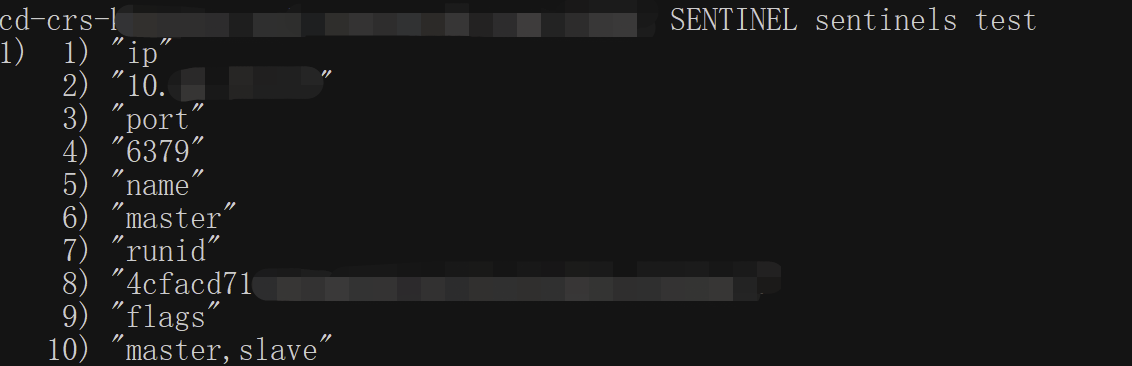
SENTINEL sentinels
This command lists the sentinels information of the monitored master.
Command format
SENTINEL sentinels <any name>Sample code
SENTINEL get-master-addr-by-name
This command gets the IP address information of the
master-name.Command format
SENTINEL get-master-addr-by-name <any name>Sample code

Connection Sample for the Sentinel Mode
Prerequisites
The Tencent Cloud Distributed Cache instance Redis version is 4.0 or 5.0.
The database instance is in the Running status.
Get the Private IPv4 Address and Port information for database connection in the Network Info section on the Instance Details page in the Tencent Cloud Distributed Cache console. For detailed directions, see Viewing Instance Information.
Get the account and password for database access. For detailed directions, see Managing Account.
Download and install Jedis. The latest version is recommended.
Connection sample
The Jedis version is 3.6.0 or later.
The Lettuce version is 5.3.0.RELEASE or later.
The Spring Data Redis version is 2.5.1 or later, for which the
spring.redis.sentinel.password parameter should be configured.You need to modify the parameters based on the comments, including IP, port, account, and password for database access.
Connection via Java
package com.example.demo;import org.apache.commons.pool2.impl.GenericObjectPoolConfig;import redis.clients.jedis.JedisSentinelPool;import java.util.HashSet;import java.util.Set;public class Main {public static void main(String[] args) {String masterName = "test";Set<String> sentinels = new HashSet<>();// You need to configure the database instance's private IPv4 address and portsentinels.add("XX.XX.XX.XX:6379");GenericObjectPoolConfig poolConfig = new GenericObjectPoolConfig();String dbPassword = "root:xxx";//Replace this with your database access passwordString sentinelPassword = "root:xxx";//Replace this with your database access passwordJedisSentinelPool jedisSentinelPool =new JedisSentinelPool(masterName, sentinels, poolConfig,2000, 2000, dbPassword,0, null, 2000, 2000,sentinelPassword, null);System.out.println("jedisSentinelPool.getResource().ping() = " + jedisSentinelPool.getResource().ping());jedisSentinelPool.close();}}
Connection via the Spring Data framework
package com.example.demo;import org.springframework.beans.factory.annotation.Qualifier;import org.springframework.boot.SpringApplication;import org.springframework.boot.autoconfigure.SpringBootApplication;import org.springframework.boot.autoconfigure.condition.ConditionalOnBean;import org.springframework.context.annotation.Bean;import org.springframework.context.annotation.Configuration;import org.springframework.data.redis.connection.RedisPassword;import org.springframework.data.redis.connection.RedisSentinelConfiguration;import org.springframework.data.redis.connection.jedis.JedisConnectionFactory;import org.springframework.data.redis.core.RedisTemplate;import redis.clients.jedis.JedisPoolConfig;@SpringBootApplicationpublic class DemoApplication {public static void main(String[] args) {SpringApplication.run(DemoApplication.class, args);}}@Configurationclass RedisConfig {@Bean@Qualifier("jedisConnectionFactory")public JedisConnectionFactory connectionFactory() {RedisSentinelConfiguration sentinelConfig = new RedisSentinelConfiguration().master("test").sentinel("XX.XX.XX.XX", 6379);//Replace this with the private IPv4 address and port of your database instancesentinelConfig.setPassword(RedisPassword.of("xxx"));//Replace this with your database access passwordsentinelConfig.setSentinelPassword(RedisPassword.of("xxx"));//Replace this with your database access passwordJedisPoolConfig poolConfig = new JedisPoolConfig();JedisConnectionFactory connectionFactory = new JedisConnectionFactory(sentinelConfig, poolConfig);connectionFactory.afterPropertiesSet();return connectionFactory;}@Bean@ConditionalOnBean(JedisConnectionFactory.class)public RedisTemplate<String, String> redisTemplate(@Qualifier("jedisConnectionFactory") JedisConnectionFactory factory) {RedisTemplate<String, String> template = new RedisTemplate<>();template.setConnectionFactory(factory);template.afterPropertiesSet();//testtemplate.opsForValue().set("test", "test1");System.out.println("template.opsForValue().get(\\"test\\") = " + template.opsForValue().get("test"));return template;}}
피드백