Change the Availability Zone
Download
포커스 모드
폰트 크기
Overview
Multiple AZs are physical regions formed by combining multiple single AZs within the same region, at a level above single AZs. Compared to single-AZ clusters, multi-AZ clusters provide higher disaster recovery capability to guard against database instance failures or AZ outages, and to withstand data center-level failures. Existing single-AZ clusters can be upgraded to multi-AZ clusters automatically through online data migration without any impact on your business.
Feature Details
Changing AZ supports the following features:
1. Supports upgrading from a single AZ to multiple AZs. When an upgrade to multiple AZs is performed, it is recommended to enable proximity access.
2. Supports downgrading from multiple AZs to a single AZ.
3. Supports AZ migration, which means the AZs of both the master node and replica nodes can be migrated simultaneously.
Billing Overview
Changing the multiple AZs feature currently incurs no additional fees.
Use Limits
This feature is currently unavailable in Shenzhen Finance and Jakarta regions and will be available in more regions and AZs in the future.
Note
To support the nearby access feature, both the Proxy version and Redis kernel minor version need to be upgraded. This process involves data migration and may take several hours. Within the last 3 minutes of the upgrade, one or more brief connection interruptions may occur. Please ensure your application has an automatic reconnection mechanism.
Prerequisites
The cluster region has at least two AZs.
The database version requirements: Redis edition 4.0 or later, ValKey 8.0.
The instance is in Running status.
Directions
1. Log in to the Tencent Cloud Distributed Cache console.
2. Above the Instance List on the right, select the region.
3. In the instance list, find the target instance.
4. Click the Instance ID of the target instance in blue to enter the Instance Details page.
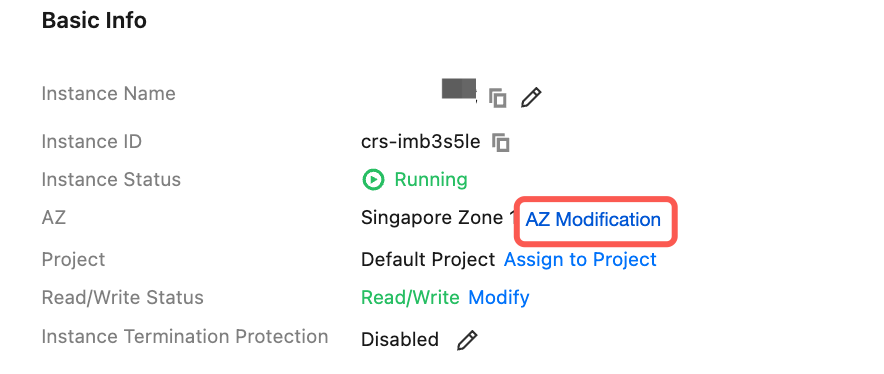
5. In the Basic Info section on the Instance Details page, click AZ Modification after AZ.
6. In the AZ Modification window, you can select a new availability zone from the drop-down list next to the Master Node and Replica respectively, as shown in the figure below.
Switch Now: Data synchronization is almost complete (data to be synchronized < 10 MB), perform the switchover.
Switch in Maintenance TIme: The switchover will be performed during the instance's maintenance window. Below the maintenance window setting, you can view and confirm the time period for executing the migration task. If the switchover conditions are not met during the current maintenance window, the switchover will be performed in the next maintenance window. You can also modify the Maintenance Time on the Instance Details page.
Note:
If the current instance version does not support changing AZs, click Upgrade Minor Version in the prompt window to perform the version upgrade before proceeding.
If the current instance version does not support the nearby access feature, when the instance is upgraded to multiple AZs, it is recommended to follow the prompts and guidance on the page to enable the nearby access feature; if not needed, it can be ignored.
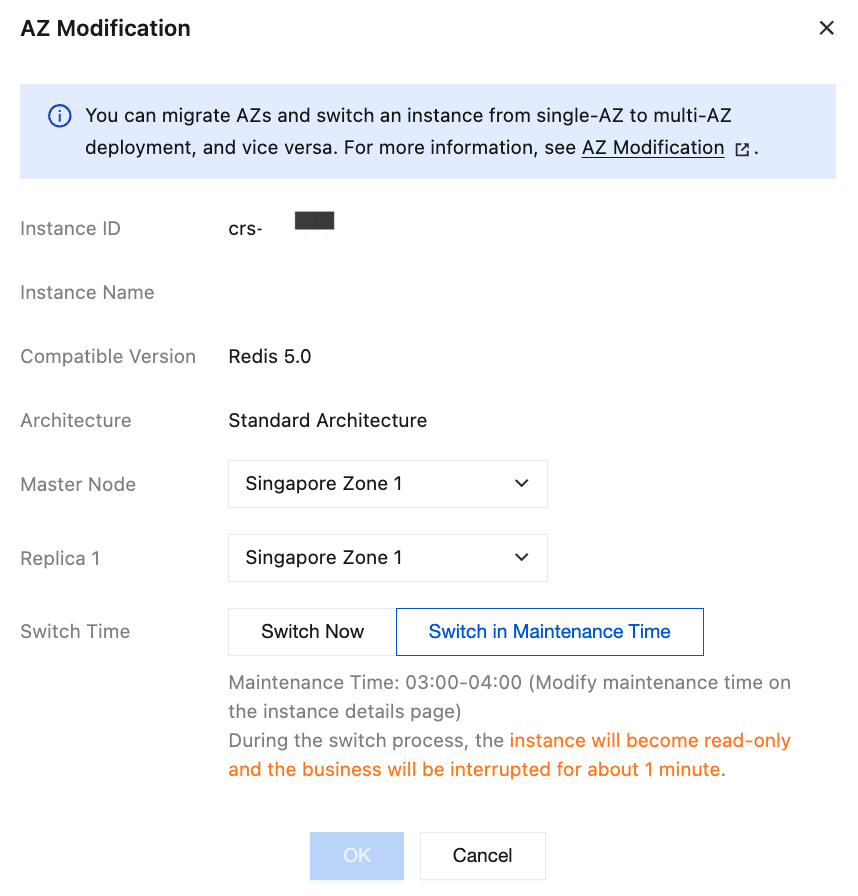
7. Click OK to initiate the migration task. Once the instance status changes to Running, the operation is complete.
Related APIs
API | Feature Description |
UpgradeVersionToMultiAvailabilityZones | Upgrades an instance to support multi-AZ deployment |
피드백