Promotion of Replicas
Download
포커스 모드
폰트 크기
Scenarios
Replica promotion refers to the process of manually promoting a secondary node with complete data synchronization to the new primary node when potential risks are detected or an alarm is triggered for the primary node. This operation enables a hot switchover before the primary node fails, ensuring no interruption for data services, and is a core Ops capability for preventive maintenance.
Version Description
The principle of promoting a replica node to a primary node (group) is to execute the cluster failover command in the cluster, achieving the switch of the primary node's role to the secondary node. The specific supported versions are as shown below.
Storage Engine | Supported Versions | Supported Architectures |
Redis Edition | 4.0 and above | Standard Architecture, Cluster Architecture |
Valkey Edition | 8.0 | Standard Architecture, Cluster Architecture |
Memcached Edition | Not supported | |
Must-Knows
A short period of service jitter may occur during the primary promotion process. The jitter lasts from a few seconds to up to 3 minutes. During the switch process, blocking commands such as BLPOP, BRPOP, BRPOPLPUSH, and SUBSCRIBE may fail one or more times.
During the switchover process for replica promotion, the instance will be read-only, and the business will experience momentary disconnection for no longer than 1 minute. The execution may fail, but retrying usually succeeds.
Note:
For a multi-AZ instance deployed in standard architecture, after the primary node is switched, your access may span across multiple AZs, resulting in increased access latency and reduced QPS.
Prerequisites
The database version requirements: Redis 4.0 or later, ValKey 8.0.
The instance status is Running.
Operation Steps
1. Log in to the Tencent Cloud Distributed Cache console.
2. At the upper part of the Instance List page on the right, select a region.
3. In the instance list, locate the multi-AZ instance that requires replica promotion.
4. Click the Instance ID to go to the Instance Details page.
5. On the Instance Details page, click the Node Management tab, then click Promote Replica to Primary in the upper-right corner of the page.

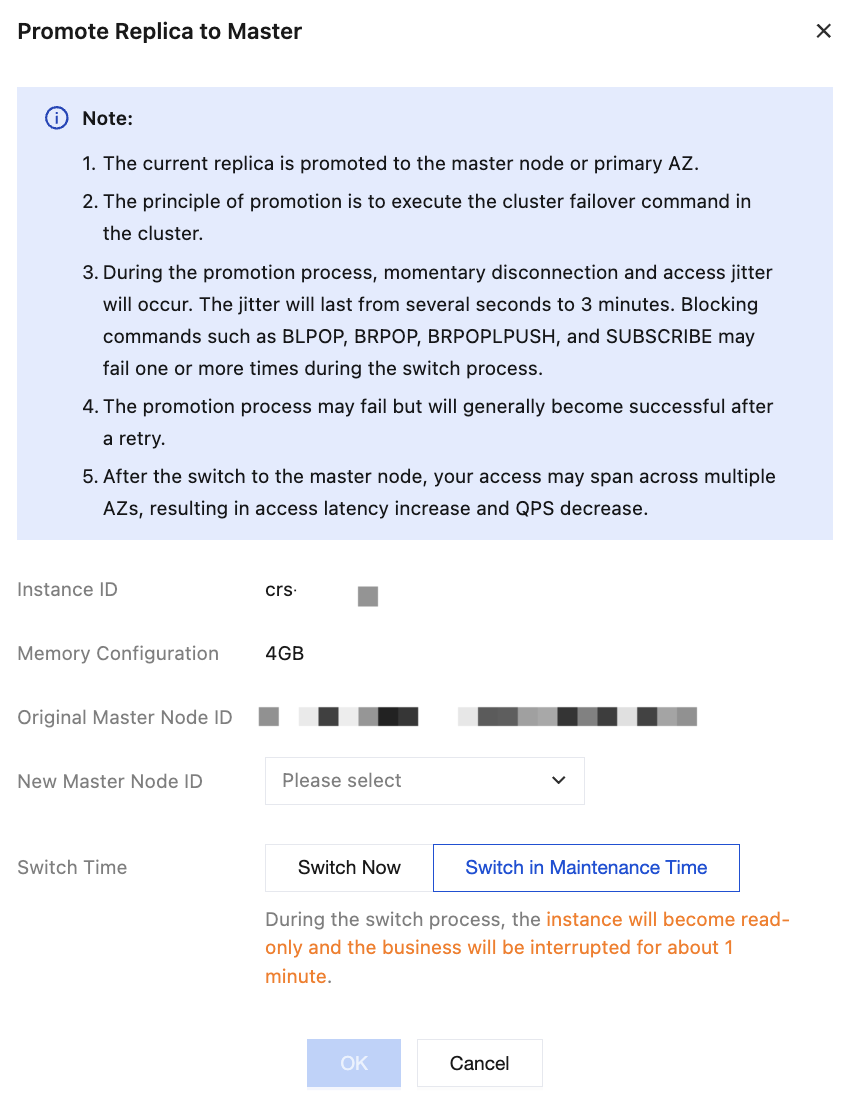
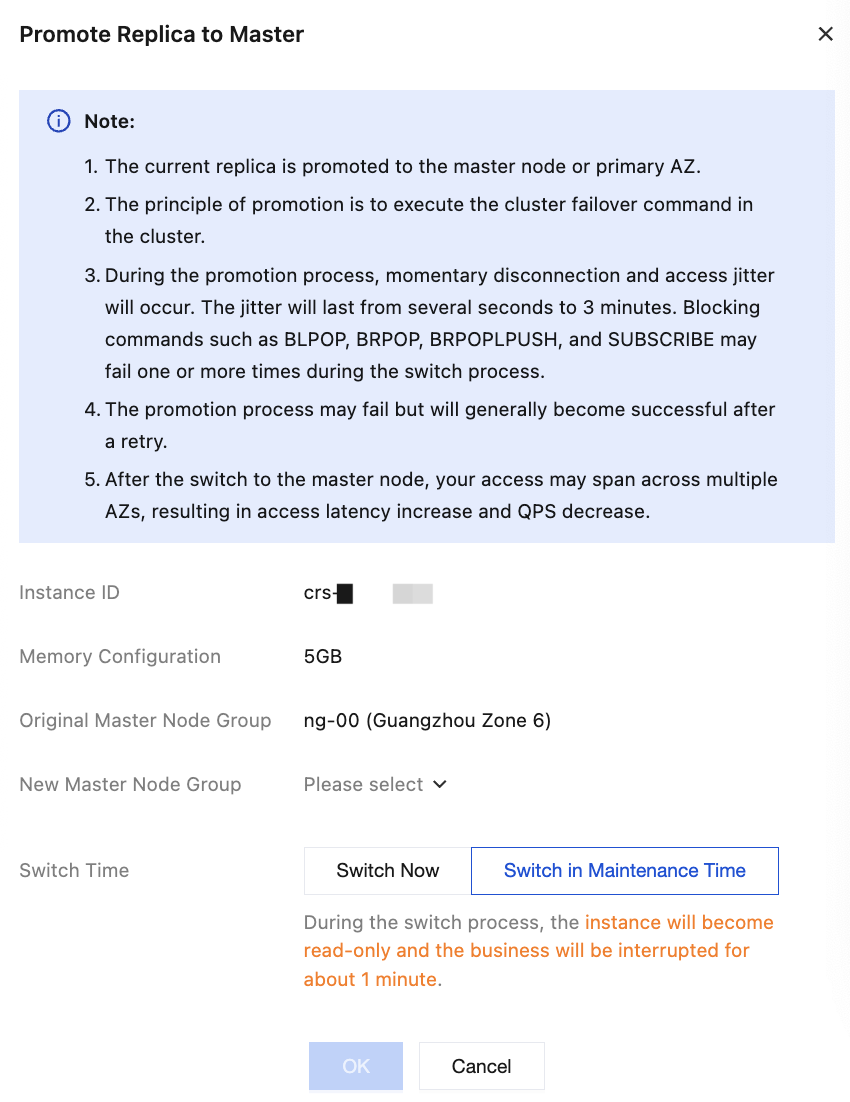
6. In the Promote Replica to Master window, configure a new master node for instances deployed in multiple AZs, so that the AZ where the new master node resides is marked as the new primary AZ, and set the switchover time, as shown in the figure below.
Standard Architecture
Cluster Architecture
Parameter | Parameter Description | Configuration Method |
Instance ID | The ID of the multi-AZ instance pending replica promotion to primary. | Confirm that the instance is correct. |
Memory Configuration | The memory configuration specifications of the current instance. | Confirm the specification information of the instance. |
Original Master Node ID | Multi-AZ standard architecture displays the current master node's ID. | Confirm the ID information of the current primary node. |
New Master Node ID | Multi-AZ standard architecture displays this parameter. Configure the replica node to be promoted to the master node. | Select the replica node to be promoted as the primary node from the dropdown list. |
Original Master Node Group | Multi-AZ cluster architecture displays this parameter, showing the name of the current master node group. | Confirm the name of the current primary node group. |
New Master Node Group | Multi-AZ cluster architecture displays this parameter. Configure the standby node group to be promoted to the master node group. | Select the standby node group to be promoted as the primary node group from the dropdown list. |
Switch Time | Select the time window for replica promotion to primary switchover. | Switch Now: This will immediately initiate the switchover task. Switch in Maintenance Time: that is, initiate the switchover task during the maintenance window. For related introduction and configuration of the maintenance window, see Set Maintenance Window. |
7. After the configuration is complete and verified, click OK.
Related APIs
API | Description |
This interface only supports multi-AZ instance replica group promotion to primary and single-AZ replica promotion to primary. |
피드백