Modify audit configuration
Download
포커스 모드
폰트 크기
Use Cases
This article describes how to modify the audit rules for a Tencent Cloud distributed cache instance via the console. You can modify the audit type, downgrade policy, and audit log retention policy as needed.
Prerequisites
A cloud database distributed cache instance has been created.
The instance has enabled the Database Audit feature. For specific operations, see enabling Database Audit.
Log Retention Period Description
Default Retention Period: 7 days.
Retention Range: Minimum 7 days, Maximum 30 days.
Audit logs exceeding the retention period will be automatically cleared and cannot be restored.
After the log retention period is modified, the new retention policy takes effect immediately.
Operation Steps
1. Log in to the Tencent Cloud Distributed Cache console.
2. In the left sidebar, select Database Audit under the Distributed Cache (Redis OSS-Compatible) menu.
3. On the Database Audit page, select a region to view at the top. On the Audit Instances tab, you can view all instances with Database Audit enabled in that region.
4. In the audited instance list, select one or more instances that require modification of audit configurations, and click the Modify Audit Service button.
The search box above the database instance list can be used to filter target instances by keywords: it supports searching based on Instance ID, Instance Name, Tag Key, and Tag.

5. In the Modify Audit Service dialog box, you can view the current audit configuration of the instance and reconfigure audit rules.
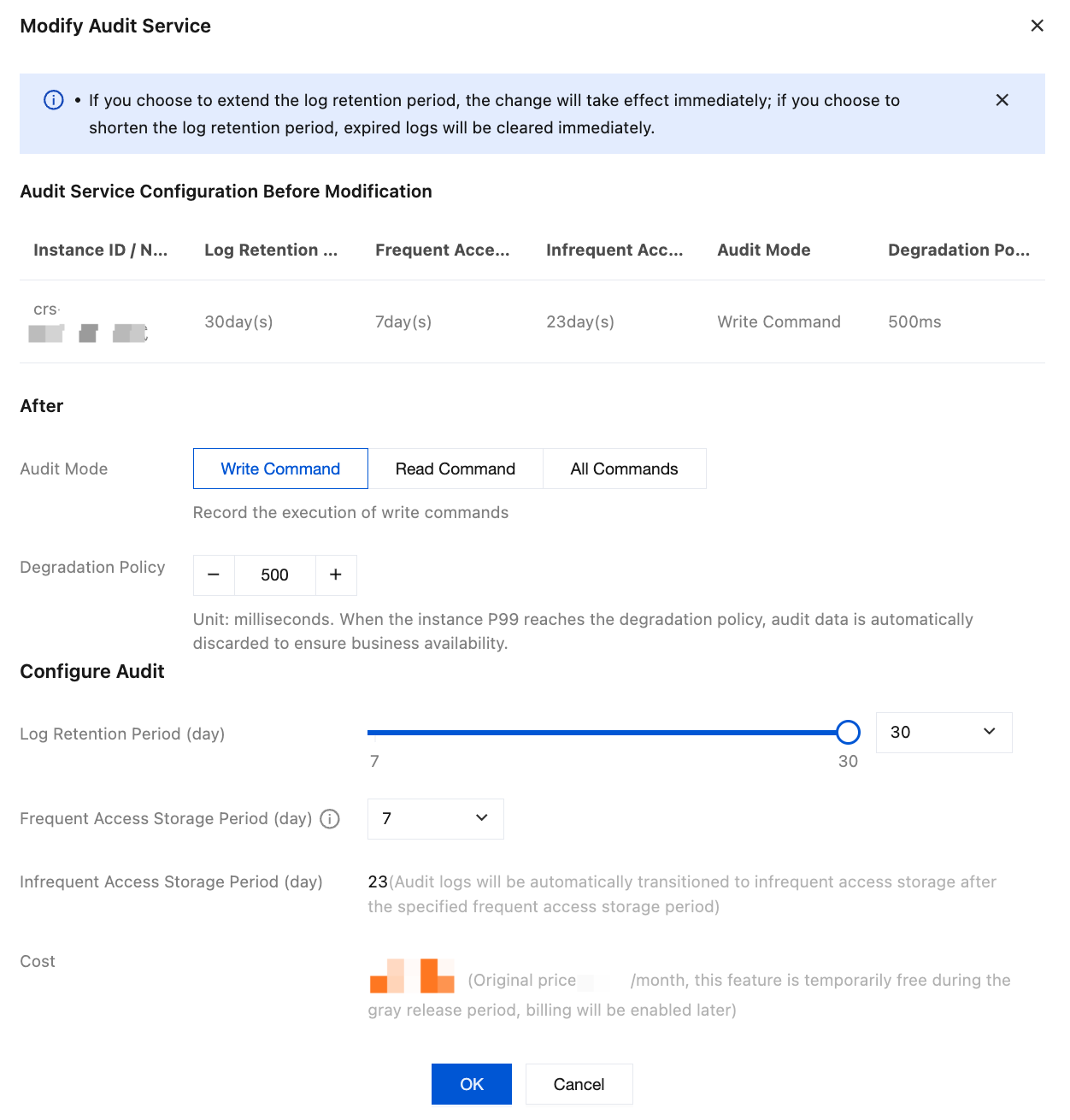
Configuration Item | Configuration Parameter | Parameter Description |
Audit Service Configuration Before Modification | - | Confirm the current instance's audit configuration information, including instance ID/name, log retention period, high-frequency storage duration, low-frequency storage duration, audit type, and downgrade policy. |
After | Audit Mode | Write Command (default): Audits the execution of write commands. Read Command: Audits the execution of read commands. All Commands: Audits the execution of all commands. |
| Degradation Policy | Set the P99 latency threshold for triggering Database Audit downgrade. Note: Database Audit consumes certain system resources during operation. After the downgrade policy is enabled, the system will continuously monitor the database's P99 latency. When the latency exceeds your configured threshold (such as during periods of high system pressure), the system will proactively trigger its self-protection mechanism. This mechanism will temporarily stop collecting and discard new audit log data, thereby releasing system resources to prioritize normal read/write requests for your core business. Once the database load decreases and latency returns to normal levels, audit data collection will automatically resume. The entire process requires no manual intervention. Default threshold: 500ms. Configurable range: 300-1000ms. |
Configure Audit | Log Retention Period | Range: 7-30 days. Default value: 7 days. Recommendation: Select an appropriate duration based on compliance requirements and cost budget. Note: If you choose to extend the log retention period, the change will take effect immediately. If you choose to shorten the log retention period, historical logs exceeding the storage duration will be purged immediately. |
| Frequent Access Storage Period | Frequent access storage uses high-performance media with fast query speeds, suitable for recent audit logs requiring frequent search. Currently, the selection is limited to 7 days. |
| Infrequent Access Storage Period | When data storage exceeds the "Frequent Acess Storage Period", it will be automatically transitioned to infrequent access storage. |
6. Click OK, and the Audit Storage Status will change to Modifying. Wait until it changes to Enabled, indicating the modification is complete.
FAQs
Q1: If I shorten the log retention period from 30 days to 7 days, will the previously stored old logs still be retained?
Caution: When the log retention period is modified and shortened, the new retention policy takes effect immediately. The system will immediately purge all historical audit logs exceeding the new storage duration (that is, older than 7 days), and this data cannot be restored. Therefore, before performing the operation to shorten the duration, be sure to confirm whether you need to export and back up historical logs to your local device in advance via the console.
Q2: Can I modify the "Frequent Access Storage Period" to 15 days or 30 days? What is the difference between frequent and Infrequent queries?
The "Frequency Access Storage Peroid" is currently fixed at 7 days and does not support custom modification.
Frequent Access Storage Period (First 7 days): Uses high-performance storage media with extremely fast query response, ideal for daily high-frequency troubleshooting and rapid pinpointing of security incidents.
Infrequent Access Storage Period (Day 8 to configured upper limit): When logs are stored for more than 7 days, they are automatically tiered down to the low-frequency storage zone. This zone primarily meets long-term, low-cost archival compliance requirements for industries such as finance and government. While querying is still supported, the search speed will be relatively lower than that of high-frequency storage.
Q3: If I change the audit type from "write commands" to "all commands", will read commands that occurred before the modification be retrievable
No, it cannot be queried. Modifying the audit type (for example, adding auditing for "read commands") only applies to new database requests generated after the configuration modification takes effect. The system cannot retroactively audit or supplement commands that were not captured prior to the configuration change.
피드백