tencent cloud

TencentDB for MongoDB

Release Notes and Announcements
Release Notes
Announcements
User Guide
Product Introduction
Overview
Strengths
Use Cases
Cluster Architecture
Product Specifications
Features
Regions and AZs
Terms
Service Regions and Service Providers
Purchase Guide
Billing Overview
MongoDB Pricing
Billing Formula
Payment Overdue
Backup Space Billing
Configuration Adjustment Billing
Getting Started
Quickly Creating an Instance
Connecting to a TencentDB for MongoDB Instance
Reading/Writing Database
Operation Guide
Access Management
Instance Management
Node Management
Version Upgrade
Network Configuration
Monitoring
Backup and Rollback
Database Audit
Data Security
SSL Authentication
Log Management
Database Management
Multi-AZ Deployment
Disaster Recovery/Read-Only Instances
Parameter Configuration
Recycle Bin
Task Management
Performance Optimization
Data Migration Guide
Practical Tutorial
Optimizing Indexes to Break Through Read/Write Performance Bottlenecks
Troubleshooting Mongos Load Imbalance in Sharded Cluster
Considerations for Using Shard Clusters
Sample of Reading and Writing Data in MongoDB Instance
Methods for Importing and Exporting Data Based on CVM Connected with MongoDB
What to Do for Errors of Repeated Instance Creation and Deletion of Databases with the Same Names?
Troubleshooting MongoDB Connection Failures
Shard Removal Task: Guide for Confirming the Progress and Troubleshooting Issues
Performance Fine-Tuning
Ops and Development Guide
Development Specifications
Command Support in Sharded Cluster v3.2
Command Support in v3.6
Development Ops
Troubleshooting
Increased Slow Queries
Number of Connections Exceeding Limit
API Documentation
History
Introduction
API Category
Making API Requests
Instance APIs
Backup APIs
Account APIs
Other APIs
Task APIs
Introduction
Data Types
Error Codes
Instance Connection
Shell Connection Sample
PHP Connection Sample
Node.js Connection Sample
Java Connection Sample
Python Connection Sample
Python Read/Write Sample
Go Connection Sample
PHP Reconnection Sample
Product Performance
Test Environment
Test Method
Test Result
FAQs
Cost
Features
Sharded Cluster
Instance
Rollback and Backup
Connection
Data Migration
Others
Service Agreement
Service Level Agreement
Terms of Service
Glossary
Contact Us

High CPU Utilization

PDF
포커스 모드
폰트 크기
마지막 업데이트 시간: 2024-01-15 14:49:55
If you find the CPU utilization is high when using MongoDB, you can troubleshoot the problem as follows:
1. Check whether your database operation is too frequent. Log in to the TencentDB for MongoDB Console and view the QPS on the system monitoring page. If the QPS is high, you may evaluate whether the instance needs to be upgraded. If the QPS is not high, check whether there are any slow queries.
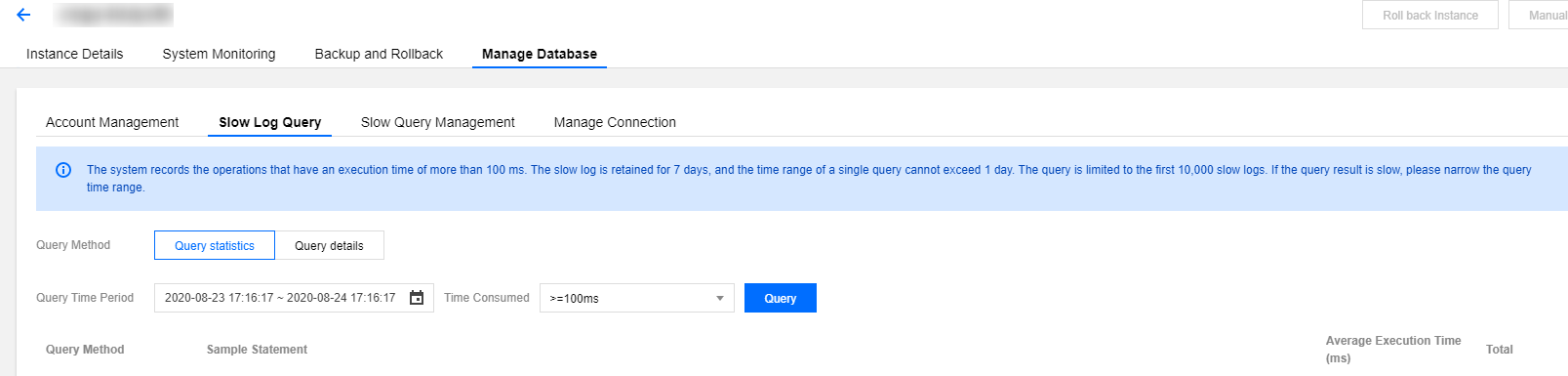
2. Check whether there are slow logs on mongod. Log in to the TencentDB for MongoDB Console and view the slow logs of the instance by using "Query statistics".

Pay attention to keywords such as command, COLLSCAN, IXSCAN, keysExamined, and docsExamined. For more log descriptions, please see Log Messages.
command indicates an operation recorded in a slow log.
COLLSCAN indicates that a full-collection scan is performed. IXSCAN indicates that an index scan is performed. For descriptions of other fields, please see Explain Results.
keysExamined refers to the number of index entries scanned. docsExamined refers to the number of documents scanned. Larger keysExamined and docsExamined values indicate that no index is created or the created index is less distinctive. Please check the fields for which an index is created.
도움말 및 지원

문제 해결에 도움이 되었나요?

피드백