Methods for Importing and Exporting Data Based on CVM Connected with MongoDB
Download
포커스 모드
폰트 크기
You can import and export data by connecting to TencentDB for MongoDB via a CVM instance. Ensure you use the latest version of the MongoDB client suite. For detailed steps, see Connecting to an Instance.
Note:
The local database mainly stores metadata such as configuration information of the replica set and oplog, and the admin database mainly stores information such as users and roles. In order to prevent data disorder and authentication failures, DB for MongoDB prohibits importing local and admin databases into an instance.
Export and Import Commands
MongoDB provides two sets of official tools for data import and export:
mongodump and mongorestore
mongoexport and mongoimport
mongodump and mongorestore
mongodump and mongorestore are generally used to export and import an entire database, as they manipulate data in BSON format, which is more efficient when a large number of dump and restore operations are performed.
The export command for mongodump is as follows:
mongodump --host 10.66.187.127:27017 -u mongouser -p thepasswordA1 --authenticationDatabase=admin --db=testdb -o /data/dump_testdb
As shown in the figure below, the operation is successful:

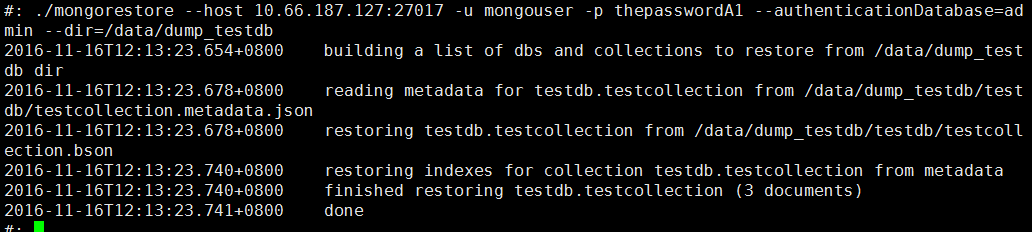
The import command for mongorestore is as follows:
mongorestore --host 10.66.187.127:27017 -u mongouser -p thepasswordA1 --authenticationDatabase=admin --dir=/data/dump_testdb
As shown in the figure below, the operation is successful:
mongoexport and mongoimport
mongoexport and mongoimport are generally used to export and import a single set, as they manipulate data in JSON format, which features a higher readability.
The export command for mongoexport is as follows:
mongoexport --host 10.66.187.127:27017 -u mongouser -p thepasswordA1 --authenticationDatabase=admin --db=testdb --collection=testcollection -o /data/export_testdb_testcollection.json
You can also add the -f parameter to specify the required fields and the -q parameter to specify a query condition to limit the scope of data to be exported.
The import command for mongoimport is as follows:
mongoimport --host 10.66.187.127:27017 -u mongouser -p thepasswordA1 --authenticationDatabase=admin --db=testdb --collection=testcollection2 --file=/data/export_testdb_testcollection.json
Parameter Description for Multiple Authentication Methods
As described in Connection Example, DB for MongoDB provides two default usernames, rwuser and mongouser, to support the MONGODB-CR and SCRAM-SHA-1 authentication methods, respectively.
For mongouser and all new users created in the console, follow the above directions to use the import and export tools.
For rwuser, the parameter --authenticationMechanism=MONGODB-CR should be included in each command.
mongodump example:
mongodump --host 10.66.187.127:27017 -u rwuser -p thepasswordA1 --authenticationDatabase=admin --authenticationMechanism=MONGODB-CR --db=testdb -o /data/dump_testdb
피드백