Release Notes
Announcements
Event Chinese Name | Event English Name | Event Type | Subordinate Dimension | Recovery Concept Availability | Event Description | Solution and Suggestion |
Insufficient Backup Oplog | oplogInsufficient | Exception event | Instance dimension | No | During the backup process of TencentDB for MongoDB, it is impossible to read the complete oplog from the last backup to the current backup, which will affect your ability to rollback the database to any point within 7 days. | It is recommended to adjust the capacity size of the TencentDB for MongoDB oplog or the frequency of backups in the MongoDB console. For specific operations, see Adjust Oplog Storage Capacity. |
Number of Connections Exceeding Limit | connectionOverlimit | Exception event | Instance dimension | Yes | Number of instance connections exceeds the maximum limit. | Increase the maximum number of connections or restart the instance. For specific operations, see Solutions for Exceeded Connection Limit. For database performance optimization, see Analysis and Resolution Methods for Abnormal High Connection Usage. |
Primary-Replica Switch | primarywitch | Exception event | Instance dimension | Yes | Instance primary node is abnormal, and switching with the secondary node occurs. This event may be triggered in case of physical server failure. | Confirm whether the instance status is normal. |
Disk Space About to Run out | instanceDiskSpaceLow | Exception event | Instance dimension | Yes | The disk space is about to be filled, which may cause the instance to become read-only. | |
Instance Rollback | instanceRollback | Exception event | Instance dimension | Yes | Instance data rollback. When some data on the primary node has not been timely synchronized to the secondary node, failure of the primary node concurrency leads to primary-replica switch, which may trigger this event. | Confirm whether the instance status is normal. |
Node CPU Exception | NodeCPUAbnormal | Exception event | Instance dimension | Yes | If any node in the cluster reaches 80% CPU usage, an alarm is immediately triggered. |
Type | Pay-as-You-Go |
Payment Method | Settlement is based on the number of events actually delivered to the event bus, calculated hourly. |
Billing Unit | USD/Million Events |
Usage Scenario | For applications with low or high fluctuating message volumes, it can effectively avoid resource waste. |
Interface Area | Interface Parameter | Parameter Explanation |
Basic Information | Region | The region where the event rule is created. |
| Event Bus | Information about the event bus to which the event rule belongs. |
| Rule Name | Set the name of the event rule. It can only contain letters, numbers, underscores, hyphens, must start with a letter, and end with a number or letter, between 2 and 60 characters. |
| Rule Description | A brief description of the event rule. |
| Tag | Set the tag key and value for the event. |
| Data Conversion | Check if data conversion is needed. |
Event Example | Event Example Selection | In the dropdown list, you can search for MongoDB and view the relevant examples of MongoDB events. |
Event Matching | Writing Pattern | Form Pattern: This pattern allows you to select cloud service type and event type, providing event matching rules. Custom Event: Define event matching rules in the input box below. For rule writing instructions, click Rule Writing Guidelines. |
| Cloud Service Type | When Writing Pattern is set to Form Pattern, this parameter is shown. In the dropdown list, select TencentDB for MongoDB. |
| Event Type | When Writing Pattern is set to Form Pattern, this parameter is displayed. In the dropdown list, select the supported event types. |
| Event Matching Rule Preview | Preview the generated event matching rules. |
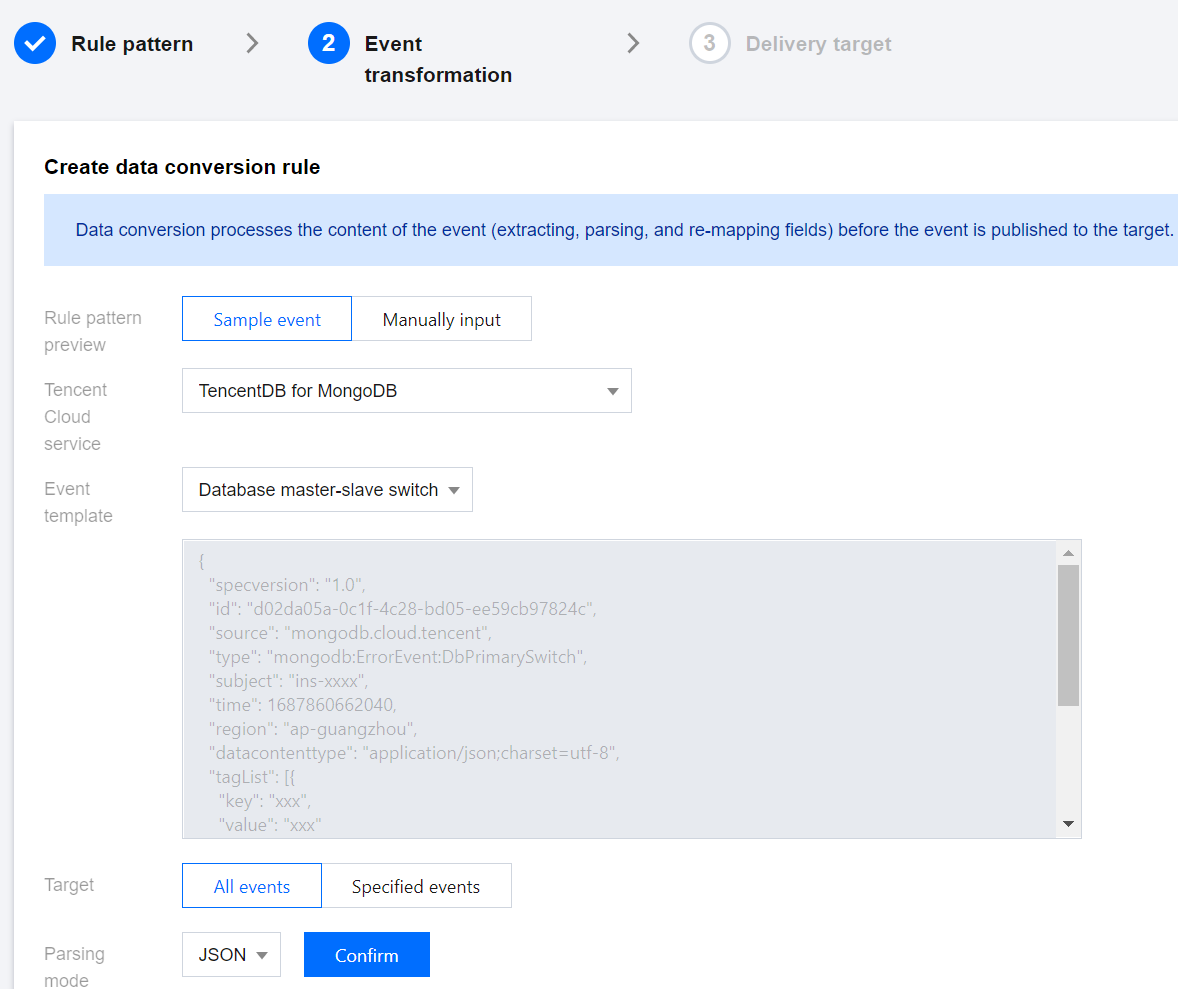
Interface Area | Interface Parameter | Parameter Explanation |
Create New Data Conversion | Event Pattern Preview | By selecting Sample Event, you can use the event template; By selecting Manually Input, you can define the event fields in the input box below. |
| Event Template | For Event Pattern Preview, select Sample Event to display the parameter. In the dropdown list, you can search for MongoDB and select a template for MongoDB events. In the input box below, the specific field information of the event template will be displayed. |
| Conversion Target | Complete Event: Routes the complete structure of event fields to the event target. Partial Event: Event Bridge uses JSONPath configuration to extract event fields and routes the specified event fields to the event target. |
| JSONPath | When you select partial events for the conversion target, this parameter is displayed. Enter the event fields you wish to convert in the input box. |
| Parsing Mode | Select a parsing mode. Supports JSON, separators, and regular expression extraction. |
| Parsing Result | Click Confirm after the parsing mode to start parsing data, converting event rules into a Key-Value format. |
| Filter | Configure the filter to only output data that meets the filter rules. |
| Data Processing | For the current parsed data, select the data type in the TYPE column. |
| Test Results | Click Testing to perform a validity check and output the final conversion result. |
Failure Information Handling | Dead Letter Queue | Configure whether to deliver messages that fail to be processed properly to CKafka's dead letter queue. |
| Delivery Type | The delivery type for failed messages is set to CKafka. |
| CKafka Instance | Select the instance ID of the CKafka instance to which failed messages will be delivered. |
| CKafka Topic | Choose the topic within the selected CKafka instance to which failed messages will be delivered. CKafka uses the concept of topics externally. Producers write messages to a topic, and consumers read them from it. |
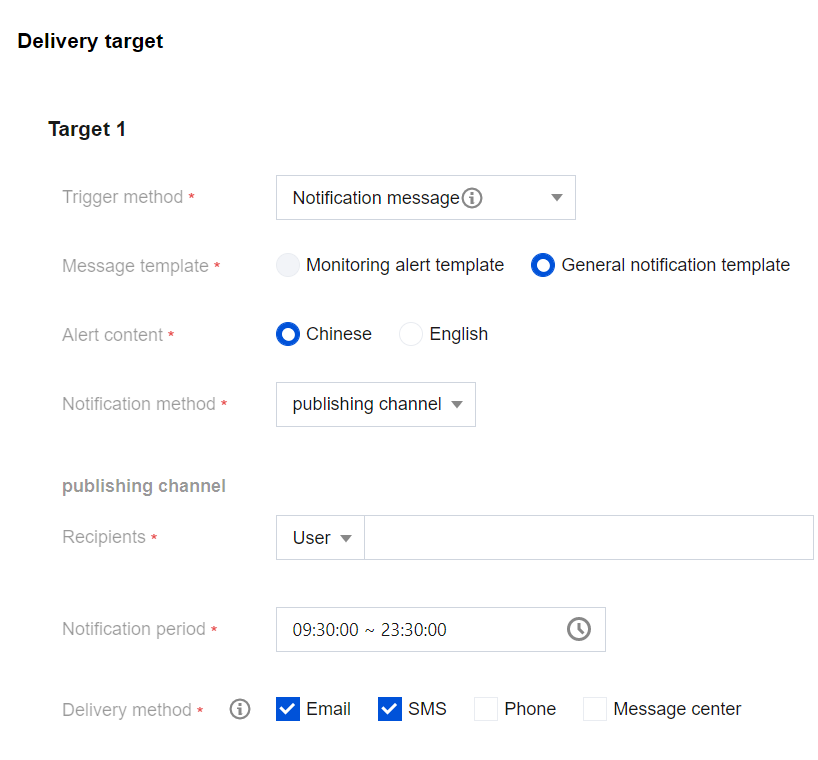
Interface Name | Interface Feature |
Validation Rules | |
Create Event Rule | |
Delete Event Rule | |
Retrieve Event Rule Details | |
Retrieve Event Rule List | |
Update Event Rules |
文档反馈