In single-task computation-intensive scenarios such as audio/video transcoding, massive data ETL, and AI reasoning, the runtime of a single function instance requires more computing power and longer stable execution. If the invoker of the function is jammed to wait for the execution result, this will not only continue to consume the invoker's resources but also raise the high requirements for the stability of the invocation linkage.
SCF provides a new function execution mechanism. You can use the async function execution mode provided by SCF to extend the execution timeout period and solve the problems with existing execution mechanisms.
Execution Mechanism
How it works
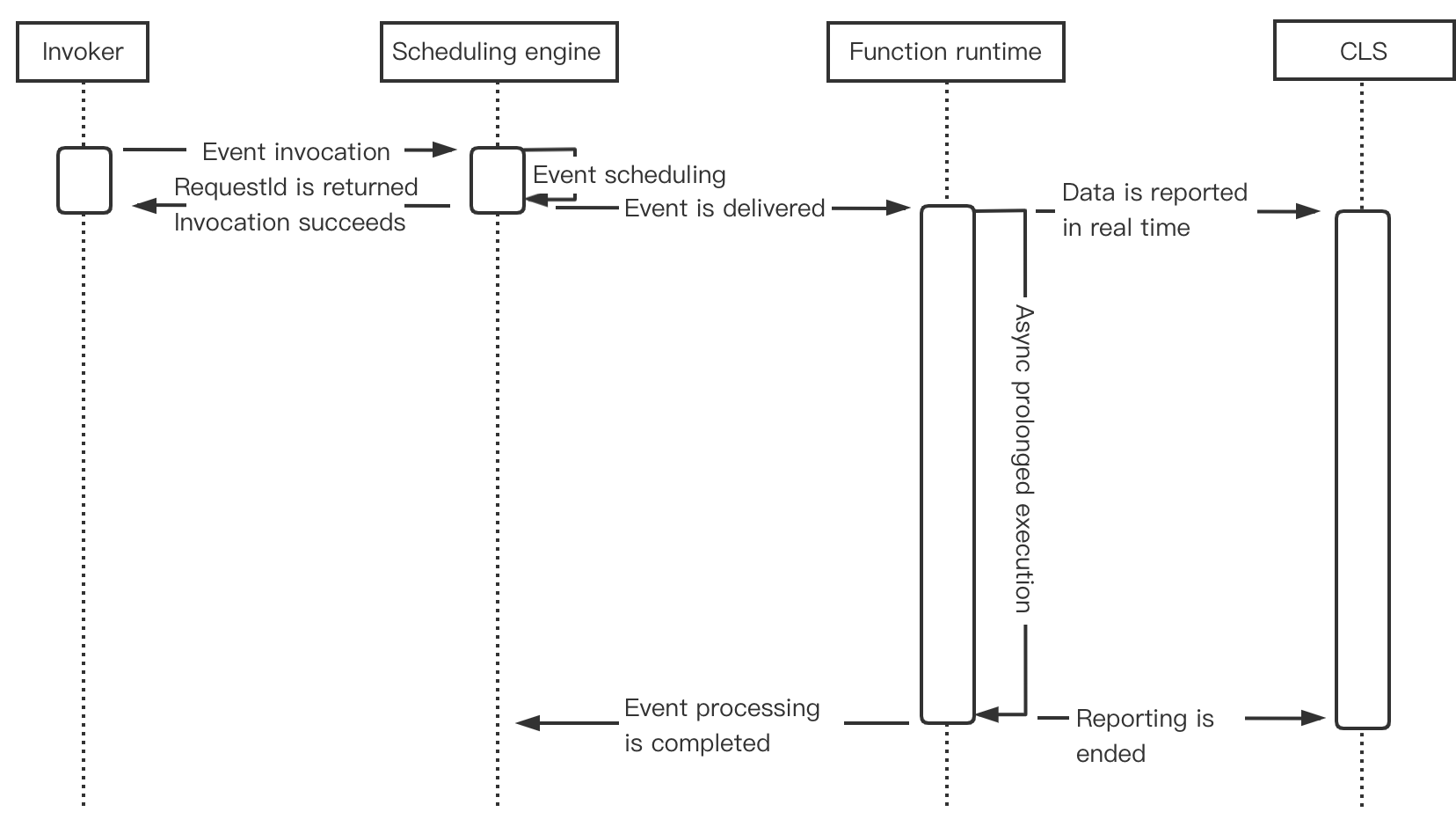
After async execution is enabled for a function, after an event is invoked by a sync invoker (such as API Gateway) or async invoker (such as COS, CKafka, and Timer), the function will respond to the event asynchronously.
In other words, after event scheduling is completed, the event invocation identifier RequestId will be returned immediately, and the invocation operation will be ended, thus eliminating the need for the invoker to wait. When the RequestId is returned, the engine will concurrently deliver the event to the function runtime to start the execution of the function logic. After the function enters the async execution status, the execution log will be reported to the log service in real time to provide real-time feedback on the execution of the event executed asynchronously. It works as shown below:
Notes
Due to differences in the execution mechanisms:
You cannot switch between sync/async execution. You can choose whether to enable the "async execution" feature only when creating a function. This configuration item will be locked and cannot be modified or updated after the function is created.
You cannot retry function execution during async invocation in case of errors.
Any exceptional execution of async functions will trigger instance repossession.
If the event is invoked successfully, the returned message will only contain RequestId and the event execution result. You need to configure the function code logic to call back specific APIs or send notification messages by yourself.
The maximum execution duration currently supported for async execution is 24 hours. If you need a longer execution duration, you can submit a ticket for application.
If you use a function execution role to get the permission to access other components of Tencent Cloud services, the role's key is valid for up to 6 hours. If the actual execution duration is longer, we recommend you use a permanent key.
The maximum QPS of asynchronously executed functions is 1,000, and any excess will be limited, resulting in response failures.
Directions
1. Log in to the SCF console and click Function Service on the left sidebar.
2. Select the region where to create a function at the top of the page and click Create to enter the function creation process.
3. Select an empty function or function template to create a function.
4. On the Function Configuration page, expand Advanced Settings and select Async Execution.