tencent cloud

TDMQ for CKafka

Release Notes and Announcements
Release Notes
Broker Release Notes
Announcement
Product Introduction
Introduction and Selection of the TDMQ Product Series
What Is TDMQ for CKafka
Strengths
Scenarios
Technology Architecture
Product Series Introduction
Apache Kafka Version Support Description
Comparison with Apache Kafka
High Availability
Use Limits
Regions and AZs
Related Cloud Services
Billing
Billing Overview
Pricing
Billing Example
Changing from Postpaid by Hour to Monthly Subscription
Renewal
Viewing Consumption Details
Overdue Payments
Refund
Getting Started
Guide for Getting Started
Preparations
VPC Network Access
Public Domain Name Access
User Guide
Usage Process Guide
Configuring Account Permission
Creating Instance
Configuring Topic
Connecting Instance
Managing Messages
Managing Consumer Group
Managing Instance
Changing Instance Specification
Configuring Traffic Throttling
Configuring Elastic Scaling Policy
Configuring Advanced Features
Viewing Monitoring Data and Configuring Alarm Rules
Synchronizing Data Using CKafka Connector
Use Cases
Cluster Resource Assessment
Client Practical Tutorial
Log Integration
Open-Source Ecosystem Integration
Replacing Supporting Route (Old)
Migration Guide
Migration Solution Overview
Migrating Cluster Using Open-Source Tool
Troubleshooting
Topics
Clients
Messages
​​API Reference
History
Introduction
API Category
Making API Requests
Other APIs
ACL APIs
Instance APIs
Routing APIs
DataHub APIs
Topic APIs
Data Types
Error Codes
SDK Reference
SDK Overview
Java SDK
Python SDK
Go SDK
PHP SDK
C++ SDK
Node.js SDK
SDK for Connector
Security and Compliance
Permission Management
Network Security
Deletion Protection
Event Record
CloudAudit
FAQs
Instances
Topics
Consumer Groups
Client-Related
Network-Related
Monitoring
Messages
Agreements
CKafka Service Level Agreements
Contact Us
Glossary

Connecting Filebeat to CKafka

PDF
포커스 모드
폰트 크기
마지막 업데이트 시간: 2026-01-20 17:10:14
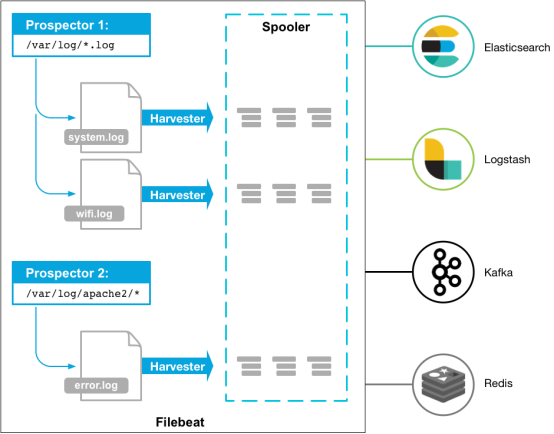
Beats Platform assembles various single-purpose data collectors. Once installed, these collectors function as lightweight agents to send collected data from hundreds, thousands, or even tens of thousands of machines to designated targets.

Beats offers various types of collectors. You can download specific collectors based on your requirements. This document uses Filebeat (a lightweight log collector) as an example to demonstrate how to connect Filebeat to CKafka, along with solutions to common issues encountered after connection.

Prerequisites

Download and install Filebeat (see Download Filebeat)
Download and install JDK 8 (see Download JDK 8)

Operation Steps

Step 1: Get the access address of CKafka instance

1. Log in to the CKafka console.
2. In the left sidebar, select Instance List, click the "ID" of the instance, and go to the instance basic information page.
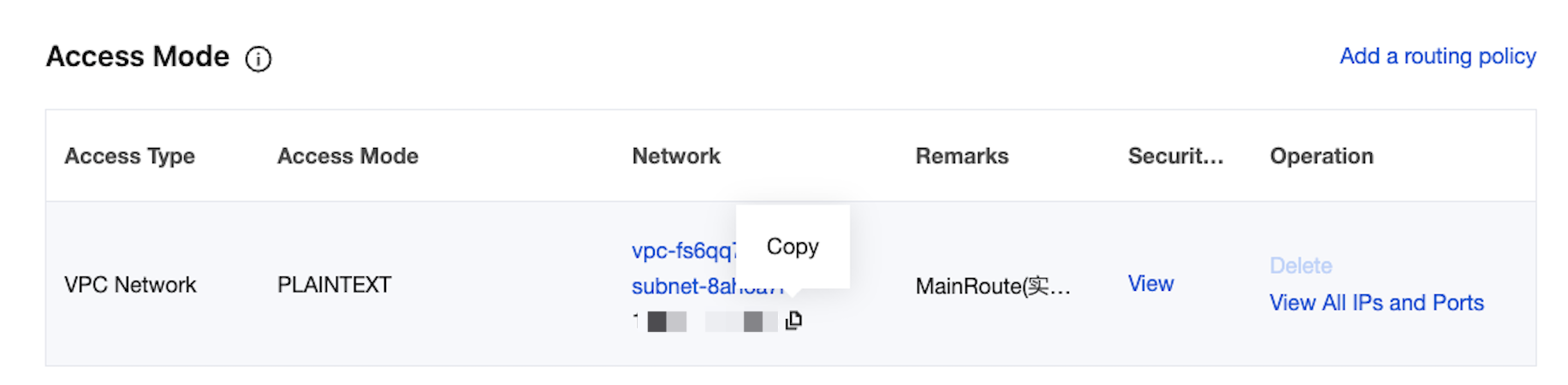
3. On the basic information page of the instance, in the Access Mode module, you can obtain the access address of the instance.


Step 2: Create topic

1. On the instance basic information page, select the Topic List tab at the top.
2. On the Topic Management page, click Create to create a Topic named test.


Step 3: Prepare the Configuration File

Enter the Filebeat installation directory and create a monitoring configuration file named filebeat.yml.
#======= For Filebeat 7.x and later versions, change filebeat.prospectors to filebeat.inputs =======
filebeat.prospectors:

- input_type: log

# Here is the listening file path.
paths:
- /var/log/messages

#======= Outputs =========

#------------------ kafka -------------------------------------
output.kafka:
version: 0.10.2 # Configure according to the open-source version of the CKafka instance.
# Set to the access address of the CKafka instance.
hosts: ["xx.xx.xx.xx:xxxx"]
# Set the name of the target topic.
topic: 'test'
partition.round_robin:
reachable_only: false

required_acks: 1
compression: none
max_message_bytes: 1000000

# Configure the following information for SASL. If not needed, the following two options can be omitted.
username: "yourinstance#yourusername" # The username needs to be concatenated with the instance ID and username.
password: "yourpassword"


Step 4: Filebeat Send Messages

1. Run the following command to start the client.
sudo ./filebeat -e -c filebeat.yml
2. Add data to the monitoring file (for example, write the testlog file for listening).
echo ckafka1 >> testlog
echo ckafka2 >> testlog
echo ckafka3 >> testlog
3. Enable the topic corresponding to the consumer to obtain the following data.
{"@timestamp":"2017-09-29T10:01:27.936Z","beat":{"hostname":"10.193.9.26","name":"10.193.9.26","version":"5.6.2"},"input_type":"log","message":"ckafka1","offset":500,"source":"/data/ryanyyang/hcmq/beats/filebeat-5.6.2-linux-x86_64/testlog","type":"log"}
{"@timestamp":"2017-09-29T10:01:30.936Z","beat":{"hostname":"10.193.9.26","name":"10.193.9.26","version":"5.6.2"},"input_type":"log","message":"ckafka2","offset":508,"source":"/data/ryanyyang/hcmq/beats/filebeat-5.6.2-linux-x86_64/testlog","type":"log"}
{"@timestamp":"2017-09-29T10:01:33.937Z","beat":{"hostname":"10.193.9.26","name":"10.193.9.26","version":"5.6.2"},"input_type":"log","message":"ckafka3","offset":516,"source":"/data/ryanyyang/hcmq/beats/filebeat-5.6.2-linux-x86_64/testlog","type":"log"}

SASL/PLAINTEXT Mode

If you want to configure SASL/PLAINTEXT, you need to set the username and password under the Kafka configuration.
# Configure the following information for SASL. If not needed, the following two options can be omitted.
username: "yourinstance#yourusername" //username needs to be the concatenation of instance ID and username.
password: "yourpassword"

FAQs

A large number of INFO logs appear in the Filebeat log (the default path is /var/log/filebeat/filebeat), for example:
2019-03-20T08:55:02.198+0800 INFO kafka/log.go:53 producer/broker/544 starting up
2019-03-20T08:55:02.198+0800 INFO kafka/log.go:53 producer/broker/544 state change to [open] on wp-news-filebeat/4
2019-03-20T08:55:02.198+0800 INFO kafka/log.go:53 producer/leader/wp-news-filebeat/4 selected broker 544
2019-03-20T08:55:02.198+0800 INFO kafka/log.go:53 producer/broker/478 state change to [closing] because EOF
2019-03-20T08:55:02.199+0800 INFO kafka/log.go:53 Closed connection to broker bitar1d12:9092
2019-03-20T08:55:02.199+0800 INFO kafka/log.go:53 producer/leader/wp-news-filebeat/5 state change to [retrying-3]
2019-03-20T08:55:02.199+0800 INFO kafka/log.go:53 producer/leader/wp-news-filebeat/4 state change to [flushing-3]
2019-03-20T08:55:02.199+0800 INFO kafka/log.go:53 producer/leader/wp-news-filebeat/5 abandoning broker 478
2019-03-20T08:55:02.199+0800 INFO kafka/log.go:53 producer/leader/wp-news-filebeat/2 state change to [retrying-2]
2019-03-20T08:55:02.199+0800 INFO kafka/log.go:53 producer/leader/wp-news-filebeat/2 abandoning broker 541
2019-03-20T08:55:02.199+0800 INFO kafka/log.go:53 producer/leader/wp-news-filebeat/3 state change to [retrying-2]
2019-03-20T08:55:02.199+0800 INFO kafka/log.go:53 producer/broker/478 shut down
A large number of INFO logs may indicate an issue with the Filebeat version, as Elastic products have very frequent releases, and major versions often contain incompatibilities. For example: Version 6.5.x natively supports Kafka versions 0.9, 0.10, 1.1.0, and 2.0.0, while version 5.6.x natively supports version 0.8.2.0.
You need to check the version configuration item in the configuration file:
output.kafka:
version: 0.10.2 // Complete settings based on different open-source edition CKafka instances.

Notes

When sending data to CKafka, the compression.codec cannot be set.
Gzip compression is not supported by default. If you need this feature, submit a ticket to apply. Gzip compression consumes significant CPU resources. Using Gzip will cause all messages to be marked as InValid messages.
When using the LZ4 compression method, the program may fail to run normally due to the following reasons: Incorrect message format. The default CKafka version is 0.10.2, and you need to use the V1 message format.
The configuration methods for SDKs of different Kafka Clients vary. You can search in the open-source community (for example, Instructions for the C/C++ Client) to set the message format version.
도움말 및 지원

문제 해결에 도움이 되었나요?

피드백
