tencent cloud

TDMQ for CKafka

Release Notes and Announcements
Release Notes
Broker Release Notes
Announcement
Product Introduction
Introduction and Selection of the TDMQ Product Series
What Is TDMQ for CKafka
Strengths
Scenarios
Technology Architecture
Product Series Introduction
Apache Kafka Version Support Description
Comparison with Apache Kafka
High Availability
Use Limits
Regions and AZs
Related Cloud Services
Billing
Billing Overview
Pricing
Billing Example
Changing from Postpaid by Hour to Monthly Subscription
Renewal
Viewing Consumption Details
Overdue Payments
Refund
Getting Started
Guide for Getting Started
Preparations
VPC Network Access
Public Domain Name Access
User Guide
Usage Process Guide
Configuring Account Permission
Creating Instance
Configuring Topic
Connecting Instance
Managing Messages
Managing Consumer Group
Managing Instance
Changing Instance Specification
Configuring Traffic Throttling
Configuring Elastic Scaling Policy
Configuring Advanced Features
Viewing Monitoring Data and Configuring Alarm Rules
Synchronizing Data Using CKafka Connector
Use Cases
Cluster Resource Assessment
Client Practical Tutorial
Log Integration
Open-Source Ecosystem Integration
Replacing Supporting Route (Old)
Migration Guide
Migration Solution Overview
Migrating Cluster Using Open-Source Tool
Troubleshooting
Topics
Clients
Messages
​​API Reference
History
Introduction
API Category
Making API Requests
Other APIs
ACL APIs
Instance APIs
Routing APIs
DataHub APIs
Topic APIs
Data Types
Error Codes
SDK Reference
SDK Overview
Java SDK
Python SDK
Go SDK
PHP SDK
C++ SDK
Node.js SDK
SDK for Connector
Security and Compliance
Permission Management
Network Security
Deletion Protection
Event Record
CloudAudit
FAQs
Instances
Topics
Consumer Groups
Client-Related
Network-Related
Monitoring
Messages
Agreements
CKafka Service Level Agreements
Contact Us
Glossary
문서TDMQ for CKafkaSDK ReferenceC++ SDKSASL_SSL Access in the Public Network

SASL_SSL Access in the Public Network

PDF
포커스 모드
폰트 크기
마지막 업데이트 시간: 2026-01-05 15:16:59

Scenarios

This task uses the C++ client as an example to guide you to use the SASL_PLAINTEXT method to access TDMQ for CKafka (CKafka) in the public network and send and receive messages.

Prerequisites

Operation Steps

Step 1: Installing C/C++ Dependency Libraries

Step 2: Installing SSL/SASL Dependencies

yum install openssl openssl-devel
yum install cyrus-sasl{,-plain}

Step 3: Sending Messages

1. Create the producer.cpp file.

// producer.cpp
#include <iostream>
#include <string>
#include "librdkafka/rdkafkacpp.h"

int main() {
std::string brokers = "$broker"; // Change to your Kafka address.
std::string topic = "$topic"; // Topic name.
std::string ca_file = "./CARoot.pem"; // CA certificate path (in the same directory as the program).
std::string sasl_username = "$username"; // SASL username.
std::string sasl_password = "$password"; // SASL password.

std::string errstr;
std::unique_ptr<RdKafka::Conf> conf(RdKafka::Conf::create(RdKafka::Conf::CONF_GLOBAL));
std::unique_ptr<RdKafka::Conf> tconf(RdKafka::Conf::create(RdKafka::Conf::CONF_TOPIC));

// ====== Global configuration. ======
conf->set("metadata.broker.list", brokers, errstr);
conf->set("security.protocol", "sasl_ssl", errstr);
conf->set("ssl.ca.location", ca_file, errstr);
conf->set("sasl.mechanisms", "PLAIN", errstr);
conf->set("sasl.username", sasl_username, errstr);
conf->set("sasl.password", sasl_password, errstr);

// acks=1
conf->set("acks", "1", errstr);

// Retry mechanism.
conf->set("message.send.max.retries", "5", errstr);
conf->set("retry.backoff.ms", "1000", errstr);

// max.in.flight.requests.per.connection=5
conf->set("max.in.flight.requests.per.connection", "5", errstr);

// ====== Create a producer. ======
std::unique_ptr<RdKafka::Producer> producer(RdKafka::Producer::create(conf.get(), errstr));
if (!producer) {
std::cerr << "Failed to create producer: " << errstr << std::endl;
return 1;
}

// ====== Create a topic object. ======
std::unique_ptr<RdKafka::Topic> topic_obj(RdKafka::Topic::create(producer.get(), topic, tconf.get(), errstr));
if (!topic_obj) {
std::cerr << "Failed to create topic object: " << errstr << std::endl;
return 1;
}

// ====== Send messages. ======
for (int i = 1; i <= 5; ++i) {
std::string msg = "Message from C++ on CentOS #" + std::to_string(i);
RdKafka::ErrorCode resp = producer->produce(
topic_obj.get(),
RdKafka::Topic::PARTITION_UA,
RdKafka::Producer::RK_MSG_COPY,
const_cast<char*>(msg.c_str()), msg.size(),
nullptr, nullptr);

if (resp != RdKafka::ERR_NO_ERROR) {
std::cerr << "Produce failed: " << RdKafka::err2str(resp) << std::endl;
} else {
std::cout << "Sent: " << msg << std::endl;
}
}

// ====== Wait for sending completion. ======
producer->flush(5000); // Wait up to 5 seconds.

return 0;
}
2. Run the following command to compile producer.cpp.

g++ -std=c++11 \\
-I/usr/local/include \\
-L/usr/local/lib \\
producer.cpp \\
-lrdkafka++ -lrdkafka \\
-o producer
3. Run the following command to send messages.

./producer
Parameter
Description
broker
Access network. On the instance details page in the console, select the Access Mode module to copy the network information in the Network column.
topic
Topic name. Copy the name on the Topic List page in the console.

username
Username in the format of instance ID + # + configured username. Obtain the instance ID in the basic information area on the instance details page in the CKafka console, and choose ACL Policy Management > User Management in the console to create a user and set the username.
password
Password is the configured user password. Choose ACL Policy Management > User Management in the console to create a user and set the password.
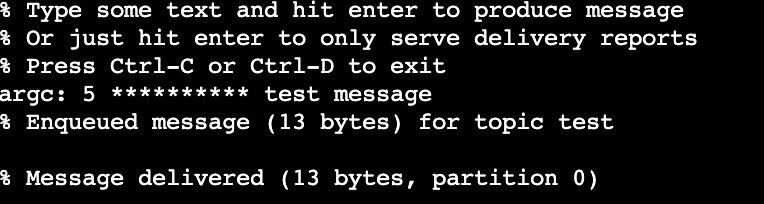
The running results are as follows:


4. On the Topic Management page in the CKafka console, select the target topic, and choose More > Message Query to view the message just sent.


Step 4: Consuming Messages

1. Create the consumer.cpp file.

// consumer.cpp
#include <iostream>
#include <string>
#include "librdkafka/rdkafkacpp.h"

class ConsumerCallback : public RdKafka::ConsumeCb {
public:
void consume_cb(RdKafka::Message &msg, void *opaque) override {
if (msg.err()) {
std::cerr << "Error: " << msg.errstr() << std::endl;
} else {
std::cout << "Received: " << std::string(static_cast<const char*>(msg.payload()), msg.len()) << std::endl;
}
}
};

int main() {
std::string brokers = "$broker";
std::string topic = "$topic";
std::string group_id = "$group.id";
std::string ca_file = "./CARoot.pem";
std::string sasl_username = "$username";
std::string sasl_password = "$password";

std::string errstr;
std::unique_ptr<RdKafka::Conf> conf(RdKafka::Conf::create(RdKafka::Conf::CONF_GLOBAL));

conf->set("metadata.broker.list", brokers, errstr);
conf->set("security.protocol", "sasl_ssl", errstr);
conf->set("ssl.ca.location", ca_file, errstr);
conf->set("sasl.mechanisms", "PLAIN", errstr);
conf->set("sasl.username", sasl_username, errstr);
conf->set("sasl.password", sasl_password, errstr);
conf->set("group.id", group_id, errstr);
conf->set("auto.offset.reset", "earliest", errstr);
conf->set("enable.auto.commit", "true", errstr);
conf->set("auto.commit.interval.ms", "5000", errstr);
conf->set("max.in.flight.requests.per.connection", "5", errstr);

ConsumerCallback consume_callback;
conf->set("consume.callback", &consume_callback, errstr);

std::unique_ptr<RdKafka::Consumer> consumer(RdKafka::Consumer::create(conf.get(), errstr));
if (!consumer) {
std::cerr << "Failed to create consumer: " << errstr << std::endl;
return 1;
}

RdKafka::ErrorCode resp = consumer->subscribe({topic});
if (resp != RdKafka::ERR_NO_ERROR) {
std::cerr << "Subscribe failed: " << RdKafka::err2str(resp) << std::endl;
return 1;
}

std::cout << "Consumer started, waiting for messages..." << std::endl;

while (true) {
consumer->consume(1000); // Wait up to 1 second each time.
}

return 0;
}
2. Run the following command to compile consumer.cpp.

g++ -std=c++11 -I/usr/local/include -L/usr/local/lib \\
consumer.cpp -lrdkafka++ -lrdkafka -o consumer
3. Run the following command to send messages.

./consumer
Parameter
Description
broker
Access network. On the instance details page in the console, select the Access Mode module to copy the network information in the Network column.
group.id
Consumer group name. You can define the name and see the consumer on the Consumer Group page after successful demo running.
username
Username in the format of instance ID + # + configured username. Obtain the instance ID in the basic information area on the instance details page in the CKafka console, and choose ACL Policy Management > User Management in the console to create a user and set the username.
password
Password is the configured user password. Choose ACL Policy Management > User Management in the console to create a user and set the password.
topic1 topic2
Topic name. Copy the name on the Topic List page in the console.

The running results are as follows:


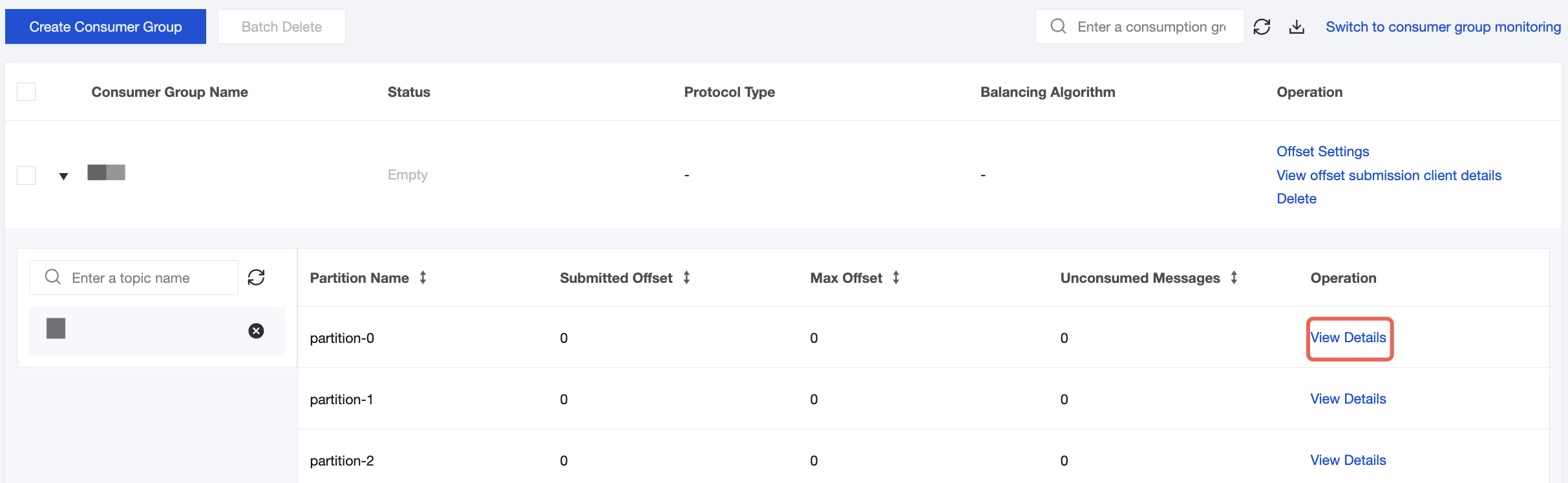
4. On the Consumer Group page in the CKafka console, select the target consumer group name, enter the topic name in the Topic Name area, and click View Details to view consumption details.


도움말 및 지원

문제 해결에 도움이 되었나요?

피드백