Action Settings
Download
포커스 모드
폰트 크기
1. Log in to the WAF console and select Configuration center > Bot and application security on the left sidebar.
2. On the Bot and application security page, select the target domain name in the top-left corner and click Bot management.

3. In the Action setting section on the Bot management tab, click Action score.
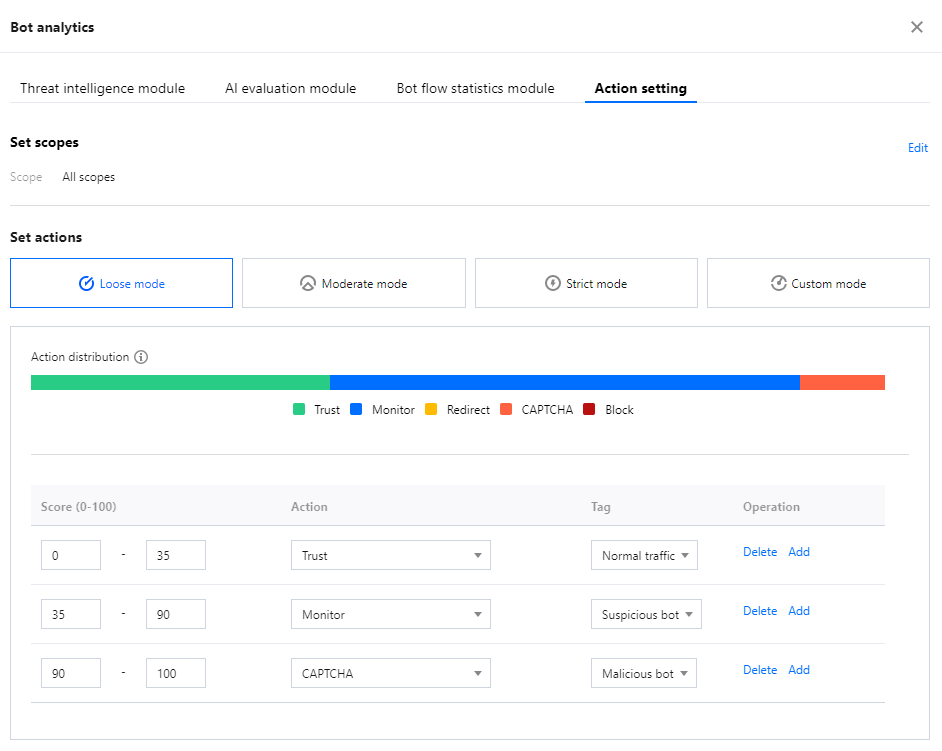
4. On the Action setting tab, you can configure different action policies, the scope of each action policy, and actions in different score ranges to precisely block risky access requests.
Use instructions
Action policy: Currently, you can select multiple action policies for one bot scenario.
Scope: It can be All scopes or Custom scope. Traffic hitting the scope will be precisely blocked based on the actions in different score ranges.
Mode: By default, there are loose, moderate, strict, and custom modes. The first three modes are preset, representing different recommended categories and handling policies for bots at different risk levels in bot behavior management. Once modified, they become the custom mode.
Score range: A score ranges from 0 to 100. Ten score entries can be added to each range, which is left-closed and right-open and cannot be overlapped. You can set a range to null, and then no action will be processed in it.
Action: You can set an action to Trust, Monitor, Redirect (to a certain website URL), CAPTCHA, or Block.
Tag: You can set a tag of Friendly bots, Malicious bots, Normal traffic, or Suspicious bots.
Friendly bots: The bot is friendly and legal for the website by default.
Suspicious bots: The system finds the access source traffic suspicious but cannot determine if it is malicious to the website.
Normal traffic: The access traffic is regarded as from a real user.
Malicious bots: The bot has malicious traffic and is unfriendly to the website.
5. After completing the configuration, click Publish in the bottom-left corner of the page.
피드백