tencent cloud

Tencent Real-Time Communication

소식 및 공지 사항
제품 업데이트
Tencent Cloud 오디오/비디오 단말 SDK 재생 업그레이드 및 권한 부여 인증 추가
TRTC 월간 구독 패키지 출시 관련 안내
제품 소개
제품 개요
기본 개념
제품 기능
제품 장점
응용 시나리오
성능 데이터
구매 가이드
Billing Overview
무료 시간 안내
Monthly subscription
Pay-as-you-go
TRTC Overdue and Suspension Policy
과금 FAQ
Refund Instructions
신규 사용자 가이드
Demo 체험
Call
개요(TUICallKit)
Activate the Service
Run Demo
빠른 통합(TUICallKit)
오프라인 푸시
Conversational Chat
온클라우드 녹화(TUICallKit)
AI Noise Reduction
UI 사용자 정의
Calls integration to Chat
Additional Features
No UI Integration
Server APIs
Client APIs
Solution
ErrorCode
릴리스 노트
FAQs
라이브 스트리밍
Billing of Video Live Component
Overview
Activating the Service (TUILiveKit)
Demo 실행
No UI Integration
UI Customization
Live Broadcast Monitoring
Video Live Streaming
Voice Chat Room
Advanced Features
Client APIs
Server APIs
Error Codes
Release Notes
FAQs
RTC Engine
Activate Service
SDK 다운로드
API 코드 예시
Usage Guidelines
API 클라이언트 API
고급 기능
RTC RESTFUL API
History
Introduction
API Category
Room Management APIs
Stream mixing and relay APIs
On-cloud recording APIs
Data Monitoring APIs
Pull stream Relay Related interface
Web Record APIs
AI Service APIs
Cloud Slicing APIs
Cloud Moderation APIs
Making API Requests
Call Quality Monitoring APIs
Usage Statistics APIs
Data Types
Appendix
Error Codes
콘솔 가이드
애플리케이션 관리
사용량 통계
모니터링 대시보드
개발 보조
Solution
Real-Time Chorus
FAQs
과금 개요
기능 관련
UserSig 관련
방화벽 제한 처리
설치 패키지 용량 축소 관련 질문
Andriod 및 iOS 관련
Web 관련
Flutter 관련
Electron 관련
TRTCCalling Web 관련
멀티미디어 품질 관련
기타 질문
Protocols and Policies
컴플라이언스 인증
보안 백서
정보 보안에 관한 참고 사항
Service Level Agreement
Apple Privacy Policy: PrivacyInfo.xcprivacy
TRTC 정책
개인 정보 보호 정책
데이터 처리 및 보안 계약
용어집

Default Gift Config

PDF
포커스 모드
폰트 크기
마지막 업데이트 시간: 2025-12-02 11:07:28

Gift System Overview

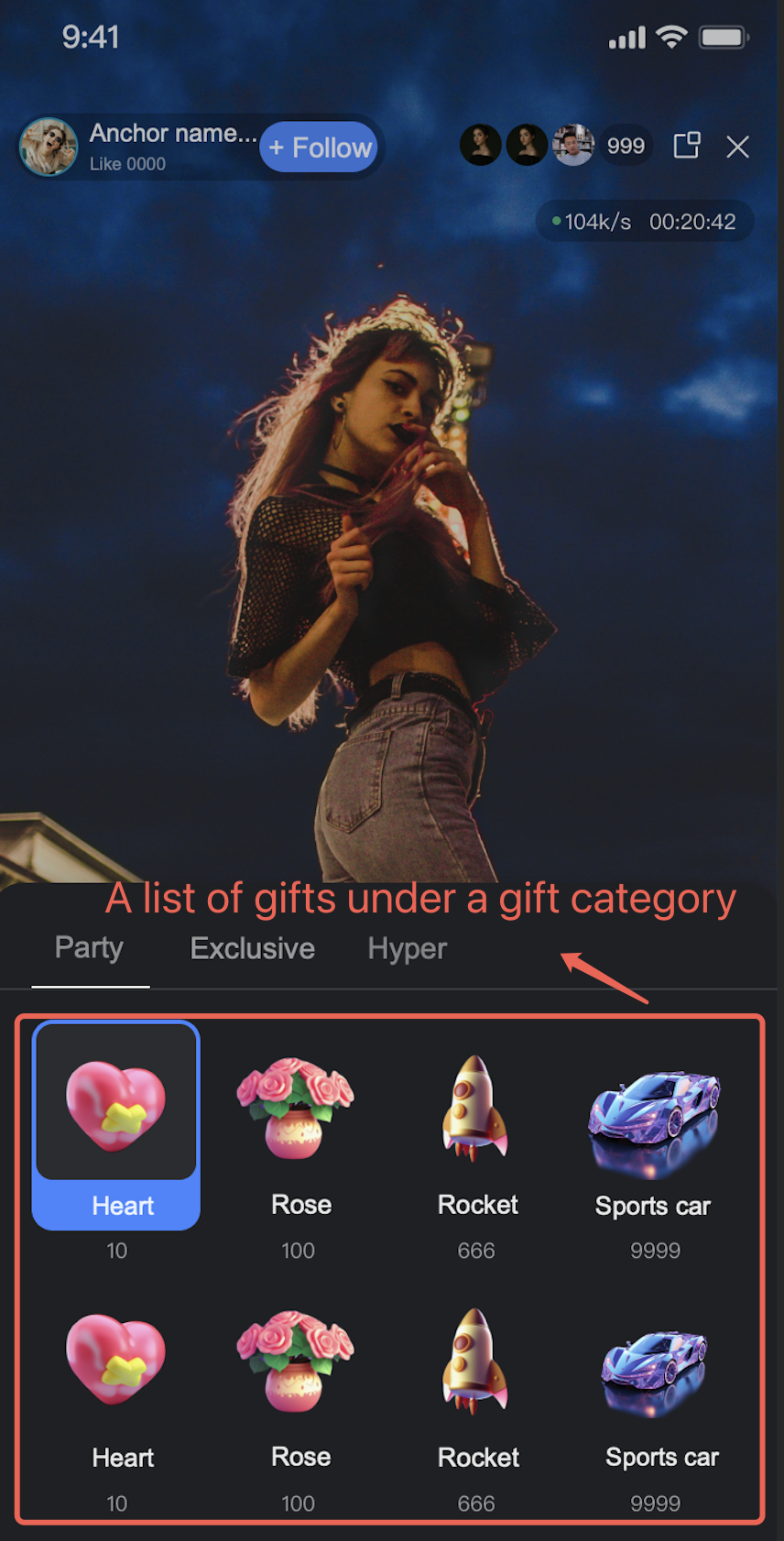
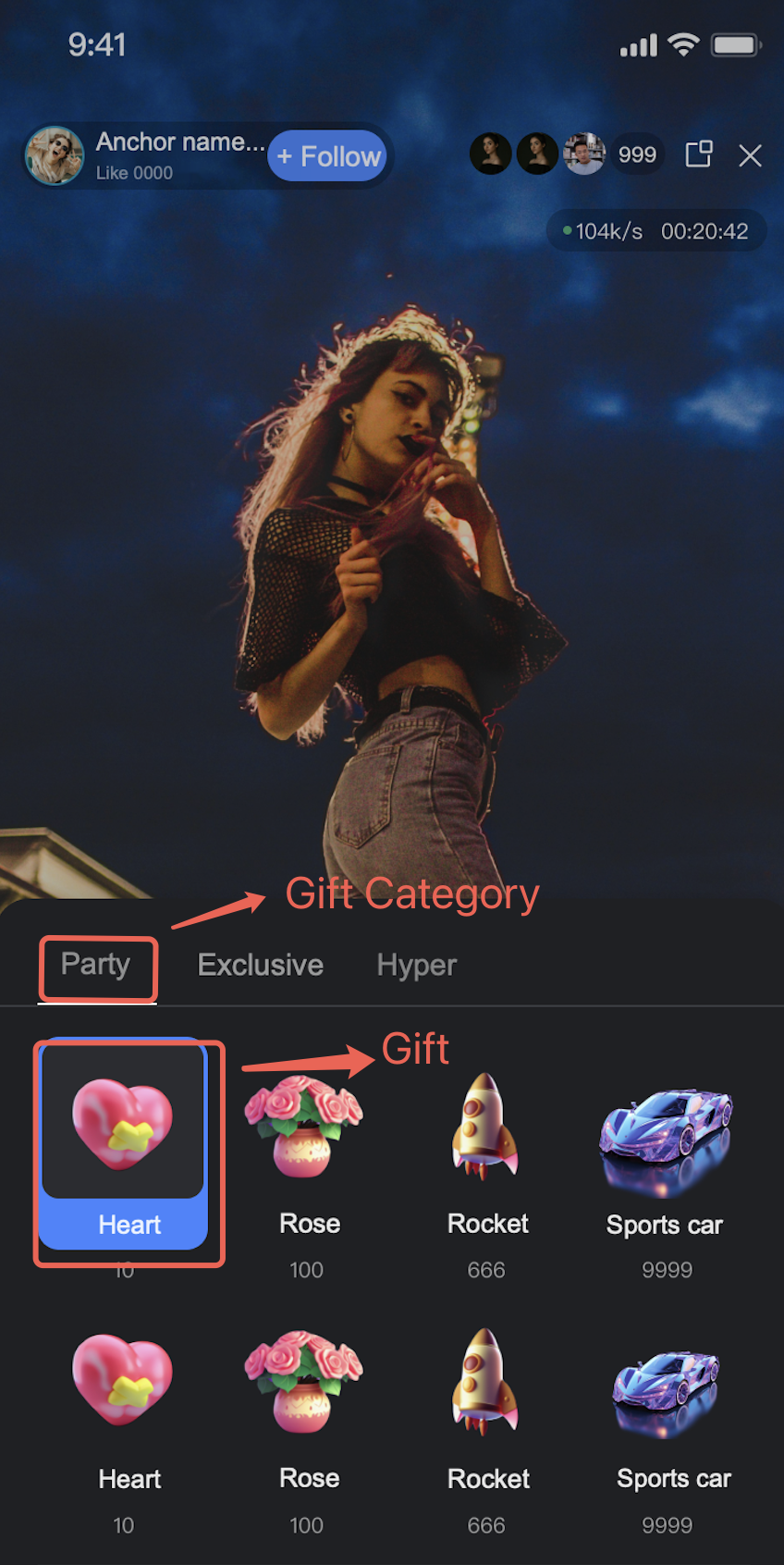
Gift-related information consists of gift, gift categorization, gift-category relationship, and language information. The information follows:
Gift: includes GiftId, default name, default description, severity, virtual currency price, icon, and custom extension information. Among them, GiftId is the unique identifier of the gift in the system and the object for subsequent operations. The virtual currency price of the gift is used for the "pricing" in gift display. The correspondence between virtual currency and actual payment amount requires additional self-definition by the business.
Gift categorization: including CategoryId, default name, default description, and custom extension information. Same as GiftId, CategoryId is the unique identifier of gift categorization in the system and the object of subsequent operations.

Note:
Gift classification information does not include the gift-category relationship. It only includes the gift category ID, category name, category description, and extended information. See Add Gift Category for detail
Gift category relationship: for description of which gifts are under a category

Language information: The names and descriptions of gifts and gift categories support internationalization. Language information is used to record translations of gift descriptions in different languages.
Note:
Note: When using SDK to get the gift list, if the gift or gift category does not have a name and description in the specified language, return the default gift name and description set when creating the gift.

Gift System Configuration Process

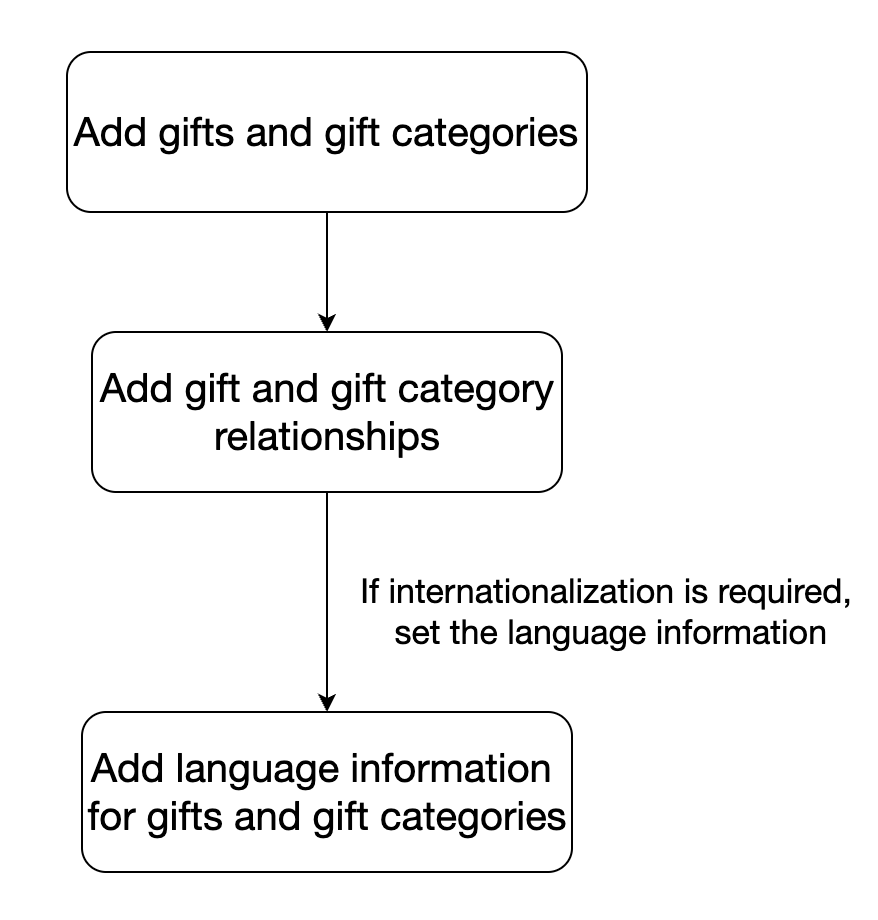
The gift function in the component requires the corresponding application (SDKAppID) to be TUILiveKit trial version or large-scale live stream version to be usable. After activation, add gift-related information in an ordered manner. Below are the gift configuration order:
1. Add gifts and gift categories
First add gifts and gift categories. After addition, you will get several GiftIDs and CategoryIds. Use these Ids to continue subsequent operations. For the add method, see Add Gift and Add Gift Category.
2. Add gift categories and gift relationships
Use the GiftId and CategoryId obtained in the previous step to set the corresponding relationship. For instructions, see Add Gift Category Relationships.
3. Add language info for gifts and gift categories
This step is not required. If there is a need for internationalization, you can configure it. For instructions, see Add Gift Language Information and Add Gift Category Language Infomation.
The configuration order is as follows:

도움말 및 지원

문제 해결에 도움이 되었나요?

피드백