제품 업데이트
Tencent Cloud 오디오/비디오 단말 SDK 재생 업그레이드 및 권한 부여 인증 추가
TRTC 월간 구독 패키지 출시 관련 안내
AtomicXCore provides two core modules: CoHostStore for cross-room connections and BattleStore for PK battles. This guide explains how to integrate these modules to enable connection and PK features in a voice chat room application.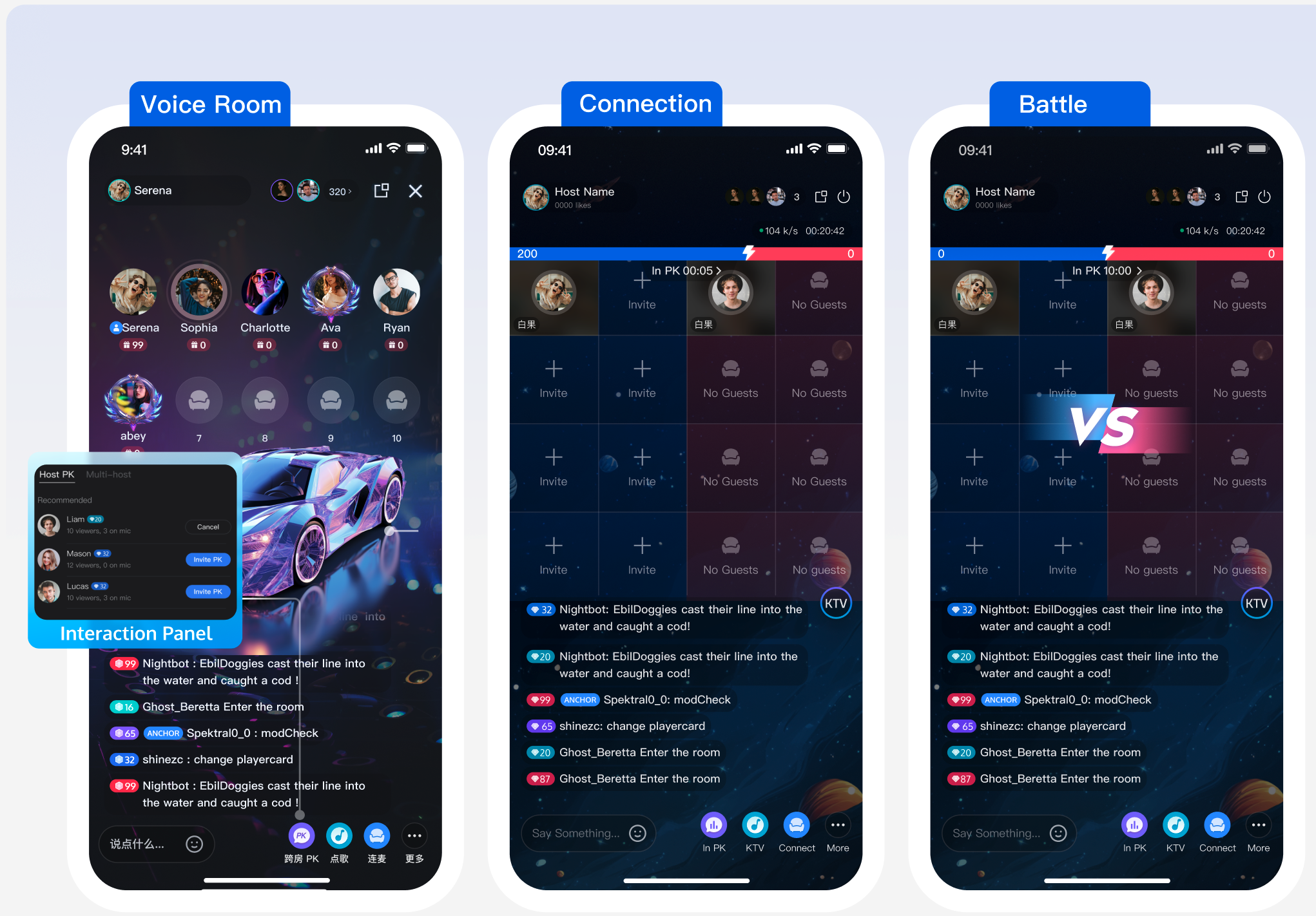
Key Concept | Type | Core Responsibilities & Description |
CoHostStore | class | Manages the lifecycle of co-hosting between streamers, providing APIs for co-hosting (requestHostConnection, acceptHostConnection). |
BattleStore | class | Handles signaling and state management for cross-room PK battles, including PK status. |
LiveListStore | class | Fetches the list of live rooms ( fetchLiveList), enabling discovery of other rooms available for co-hosting. |
LiveSeatStore | class | Manages the status of all seats in a room (including cross-room seats during co-hosting), tracks users joining/leaving seats and microphone status. |
CoHostLayoutTemplate | enum | Defines seat layout templates for co-hosting, such as .hostStaticVoice6v6. |
BattleConfig | struct | Configures PK details, including PK duration ( duration) and whether a response (needResponse) is required. |
LiveListStore.shared.fetchLiveList.Result is .success callback for subsequent requests. If the returned cursor is empty, all rooms have been fetched.import AtomicXCorefunc fetchLiveListForCoHost() {var cursor = "" // Initial fetch, cursor is emptylet count = 20 // Fetch 20 items per requestlet liveListStore = LiveListStore.sharedliveListStore.fetchLiveList(cursor: cursor, count: count, completion: { [weak self] result inguard let self = self else { return }switch result {case .success:print("Live room list fetched successfully")// The live room list is updated in LiveListStore.shared.state.value.liveList.// Update the co-host invitation panel with the recommended users.// inviteAdapter.submitList(LiveListStore.shared.state.value.liveList)case .failure(let error):print("Failed to fetch live room list: \\(error.code), \\(error.message)")}})}
CoHostStore.requestHostConnection to send a co-hosting invitation. Result is .success in the completion callback.onCoHostRequestReceived callback. Use it to pass custom business data, such as "start PK immediately".import AtomicXCorelet targetHostLiveID = "target_host_room_id"let layoutTemplate = .hostStaticVoice6v6let timeout: TimeInterval = 10 // Invitation timeout (seconds)let extraInfo: String = "" // Custom business info, e.g., for direct PKcoHostStore.requestHostConnection(targetHost: targetHostLiveID,layoutTemplate: layoutTemplate,timeout: timeout,extraInfo: extraInfo,completion: { [weak self] result inguard let self = self else { return }switch result {case .success():print("Invitation sent successfully")case .failure(let error):print("Failed to send invitation: \\(error.code), \\(error.message)")}})
onCoHostRequestReceived event from CoHostEventPublisher. Listen for this event to display a UI prompt, such as "Streamer invites you to join co-hosting".var coHostStore: CoHostStore {return CoHostStore.create(liveID: liveID)}coHostStore.coHostEventPublisher.receive(on: RunLoop.main).sink { [weak self] event inguard let self = self else { return }switch event {case .onCoHostRequestReceived(let inviter, let extensionInfo):// Handle co-hosting invitationdefault:break}}.store(in: &cancellableSet)
acceptHostConnection or rejectHostConnection.import AtomicXCoreimport Combineprivate var cancellableSet: Set<AnyCancellable> = []var coHostStore: CoHostStore {return CoHostStore.create(liveID: liveID)}coHostStore.coHostEventPublisher.receive(on: RunLoop.main).sink { [weak self] event inguard let self = self else { return }switch event {case .onCoHostRequestReceived(let inviter, let extensionInfo):// Accept co-hosting requestcoHostStore.acceptHostConnection(fromHostLiveID: inviter.liveID) { [weak self] result inguard let self = self else { return }switch result {case .success():// Acceptedcase .failure(let error):// Handle error}}// To reject:// coHostStore.rejectHostConnection(fromHostLiveID: inviter.liveID) { ... }default:break}}.store(in: &cancellableSet)
CoHostStore.coHostState.connected and LiveSeatStore.liveSeatState.seatList to update the seat layout dynamically.import AtomicXCoreimport Combineprivate var cancellableSet: Set<AnyCancellable> = []var liveSeatStore: LiveSeatStore {return LiveSeatStore.create(liveID: liveID)}// Listen for co-hosting statecoHostStore.state.subscribe(StatePublisherSelector(keyPath: \\CoHostState.connected)).receive(on: RunLoop.main).dropFirst().sink { [weak self] connected inguard let self = self else { return }// If connected > 0, host is in co-hosting state}.store(in: &cancellableSet)// Listen for seat info to refresh avatars, mute status, etc.liveSeatStore.state.subscribe(StatePublisherSelector(keyPath: \\LiveSeatState.seatList)).removeDuplicates().receive(on: RunLoop.main).sink { [weak self] seatList inguard let self = self else { return }// Use seatInfo.userInfo.liveID to distinguish local/remote users// Use seatInfo.userInfo.microphoneStatus for mute icon}.store(in: &cancellableSet)
requestHostConnection again.import AtomicXCorelet targetHostLiveID = "target_host_room_id"let layoutTemplate = .hostStaticVoice6v6let timeout: TimeInterval = 10let extraInfo: String = ""coHostStore.requestHostConnection(targetHost: targetHostLiveID,layoutTemplate: layoutTemplate,timeout: timeout,extraInfo: extraInfo,completion: { [weak self] result inguard let self = self else { return }switch result {case .success():print("Invitation sent successfully")case .failure(let error):print("Failed to send invitation: \\(error.code), \\(error.message)")}})
exitHostConnection. Other streamers in the session will receive updated seat information and should change their layouts.func onExitButtonClicked() {coHostStore.exitHostConnection() { [weak self] result inguard let self = self else { return }switch result {case .success():// Exited co-hostingcase .failure(let error):// Handle error}}}
PK Mode | Room State (Before PK) | Room State (After PK) |
Scenario 1: PK after co-hosting | Both sides already co-hosting | Return to co-hosting state |
Scenario 2: Co-hosting with PK mode | Both sides not co-hosting | Return to co-hosting state |
PK to start a timed battle. Winner is determined by the gifts received.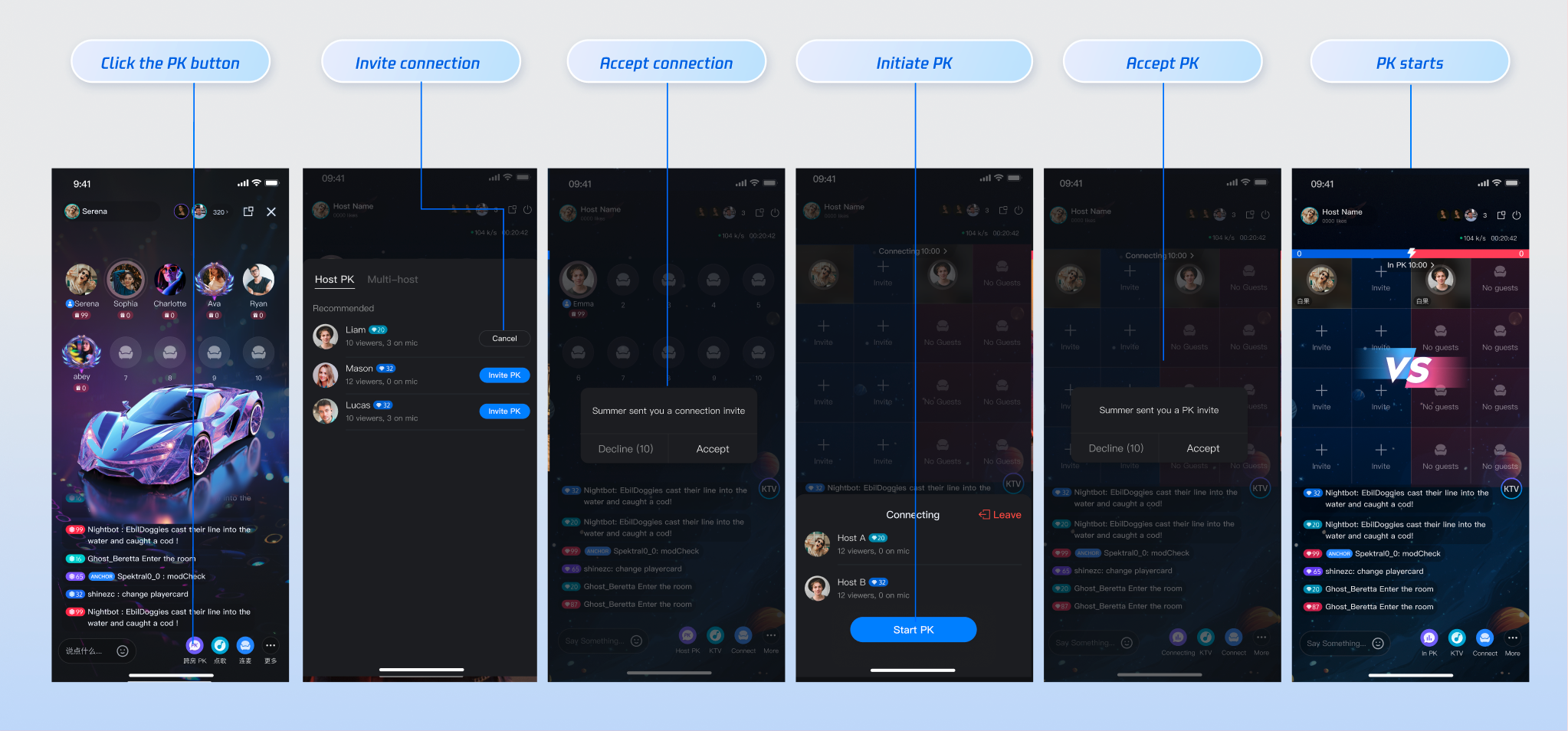
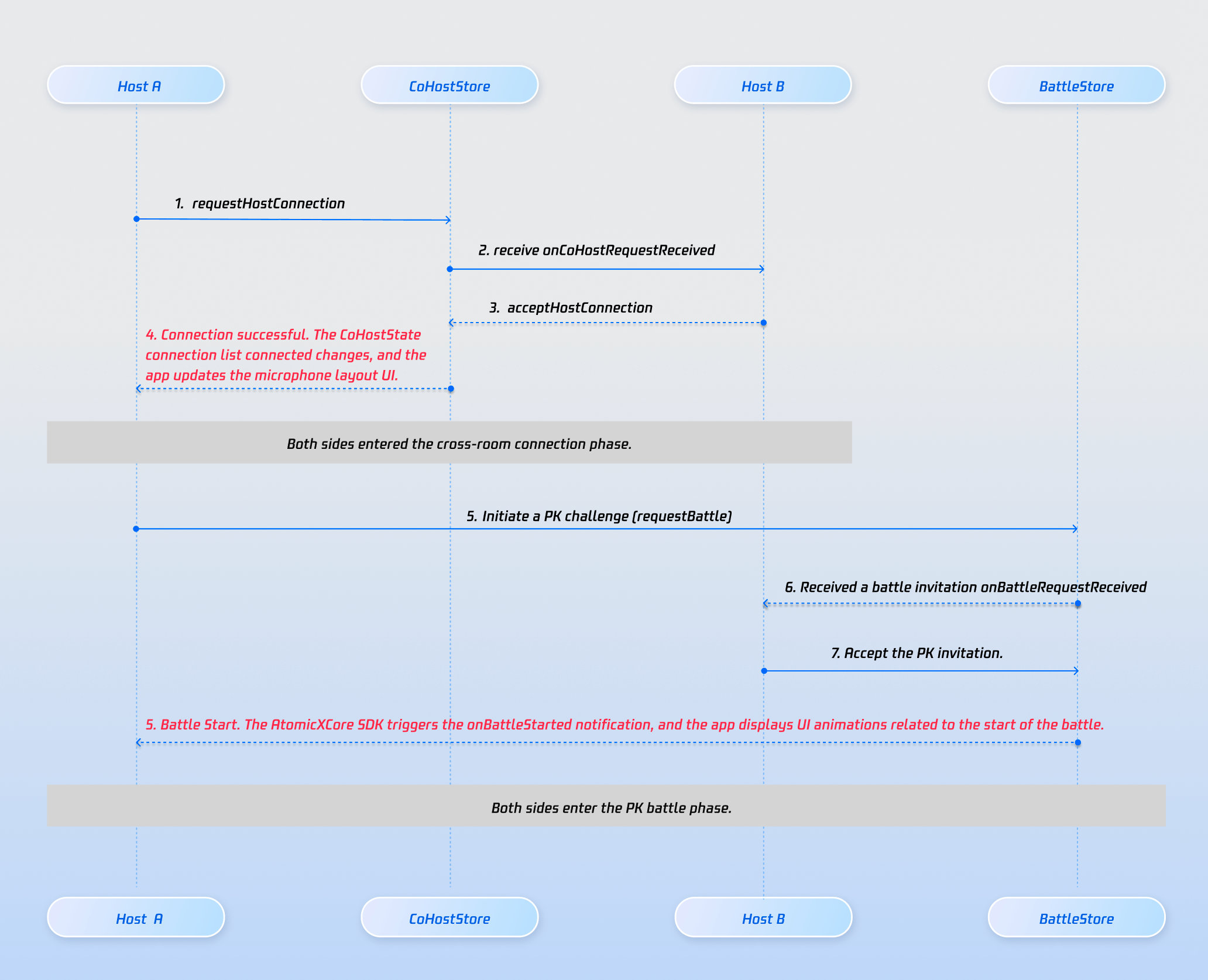
BattleStore.requestBattle to send a PK invitation. Configure PK duration, whether acceptance is required, and any extension info.var battleStore: BattleStore {return BattleStore.create(liveID: liveID)}let targetUserID = ""let config = BattleConfig(duration: 30, // PK duration in secondsneedResponse: true, // Target must acceptextensionInfo: "")battleStore.requestBattle(config: config, userIDList: [targetUserID], timeout: 10) { [weak self] result inguard let self = self else { return }switch result {case .success(let (battleInfo, _)):// PK startedcase .failure(_):// Handle error}}
onBattleRequestReceived event from BattleEventPublisher. Use this event to prompt the target in the UI.battleStore.battleEventPublisher.receive(on: RunLoop.main).sink { [weak self] event inguard let self = self else { return }switch event {case .onBattleRequestReceived(let battleID, let inviter, let invitee):// Handle PK invitationdefault:break}}.store(in: &cancellableSet)
onBattleStarted event, render the PK progress bar in the UI.needResponse is false, PK starts automatically after sending the invitation.needResponse is true, PK starts only after all targets call acceptBattle.onUserJoinBattle.onBattleStarted.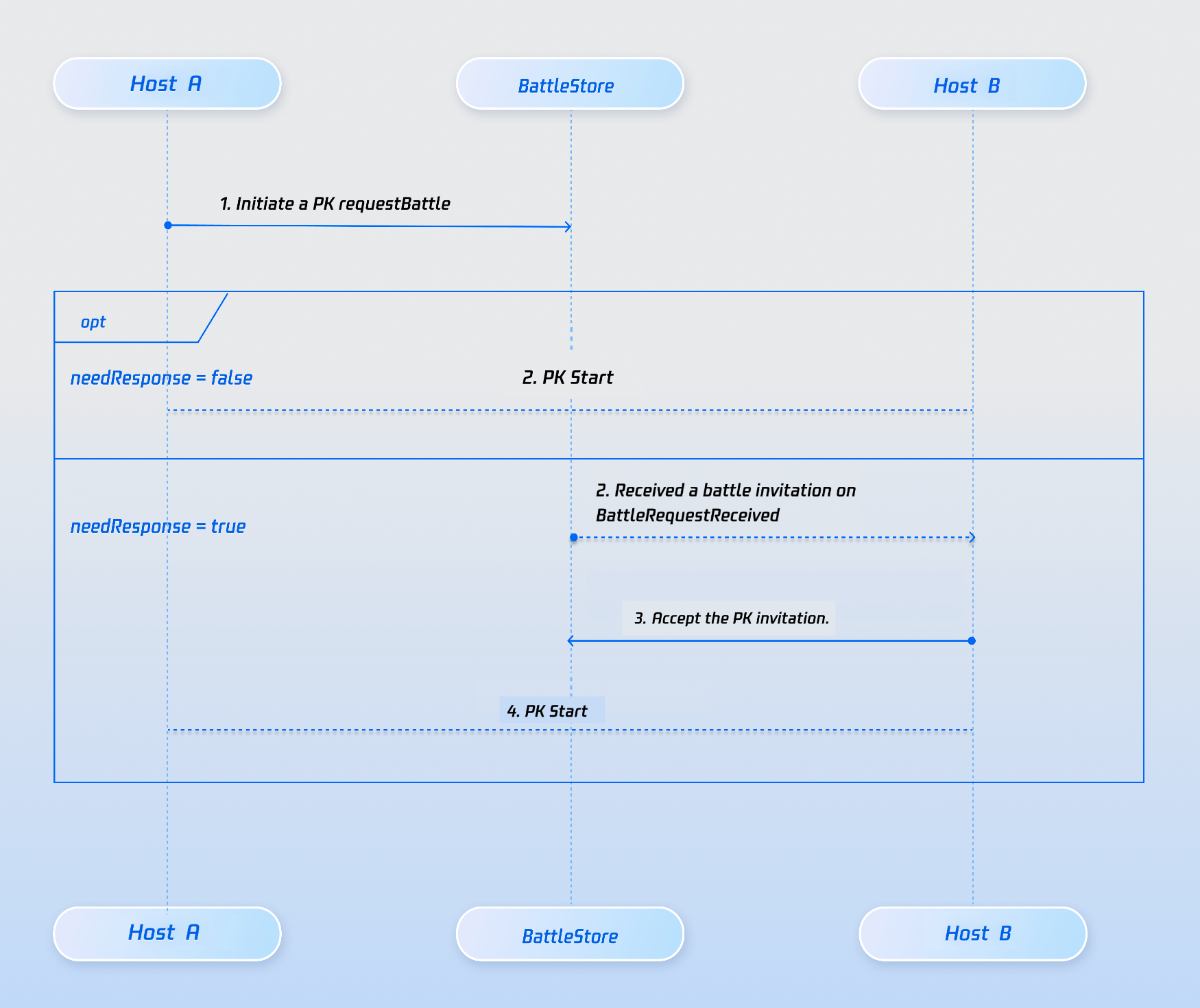
onBattleEnded.exitBattle to leave PK. Remaining users receive onUserExitBattle. If all participants exit before time ends, PK ends early.var battleStore: BattleStore {return BattleStore.create(liveID: liveID)}guard let battleID = battleStore.state.value.currentBattleInfo?.battleID else { return }battleStore.exitBattle(battleID: battleID, completion: { [weak self] result inguard let self = self else { return }switch result {case .success():// Exited PKcase .failure(let error):// Handle error}})
onBattleEnded), display results and identify the winner/loser (see Winner Determination section).exitHostConnection.PK, opens a panel with active streamers (see Step 1 above).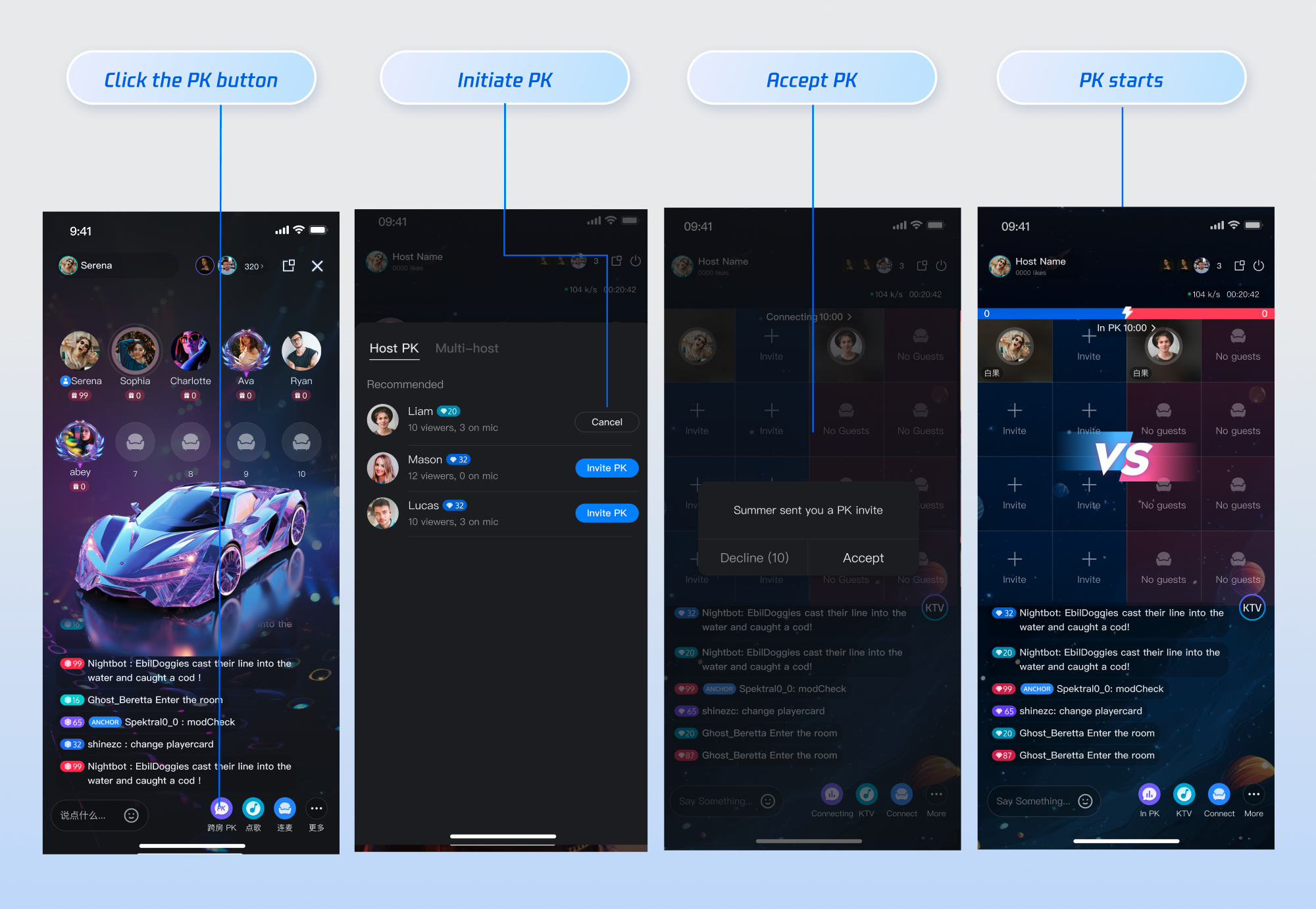
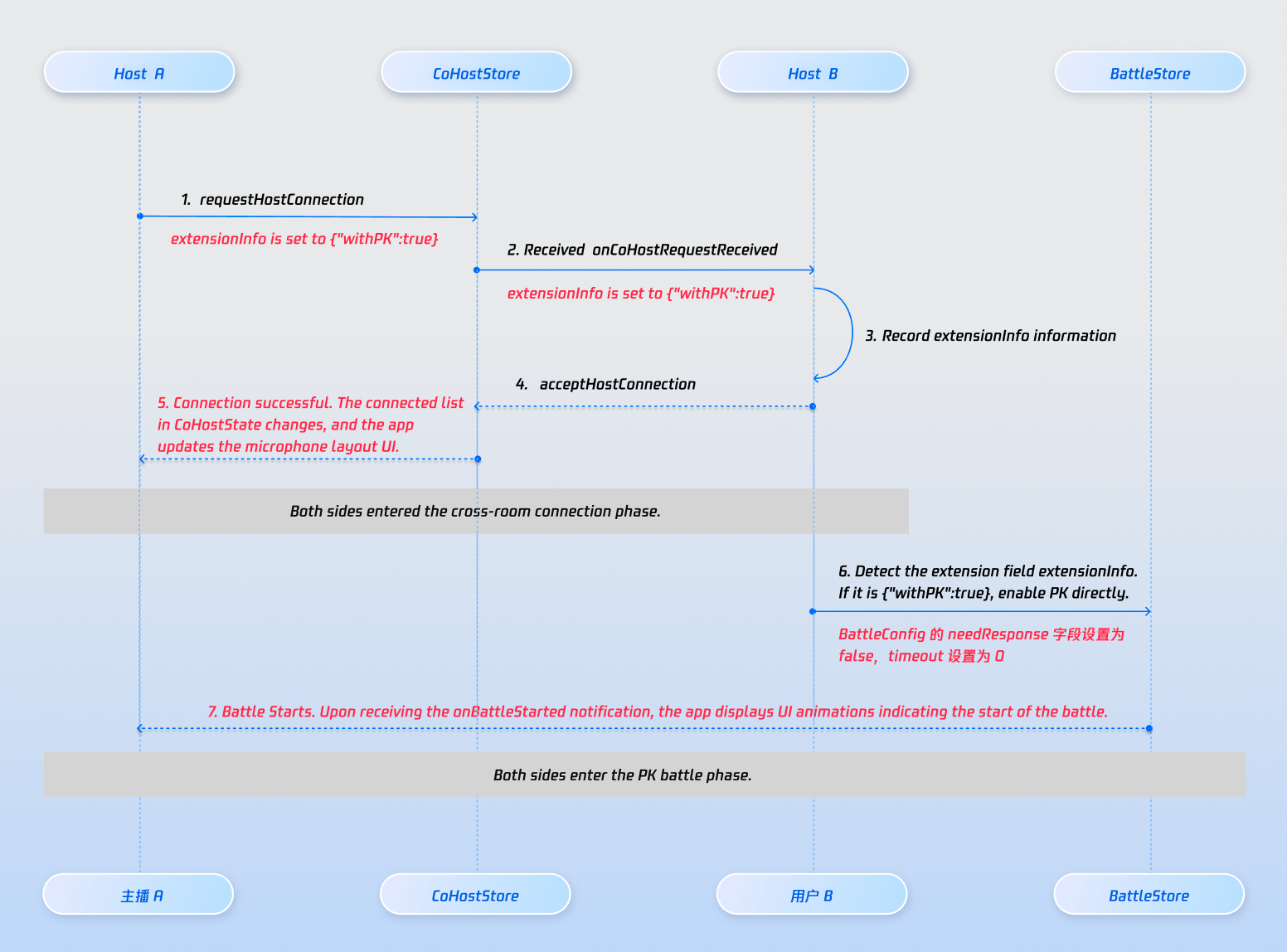
BattleConfig.needResponse set to false.extraInfo field in requestHostConnection to indicate PK should follow co-hosting. This enables custom UI prompts for the target streamer.{"withPK:true"} prompts "Streamer invites you to PK".{"withPK:false"} prompts "Streamer invites you to join cross-room co-hosting".import AtomicXCorelet targetHostLiveID = "target_host_room_id"let layoutTemplate = .hostStaticVoice6v6let timeout: TimeInterval = 10let extraInfo: String = "" // e.g., {"withPK:true"}coHostStore.requestHostConnection(targetHost: targetHostLiveID,layoutTemplate: layoutTemplate,timeout: timeout,extraInfo: extraInfo,completion: { [weak self] result inguard let self = self else { return }switch result {case .success():print("Invitation sent successfully")case .failure(let error):print("Failed to send invitation: \\(error.code), \\(error.message)")}})
onCoHostRequestReceived and can accept or reject the invitation.var coHostStore: CoHostStore {return CoHostStore.create(liveID: liveID)}coHostStore.coHostEventPublisher.receive(on: RunLoop.main).sink { [weak self] event inguard let self = self else { return }switch event {case .onCoHostRequestReceived(let inviter, let extensionInfo):// Accept co-hosting requestcoHostStore.acceptHostConnection(fromHostLiveID: inviter.liveID) { [weak self] result inguard let self = self else { return }switch result {case .success():// Acceptedcase .failure(let error):// Handle error}}// To reject:// coHostStore.rejectHostConnection(fromHostLiveID: inviter.liveID) { ... }default:break}}.store(in: &cancellableSet)
BattleStore.requestBattle with needResponse: false to start PK.import AtomicXCorevar coHostStore: CoHostStore {return CoHostStore.create(liveID: liveID)}coHostStore.coHostEventPublisher.receive(on: RunLoop.main).sink { [weak self] event inguard let self = self else { return }switch event {case .onCoHostRequestAccepted(let invitee):let config = BattleConfig(duration: 30, needResponse: false, extensionInfo: "")battleStore.requestBattle(config: config, userIDList: [invitee.userID], timeout: 0) { [weak self] result inguard let self = self else { return }switch result {case .success:// PK startedcase .failure(let error):// Handle error}}default:break}}.store(in: &cancellableSet)
REST API.Gift Type | Score Calculation Rule | Example |
Basic Gift | Gift value × 5 | 10 RMB gift → 50 points |
Intermediate Gift | Gift value × 8 | 50 RMB gift → 400 points |
Advanced Gift | Gift value × 12 | 100 RMB gift → 1200 points |
Special Effect Gift | Fixed high score | 520 RMB gift → 1314 points |
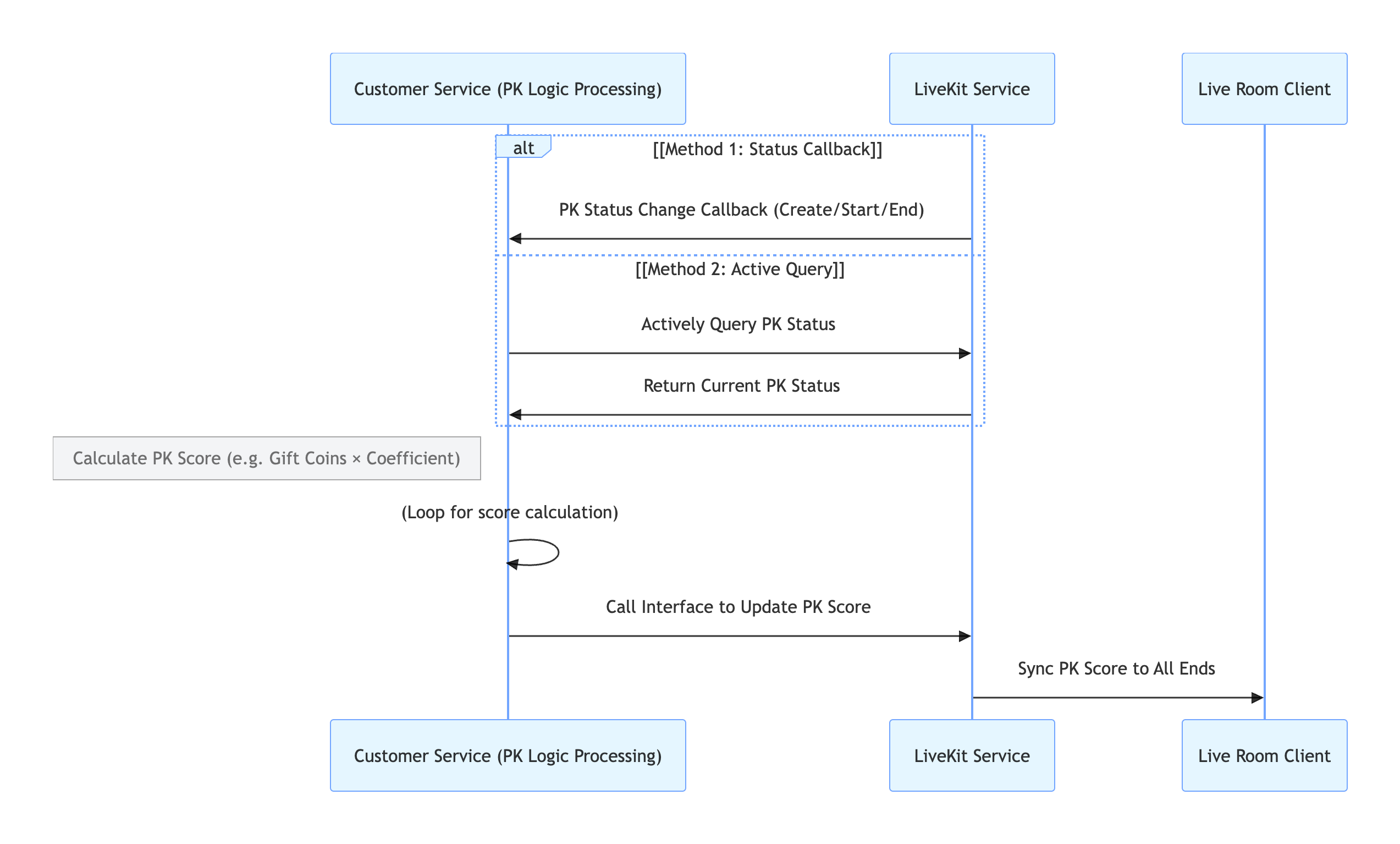
LiveKit backend actively notify your system when PK starts or ends.LiveKit backend.API | Function Description | Request Example |
Active API - Query PK Status | Check whether the current room is in PK | |
Active API - Update PK Score | Update the calculated PK score | |
Callback Configuration - PK Start Callback | Receive real-time notification when PK starts | |
Callback Configuration - PK End Callback | Receive real-time notification when PK ends |
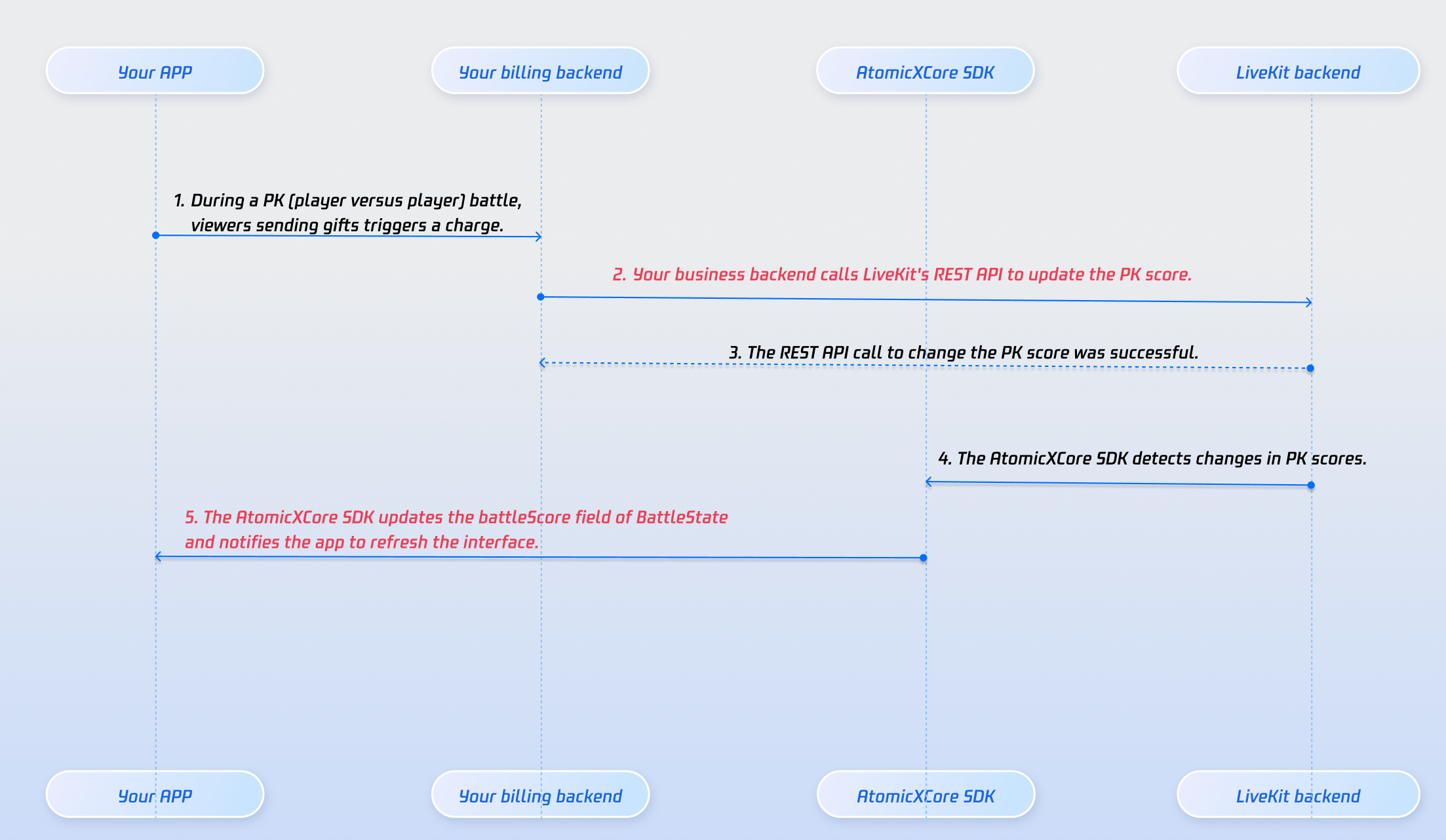
battleScore in BattleState. Use this to update the PK progress bar.battleStore.state.subscribe(StatePublisherSelector(keyPath: \\BattleState.battleScore)).receive(on: RunLoop.main).sink { [weak self] battleScore inguard let self = self else { return }// Update PK progress bar here}.store(in: &cancellableSet)
Store/Component | Function Description | API Documentation |
CoHostStore | Core component for live stream display and interaction: handles video rendering, widget management, streamer live, audience mic-link, streamer co-hosting, and more. | |
BattleStore | Manages the full lifecycle of live rooms: create, join, leave, destroy, query room list, modify live info, listen for live status changes. | |
LiveListStore | Manages live room lifecycle: query room list, modify live info, etc. | |
LiveSeatStore | Manages seat status: tracks all seats in the room (including cross-room seats during co-hosting), check user join/leave, microphone, seat status, etc. |
onBattleEnded callback from battleEventPublisher, use battleScore in BattleState to determine the winner and loser. Co-hosting continues after PK ends. Implement a custom 30-second penalty phase, then disconnect co-hosting after the countdown.targetHostLiveId is correct and the target room is actively streaming.REST API ensures PK score security, real-time performance, and scalability:피드백