제품 업데이트
Tencent Cloud 오디오/비디오 단말 SDK 재생 업그레이드 및 권한 부여 인증 추가
TRTC 월간 구독 패키지 출시 관련 안내
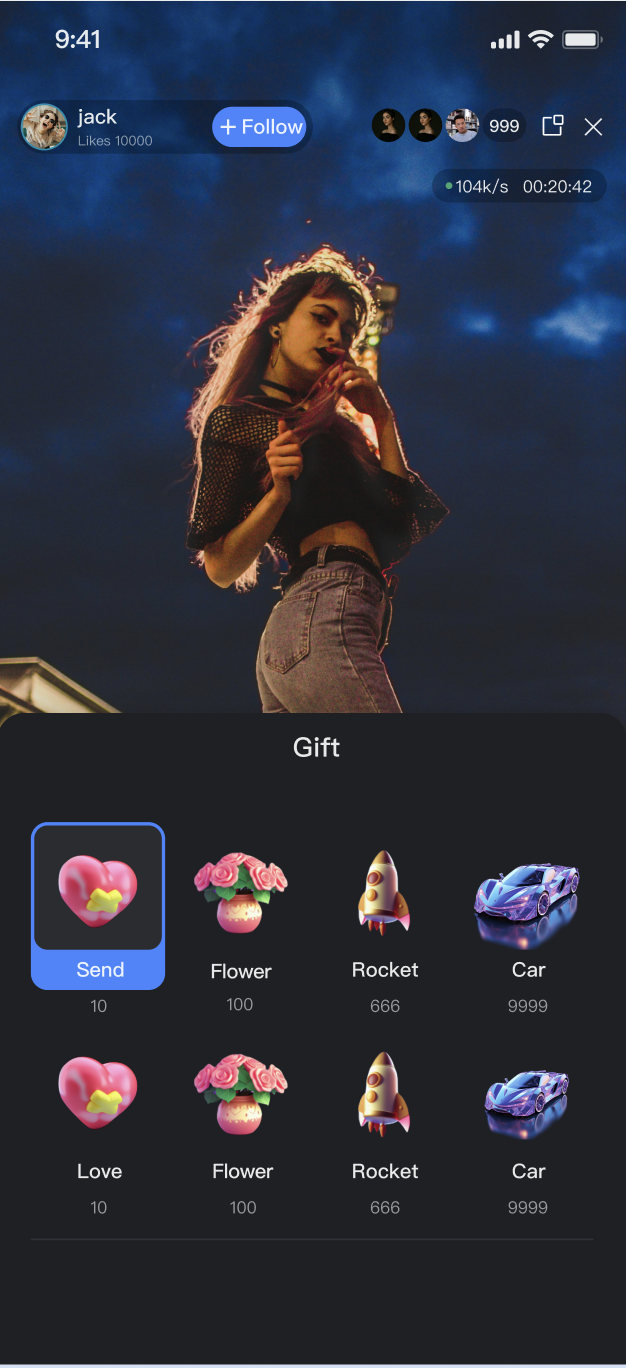
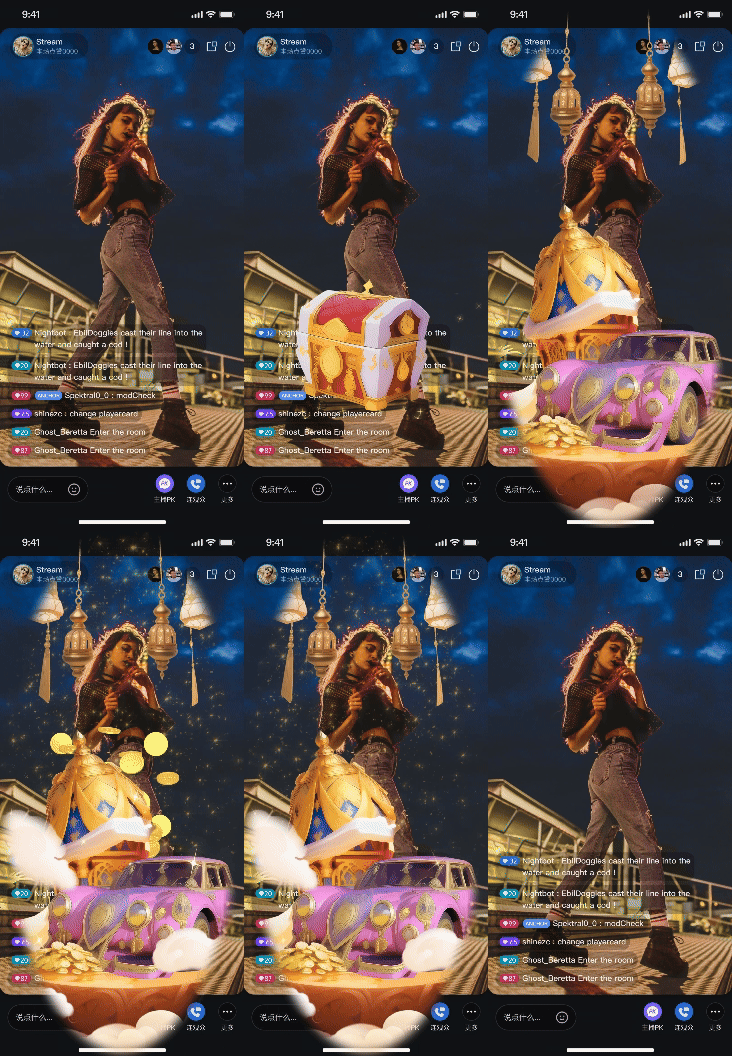
GiftStore is a dedicated module within AtomicXCore for managing live room gifting features. It enables you to build a complete gifting system for your live streaming application, supporting robust monetization and interactive experiences.Gift Panel | Barrage Gift | Full-Screen Gift |
 |  |  |
Core Concept | Type | Core Responsibilities & Description |
Gift | data class | Represents a gift data model, including ID, name, icon URL, animation resource URL (resourceURL), price (coins), and more. |
GiftCategory | data class | Represents a gift category (e.g., "Popular", "Luxury"). Contains the category name and a list of Gift objects. |
GiftState | data class | Represents the current state of the gift module. The core property, usableGifts, is a StateFlow containing the full gift list from the server. |
GiftEvent | abstract class | Defines the event listener for gift events in the live room. Currently, only onReceiveGift is available; all users in the room receive this event when any user sends a gift. |
GiftStore | abstract class | The core management class for gift features. Use it to fetch the gift list, send gifts, and receive gift events via listeners. |
GiftStore instance and set up listeners to receive gift events and updates to the gift list.GiftStore.create(liveID) to obtain a GiftStore instance for the current live room.GiftListener to receive onReceiveGift events.giftStore.giftState.usableGiftsto receive gift list updates.import io.trtc.tuikit.atomicxcore.api.gift.Giftimport io.trtc.tuikit.atomicxcore.api.gift.GiftCategoryimport io.trtc.tuikit.atomicxcore.api.gift.GiftListenerimport io.trtc.tuikit.atomicxcore.api.gift.GiftStoreimport io.trtc.tuikit.atomicxcore.api.live.LiveUserInfoimport kotlinx.coroutines.flow.StateFlowimport kotlinx.coroutines.flow.MutableStateFlowimport kotlinx.coroutines.flow.asStateFlowimport kotlinx.coroutines.CoroutineScopeimport kotlinx.coroutines.Dispatchersimport kotlinx.coroutines.launchclass GiftManager(private val liveId: String) {private val giftStore: GiftStore = GiftStore.create(liveId)private val coroutineScope = CoroutineScope(Dispatchers.Main)// Expose gift list externallyprivate val _giftList = MutableStateFlow<List<GiftCategory>>(emptyList())val giftList: StateFlow<List<GiftCategory>> = _giftList.asStateFlow()init {setupGiftListener()subscribeToGiftState()}// Subscribe to gift eventsprivate fun setupGiftListener() {giftStore.addGiftListener(object : GiftListener() {override fun onReceiveGift(liveID: String, gift: Gift, count: Int, sender: LiveUserInfo) {// Forward event to UI layer for processing}})}// Subscribe to gift list stateprivate fun subscribeToGiftState() {coroutineScope.launch(Dispatchers.Main) {giftStore.giftState.usableGifts.collect { giftList ->_giftList.value = giftList}}}}
Parameter | Type | Description |
categoryID | String | Unique ID of the gift category. |
name | String | Display name of the gift category. |
desc | String | Description of the gift category. |
extensionInfo | Map<String, String> | Extension information field. |
giftList | List | Array of Gift objects in this category. |
Parameter | Type | Description |
giftID | String | Unique ID of the gift. |
name | String | Display name of the gift. |
desc | String | Description of the gift. |
iconURL | String | Gift icon URL. |
resourceURL | String | Gift animation resource URL. |
level | Long | Gift level. |
coins | Long | Gift price. |
extensionInfo | Map<String, String> | Extension information field. |
refreshUsableGifts method to fetch gift data from the server.giftStore.refreshUsableGifts() at the appropriate time (e.g., after entering the live room).giftStore.giftState.usableGifts.class GiftManager(private val liveId: String) {private val giftStore: GiftStore = GiftStore.create(liveId)// Refresh the gift list from the serverfun fetchGiftList() {giftStore.refreshUsableGifts(object : CompletionHandler {override fun onSuccess() {println("Gift list fetched successfully")// Data will be updated via the giftState subscription}override fun onFailure(code: Int, desc: String) {println("Failed to fetch gift list: $desc")}})}}
sendGift API.giftID and quantity (count) from the UI.giftStore.sendGift(giftID, count, completion).callback to handle failures (e.g., insufficient balance). UI updates (animations, barrage) after a successful send should be triggered by the onReceiveGift event.class GiftManager(private val liveId: String) {private val giftStore: GiftStore = GiftStore.create(liveId)// Send a giftfun sendGift(giftID: String, count: Int) {giftStore.sendGift(giftID, count, object : CompletionHandler {override fun onSuccess() {println("Gift $giftID sent successfully")// All users, including the sender, will receive the onReceiveGift event}override fun onFailure(code: Int, desc: String) {println("Gift send failed: $desc")// Prompt user if needed, e.g., "Insufficient balance" or "Network error"}})}}
Parameter Name | Type | Description |
giftID | String | Unique ID of the gift to send. |
count | Int | Number of gifts to send. |
completion | CompletionHandler? | Callback invoked after sending completes. |
GiftStore are closely tied to your backend services. This section explains how to build a feature-rich gifting system through server-side configuration and client integration.LiveKit server REST API to manage gift information, categories, and multi-language support. See the Gift Configuration Guide.refreshUsableGifts to retrieve configuration data.List<GiftCategory> to populate the gift panel.
Interface Category | Interface | Request Example |
Gift Management | Add Gift Information | |
| Delete Gift Information | |
| Query Gift Information | |
Gift Category Management | Add Gift Category Information | |
| Delete Specific Gift Category Information | |
| Get Specific Gift Category Information | |
Gift Relationship Management | Add Relationship between a Specific Gift Category and Gift | |
| Delete Relationship between a Specific Gift Category and Gift | |
| Get Gift Relationships under a Specific Gift Category | |
Gift Multi-language Management | Add Gift Multi-language Information | |
| Delete Specific Gift Multi-language Information | |
| Get Gift Multi-language Information | |
| Add Gift Category Multi-language Information | |
| Delete Specific Gift Category Multi-language Information | |
| Get Gift Category Multi-language Information | |
sendGift.onReceiveGift event; if failed, the completion callback of sendGift receives an error.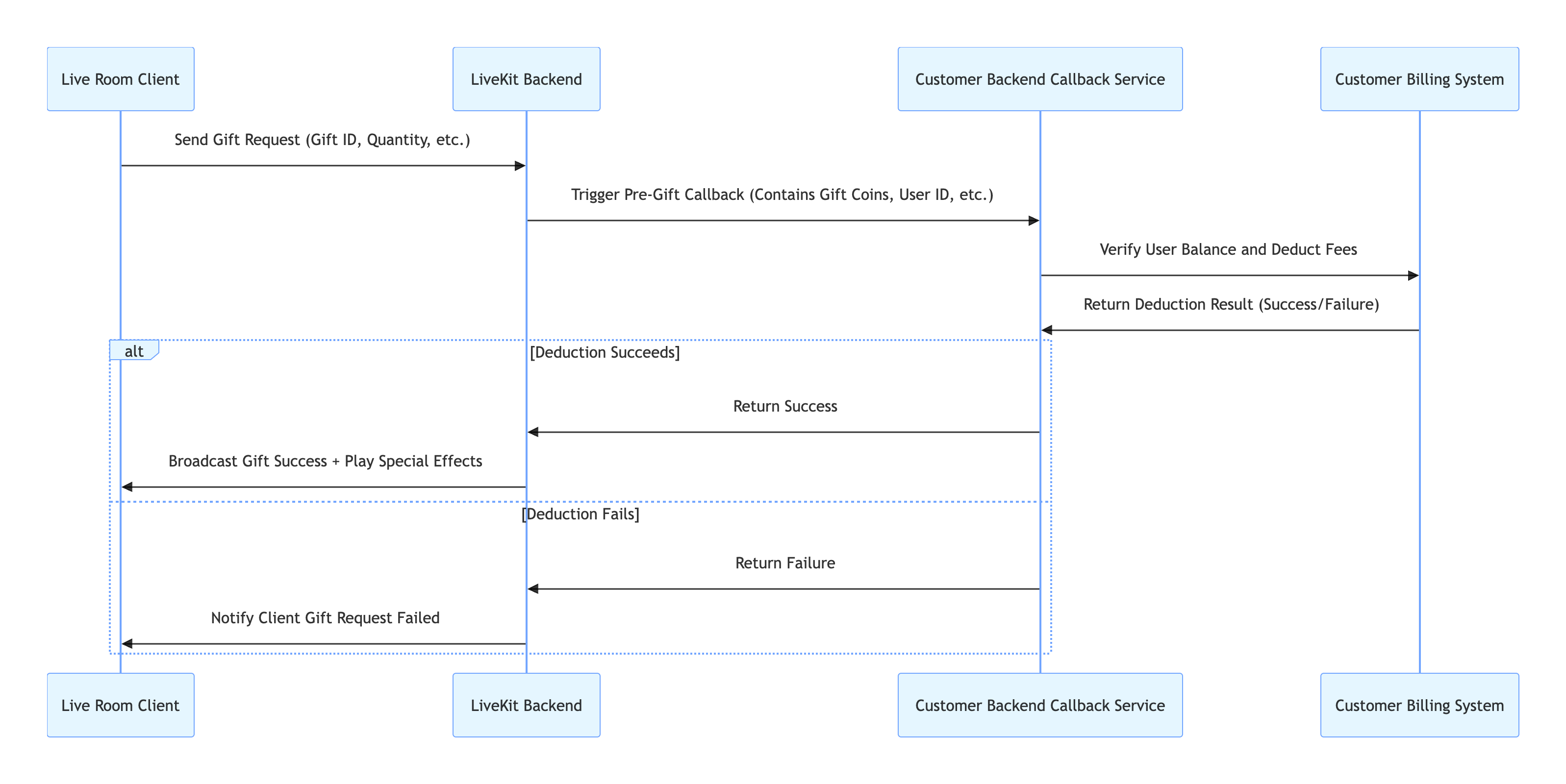
Interface | Description | Request Example |
Callback Configuration - Callback before sending a gift | The customer's backend can use this callback to decide whether to pass pre-gifting checks, etc. |
Comparison Item | Basic Solution (SVGAPlayer-Android) | Advanced Solution (TCEffectPlayerKit) |
Billing | Free (open source) | |
Integration Method | Manual integration via Gradle | Requires additional integration and authentication |
Supported Animation Formats | SVGA only | SVGA, PAG, WebP, Lottie, MP4, and more |
Performance | Recommended SVGA file size ≤ 10MB | Supports larger files, better performance for complex/multiple/low-end scenarios |
Recommended Scenario | Uniform SVGA format, controllable file size | Multiple formats or higher performance/device compatibility needs |
dependencies {// ... other dependenciesimplementation 'com.github.yyued:SVGAPlayer-Android:2.6.1'}
GiftListener in GiftStore.onReceiveGift, check if gift.resourceURL is a valid SVGA file. Use SVGAParser to parse and play the animation.import android.os.Bundleimport androidx.appcompat.app.AppCompatActivityimport com.opensource.svgaplayer.SVGAParserimport com.opensource.svgaplayer.SVGAVideoEntityimport com.opensource.svgaplayer.SVGAImageViewimport io.trtc.tuikit.atomicxcore.api.gift.Giftimport io.trtc.tuikit.atomicxcore.api.gift.GiftListenerimport io.trtc.tuikit.atomicxcore.api.gift.GiftStoreimport io.trtc.tuikit.atomicxcore.api.live.LiveUserInfoimport java.net.URLclass LiveRoomActivity : AppCompatActivity() {private lateinit var giftStore: GiftStoreprivate lateinit var svgaImageView: SVGAImageViewprivate lateinit var svgaParser: SVGAParseroverride fun onCreate(savedInstanceState: Bundle?) {super.onCreate(savedInstanceState)setContentView(R.layout.activity_live_room)setupSVGAPlayer()}private fun setupSVGAPlayer() {svgaImageView = findViewById(R.id.svga_player)svgaParser = SVGAParser(this)svgaImageView.visibility = android.view.View.GONE}fun setupGiftSubscription(liveId: String) {giftStore = GiftStore.create(liveId)giftStore.addGiftListener(object : GiftListener() {override fun onReceiveGift(liveID: String, gift: Gift, count: Int, sender: LiveUserInfo) {if (gift.resourceURL.isNotEmpty()) {try {val url = URL(gift.resourceURL)playAnimation(url)} catch (e: Exception) {println("Invalid animation URL: ${gift.resourceURL}")}}}})}private fun playAnimation(url: URL) {svgaParser.decodeFromURL(url, object : SVGAParser.ParseCompletion {override fun onComplete(videoItem: SVGAVideoEntity) {runOnUiThread {svgaImageView.setVideoItem(videoItem)svgaImageView.visibility = android.view.View.VISIBLEsvgaImageView.startAnimation()}}override fun onError() {println("SVGA animation parsing failed")// Optionally add retry or error reporting}})}}
GiftListener in giftStore.onReceiveGift, extract the sender, gift, and count.BarrageStore.create(liveID) for the current room.messageType = BarrageType.TEXT, and set textContent to your message.barrageStore.appendLocalTip(message: giftTip) to add the message to the local barrage list.import io.trtc.tuikit.atomicxcore.api.barrage.Barrageimport io.trtc.tuikit.atomicxcore.api.barrage.BarrageStoreimport io.trtc.tuikit.atomicxcore.api.barrage.BarrageTypeimport io.trtc.tuikit.atomicxcore.api.gift.Giftimport io.trtc.tuikit.atomicxcore.api.gift.GiftListenerimport io.trtc.tuikit.atomicxcore.api.gift.GiftStoreimport io.trtc.tuikit.atomicxcore.api.live.LiveUserInfoclass LiveRoomManager(private val liveId: String) {private val giftStore: GiftStore = GiftStore.create(liveId)private val barrageStore: BarrageStore = BarrageStore.create(liveId)private fun setupGiftToBarrageFlow() {giftStore.addGiftListener(object : GiftListener() {override fun onReceiveGift(liveID: String, gift: Gift, count: Int, sender: LiveUserInfo) {val tipText = "${sender.userName} sent ${gift.name} x $count"val giftTip = Barrage(liveID = liveID,messageType = BarrageType.TEXT,textContent = tipText)barrageStore.appendLocalTip(giftTip)}})}}
Store/Component | Feature Description | API Documentation |
GiftStore | Gift interactions: fetch gift list, send/receive gifts, listen for gift events (including sender and gift details). | |
BarrageStore | Barrage features: send text/custom barrage, maintain barrage list, listen to barrage status in real time. |
refreshUsableGifts(completion) to fetch gift data from your backend. Ensure your backend is configured with gift data via the server REST API.GiftStore.setLanguage(language: String) API before calling refreshUsableGifts, passing the target language code (e.g., "en" or "zh-CN"). The server will return gift names and descriptions in the specified language.onReceiveGift event is broadcast to all room members, including the sender. If you update the UI both in the sendGift completion callback and in the onReceiveGift event, the animation will play twice.onReceiveGift event handler. Use the sendGift completion callback only for handling failures (such as "Send failed" or "Insufficient balance").onReceiveGift events) are not affected by mute or frequency controls and are always delivered reliably.피드백