본 문서의 저작권은 텐센트 클라우드(Tencent Cloud)에 단독으로 귀속됩니다. 텐센트 클라우드의 사전 서면 승인 없이는 어떠한 주체도 본 문서 내용의 전부 또는 일부를 복제·수정·표절·전송하는 등 어떠한 형태로도 이용할 수 없습니다.
상표 고지
텐센트 클라우드(Tencent Cloud) 및 관련 서비스의 모든 상표는 텐센트(Tencent) 그룹 산하 법인들(모회사, 자회사 및 계열사 포함)이 소유합니다. 본 문서에 언급된 제3자 상표는 해당 법적 권리자가 소유합니다.
서비스 고지
본 문서는 고객에게 텐센트 클라우드(Tencent Cloud) 제품 및 서비스 전부 또는 일부에 대한 현재적 개괄적 정보를 제공 하기 위한 것으로, 특정 제품·서비스의 내용은 수시로 변경될 수 있습니다. 고객이 실제 구매한 제품·서비스의 적용 기준은 고객과 텐센트 클라우드간 체결된 상업계약에 명시된 내용이 우선하며, 별도 서면 합의가 없는 한 텐센트 클라우드는 본 문서 내용에 대해 법적 효력이 있는 명시적·묵시적 진술이나 보증을 일체 하지 않습니다.
UserSig is a password with which you can login to Chat service. It is the ciphertext generated by encrypting information such as userID.
How can I generate a UserSig?
The issuance method for UserSig involves integrating the calculation code of UserSig into your server, and providing an interface oriented towards your project. When UserSig is needed, your project sends a request to the business server to access the dynamic UserSig. For more information, please see generate UserSig.
Caution
The method for accessing UserSig adopted in the quick-start guide of chat-uikit-uniapp is to configure a SECRETKEY in the local code. In this method, the SECRETKEY is susceptible to decompilation and reverse engineering. In the event that your key is leaked, attackers can steal your Tencent Cloud traffic. Therefore, this method is only suitable for locally running function debugging. For the correct method of issuing UserSig, please refer to the above text.
TUIKit uses TypeScript for development. Is it possible to integrate it into a JavaScript project?
This project uses TypeScript for development but also supports direct integration into JavaScript projects.
Is integration possible in a project created with vue-cli?
Currently, projects created with vue-cli are not supported.
What should I do if the audio message time display error occurs when building a native app with uni-app?
When building a native app with uni-app, the recorderManager.onStop callback does not include duration and fileSize. Users are required to supplement the duration and fileSize.
Record the time using setInterval, to calculate duration.
Locally calculate the file size, where the file size = (audio bit rate) × time length (in seconds) / 8, for a rough estimate.
For detailed code, please refer to the implementation of uni-app TUIKit source code.
Caution
The Voice Message Service object must include attributes duration and fileSize, without fileSize, the duration of the Voice Message Service will display as an incorrect numeric string.
How can we implement the uploading of file messages?
uni-app official documentation suggests that chooseFile does not support APP choosing non-media files. Therefore, customers should choose the appropriate plugin from the plugin market based on their specific needs.
Refer to the available plugins in the plugin library: iOS Upload File Plugin, Android Upload File Plugin (unofficial) to complete file selection and format data in accordance with the file message data format requirements.
The file parameters are as follows:
Parameter
Type
Meaning
name
String
File Name (Necessary)
size
Number
File size (essential, cannot be 0)
type
String
File type (essential)
path
String
File Path (Necessary)
lastModified
String
Modification Time (Not Necessary)
Refer to the example format:
const fileData ={
files:[
{
name:'',// File name
size:10,//Local file size
type:'pdf',//File type
path:'',//Local file path
lastModified:'',// Modification time
},
],
};
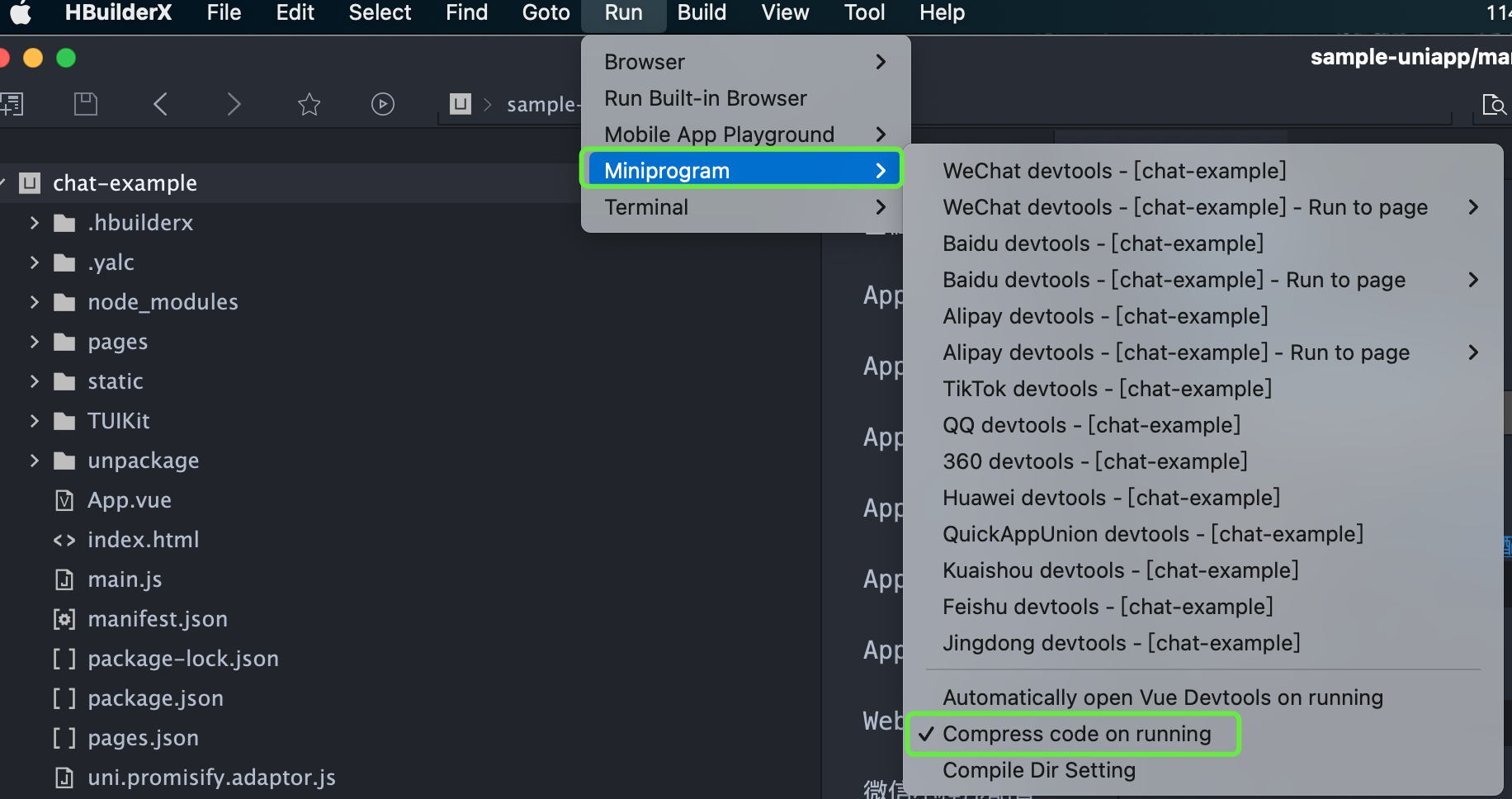
How can I elect to compress the code during runtime in a mini program?
What should I do when an exception error occurs while running in a mini program?
The issue may relate to the version of WeChat Developer Tools. Please use the latest developer tools, and ensure you have a stable debug library version.
What should I do if an error like this occurs when introducing native audio and video plugins?
What should I do if HBuilder reports an error: SyntaxError: Unexpected token '.'?
If the following error message appears after following the above access steps, it means that your current version of HBuilder is too low, please upgrade to the latest version.
How should I handle it if, after building the uni-app, I get a white screen and a prompt that says: '[Vue warn]: Property or method "isPC" is not defined'?
After considering the aforementioned content, proceed to import VueCompositionAPI in main.js file, and apply Vue.use(VueCompositionAPI), as demonstrated below:
Once the applet is integrated according to the documentation, clicking "Open TUIKIT Conversation" will initiate a conversation, leaving the rest of the content whitewashed, devoid of a conversation list. How does one resolve it?
Please refer to the documentation: quick start(uni-app)TUIKIT Source Code Integration/Step 2: Download and Introduce TUIKit/Integrate TUIKit Components. Strictly adhere to this section's four steps in sequential order for integration, especially the final item "Miniprogram Subpackage Home Page".
Note:
The mini program defaults to integrate via the subpackage process in order to prevent the main package from being oversized. Hence, if you wish to package a mini program, please do not skip the configuration of the "Miniprogram Subpackage Home Page".
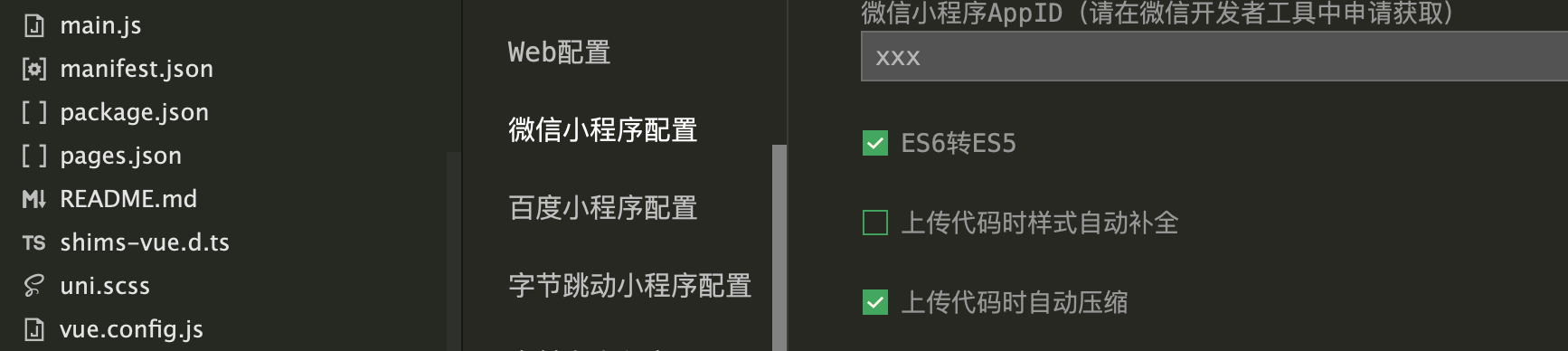
To package a mini program, please check the following options under project manifest.json > WeChat mini-program configuration
What should be done in the event the mini program needs to be launched or deployed to a production environment?
Please perform domain configuration in WeChat Official Platform > Development > Development Management > Development Setting > Server Domain Name:
Beginning from v2.11.2, the SDK supports WebSocket, and the subsequent versions must append the following domain names to the valid socket domains:
Domain name
Description
Is Mandatory
wss://wss.im.qcloud.com
Web Chat service domain
Essential
wss://wss.tim.qq.com
Web Chat service domain
Essential
Add the following domains to the request for valid domains:
Domain name
Description
Is Mandatory
https://web.sdk.qcloud.com
Web Chat service domain
Essential
https://webim.tim.qq.com
Web Chat service domain
Essential
https://api.im.qcloud.com
Web Chat service domain
Essential
Add the following domain name to the uploadFile valid domain name:
Domain name
Description
Is Mandatory
https://cos.ap-shanghai.myqcloud.com
File upload domain
Essential
https://cos.ap-shanghai.tencentcos.cn
File upload domain
Essential
https://cos.ap-guangzhou.myqcloud.com
File upload domain
Essential
Add the following domain name to downloadFile legal domain name:
프로 버전과 울티메이트 버전은 DAU 제한이 없습니다. 매월 처음 10,000 DAU는 무료입니다. 무료 할당량을 초과하는 DAU는 월 149.99 USD/1만DAU가 청구되며 1만 미만은 1만으로 계산됩니다. DAU 요금은 월 결산 후불제입니다. 한 달 내에 발생한 수수료는 익월 3일에 차감됩니다.
한 달 내내 일별 DAU가 10,000 미만인 경우, 해당 월의 DAU 한도 초과 요금은 발생하지 않습니다. 한 달 내 특정일의 DAU가 10,000을 초과하는 경우, 해당 월의 DAU 피크값을 기준으로 요금이 청구됩니다.
과금 규정에 관한 자세한 내용은 요금 안내를 참고하십시오.
IM에서 100개의 계정 생성 시 오류가 발생하면 어떻게 해야 합니까?
체험판은 최대 100개의 계정을 만들 수 있습니다. 프로덕션 환경에서 계정을 사용하려면 각 SDKAppID에 대한 요금 패키지를 구성해야 합니다. 또한 계정 삭제 인터페이스를 호출하여 체험판에서 원하지 않는 계정을 삭제할 수 있습니다. 계정이 삭제되면 사용자 데이터를 복구할 수 없으므로 주의하시기 바랍니다.
IM은 글로벌 액세스를 지원합니까?
IM은 높은 연결성, 높은 신뢰성, 강력한 보안성을 갖춘 글로벌 네트워크 연결 채널을 제공합니다. 자체 개발한 다중 최적 주소 지정 알고리즘 및 전체 네트워크 스케줄링 기능 보유하고 있습니다. 로그인 시 IM SDK는 가장 가까운 액세스 포인트 또는 가속 노드에 액세스합니다. 글로벌 액세스 가속 노드 분포는 다음과 같습니다.
중국: 화남, 화북, 화동, 홍콩, 대만 등
기타 국가(또는 지역):
아시아: 싱가포르, 인도네시아, UAE, 태국, 일본, 베트남, 인도, 한국 필리핀 등
유럽: 영국, 네덜란드, 독일, 이탈리아, 노르웨이, 프랑스, 러시아, 스페인 등
남미: 브라질 등
북미: 미국, 캐나다, 멕시코 등
오세아니아: 호주 등
아프리카: 남아공, 나이지리아 등
IM을 사용하면 최대 50개의 라이브 방송 그룹을 만들 수 있습니다. 3개를 만들고 3개를 삭제하면 몇 개의 라이브 방송 그룹을 만들 수 있습니까?
3개의 라이브 방송 그룹을 생성한 다음 3개를 삭제한 경우에도 50개를 생성할 수 있습니다. 생성할 수 있는 라이브 방송 그룹 수량은 net value이므로, 삭제된 그룹은 할당량에 포함되지 않습니다. 구성원이 없지만 삭제되지 않은 라이브 방송 그룹의 경우 수량에 포함됩니다.
최대 몇 개의 그룹을 만들 수 있습니까?
그룹 생성 수량은 제한이 없지만, 100,000개를 초과하는 그룹을 생성할 경우, 특정 리소스 요금을 지불해야 합니다. 총 그룹 수량은 net value입니다. 그룹을 삭제하면 전체 그룹 수에 포함되지 않습니다.
요금은 다음과 같습니다. 총 그룹 수가 100,000개를 초과하는 경우, 그룹 100,000개당 149.99 USD/월(100,000개 미만인 경우 100,000개로 청구됨)가 청구됩니다. 자세한 내용은 가격 문서의 설명을 참고하십시오.
음성/영상 통화 기능은 무료인가요? 이용 과정에서 다른 요금이 발생합니까?
음성/영상 통화 기능은 현재 베타 버전이며 60일 무료 버전이 제공됩니다. 정식 유료 버전은 2022년 12월에 출시될 예정입니다. 많은 관심 부탁드립니다.
음성/영상 통화 기능의 무료 체험판은 체험판 기능 무료 사용 권한만 제공합니다. 구체적인 기능은 음성/영상 통화 기능 세부 정보를 참고하십시오. 이 기능을 사용하는 과정 중 발생한 통화 시간 사용량은 TRTC 과금에 명시된 대로 요금이 부과되며 관련 IM 서비스는 IM 과금 개요에 명시된 대로 요금이 부과됩니다.
SDK 관련 질문
터미널 SDK 관련 질문
최종 업데이트 날짜::2024-02-22 14:44:18
TUIKit 소스 코드는 Androidx를 지원합니까?
네. TUIKit 소스 코드는 Androidx를 지원합니다.
로그인 시 6012 오류 또는 “TLSSDK exchange ticket fail”이 발생하는 이유는 무엇입니까?
초기화 API와 로그인 API는 별도로 호출해야 하며 연속적으로 호출할 수 없습니다(초기화 메소드에 비동기 작업이 있기 때문에).
IM 체험판을 사용 중이고 프로 버전으로 업그레이드하려는 경우, 업그레이드 후 콘솔에서 SDKAppID를 구성하여 정상적으로 로그인할 수 있습니다. 요금 정보는 제품 가격을 참고하십시오.
6013 "SDK가 초기화되지 않음" 오류가 발생하는 이유는 무엇입니까?
6013 "SDK가 초기화되지 않음" 오류가 발생하면 다음 문제 해결 방법을 시도하십시오.
1. 로그인하기 전에 메시지 수발신 등 다른 작업을 수행했는지 확인합니다.
2. 동일 계정이 다른 디바이스에서 이미 로그인되어 있는지 확인합니다. IM SDK는 기본적으로 하나의 계정으로 하나의 디바이스에 로그인할 수 있으며, 중복 로그인 시 강제 오프라인됩니다. 자세한 내용은 멀티 단말 동시 로그인 문서를 참고하십시오.
3. Android의 경우, 사용 도중 시스템에서 모든 라이브러리 파일을 로딩하거나 회수했는지 확인합니다.
"code: 6205 desc: QALSERVICE not ready"가 발생하는 이유는 무엇입니까?
초기화 후 stopQALService를 호출하면 이 오류가 발생합니다. 고객 중 한 명이 공유한 구성 방법을 참고하십시오.
이모티콘이 나타나지 않거나 깨짐 현상이 나타나는 이유는 무엇입니까?
IM은 이모티콘 패키지를 제공하지 않습니다. 실질적인 파싱은 자체 정렬해야 합니다.
이모티콘을 사용하는 방법에는 두 가지가 있습니다.
TIMFaceElem의 index를 사용하여 이모티콘의 인덱스를 식별합니다. 예를 들어, Android 디바이스와 iOS 디바이스에 동일한 이모티콘 세트가 있고, 인덱스 2는 웃음 이모티콘을 나타내는 경우, index=2일 때, 두 디바이스 모두 동일하게 색인된 이모티콘을 수/발신 합니다.
TIMFaceElem의 data를 사용합니다. 예를 들어, 이모티콘 이미지의 이름은 문자열 형식이며, smile 이라는 단어를 사용하여 웃음 이모티콘을 나타내고, smile을 data 에 저장합니다. 그런 다음 iOS 및 Android 디바이스 모두 data를 key로 사용하여 해당 이모티콘을 검색하고 표시합니다.
두 필드를 동시에 사용할 수도 있습니다. 예를 들어. data를 사용하여 이모티콘 세트를 지정하고, index를 사용하여 해당 이모티콘 세트의 특정 인덱스를 나타냅니다. 이런 식으로 QQ에서와 같이 다양한 이모티콘 효과를 구현할 수 있습니다. 디바이스가 동일한 파싱 규칙을 따른다면, 더 복잡한 데이터 구조를 data 데이터에 저장할 수 있습니다.
작업 중에 오류 10002가 발생하는 이유는 무엇입니까?
이 상태 코드는 서버 측 인증 중에 네트워크 예외, 시간 초과 또는 티켓 전환 실패가 발생할 때 반환됩니다. 이 상태 코드가 표시되면 잠시 기다렸다가 다시 시도하십시오.
메시지 수발신 시 오류 코드 6200 또는 6201이 발생하는 이유는 무엇입니까?
이 상태 코드는 클라이언트 오프라인, 타임 아웃, 연결 끊김 시 반환됩니다. 오류 6200은 요청 전송 중 네트워크 연결 없음을, 오류 6201은 응답 전송 중 네트워크 연결 없음을 나타냅니다. 이 상태 코드가 표시되면 네트워크 상태를 확인하거나 네트워크가 복원될 때까지 기다렸다가 다시 시도하십시오.
메시지 수발신 시 오류 코드 20003이 발생하는 이유는 무엇입니까?
이 오류 코드는 사용자 계정(UserID)이 유효하지 않거나, UserID를 IM으로 가져오지 않은 경우 반환됩니다. 이를 수정하려면 UserID를 Tencent Cloud로 가져왔는지 확인하십시오.
음성 메시지 재생 시 오류 코드 6010이 발생하는 이유는 무엇입니까?
로밍 서버에서 더 이상 저장하지 않는 음성 메시지를 요청하면 이 오류 코드가 반환됩니다. 로밍 시간 연장을 통해 이를 수정하거나, 오디오 파일을 로컬 저장소에 다운로드하여 재생합니다. 만료된 파일은 복원할 수 없습니다. 다양한 SDK 버전을 통해 다양한 메시지 유형에 대한 저장 기간을 늘릴 수 있습니다. 자세한 내용은 메시지 저장을 참고하십시오.
계정 인증 중 오류 코드 70001, 70003, 70009 또는 70013이 발생하는 이유는 무엇입니까?
이러한 오류는 UserID와 UserSig가 일치하지 않기 때문에 발생합니다. 이를 수정하려면 UserID 및 UserSig의 유효성을 확인하십시오. 오류 코드 70001은 UserSig 만료, 오류 코드 70003은 잘린 UserSig로 인한 인증 실패, 오류 70009는 UserSig 공개키 확인 실패, 오류 70013은 UserID 불일치를 나타냅니다.
Web 클라이언트 애플리케이션의 IM SDK 사용 시 오류 코드 -2 또는 -5가 발생하는 이유는 무엇입니까?
-2: 일반적으로 네트워크 문제로 인해 서버에 대한 Web 애플리케이션 요청이 실패했음을 나타냅니다. Web 애플리케이션이 HTTP Long Polling 방법을 사용하여 서버에 요청 발송 시, 네트워크 문제가 발생하면 이 상태 코드가 반환됩니다. 문제를 해결하려면 네트워크를 확인하거나 다시 시도하십시오.
-5: 로그인 작업이 완료되지 않았으며, SDK가 서버에서 반환된 a2key 및 tinyID를 수신하지 못한 경우, 다른 API를 직접 호출하면 "tinyid or a2 is empty" 오류 메시지와 -5 오류 코드가 반환됩니다.
armeabi 플랫폼의 SDK가 "java.lang.UnsatisfiedLinkError: No implementation found for"의 오류 보고 시 어떻게 해결합니까?
IM SDK의 aar 파일에 있는 jni/armeabi-v7a/libImSDK.so를 소스 코드 프로젝트의 src/main/jniLibs/armeabi 디렉터리에 복사하고 build.gradle에 로딩합니다.
애플리케이션 App Store 런칭 시, x86_64 및 i386 아키텍처 오류가 발생하면 어떻게 해결합니까?
이 오류는 App Store가 x86_64 및 i386 아키텍처를 지원하지 않기 때문에 발생합니다. 해결방법은 다음과 같습니다.
1. 프로젝트 컴파일 캐시 지우기:
[Product]>[clean]을 선택하고 "clean build Folder..."가 나타날 때까지 Alt를 누른 다음 작업이 완료될 때까지 기다립니다.
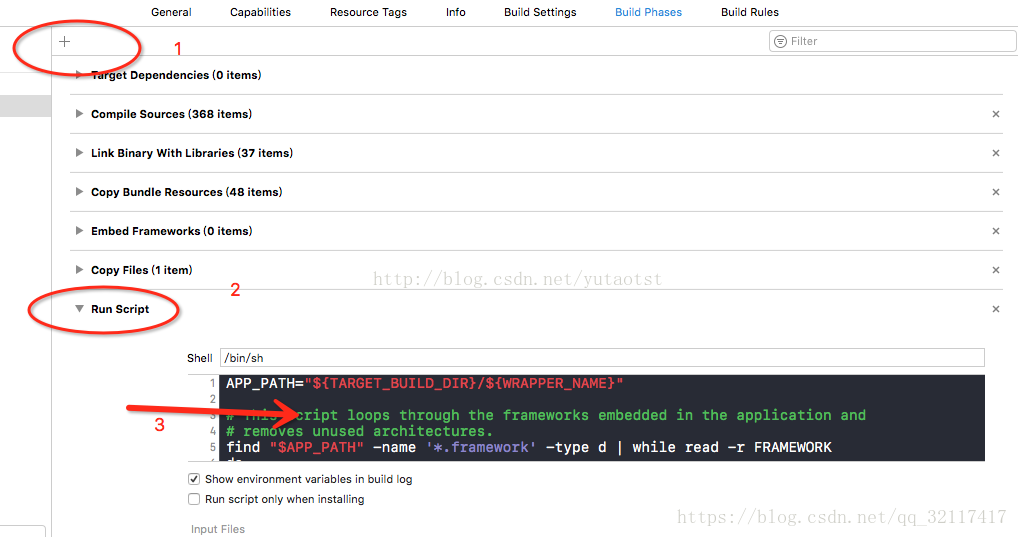
2. App Store에서 지원하지 않는 x86_64 및 i386 아키텍처를 제거합니다.
a. [TARGETS]>[Build Phases]를 선택합니다.
b. 덧셈 부호를 클릭하고, [New Run Script Phase]를 선택합니다.
c. 다음 코드를 추가합니다.
APP_PATH="${TARGET_BUILD_DIR}/${WRAPPER_NAME}"
# This script loops through the frameworks embedded in the application and
# removes unused architectures.
find"$APP_PATH" -name '*.framework' -type d |whileread -r FRAMEWORK
at com.tls.tls_sigcheck.tls_gen_signature_ex2(Native Method)
at Demo.main(Demo.java:31)
동적 라이브러리 경로의 잘못된 요소를 배제한 후, 코드의 package 경로가 올바른지 확인합니다. API 이름은 JNI 동적 라이브러리 컴파일 중 package 경로를 통해 생성됩니다. 따라서 tls_sigcheck.java에서 package 경로를 수정하여 컴파일하지 마십시오. 그렇지 않으면 위와 같은 문제가 발생합니다.
JNI 방식으로 APl를 사용할 때 다음과 같은 문제가 발생하면 어떻게 해야 합니까?
Exception in thread “main” java.lang.UnsatisfiedLinkError: *** Can't load IA 32-bit *** on a AMD 64-bit platform
이는 전형적인 JVM과 동적 라이브러리 간의 불일치를 나타냅니다. 이를 수정하려면 32비트 동적 라이브러리를 사용하여 32비트 JVM을 로딩하십시오.
IM 로그인 인증을 위한 중요한 자격 증명인 UserSig의 기본 유효 기간은 180일이며 기본 API를 통해서만 수정할 수 있습니다. 다른 API 및 도구는 유효 기간을 수정할 수 없습니다. UserSig의 유효 기간은 최대 50년까지 설정할 수 있습니다. 계정 보안을 위해 유효 기간을 2개월로 설정할 것을 권장합니다. 자세한 내용은 UserSig 생성을 참고하십시오.
공개키와 개인키가 일치하는지 확인하십시오. IM Demo의 개인 키를 사용하여 UserSig를 생성하지 마십시오.
IM 계정을 가져오지 않았을 때 다음과 같은 문제가 발생하면 어떻게 해야 하나요?
오류 코드 10019가 발생하는 경우
요청의 UserID가 존재하지 않습니다. MemberList의 각 Member_Account가 올바른지 확인하십시오.
오류 10007가 발생하는 경우
작업 권한이 없습니다. (예: Public 그룹의 일반 구성원이 그룹에서 구성원을 제거하려고 시도하지만 권한은 App 관리자에게만 있음)
오류 20003가 발생하는 경우
메시지 수신자 또는 발신자의 User ID가 잘못되었거나 존재하지 않습니다. UserID를 IM 콘솔로 가져왔는지 확인하십시오.
설명:
계정을 생성하고 API 호출을 통해 계정을 IM으로 가져와야 합니다. 계정은 가져오기 후에만 사용할 수 있습니다.
사용자 정보 및 관계망
최종 업데이트 날짜::2021-09-16 11:33:01
오류 코드 30001이 발생하는 이유는 무엇입니까?
오류 코드 30001 발생 가능 원인은 다음과 같습니다.
1. 요청 매개변수 오류.
2. 사용자 A가 사용자 B 친구 추가 요청을 했지만, 사용자 B가 이미 사용자 A의 친구 목록에 있는 경우.
3. 사용자 A가 사용자 B 친구 삭제 요청을 했지만, 사용자 B가 사용자 A의 친구 목록에 없는 경우.
4. 사용자 A가 친구 B의 관계망 데이터 업데이트를 위해 친구 업데이트 요청을 했지만, 친구 B가 사용자 A의 친구 목록에 없는 경우.
5. 사용자 A가 친구 B의 관계망 데이터 가져오기를 요청했지만, 친구 B가 사용자 A의 친구 목록에 없는 경우.
6. 사용자 A가 사용자 B 블랙리스트 추가 요청을 했지만, 사용자 B가 이미 사용자 A의 블랙리스트에 있는 경우.
7. 사용자 A가 블랙리스트에서 사용자 B를 제거하기 위한 요청을 했지만, 사용자 B가 사용자 A의 블랙리스트에 없는 경우.
IM 백엔드는 오류 코드 반환 시 자세한 오류 정보도 반환합니다. 사용자는 오류 정보를 기반으로 오류 원인을 식별할 수 있습니다.
프로필 정보/관계망 시스템의 REST API 호출 시, 오류 코드 30004/40004가 반환되면 어떻게 해야 합니까?
프로필 정보/관계망 시스템 요청 패킷에는 요청자를 나타내는 데 사용되는 From_Account 필드가 포함되어 있습니다. 요청 패킷의 From_Account 필드 값이 실제 요청자와 일치하지 않는 경우, IM 백엔드는 요청이 App 백엔드에서 전송된 것으로 간주합니다. 이 경우 백엔드는 요청자에게 App 관리자 권한이 있는지 확인합니다. 확인 결과 관리자가 아닌 경우, 오류 코드 30004/40004가 반환됩니다.
친구가 아닌 사용자가 보낸 메시지 관련 사항은 어떻게 설정합니까?
친구가 아닌 사용자가 메시지를 보낼 수 있도록 하려면, IM 콘솔에서 1:1 채팅 메시지 관계망 확인을 비활성화합니다. 친구가 아닌 사용자가 메시지를 보내는 것을 금지하려면 이를 활성화합니다. 설정 적용에는 5분이 소요됩니다.
메시지
최종 업데이트 날짜::2024-10-23 11:57:57
IM과 TPNS를 동시에 통합한 후 많은 벤더 충돌이 발생합니다. 어떻게 해야 하나요?
현재 IM은 TPNS에서 제공하는 벤더 jar 패키지를 사용합니다. Offline Push (Android) 문서를 참고하여 관련 종속성 패키지를 교체하면 이 문제를 해결할 수 있습니다.
메시지 미수신 또는 메시지 손실 시 어떻게 해결합니까?
1:1 채팅 메시지
메시지가 성공적으로 발송되었는지 확인합니다.
수신자가 성공적으로 로그인했는지 확인합니다.
메시지를 보낸 대화가 수신자의 대화와 일치하는지 확인합니다.
그룹 메시지
메시지가 성공적으로 발송되었는지 확인합니다.
수신자가 성공적으로 로그인했는지 확인합니다.
수신자가 그룹 구성원인지 확인합니다.
C2C 메시지 또는 그룹 메시지 모두 상기 방법으로 문제를 확인할 수 없는 경우, 다음 내용을 확인하십시오.
1. 메시지 리스너가 등록되었는지 확인합니다.
2. 발신자가 메시지를 보낼 때 메시지에 ‘elem’을 추가했는지 확인합니다(메시지를 보낼 때 ‘addElement’의 반환 값 확인).
3. Android 사용자의 경우 여러 메시지 리스너 등록 여부 및 메시지 리스너에 ‘true’ 반환 여부를 확인합니다.
6. 여전히 문제를 진단할 수 없으면, 기술 지원 담당자에게 관련 정보를 제공하여 해결할 수 있습니다.
홍바오 메시지는 어떻게 처리됩니까?
홍바오 메시지는 @ 메시지와 유사하며 ‘TIMCustomElem’을 통해 구현할 수 있습니다. 홍바오 메시지는 앱이 UI에서 특수 처리를 수행해야 합니다. 예를 들어, 시스템이 현재 메시지가 홍바오 메시지임을 감지하면 메시지는 홍바오 형태로 표시됩니다.
또한, 홍바오 메시지는 중요한 메시지이므로, 홍바오 메시지 우선 순위를 높게 설정하는 것이 좋습니다. 우선 순위를 높게 설정하면, 홍바오 메시지가 메시지 빈도 제한에 걸리더라도 전달될 가능성이 높아집니다(기본 빈도 제한: 그룹 메시지 40개/초, 1:1 메시지: 5개/초).
1:1 메시지 및 라이브 방송 그룹 외 기타 그룹 메시지는 메시지 기록 저장 기능을 지원합니다.IM 콘솔 에 로그인하여 관련 설정을 수정할 수 있습니다. 패키지별 기본 구성은 다음과 같습니다.
체험판: 7일, 연장 불가능
프로 에디션: 7일, 연장 가능
플래그십 에디션: 30일, 연장 가능
메시지 기록 보관 기간 연장은 부가 가치 서비스입니다. 자세한 내용은 부가 가치 서비스 요금을 참고하십시오.
발신자가 블록리스트에 포함되었는데 왜 계속 메시지에 발송 성공이라고 표시되나요?
IM 콘솔의 블록리스트 확인에서 메시지 발송 후 발송 성공 표시 기능을 제공합니다. 해당 기능을 활성화하면 블록리스트에 포함된 사용자가 메시지를 발송한 후에도 발송 성공이 표시됩니다(실제로 상대방은 메시지를 수신하지 않음). 해당 설정을 비활성화하면 블록리스트에 추가된 사용자는 메시지 발송 후 실패 알람을 받으며 SDK는 에러 코드 20007를 수신합니다. 자세한 설정은 블록리스트 확인 문서를 참고하십시오.
COS를 사용하여 이미지 주소를 다운로드 가능한 도메인 형식으로 변경하는 방법은 무엇입니까?
업로드는 사용자가 처리해야 합니다. 스토리지 서비스 비공개 읽기를 사용하는 경우 다운로드 권한을 보장하기 위해 URL 서명이 필요합니다(사전 서명된 URL을 통해 다운로드).
IM 메시지의 고유 식별 규칙은 무엇입니까?
IM 클라이언트 1:1 채팅/그룹 채팅 메시지, Web 1:1 채팅/그룹 채팅 메시지 및 서버 1:1 채팅 메시지 고유 식별자는 각각 msg_id, msgID 및 msgKey에 해당합니다.
각 서로 다른 유형의 메시지를 고유하게 식별하는 규칙은 서로 다르며 구체적인 규칙은 다음과 같습니다.
클라이언트 1:1 채팅/그룹 채팅 메시지의 msg_id 구성은 tinyid-clientTime-random입니다.
Web 1:1 채팅/그룹 채팅 메시지의 msgID 구성은 (v2.17.0 이하): 세션 id-msgSeq-random-1(내가 보낸 메시지) / 0(내가 보내지 않은 메시지)입니다.
Web 1:1 채팅/그룹 채팅 메시지의 msgID 구성은 (v2.18.0 이상): tinyid-clientTime-random입니다.
서버 1:1 채팅 메시지 msgKey의 구성은 clientSeq_random_serverTime입니다.
서버 그룹 채팅 메시지는 그룹 id + msgSeq로 고유하게 식별됩니다.
라이브 그룹과 커뮤니티는 @ 메시지를 지원합니까?
라이브 그룹(AVChatRoom)은 @ 메시지 보내기를 지원하지 않으며 커뮤니티(Community)는 @ 단일 사용자를 지원하며 @ALL을 지원하지 않습니다.
그룹
최종 업데이트 날짜::2024-02-22 14:51:48
그룹 채팅에서 그룹 구성원을 음소거 또는 음소거 해제하려면 어떻게 합니까?
음소거는 그룹 구성원의 메시지 발송을 제어하는 방법입니다. 음소거된 구성원은 음소거된 기간 동안 메시지를 보낼 수 없습니다. 구성원 음소거 방법에 대한 자세한 내용은 다음 SDK 문서를 참고하십시오.
그룹 관리자와 그룹 소유자는 IM SDK에서 제공하는 API를 통해 구성원을 음소거하거나 음소거를 해제할 수 있습니다. (구성원 음소거를 해제하려면 음소거 시간을 0으로 설정합니다.)
구성원 음소거 관련 정보를 조회하려면, 그룹 구성원 프로필 정보를 조회합니다. 자세한 내용은 다음 SDK 문서를 참고하십시오.
그룹 참여 전의 그룹 메시지 기록을 보려면, 이 그룹 유형에 대한 메시지 기록이 클라우드 스토리지를 지원해야 합니다. 그룹 유형 및 시나리오에 따라 다음 설정이 적용됩니다.
라이브 방송 그룹(AVChatRoom) 및 이전 버전의 **온라인 방송 채팅방(BChatRoom)**은 메시지 기록 저장이 지원되지 않습니다. 따라서 이 두 가지 유형의 그룹은 참여 전 메시지를 볼 수 없습니다.
라이브 방송 그룹 외 기타 그룹의 경우, 업무 그룹(Work) 및 **공개 그룹(Public)**은 기본적으로 구성원이 그룹 참여 전 메시지 기록을 볼 수 있도록 허용하지 않는 반면, **회의 그룹(Meeting)**은 기본적으로 구성원이 메시지 기록을 볼 수 있도록 허용합니다. 이러한 기본 설정은 티켓 제출을 통해 변경 신청할 수 있습니다.
라이브 방송 그룹 외 기타 그룹의 메시지 기록의 기본 저장 기간은 7일(울티메이트 버전의 경우 30일)입니다. 이 기간을 연장하려면 콘솔 > [기능 설정]에서 설정할 수 있습니다.메시지 저장 기간 연장은 유료 부가 가치 서비스입니다. 과금 관련 자세한 내용은 요금 안내를 참고하십시오.
AVChatRoom과 Meeting(이전 버전의 ChatRoom)의 차이점은 무엇입니까?
이 두 가지 유형의 그룹은 서로 다른 시나리오에 맞게 설계되었습니다. Meeting는 중간 규모의 그룹(구성원 6,000명 미만)에 적합합니다. AVChatRoom은 인원 제한이 없는 대규모 라이브 방송 시나리오에 적합합니다. 주요 차이점은 다음 표와 같습니다.
그룹 기능
Meeting
AVChatRoom
그룹 인원 제한
6000명
무제한
그룹 구성원 정보 저장
모든 구성원 정보
구성원 정보를 저장하지 않음
그룹 소유자의 그룹 관리자 설정
지원
미지원
그룹 구성원 삭제
그룹 관리자, 그룹 소유자, App 관리자는 그룹 구성원 삭제 지원
미지원
메시지 로밍
지원
미지원
그룹 가입 전 메시지 기록 보기
메시지 기록 저장 기간 내 메시지 보기 지원(기본값)
미지원
구성원 변경 알림
미지원
지원
App 관리자의 그룹 가져오기
지원
미지원
그룹/그룹 구성원 레벨의 사용자 정의 필드의 값을 가져올 수 없는 이유는 무엇입니까?
다음 방법으로 문제를 진단합니다.
1. 콘솔에서 사용자 정의 필드가 올바르게 구성되었는지 확인합니다.
2. 요청자에게 읽기 권한이 있고 그룹 유형이 사용자 정의 필드를 지원하는지 쿼리 요청에서 확인합니다.
3. 사용자 정의 필드의 구성 요청이 성공했는지 확인합니다.
4. 그룹 사용자 정의 필드의 경우:
iOS: IM SDK에 로그인하기 전에 TIMManager > setUserConfig > TIMUserConfig > TIMGroupInfoOption > groupCustom으로 이동하여 설정합니다.
Android: IM SDK에 로그인하기 전에 TIMManager > setUserConfig > TIMUserConfig > TIMGroupSettings > groupInfoOptions > setCustomTags로 이동하여 설정합니다.
5. 그룹 구성원 사용자 정의 필드의 경우:
iOS: IM SDK에 로그인하기 전에 TIMManager > setUserConfig > TIMUserConfig > TIMGroupMemberInfoOption > memberCustom으로 이동하여 설정합니다.
Android: IM SDK에 로그인하기 전에 TIMManager > setUserConfig > TIMUserConfig > TIMGroupSettings > memberInfoOptions > setCustomTags로 이동하여 설정합니다.
라이브 방송 그룹
최종 업데이트 날짜::2024-02-22 14:54:16
발송한 메시지의 'Message.nick', 'Message.avatar'가 모두 비어 있습니다. 어떻게 해야 인터페이스에 닉네임과 프로필 사진이 정상적으로 표시됩니까?
음소거(발언 금지) 기능은 사용자 정의 메시지를 통해 구현될 수 있으며, 사용자 정의 메시지에 음소거 대상 Members_Account, 음소거 시간이 포함되어 있어야 합니다. 그룹 내 발언 전 콜백을 통해 해당 사용자 정의 메시지를 비즈니스 백엔드에 발송하고, 비즈니스 백엔드에서 일괄 음소거 및 음소거 취소 인터페이스를 호출하여 지정 사용자에 대한 음소거 기능을 구현할 수 있습니다.
라이브 방송 그룹에서 내보내기 기능은 어떻게 구현합니까?
내보내기 기능은 사용자 정의 메시지를 통해 구현할 수 있으며, 사용자 정의 메시지에는 내보내기 대상자의 Members_Account가 포함되어 있어야 합니다. 해당 메시지의 우선순위를 High로 설정하여, 메시지 빈도 제한(40개/초)에 걸려 백엔드로부터 폐기되지 않도록 합니다. 내보내기 대상자 SDK가 해당 메시지를 수신한 후, kickGroupMember API를 호출하여 라이브 방송 그룹에서 내보내기 기능을 구현합니다.
미니프로그램/Web에서 그룹 퇴장 API를 호출하면, Android/iOS/PC에서도 동시에 그룹 퇴장되는데, 반대로 Android/iOS/PC에서 그룹 퇴장 API를 호출하면 미니프로그램/Web에서는 그룹 퇴장이 되지 않는 이유는 무엇입니까?
미니프로그램/Web은 사용자가 게스트 신분으로 액세스하는 것을 허용하기 때문에, Android/iOS/PC에서 그룹 퇴장한 후에도 미니프로그램/Web에서는 그룹 퇴장 작업이 자발적으로 트리거되지 않습니다.
모든 클라이언트에서 동기화된 그룹 퇴장을 구현하려면, 그룹 구성원 퇴장 후 콜백을 구성하고, OptPlatform 필드를 통해 퇴장 플랫폼을 판단합니다. 퇴장 플랫폼이 Android/iOS/PC인 경우, 1:1 채팅 메시지 발송 API를 호출하여 시스템 메시지 방식으로 그룹 퇴장 구성원에게 사용자 정의 메시지를 발송하면 프론트 엔드는 대화를 차단하고 UI에 표시하지 않습니다. 미니프로그램/Web은 해당 메시지를 수신한 후, quitGroup API를 호출합니다.
단일 클라이언트 퇴장을 구현하려면, 그룹 구성원 퇴장 후 콜백을 구성하고, OptPlatform 필드를 통해 퇴장 플랫폼을 판단한 후, 1:1 채팅 메시지 발송 API를 호출하여 시스템 메시지 방식으로 그룹 퇴장 구성원에게 사용자 정의 메시지를 발송하면 프론트 엔드는 대화를 차단하고 UI에 표시하지 않습니다. 퇴장하지 않는 플랫폼은 해당 메시지를 수신한 후, joinGroup API를 호출하여 그룹에 입장합니다. 그룹 입/퇴장 대한 시스템 알림을 중단하려면, 티켓을 제출하여 그룹 입/퇴장 시스템 알림을 비활성화할 수 있습니다.
메시지가 손실되는 원인은 무엇입니까?
메시지가 손실되는 가능 원인은 다음과 같습니다.
라이브 방송 그룹의 메시지 전송 빈도 제한은 초당 40개입니다. 메시지 발송 전/후 콜백을 통해 빈도 제한으로 인한 메시지 폐기 여부를 판단할 수 있습니다. 메시지가 그룹 메시지 발송 전 콜백을 수신하지만 발송 후 콜백은 수신하지 않는 경우, 해당 메시지는 빈도 제한에 걸린 것입니다.
미니프로그램/Web단에서의 그룹 퇴장으로 인하여 Android/iOS/PC에서 퇴장이 되었는지에 대한 판단은 FAQ를 참고하시기 바랍니다.
미니프로그램/Web에 문제가 있는 경우, 사용 중인 SDK 버전을 확인하고, V2.7.6 이전 버전이면 최신 버전으로 업그레이드 하시기 바랍니다.
상기 원인에 해당되지 않는 경우, 티켓 제출을 통해 문의주시기 바랍니다.
좋아요/팔로우 수는 어떻게 알 수 있습니까?
먼저 좋아요/팔로우 메시지 유형을 사용자 정의합니다. 사용자가 프론트 엔드의 좋아요/팔로우 icon을 클릭하여 사용자 정의 메시지 전달을 트리거하면, 좋아요/팔로우 메시지는 그룹 내 발언 전 콜백을 통해 비즈니스 측에 전달됩니다. 비즈니스 측은 수신된 좋아요/팔로우 메시지 수를 합산하여 3초~5초마다 그룹 기본 정보 수정 API를 통해 해당 데이터를 그룹 정보 필드에 업데이트하고, SDK는 getGroupsInfo API를 통해 좋아요/팔로우 수를 통계합니다.
메시지 우선순위를 합리적으로 설정하는 방법은 무엇입니까?
라이브 방송 그룹은 중요한 메시지가 폐기되는 것을 방지하기 위해 모든 메시지에 대해 3가지 우선순위 옵션을 제공합니다. SDK는 우선순위가 높은 메시지를 먼저 받게 되며, 사용자 지정 메시지 우선 순위 설정에 대한 권장 방법은 다음과 같습니다.
대화 자체에는 닉네임과 프로필 사진이 저장되지 않습니다. 따라서 SDK는 로컬에 저장된 사용자 프로필 정보 또는 그룹 프로필 정보를 가져와 대화에 사용합니다. 1:1 대화의 경우 SDK는 다른 사용자의 닉네임과 프로필 사진을 가져와 사용합니다. 그룹 대화의 경우 SDK는 그룹 이름과 그룹 프로필 사진을 가져와 사용합니다. 로컬 사용자 프로필 정보 및 그룹 프로필 정보를 최신 상태로 유지하기 위해, 최신 SDK 버전은 다음과 같이 최적화되었습니다.
1:1 대화:
ⅰ. 사용자가 대화를 자발적으로 가져오기 하거나 SDK가 대화 업데이트를 콜백할 때, SDK가 로컬에 다른 사용자의 프로필 정보가 없음을 감지하면, 서버에서 사용자 프로필 정보를 동기화하고 로컬에 저장합니다.
ⅱ. 친구의 프로필 정보가 변경되면, SDK는 백엔드에서 변경 알림을 수신하고, 친구의 프로필 정보를 로컬로 업데이트합니다. 낯선 사람의 프로필 정보가 변경되면 백엔드에서 알림을 보내지 않으므로, 낯선 사람의 프로필 정보는 로컬에 업데이트되지 않습니다. 낯선 사람의 프로필 정보를 가져와 로컬에 업데이트하려면 getFriendsInfo API를 자발적으로 호출해야 합니다.
ⅲ. 메시지를 보낼 때 백엔드는 사용자의 최신 닉네임과 프로필 사진을 메시지 본문에 첨부합니다. 메시지 수신 후 사용자의 프로필 정보가 이미 로컬 저장소에 있는 경우, SDK는 닉네임과 프로필 사진을 로컬에 업데이트합니다.
상기 내용을 요약하면, SDK는 친구와의 대화에서 닉네임과 프로필 사진이 최신 상태인지 확인합니다. 낯선 사람과의 대화에서는 SDK는 이를 보장할 수 없으며, 필요한 경우 닉네임과 프로필 사진을 가져오기 해야 합니다.
그룹 대화:
그룹에 참여하면 SDK가 자발적으로 그룹 프로필 정보를 가져와 로컬에 저장합니다.
가입한 그룹의 프로필 정보가 수정되면, 백엔드에서 클라이언트에게 이를 알리고 클라이언트는 즉시 로컬에 그룹 프로필 정보를 업데이트합니다.
상기 내용을 요약하면, SDK는 참여한 그룹의 닉네임과 프로필 사진이 최신 상태인지 확인합니다. 참여하지 않았거나 탈퇴한 그룹에 대해서는 해당 작업을 진행하지 않습니다.
주의:
사용자 프로필 정보 또는 그룹 프로필 정보를 변경해도 대화 업데이트가 트리거되지 않습니다. 따라서 대화의 닉네임과 프로필 사진은 다음 번 대화 작업(예: 자발적인 대화 가져오기, 대화를 읽은 상태로 표시, 메시지 수발신)이 수행될 때까지 업데이트되지 않습니다.
나 자신과 낯선 사람 사이에는 관계망이 없습니다. 낯선 사람의 프로필 정보가 변경되면, 백엔드는 알림을 보내지 않으며, 낯선 사람의 로컬 프로필 정보는 업데이트되지 않습니다. 낯선 사람의 프로필을 자발적으로 풀링할 때만 업데이트됩니다.
메시지 목록의 닉네임 및 프로필 사진 업데이트
메시지에는 닉네임과 프로필 사진이 저장됩니다. 메시지의 닉네임과 프로필 사진을 최신 상태로 유지하기 위해, 최신 SDK 버전은 다음과 같이 최적화되었습니다.
ⅰ. 메시지를 보낼 때 백엔드는 사용자의 최신 닉네임과 프로필 사진을 메시지 본문에 첨부합니다. 메시지 수신 후, 사용자의 프로필 정보가 이미 로컬에 있는 경우 SDK는 닉네임과 프로필 사진을 로컬로 업데이트합니다.
ⅱ. 메시지 수발신이 완료된 후에는 메시지에 저장된 닉네임과 프로필 사진을 수정할 수 없습니다. 메시지 기록에도 새 닉네임과 프로필 사진을 가져오기 위해서 SDK가 메시지를 통해 닉네임 및 프로필 사진 필드를 얻으려고 할 때, 먼저 로컬 사용자 프로필 정보를 쿼리합니다. 로컬 사용자 프로필 정보가 있는 경우, 로컬 닉네임과 프로필 사진이 반환됩니다(최적화ⅰ에 기술된 바와 같이, 로컬 닉네임 및 프로필 사진은 새 메시지에 따라 실시간으로 업데이트됩니다). 그렇지 않을 경우, 메시지 본문의 닉네임 및 프로필 사진이 반환됩니다.
상기 내용을 요약하면, SDK는 새 메시지의 닉네임과 프로필 사진이 최신 상태인지 확인하지만, 과거 메시지의 닉네임과 프로필 사진은 확인하지 않습니다. 메시지 기록의 닉네임과 프로필 사진은 보낸 사람의 프로필 정보가 로컬 저장소에 있는 경우에만 업데이트됩니다.
FAQ
상기 내용과 같이, 최신 SDK 버전은 닉네임과 프로필 사진 관련 최적화가 많이 진행되어 있습니다. 닉네임 및 프로필 사진 관련 문제 발생 시, 먼저 SDK 최신 버전으로 업그레이드한 후, 문제가 해결되었는지 확인하십시오. 만약 해결되지 않은 경우, 다음 FAQ를 참고하십시오.
닉네임과 프로필 사진이 변경되었는데 대화에 즉시 업데이트되지 않는 이유는 무엇입니까?
닉네임 및 프로필 사진 변경은 대화 업데이트를 트리거하지 않습니다. 따라서 대화의 닉네임과 프로필 사진은 다음 번 대화 작업(예: 대화 가져오기, 대화를 읽은 상태로 표시, 메시지 수발신)이 수행될 때까지 업데이트되지 않습니다. 그러나 친구 또는 그룹 프로필 정보 업데이트 알림 수신을 통해 닉네임과 프로필 사진을 업데이트할 수 있습니다.
낯선 사람의 닉네임과 프로필 사진이 변경되었는데 대화에 계속 업데이트되지 않는 이유는 무엇입니까?
나 자신과 낯선 사람 사이에는 관계망이 없습니다. 낯선 사람의 프로필 정보가 변경되면 백엔드는 알림을 보내지 않으며, 낯선 사람의 로컬 프로필 정보는 업데이트되지 않습니다. 낯선 사람의 프로필 정보를 자발적으로 가져오기 하거나 낯선 사람의 메시지를 수신할 때만 업데이트됩니다. 메시지에는 낯선 사람의 최신 닉네임과 프로필 사진이 포함되며 SDK는 메시지를 수신한 후 로컬에 업데이트합니다.
메시지 기록의 닉네임과 프로필 사진을 업데이트할 수 없는 이유는 무엇입니까?
메시지 목록의 닉네임 및 프로필 사진 업데이트의 최적화 ⅱ를 참고하십시오. 로컬에 보낸 사람의 프로필 정보가 없으면 메시지 기록의 닉네임과 프로필 사진이 업데이트되지 않습니다. 발신자의 프로필을 자발적으로 가져오기할 때만 업데이트됩니다.
대화 업데이트 또는 메시지 수신 시 SDK가 사용자 프로필 정보를 자발적으로 가져오지 않는 이유는 무엇입니까?
대화 업데이트와 메시지 수발신은 모두 빈번한 이벤트입니다. 매번 사용자 프로필을 동기화하면 클라이언트와 백엔드에 큰 부담을 주어 애플리케이션 성능에 심각한 영향을 미칩니다. 그러므로, 두 가지 경우 모두 사용자 프로필 정보를 자발적으로 가져오지 않는 것이 좋습니다. 사용자가 메시지의 프로필 사진을 클릭할 때 사용자 프로필 정보를 가져오기하는 방법을 권장합니다.