Step 1: Create a VPN Gateway
Download
Focus Mode
Font Size
This document describes how to create a VPN gateway.
Directions
1. Log in to the VPC console.
2. Select VPN Connections > VPN Gateway in the left sidebar to enter the admin page.
3. Choose a region, for example, Guangzhou, and click +Create.
Note:
If the +New button is grayed out and “No VPC available” is displayed when the mouse hovers over it, create a VPC as instructed in Creating VPCs before creating the VPN gateway.
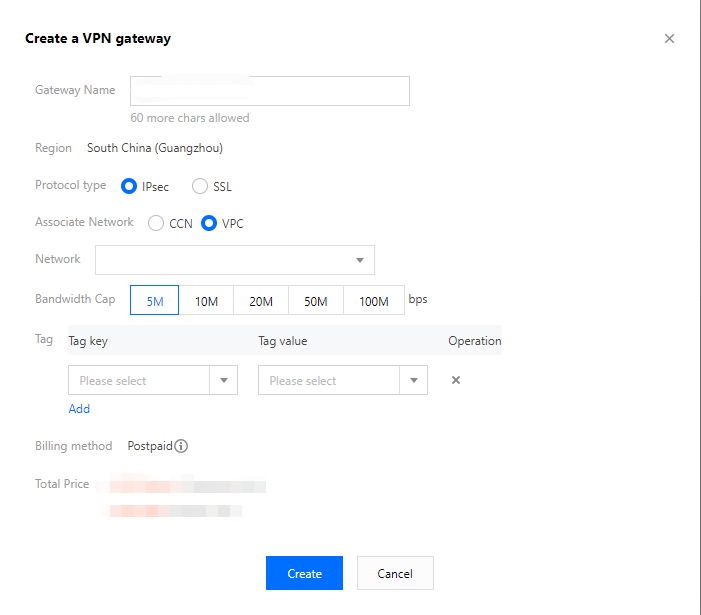
4. Enter a name for the VPN gateway, such as TomVPNGw. Select the associate network, subordinate network, bandwidth cap, labels, and billing method, and click Create. After the VPN gateway is created, the system randomly assigns a public IP address, such as
203.195.147.82.Note:
200 Mbps, 500 Mbps, 1,000 Mbps, and 3,000 Mbps bandwidths are available only in the following availability zones: North China (Beijing), East China (Shanghai), South China (Guangzhou), Southwest China (Chengdu), Hong Kong, Macao and Taiwan regions of China( Hong Kong, China), and East China (Nanjing). To use the bandwidths, please submit a ticket.
Only new gateways can use 200 Mbps, 500 Mbps, 1,000 Mbps, and 3,000 Mbps bandwidths. Existing gateways cannot use the preceding bandwidths.
If the VPN gateway uses the 200 Mbps, 500 Mbps, 1,000 Mbps, or 3,000 Mbps bandwidth, we recommend that you use AES128+MD5 for VPN tunnel encryption.
Note:
The labels are alternatively configured, please retain the default settings.
References
Help and Support
Was this page helpful?
You can also Contact sales or Submit a Ticket for help.
Help us improve! Rate your documentation experience in 5 mins.
Feedback