tencent cloud

Tencent Cloud TCHouse-D

Product Introduction
Overview
Concepts
Cluster Architecture
Strengths
Scenarios
Purchase Guide
Billing Overview
Renewal Instructions
Overdue Policy
Refund Instructions
Configuration Adjustment Billing Instructions
Getting Started
Using Tencent Cloud TCHouse-D Through the Console
Using Tencent Cloud TCHouse-D Through a Client
Operation Guide
Cluster Operation
Monitoring and Alarm Configuration
Account Privilege Management
Data Management
Query Management
Modify Configurations
Node Management
Log Analysis
SQL Studio
Enabling Resource Isolation
Development Guide
Design of Data Table
Importing Data
Exporting Data
Basic Feature
Query Optimization
Ecological Expansion Feature
API Documentation
History
Introduction
API Category
Making API Requests
Cluster Operation APIs
Database and Table APIs
Cluster Information Viewing APIs
Hot-Cold Data Layering APIs
Database and Operation Audit APIs
User and Permission APIs
Resource Group Management APIs
Data Types
Error Codes
Cloud Ecosystem
Granting CAM Policies to Sub-accounts
Query Acceleration for Tencent Cloud DLC
Practical Tutorial
Basic Feature Usage
Advanced Features Usage
Resource Specification Selection and Optimization Suggestions
Naming Specifications and Limits to the Database and Data Table
Table Design and Data Import
Query Optimization
Suggested Usage to Avoid
Accessing TCHouse-D via JDBC over the Public Network
Performance Testing
TPC-H Performance Testing
SSB Performance Testing
TPC-DS Performance Testing
FAQs
Common Operational Issues
Common Errors
Contact Us
Glossary
Product Policy
Service Level Agreement
Privacy Policy
Data Processing And Security Agreement

S3 Load ( Cloud Object Storage, COS)

PDF
Modo Foco
Tamanho da Fonte
Última atualização: 2024-06-27 10:56:08
Doris can directly import data from online storage systems that support the S3 protocol.
This document mainly introduces how to import data stored in Tencent Cloud COS (compatible with the S3 protocol). It also supports the import of other COS systems that support the S3 protocol, such as AWS S3, Baidu Cloud's BOS, and Alibaba Cloud's OSS.

Applicable Scenario

The source data is in storage systems that support the S3 protocol, such as COS, S3, BOS, and OSS, etc.
The data volume ranges from tens to hundreds of GB.

Preparations

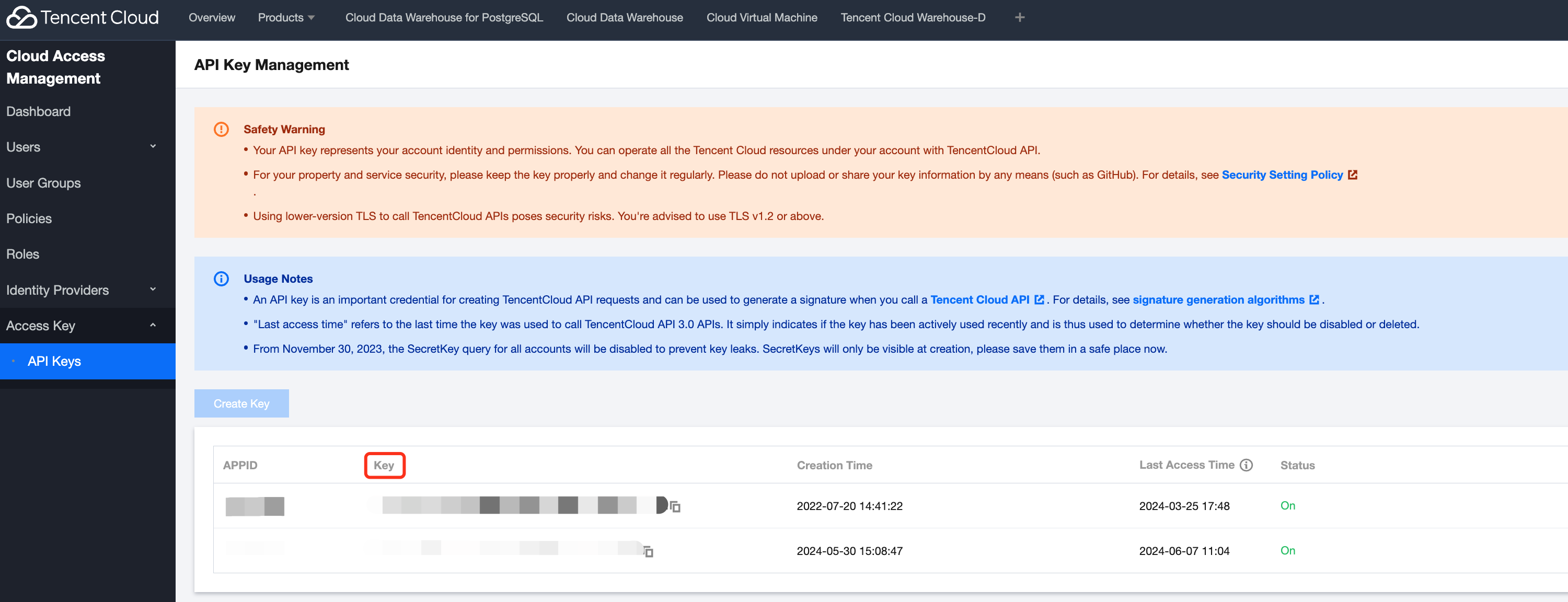
1. Prepare AWS_ACCESS_KEY and AWS_SECRET_KEY. First, you need to find or add the Tencent Cloud access Key. The path is: search for the access Key in Tencent Cloud, use the existing Key, or click New Key. Then access the SecretId and SecretKey. SecretId is AWS_ACCESS_KEY, SecretKey is AWS_SECRET_KEY, as shown below:

2. Prepare the REGION and ENDPOINT. The REGION can be chosen during bucket creation or viewed from the bucket list, related to the bucket's located region, such as ap-beijing, and ap-guangzhou. The format of the ENDPOINT is https://cos.<REGION>.myqcloud.com. For other cloud Storage systems, you can find S3-compatible information in their respective documentation.

Starting Import

The import method is basically the same as Broker Load(HDFS Data), you only need to replace the WITH BROKER broker_name () statement with the following part:
WITH S3
(
"AWS_ENDPOINT" = "http://cos.<REGION>.myqcloud.com",
"AWS_ACCESS_KEY" = "AWS_ACCESS_KEY",
"AWS_SECRET_KEY"="AWS_SECRET_KEY",
"AWS_REGION" = "<REGION>"
)
Below is a complete sample:
LOAD LABEL example_db.exmpale_label_1
(
DATA INFILE("s3://your_bucket_name/your_path/your_file.txt")
INTO TABLE load_test
COLUMNS TERMINATED BY ","
)
WITH S3
(
"AWS_ENDPOINT" = "http://cos.<REGION>.myqcloud.com",
"AWS_ACCESS_KEY" = "AWS_ACCESS_KEY",
"AWS_SECRET_KEY"="AWS_SECRET_KEY",
"AWS_REGION" = "<REGION>"
)
PROPERTIES
(
"timeout" = "3600"
);

FAQs

S3 SDK uses virtual-hosted style by default. However, some COS systems may not have activated or support access via the virtual-hosted style. In this case, we can add the use_path_style parameter to force the use of the path style:
WITH S3
(
"AWS_ENDPOINT" = "http://cos.<REGION>.myqcloud.com",
"AWS_ACCESS_KEY" = "AWS_ACCESS_KEY",
"AWS_SECRET_KEY"="AWS_SECRET_KEY",
"AWS_REGION" = "<REGION>",
"use_path_style" = "true"
)


Ajuda e Suporte

Esta página foi útil?

comentários