DocumentaçãoTencent Cloud Agent Development Platform
Workflow Concept
Modo Foco
Tamanho da Fonte
Última atualização: 2025-08-26 14:37:21
The workflow provides users with an intuitive visual canvas, supporting complex business process orchestration through multiple nodes such as large language model (LLM) node, code node, and parameter extractor node. It aims to achieve stable and controllable business impact while ensuring accuracy and interpretability for each process node. This section introduces key concepts in the workflow.
Variables
Variable Type
Variables are for hosting data that can circulate in a running workflow, including the following three types:
1. System Variables: Represent system-level variables with global scope, which can be referenced at any node in the workflow. Includes the following three types:
User dialogue content in this round: Indicates the content of the user's current round of dialogue.
Dialogue history: Refers to all conversation content from when the dialogue starts to the previous round of user dialogue, including user dialogue content and system reply content.
Current time: Indicates the current system time.
2. API parameters: API parameters come from external systems. When calling the application API, they are imported into the workflow through the custom_variables field (for details, please refer to Dialog API Documentation (WebSocket), Dialog API Documentation (HTTP SSE)). The workflow obtains the parameter value based on the variable name. For example, in a in-vehicle scenario, set the end user ID field in the workflow's API parameters: userID. When calling the API, pass "userID":"abc" via custom_variables. Then, within the workflow, use API.userID to obtain the variable value "abc".
3. Node variables:
Input variables of the node: represent variables input to the node, with customizable names. Input variables support references (including system variables, API parameters, and output variables of all ancestor nodes connected to the current node) and fixed values as two configuration modes.
Output variables of the node: represent variables output to subsequent nodes after processing by the node. Based on the feature of each node, output variables have differences. For example, the output variable of a parameter extractor node is the extracted parameter, while the output variable of a tool node is the returned result after calling the tool.
Variable Usage Method
The workflow variable name and reference method are as follows:
Variable Type
Variable Name
Variable English Name (Used When Referenced)
Example
System Variable
User dialogue content in this round
SYS.UserQuery
-
Rewrite result in this round of multi-round dialogue
SYS.RewriteQuery
-
Dialogue history
SYS.ChatHistory
-
Current Time
SYS.CurrentTime
-
API parameters
customizable name
API.ParmName (user-defined name)
API.UserID
Node variables
input variable
user-defined input variable name, for internal use in that node
Query
output variable
node name.Output.ParmName (this name varies based on node)
hospital name extraction.Output.HospitalName
Node
Nodes are the basic building units in the workflow. Each node represents a specific operation or feature. Nodes connect to form a complete business process. According to functionality and purpose, Tencent Cloud Agent Development Platform (Tencent Cloud ADP) workflow nodes can be divided into the following categories:
1. Information collection nodes: Used to collect necessary information from user dialogues or UI interactions and deliver this information to subsequent nodes. Information collection nodes include:
3. Basic node: The foundation of workflow operation, responsible for workflow entry or exit, conditional branch judgment, serial/parallel execution, reply content output and other features. Basic nodes include:
A connecting line is a directed line segment used to connect two workflow nodes, describe the flow direction of workflow execution, and connect nodes under limitations.
Limitations
Constraints hinder connecting lines between nodes, and under specific circumstances do not allow connection. Specific constraints include:
At least one end node is required in the workflow for the entire workflow to execute normally.
The input of the current node must connect to the output of the previous node. Inputs cannot connect with each other, and outputs cannot connect with each other.
Information collection nodes and information processing nodes have no fixed sequential relationship.
Information collection nodes, information processing nodes, and start nodes can be connected to multiple subsequent nodes, supporting parallel processing.
Connections between multi-nodes must comply with the following validation logic:
Loop validation
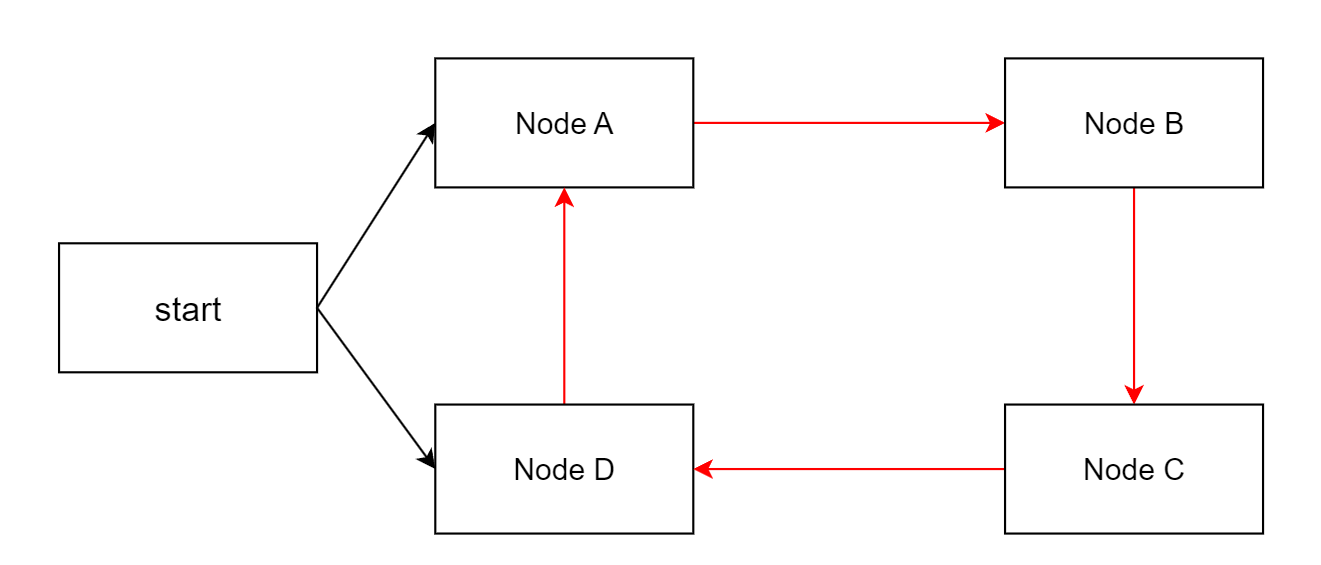
Definition: Circular dependency between nodes cannot occur in the workflow, meaning no loops are allowed.
Example: Node A -> Node B -> Node C -> Node D -> Node A ring-shaped connection.
Parallel execution validation
Definition: Information collection nodes cannot appear in parallel execution branches.
Example: Parameter extraction node 2 and parameter extraction node 3 are in different parallel branches.