The dynamic routing feature refers to the mechanism where users control traffic distribution based on routing rules, directing traffic that meets the rules to target instance groups. This feature is commonly used in scenarios such as grayscale release and disaster recovery degradation. To meet customers' customization needs, Polaris allows users to add custom Tags to service instances for directional traffic allocation. In summary, the service routing feature primarily allocates call traffic according to specific requirements.
Scenarios
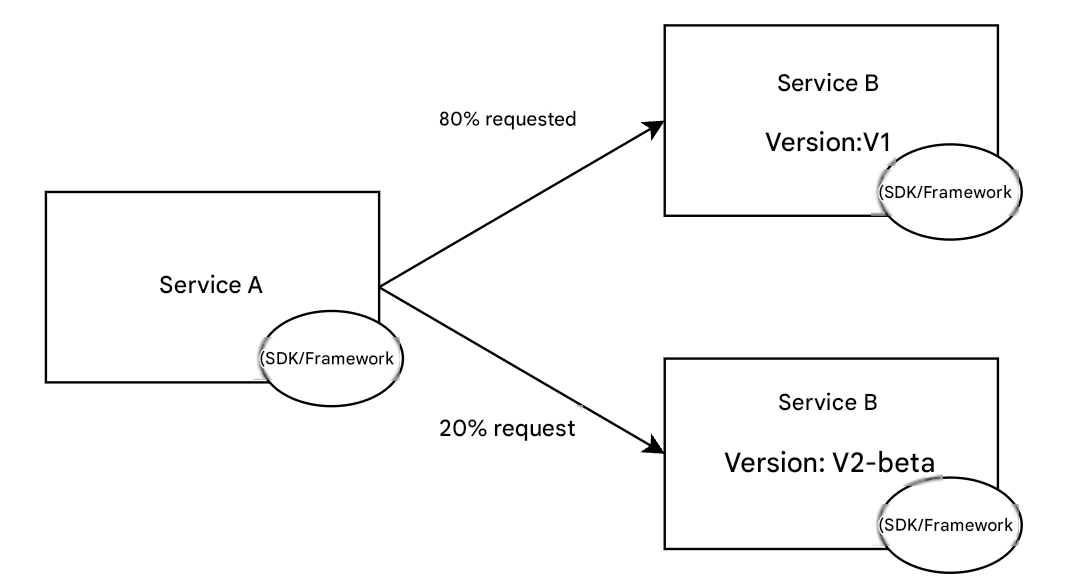
Grayscale Release Scenarios: In the context of microservices, the iteration cycle for users to develop and release new versions is becoming faster. Stably and agilely releasing new versions requires the microservice framework to support release methods such as grayscale release, canary release, and rolling release. Through the service routing feature, users can configure traffic allocation weights, setting traffic with grayscale characteristics to be allocated to a specific version. Through the routing feature, users can also forward requests from specified grayscale users to the grayscale version. The routing capability provides underlying capability support for release models such as grayscale release without the need to terminate services.
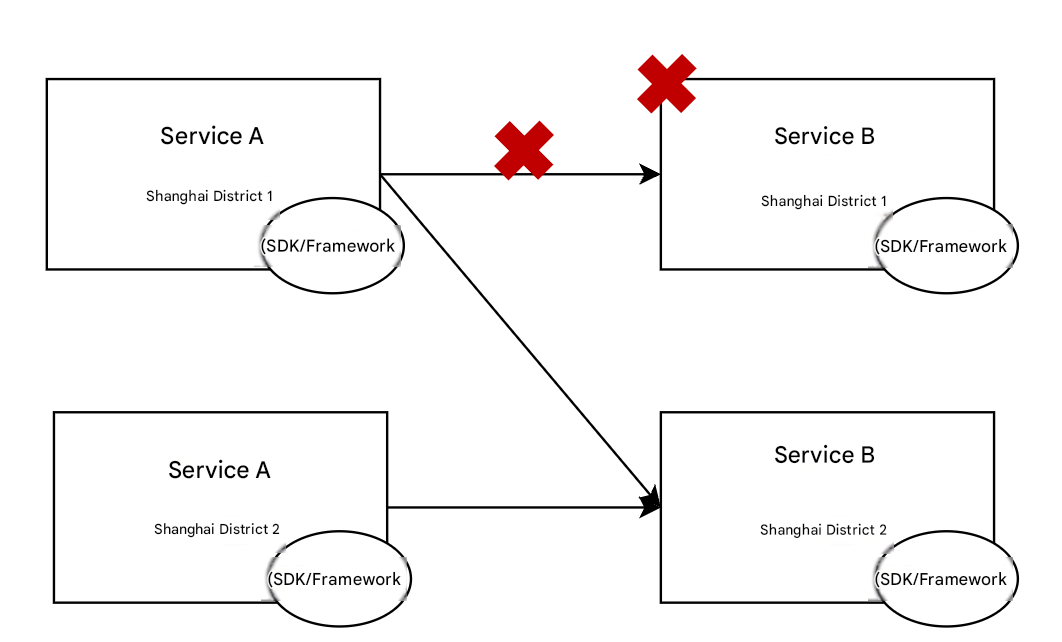
Disaster Recovery Scenario: To ensure overall robustness and high availability of application systems, businesses typically deploy applications across AZs and regions. Service routing provides the capability to configure target service priorities, supporting request redirection to lower-priority instance groups when target services fail in an AZ or region. This helps users implement multi-active solutions more efficiently.
How It Works
When service A calls service B, it first obtains the full set of B service IP addresses from the registry. Without service routing, load balancing is performed directly, selecting one service instance from the full set of B service addresses based on the load balancing algorithm to initiate the service call. After the service routing phase is introduced, service instance selection is divided into two stages:
Phase 1: Select a batch of target service instance IP addresses from the full set of service addresses based on routing rules.
Phase 2: Select one instance from the batch of target service instance IP addresses chosen in Phase 1 based on the load balancing algorithm.
Usage instructions
To implement service routing, you need to complete two parts of operations:
Configure routing rules on the console.
The client obtains routing rules and distributes requests based on these rules.
2. In the left sidebar, select Polaris (North Star), and then select the target engine instance on the instance details page.
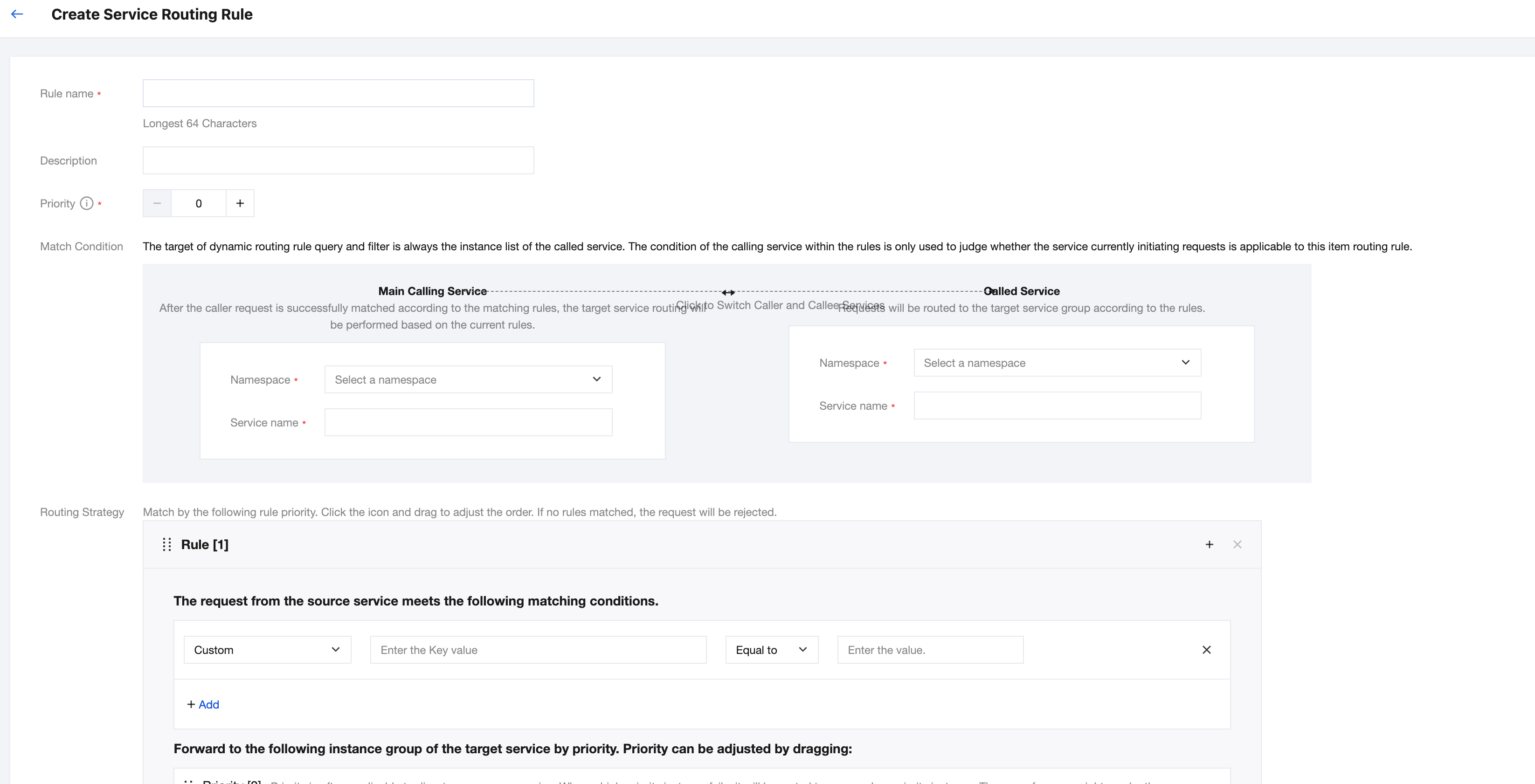
3. Click Dynamic Routing in the left sidebar, go to the dynamic routing rules display page, and click New Routing Rule.
Rule name: Enter a routing rule name, up to 64 characters.
Priority: A smaller priority number indicates a higher precedence in rule matching.
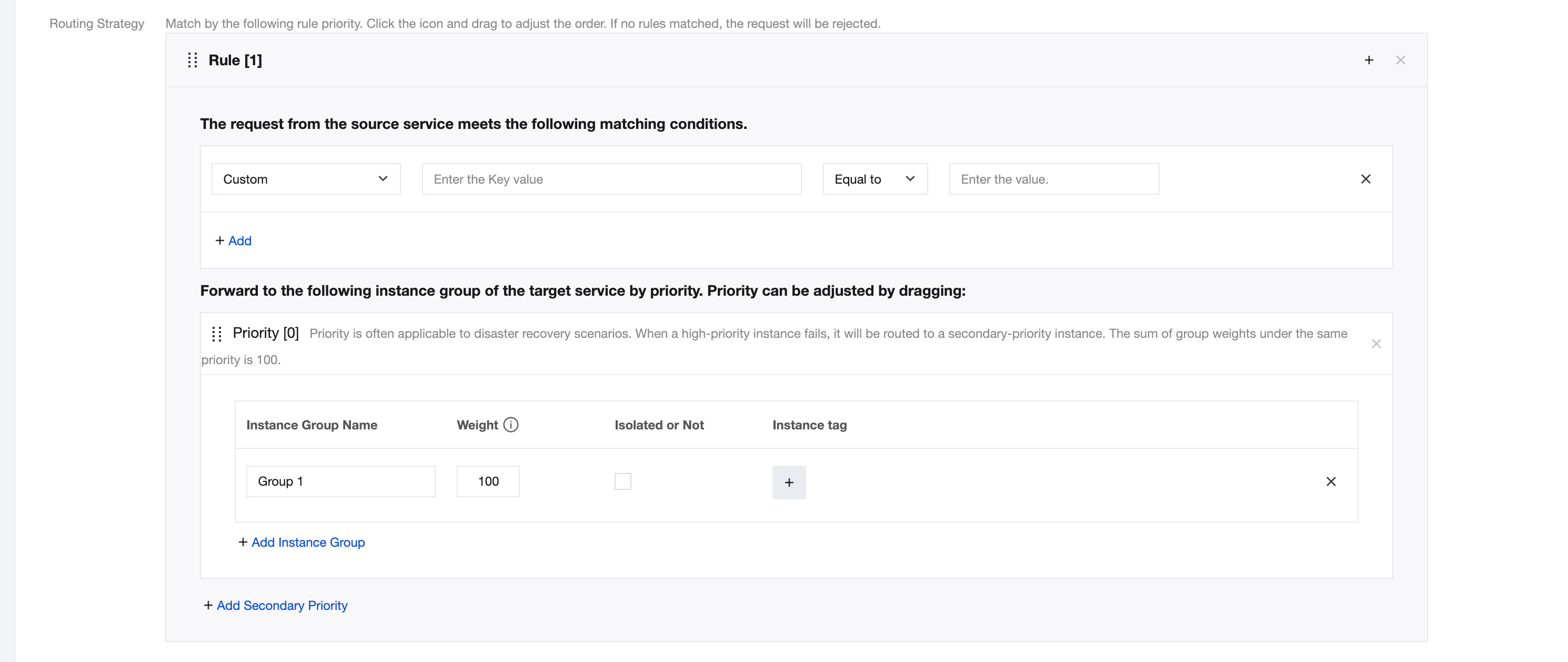
Matching conditions: Configure the calling service (service consumer) and called service (service provider) for the routing rule. The calling service supports selecting all namespaces and all services. You can select as needed.
Note:
When "Called Service" is set to "All Namespaces" & "All Services": This rule takes effect whenever any service within the namespace acts as the called party. As long as the calling service matches the conditions set in this rule, the routing rule will be applied to any called service.
When "Calling Service" is set to "All Namespaces" & "All Services": This rule takes effect whenever any service is called.
Please carefully evaluate the global impact of this configuration and confirm whether it should take effect on all services.
Routing policies can be configured in multiple entries and are matched in sequence. You can drag to adjust the order. If none of the rules are matched, the request is rejected.
Supported logical relations: equal, not equal, contains, does not contain, regular expression, range expression.
In scenarios where traffic is undifferentiated and gradual rollout is performed by percentage, simply delete the traffic matching policy.
Instance Group Weight:
Under the same priority level, the sum of instance group weights must equal 100.
In traffic percentage scenarios, different instance groups can be configured with varying traffic percentages. As shown in the figure below, 10% of the traffic is allocated to the canary version, while 90% is routed to the baseline version.
Whether to isolate: Isolation is typically used for production failures or deployment verification scenarios. Services are manually removed first, and the isolation is removed after the issue is resolved or verification is passed.
Priority: Priority is commonly used in disaster recovery scenarios. When high-priority instances fail, traffic is redirected to lower-priority instances.