This article demonstrates the entire process of integrating a Golang application with Polaris (Polaris) through a demo, helping you quickly understand how to use PolarisMesh.
Download the Github demo source code to your local machine and extract it.
The local build environment has the golang environment installed and can access Github.
Based on your business needs, resources for business deployment have been prepared. You can choose either virtual machine deployment or containerized deployment.
2. Select Polaris (Polaris) in the left sidebar to go to the Polaris instance list page.
3. Click the "ID" of the target engine to go to the basic information page.
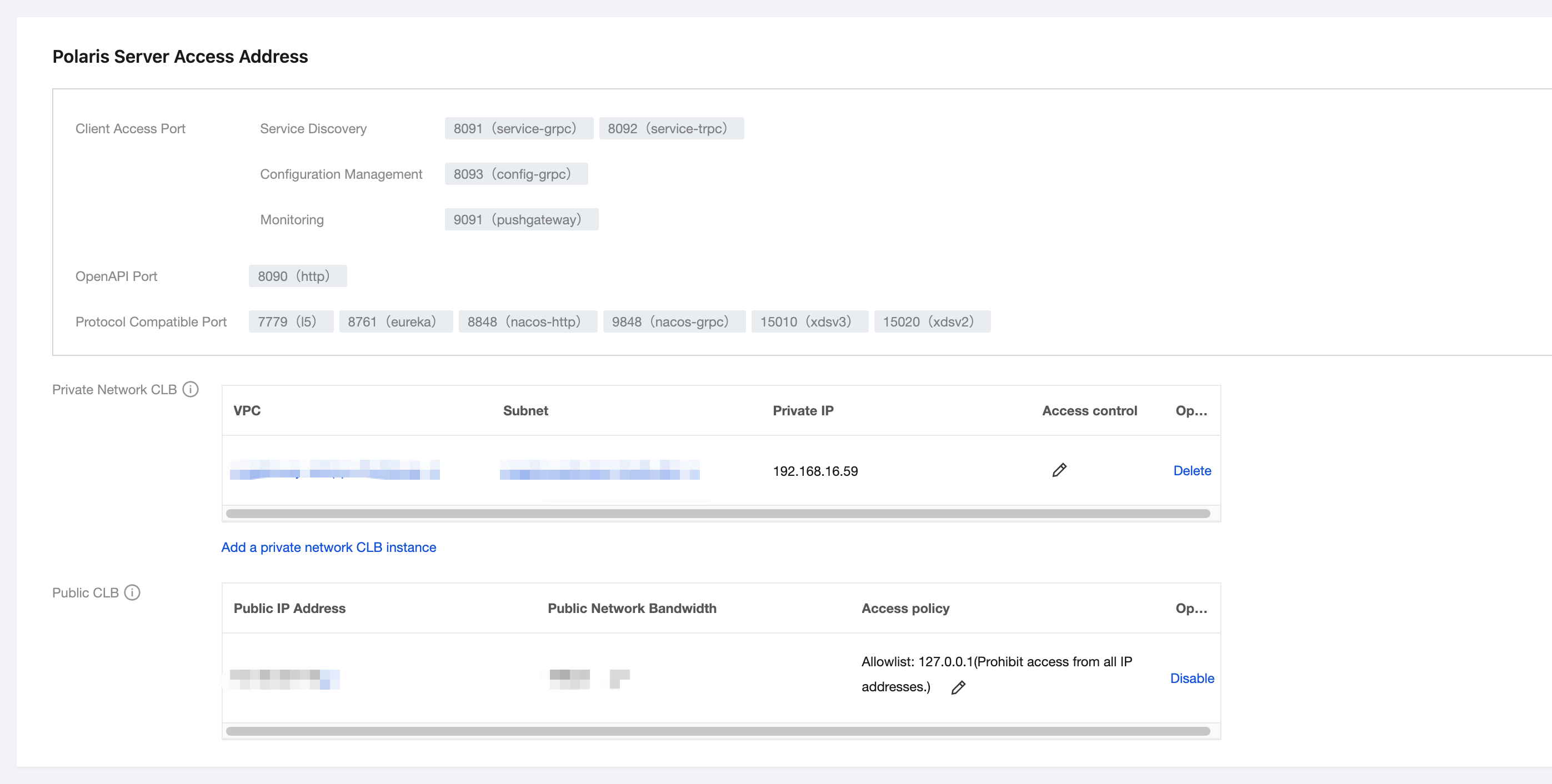
4. View the IP address. The Golang application accesses using the gRPC port (8091):
5. Modify the registry center address in the demo.
5.1 In the downloaded demo source code directory, locate the quickstart/consumer/polaris.yaml and quickstart/provider/polaris.yaml files respectively.
5.2 Add the Microservices Engine PolarisMesh grid address to the project configuration file (here taking quickstart/consumer/polaris.yaml as an example).
global:
serverConnector:
addresses:
- '10.0.4.6:8091'
6. Compile the source code into an executable program.
6.1 In the consumer and provider directories respectively, open a command prompt and run the following command to compile the project:
Compile consumer: CGO_ENABLED=0 go build -ldflags "-s -w" -o consumer
Compile provider: CGO_ENABLED=0 go build -ldflags "-s -w" -o provider
6.2 After successful compilation, two binary packages are generated as shown in the following table.
Software Package Directory
Software Package Name
Description
\\examples\\quickstart\\provider
provider
Service Provider
\\examples\\quickstart\\consumer
consumer
Service Consumer
6.3 Respectively upload the binaries of consumer and provider to different Cloud Virtual Machine (CVM) instances. Here, it is assumed that the upload path is /data/polaris/golang_examples.
7. Deploy the provider and consumer microservices applications. You can choose either VM deployment or containerized deployment based on your actual business needs.
7.1 VM deployment
Upload the binary files and configuration file (polaris.yaml) to the Cloud Virtual Machine (CVM) instance.
Run the start command to launch:
./[binary file name]
7.2 Containerized deployment
Write the dockerfile to build the image. Refer to:
FROM golang:alpine
WORKDIR /root
ADD . /root
ENTRYPOINT ./[binary name][startup parameters]
Deploy and run the image via TKE.
8. Verify the deployment results.
8.1 Go to the Micro PolarisMesh instance page mentioned earlier.
8.2 Choose Service Management > Service List to view the number of instances for the microservice EchoServerGolang.
If the number of instances is not zero, it indicates that the microservices engine has been successfully connected.
If the number of instances is 0 or the EchoServerGolang service name cannot be found, it indicates that the microservice application failed to connect to the microservice engine.
8.3 Invoke the HTTP interface of the consumer. Execute the http call, replacing ${app.port} with the listening port of the consumer (default: 18080), and ${add.address} with the exposed IP address of the consumer.
curl -L -X GET 'http://${add.address}:${app.port}/echo'