tencent cloud

Cloud Object Storage

Release Notes and Announcements
Release Notes
Announcements
Product Introduction
Overview
Features
Use Cases
Strengths
Concepts
Regions and Access Endpoints
Specifications and Limits
Service Regions and Service Providers
Billing
Billing Overview
Billing Method
Billable Items
Free Tier
Billing Examples
Viewing and Downloading Bill
Payment Overdue
FAQs
Getting Started
Console
Getting Started with COSBrowser
User Guide
Creating Request
Bucket
Object
Data Management
Batch Operation
Global Acceleration
Monitoring and Alarms
Operations Center
Data Processing
Content Moderation
Smart Toolbox
Data Processing Workflow
Application Integration
User Tools
Tool Overview
Installation and Configuration of Environment
COSBrowser
COSCLI (Beta)
COSCMD
COS Migration
FTP Server
Hadoop
COSDistCp
HDFS TO COS
GooseFS-Lite
Online Tools
Diagnostic Tool
Use Cases
Overview
Access Control and Permission Management
Performance Optimization
Accessing COS with AWS S3 SDK
Data Disaster Recovery and Backup
Domain Name Management Practice
Image Processing
Audio/Video Practices
Workflow
Direct Data Upload
Content Moderation
Data Security
Data Verification
Big Data Practice
COS Cost Optimization Solutions
Using COS in the Third-party Applications
Migration Guide
Migrating Local Data to COS
Migrating Data from Third-Party Cloud Storage Service to COS
Migrating Data from URL to COS
Migrating Data Within COS
Migrating Data Between HDFS and COS
Data Lake Storage
Cloud Native Datalake Storage
Metadata Accelerator
GooseFS
Data Processing
Data Processing Overview
Image Processing
Media Processing
Content Moderation
File Processing Service
File Preview
Troubleshooting
Obtaining RequestId
Slow Upload over Public Network
403 Error for COS Access
Resource Access Error
POST Object Common Exceptions
API Documentation
Introduction
Common Request Headers
Common Response Headers
Error Codes
Request Signature
Action List
Service APIs
Bucket APIs
Object APIs
Batch Operation APIs
Data Processing APIs
Job and Workflow
Content Moderation APIs
Cloud Antivirus API
SDK Documentation
SDK Overview
Preparations
Android SDK
C SDK
C++ SDK
.NET(C#) SDK
Flutter SDK
Go SDK
iOS SDK
Java SDK
JavaScript SDK
Node.js SDK
PHP SDK
Python SDK
React Native SDK
Mini Program SDK
Error Codes
Harmony SDK
Endpoint SDK Quality Optimization
Security and Compliance
Data Disaster Recovery
Data Security
Cloud Access Management
FAQs
Popular Questions
General
Billing
Domain Name Compliance Issues
Bucket Configuration
Domain Names and CDN
Object Operations
Logging and Monitoring
Permission Management
Data Processing
Data Security
Pre-signed URL Issues
SDKs
Tools
APIs
Agreements
Service Level Agreement
Privacy Policy
Data Processing And Security Agreement
Contact Us
Glossary

Setting Audio Moderation

PDF
Modo Foco
Tamanho da Fonte
Última atualização: 2025-11-19 20:07:36

Overview

This document describes how to use the audio moderation feature in the console to check audio content for pornographic, illegal, and advertising information.
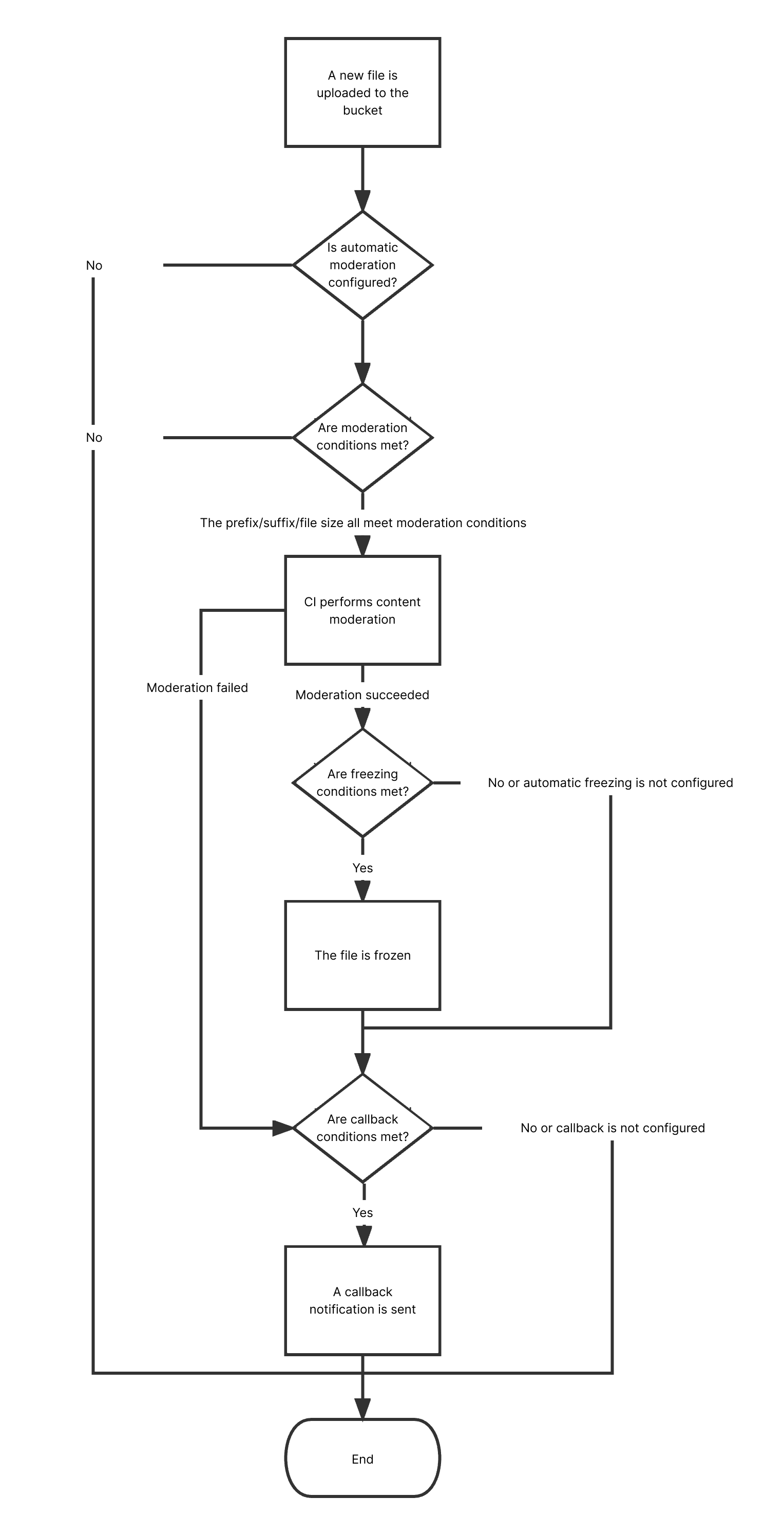
After you configure automatic audio moderation, new audios uploaded to a bucket will be automatically moderated, and the identified non-compliant content can be automatically blocked (by denying public read access to the content).
You can also moderate existing audios stored in COS. For more information, see Audio Moderation.
Note:
Audio moderation is billed by CI.
Supported audio formats: MP3, WAV, AAC, FLAC, AMR, 3GP, M4A, WMA, OGG, APE.
Supported audio bitrate: 128–256 Kbps.
Supported audio size: < 600 MB.
Maximum duration: 3 hours.
Audio moderation can recognize Mandarin and English.

Flowchart


Directions

1. Log in to the COS console. On the Bucket List page, click the target bucket to enter the bucket details page.
2. On the left sidebar, select Sensitive Content Moderation > Automatic Moderation Configuration and click Audio Moderation.
3. Click Add Automatic Audio Moderation Configuration and set the following configuration items:
Moderation Scope: Select the scope of audio files to be moderated, which can be the entire bucket, a specific directory, or a specific file prefix.
Moderation Suffix: The following audio formats can be moderated: MP3, WAV, AAC, FLAC, AMR, 3GP, M4A, WMA, OGG, and APE. You can select multiple formats.
Moderation Policy: Select a moderation policy. You can create different policies for refined moderation. If no policies have been configured, the default policy will be used. Moderation scene options include Pornographic, Illegal, and Advertisement, and you can select one or multiple options. For detailed directions on how to configure a moderation policy, see Setting Moderation Policy.
Moderation Scene: It displays the scene that you configure in the moderation policy. You can select the target scene as needed.
File block configuration: You can enable this service to authorize CI to perform automatic or human moderation and block the identified non-compliant files by denying public read access to them. After enabling this service, you need to select the block type and score range of audios to be blocked.
Block mode: The following two block modes are supported:
Change the file ACL to private read: Doing so actually blocks the file. Then, a 403 status code will be returned when the file is accessed again, indicating that access is denied. For more information on file permissions, see ACL.
Transfer the file to the backup directory: Doing so actually blocks the file. Then, a 404 status code will be returned when the file is accessed again, indicating that the file does not exist. The backup directory is automatically generated by the backend at audit_freeze_backup/increment_audit in the current bucket.
Block Type: You can select a block type and mechanism. Machine moderation and block is selected by default. If you select Human moderation and block, Tencent Cloud security team will review suspiciously sensitive audios identified during machine moderation. You can select the audio score range for blocking (by specifying an integer between 60 and 100; the greater the score, the more sensitive the audio).
Callback: After callback is enabled, you will receive moderation results. You need to select the moderation type and callback content and set the callback URL. For more information, see Callback Content.
4. After completing the configuration, click Save. Audios uploaded subsequently will be moderated.

Callback Content

If you enable callback, after audio moderation is completed, the system will send the following callback message to the callback URL:
{
"code":0,
"message":"success",
"data":{
"url":"",
"result":1,
"forbidden_status":1,
"trace_id":"",
"porn_info":{
"hit_flag":1,
"score":91,
"label":""
},
"ads_info":{
"hit_flag":0,
"score":0,
"label":""
}
}
}
Parameter
Description
Type
Required
forbidden_status
Block status. Valid values: 0 (normal); 1 (blocked).
Int
Yes
porn_info
Porn detection information, including moderation result, score, and detailed tags.
json
Yes
ads_info
Ad detection information, including moderation result, score, and detailed tags.
json
Yes
result
Recognition result for reference. Valid values: 0 (normal), 1 (sensitive), 2 (suspiciously sensitive).
Int
Yes
trace_id
jobid of the submitted moderation job.
String
Yes
url
The URL of the uploaded resource, including the domain name.
String
Yes
The moderation information (porn_info and ads_info) has the following sub-nodes:
Parameter
Description
Type
Required
hit_flag
Whether the moderation type is hit. Valid values: 0 (miss), 1 (hit), and 2 (suspected).
Int
Yes
label
Recognized audio tag.
String
Yes
score
Moderation score. Valid value ranges: 0–60 (normal); 60–90 (suspiciously sensitive); 90–100 (sensitive).
Int
Yes

Notes

1. Audio moderation adopts a scoring mechanism, with a score between 0 and 100 returned for each audio.
2. The confirmed part refers to the audios that are confirmed to be normal or sensitive (with a score in the range of [0,60] or (90,100]). For such audios, no manual intervention is required.
3. The uncertain part refers to the audios that are suspected to be sensitive (with a score in the range of (60,90]). For such audios, human moderation is recommended.
Ajuda e Suporte

Esta página foi útil?

comentários