Migrating Online DDL Temp Table
Download
Modo Foco
Tamanho da Fonte
Overview
When performing an online DDL operation on tables in the source database with the gh-ost or pt-online-schema-change (pt-osc) tool, you need to migrate the temp tables generated by online DDL changes to the target database.
DTS allows you to associate the temp table names of the object table in advance when selecting the migration objects, so that the object table can be migrated together with the temp tables subsequently generated by the source database.
When you perform an online DDL operation on the table
table name with the gh-ost tool, DTS supports migrating temp tables _table name_ghc, _table name_gho, and _table name_del to the target database.When you perform an online DDL operation on the table
table name with the pt-osc tool, DTS supports migrating temp tables _table name_new and _table name_old to the target database.Scope of application
Currently, temp tables can be migrated between MySQL, MariaDB, Percona, and TDSQL-C for MySQL.
Restrictions
The table mapping (table renaming) feature conflicts with the temp table migration feature (online DDL), and only one of them can be enabled at any time.
Directions
1. Log in to the DTS console, select Data Migration on the left sidebar, and create a migration task.
2. In the Set migration options and select migration objects step, select Sync Online DDL Temp Table and Online DDL Tool
If you select gh-ost, DTS will migrate the temp tables (
_table name_ghc, _table name_gho, and _table name_del) generated by the gh-ost tool to the target database.If you select pt-osc, DTS will migrate the temp tables (
_table name_new and _table name_old) generated by the pt-osc tool to the target database.Note:
In Selected Object on the right, you need to selected the specified table object, and then the button Sync Online DDL Temp Table will be displayed below. If you select the databases or tables, the button cannot be displayed.
If the source database already contains tables with the same names as temp tables
_table name_new and _table name_old, pt-osc will generate other temp tables with different names, which DTS cannot migrate. In this case, if you just choose the table itself as the Migration Object, data in temp tables created by online DDL updates can’t be migrated to the target database. Instead, you must select the entire database or instance where the table to be migrated resides.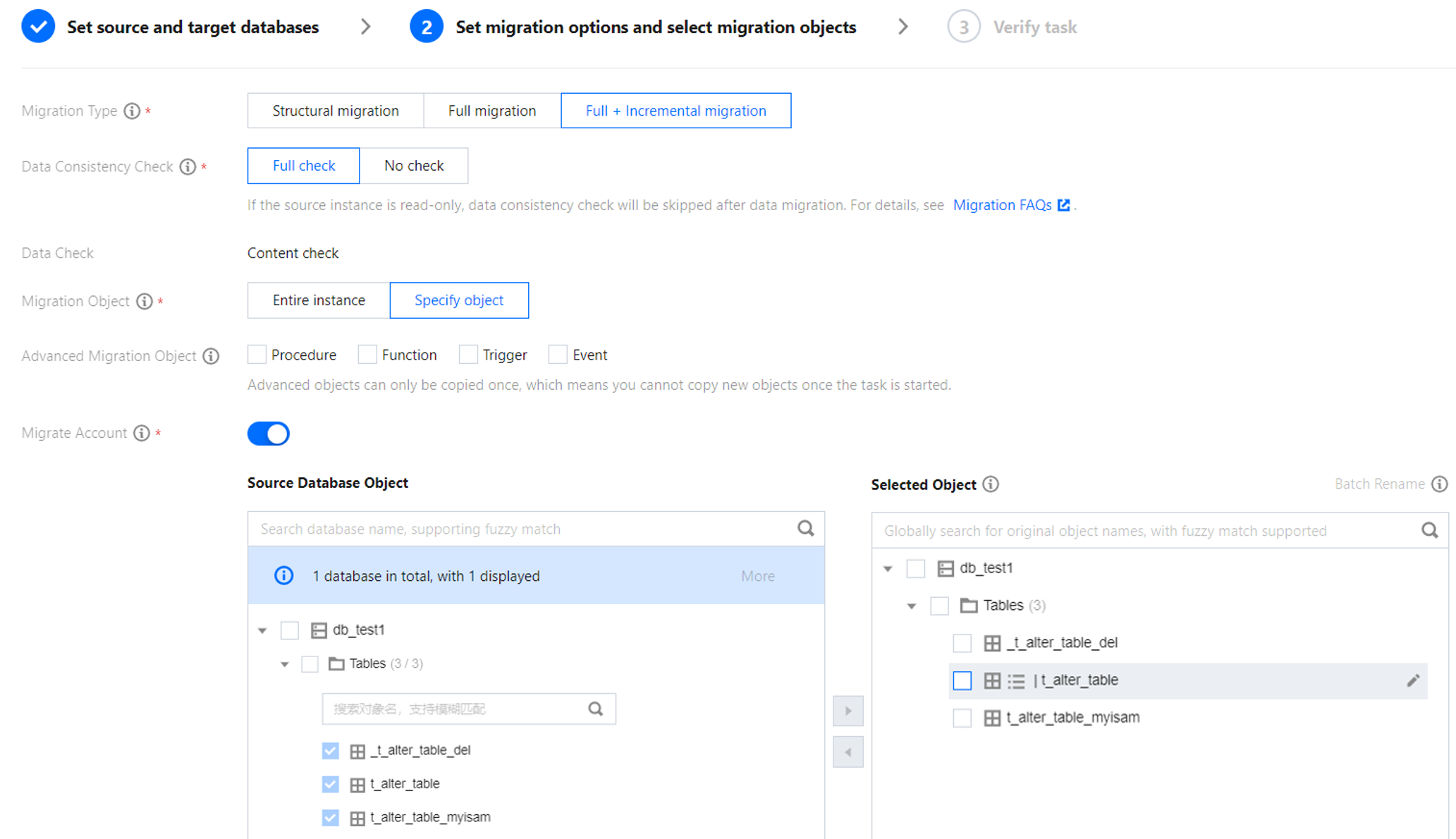
Ajuda e Suporte
Esta página foi útil?
Você também pode entrar em contato com a Equipe de vendas ou Enviar um tíquete em caso de ajuda.
comentários