Changing from Postpaid by Hour to Yearly/Monthly Subscription
Download
Modo Foco
Tamanho da Fonte
To make usage more flexible, TDMQ for CKafka (CKafka) allows you to switch an instance's billing mode from postpaid by hour to yearly/monthly subscription. You can convert temporarily used postpaid by hour instances into long-term, stable yearly/monthly subscription instances to reduce costs. The switch can be made directly in the CKafka console.
Note:
Standard Edition has been unavailable for new purchases since March 6, 2024. Management features for existing instances, such as upgrades and renewals, are not affected. However, the feature to switch pay-as-you-go instances to yearly/monthly subscription instances has been discontinued. It is recommended that you use Advanced Edition or Pro Edition.
Switching Rules
Bills
When the billing mode is changed from postpaid by hour to yearly/monthly subscription, a new order will be generated. The yearly/monthly subscription mode will take effect immediately after the order payment is completed.
Assume that a user purchased a postpaid by hour instance at 14:30:15 on June 28, 2025. Then, the user switched the billing mode from postpaid by hour to yearly/monthly subscription and paid for one month of instance fees at 15:50:15 on June 28, 2025. After the user completes the order payment, the yearly/monthly subscription instance will take effect immediately. On the Billing Center > Bill Details page, three bill records will be generated.
Postpaid by hour: During the period from 14:00:00 to 15:00:00 on June 28, 2025, fees incurred from 14:30:15 to 15:00:00.
Postpaid by hour: During the period from 15:00:00 to 16:00:00 on June 28, 2025, fees incurred from 15:00:00 to 15:50:15.
Yearly/monthly subscription: Fees incurred from 15:50:15 on June 28, 2025 to 15:50:15 on July 28, 2025.
Billable Items that Support Billing Mode Changes
Billable Item | Whether Billing Mode Switch with Instance Is Supported |
Peak bandwidth | Supported |
Fixed storage | Supported |
Partition | Supported |
Public network bandwidth | Not supported |
Elastic bandwidth | Not supported |
Elastic storage | Not supported |
Limits on Switching
Instances whose billing mode is switched from postpaid by hour to yearly/monthly subscription do not support a five-day unconditional return.
After the billing mode switch and payment are completed, the yearly/monthly subscription mode will take effect immediately. The start time of the new yearly/monthly subscription instance is the time when the switch is completed.
Before the payment is completed, the billing mode of the instance cannot be repeatedly switched.
If the instance configuration changes before payment is completed (for example, configuration adjustment, OS reinstallation, bandwidth change, or disk modification), the new order amount will no longer match the instance, and payment for the order will be blocked. You need to cancel the current unpaid order in Order Center, and then perform a new switch operation.
After a pay-as-you-go instance is converted to a yearly/monthly subscription instance, the billing mode cannot be changed back to pay-as-you-go.
Currently, batch billing mode switches are not supported.
Operation Steps
1. Log in to the TDMQ for CKafka (CKafka) console.
2. In the left sidebar, select Instance List, select a region, and choose More > Change from Pay-as-you-go to Monthly Subscription in the Operation column of the target instance.
3. In the pop-up window, select the purchase duration and whether to enable auto-renewal based on actual needs.
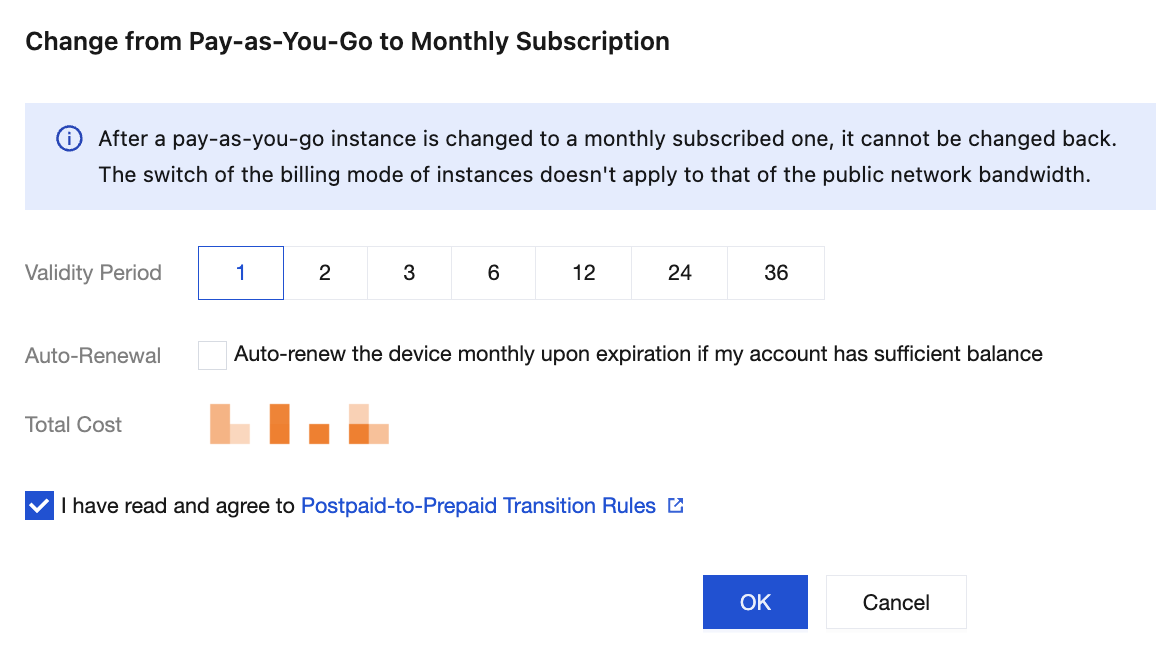
4. Select I have read and agree to Postpaid-to-Prepaid Transition Rules, click OK, and complete the payment on the order payment page to complete the switch.
Ajuda e Suporte
Esta página foi útil?
Você também pode entrar em contato com a Equipe de vendas ou Enviar um tíquete em caso de ajuda.
comentários