Using the SDK to Send and Receive Messages (Recommended)
Baixar
Modo Foco
Tamanho da Fonte
Overview
After completing configurations of resources, such as instances and topics, in the console, you can use the SDK demo we provide to connect to the cluster and perform message sending and receiving tests. This document introduces how to use an open-source SDK (taking the Java SDK as an example) to send and receive messages, so as to help you better understand the complete process of sending and receiving messages.
Prerequisites
You have created the required TDMQ for CKafka (CKafka) resources.
You have completed the environment configuration by seeing Preparations.
Operation Steps
Step 1: Preparing for Configurations
2. Unzip the downloaded demo, and go to the PUBLIC_SASL directory under javakafkademo.
3. Modify the JAAS configuration file ckafka_client_jaas.conf.
KafkaClient {org.apache.kafka.common.security.plain.PlainLoginModule requiredusername="yourinstance#yourusername"password="yourpassword";};
Note:
Username is in the format of
instance ID + # + configured username, and password is the configured user password.4. Modify the configuration file kafka.properties.
## Configure the access network and copy the network information from the Network column of the Access Method module on the instance details page in the console.bootstrap.servers=ckafka-xxxxxxx## Configure a topic and copy the topic information on the topic management page in the console.topic=XXX## Configure a consumer group. You can customize the settings.group.id=XXX##Path to the JAAS configuration file ckafka_client_jaas.conf.java.security.auth.login.config.plain=/xxxx/ckafka_client_jaas.conf
Parameter | Description |
bootstrap.servers | Access network. On the instance details page in the console, copy the network information in the Network column of the Access Mode module. 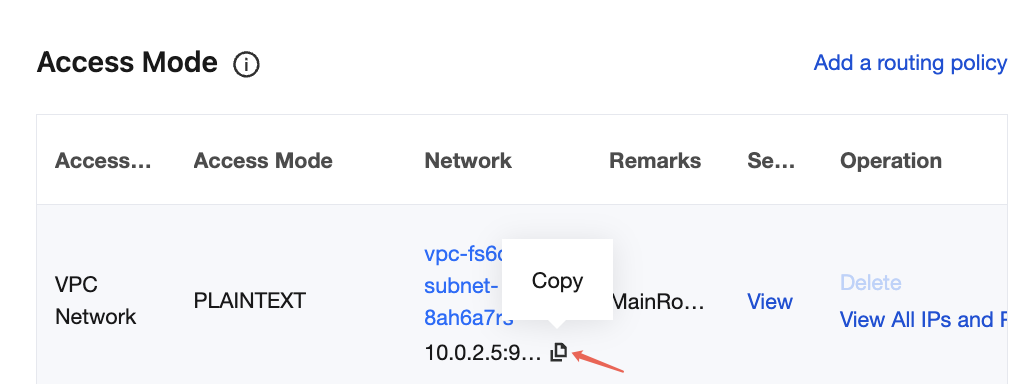 |
topic | Topic name. Copy the name on the topic list page in the console.  |
group.id | You can define the name and see the consumer group on the Consumer Group page in the console after successful demo running. |
java.security.auth.login.config.plain | Enter the path to the JAAS configuration file ckafka_client_jaas.conf. |
Step 2: Sending Messages
1. Compile and run the message sending program CKafkaSaslProducerDemo.java.
public class CKafkaSaslProducerDemo {public static void main(String args[]) {//Set the path to the JAAS configuration file.CKafkaConfigurer.configureSaslPlain();//Load kafka.properties.Properties kafkaProperties = CKafkaConfigurer.getCKafkaProperties();Properties props = new Properties();//Set the access point. You can obtain the access point of the corresponding topic in the console.props.put(ProducerConfig.BOOTSTRAP_SERVERS_CONFIG, kafkaProperties.getProperty("bootstrap.servers"));//Access protocol.props.put(CommonClientConfigs.SECURITY_PROTOCOL_CONFIG, "SASL_PLAINTEXT");//Plain method.props.put(SaslConfigs.SASL_MECHANISM, "PLAIN");//Serialization method for CKafka messages.props.put(ProducerConfig.KEY_SERIALIZER_CLASS_CONFIG, "org.apache.kafka.common.serialization.StringSerializer");props.put(ProducerConfig.VALUE_SERIALIZER_CLASS_CONFIG, "org.apache.kafka.common.serialization.StringSerializer");//The maximum request waiting time.props.put(ProducerConfig.MAX_BLOCK_MS_CONFIG, 30 * 1000);//Set the number of internal retries on the client.props.put(ProducerConfig.RETRIES_CONFIG, 5);//Set the interval of internal retries on the client.props.put(ProducerConfig.RECONNECT_BACKOFF_MS_CONFIG, 3000);//Construct a producer object. Note that this object is thread-safe. Generally, only one producer object is required in one process.KafkaProducer<String, String> producer = new KafkaProducer<>(props);//Construct a CKafka message.String topic = kafkaProperties.getProperty(“topic”); //The topic to which the message belongs. Fill it in here after applying in the console.String value = “this is ckafka msg value”; //The content of the message.try {//Obtaining Future objects in batches can speed up the process. Be careful not to use too large a batch.List<Future<RecordMetadata>> futures = new ArrayList<>(128);for (int i =0; i < 100; i++) {//Send a message and obtain a Future object.ProducerRecord<String, String> kafkaMessage = new ProducerRecord<>(topic, value + ": " + i);Future<RecordMetadata> metadataFuture = producer.send(kafkaMessage);futures.add(metadataFuture);}producer.flush();for (Future<RecordMetadata> future: futures) {//Synchronously obtain the result of the Future object.RecordMetadata recordMetadata = future.get();System.out.println("Produce ok:" + recordMetadata.toString());}} catch (Exception e) {//After the client retries internally, the sending still fails. The service needs to respond to this type of error.System.out.println("error occurred");}}}
2. The running result (output) is as follows:
Produce ok:ckafka-topic-demo-0@198Produce ok:ckafka-topic-demo-0@199
Step 3: Consuming Messages
1. Compile and run the consumer message subscription program CKafkaSaslConsumerDemo.java.
public class CKafkaSaslConsumerDemo {public static void main(String args[]) {//Set the path to the JAAS configuration file.CKafkaConfigurer.configureSaslPlain();//Load kafka.properties.Properties kafkaProperties = CKafkaConfigurer.getCKafkaProperties();Properties props = new Properties();//Set the access point. You can obtain the access point of the corresponding topic in the console.props.put(ProducerConfig.BOOTSTRAP_SERVERS_CONFIG, kafkaProperties.getProperty("bootstrap.servers"));//Access protocol.props.put(CommonClientConfigs.SECURITY_PROTOCOL_CONFIG, "SASL_PLAINTEXT");//Plain method.props.put(SaslConfigs.SASL_MECHANISM, "PLAIN");//Set the maximum allowed interval between two polls.//The default value is 30 seconds. If a consumer fails to return a heartbeat within the duration, the server determines that the consumer is not alive, removes it from the consumer group, and triggers the rebalance process.props.put(ConsumerConfig.SESSION_TIMEOUT_MS_CONFIG, 30000);//Maximum number per poll.//Be careful that this value cannot be too large. If too much data is polled and cannot be consumed before the next poll, a load balancing will be triggered, resulting in delays.props.put(ConsumerConfig.MAX_POLL_RECORDS_CONFIG, 30);//Deserialization method of messages.props.put(ConsumerConfig.KEY_DESERIALIZER_CLASS_CONFIG, "org.apache.kafka.common.serialization.StringDeserializer");props.put(ConsumerConfig.VALUE_DESERIALIZER_CLASS_CONFIG, "org.apache.kafka.common.serialization.StringDeserializer");//The consumer group to which the current consumption instance belongs. Fill it in after applying in the console.//Consumption instances of the same group will carry consumption messages.props.put(ConsumerConfig.GROUP_ID_CONFIG, kafkaProperties.getProperty("group.id"));//Construct a consumption object, that is, generate a consumer instance.KafkaConsumer<String, String> consumer = new KafkaConsumer<String, String>(props);//Set the topics subscribed by the consumer group. Multiple topics can be subscribed to.//If GROUP_ID_CONFIG is the same, it is recommended to set the subscribed topics as the same.List<String> subscribedTopics = new ArrayList<String>();//If multiple topics need to be subscribed to, add them here.//Create each topic in the console first.String topicStr = kafkaProperties.getProperty("topic");String[] topics = topicStr.split(",");for (String topic: topics) {subscribedTopics.add(topic.trim());}consumer.subscribe(subscribedTopics);//Consume messages in loops.while (true){try {ConsumerRecords<String, String> records = consumer.poll(1000);//The data must be consumed before the next poll, and the total time cannot exceed the value of SESSION_TIMEOUT_MS_CONFIG.for (ConsumerRecord<String, String> record : records) {System.out.println(String.format("Consume partition:%d offset:%d", record.partition(), record.offset()));}} catch (Exception e) {System.out.println("consumer error!");}}}}
2. Running results.
Consume partition:0 offset:298Consume partition:0 offset:299
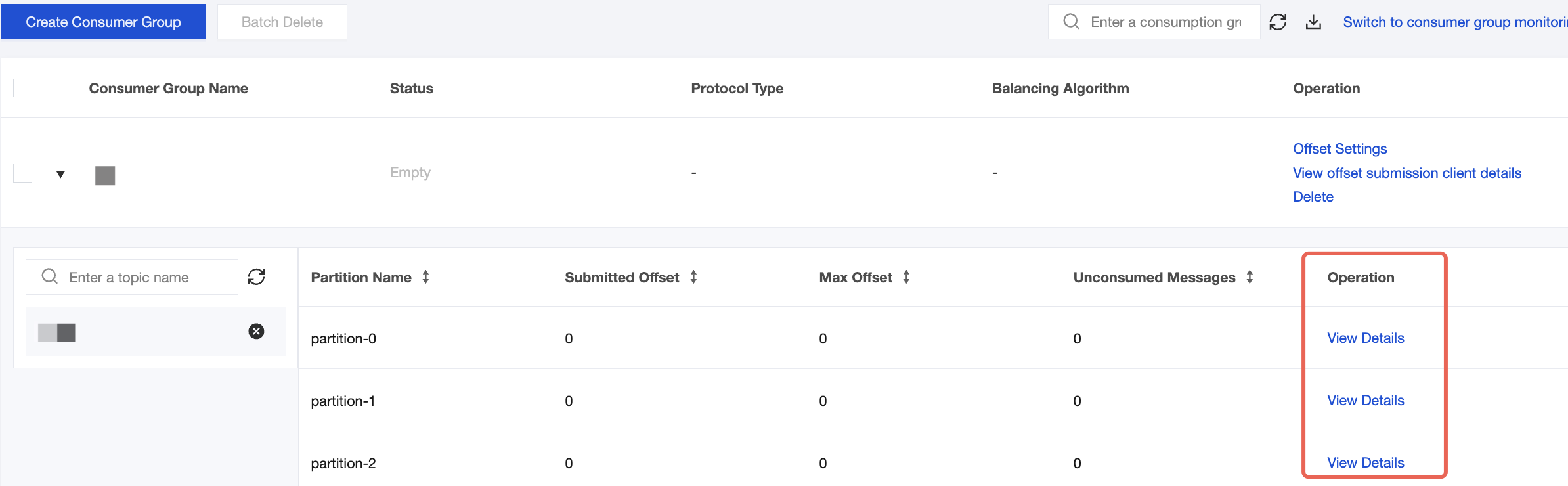
3. On the Consumer Group page in the CKafka console, select the target consumer group name, enter the topic name in the Topic Name area, and click View Details to view consumption details.
Ajuda e Suporte
Esta página foi útil?
Você também pode entrar em contato com a Equipe de vendas ou Enviar um tíquete em caso de ajuda.
comentários