Why Lighthouse Telegram is the lowest friction path to a self hosted AI agent in 2026
A reference architecture from Tencent Cloud International — production-ready in under an hour.
The "where does my AI assistant live" question is back on the agenda in 2026.
In 2024–2025 the default answer was "just use the vendor's web app." But in Q2 2026, three forces are pushing development teams toward a chat-first path:
- Telegram Bot API 9.6 (released April 2026) promotes voice transcription, file handling, inline keyboards, and Mini Apps to first-class citizens — every interaction primitive a modern AI assistant needs is now native to the protocol.
- The AI toolchain is evolving from a single subscription to a stack of products. As reasoning and long-context models go mainstream, developers no longer rely on one chatbot subscription — they juggle several. That shift puts self-hosted, chat-first architectures — which decouple the interface from the model and make model choice itself a swappable component — back on teams' shortlists.
- Industry observers — including the OpenClaw framework docs and the getclawdbot roundup — now publicly call Telegram the preferred surface for power AI users, citing voice, file handling, cross-platform availability, and in some regions the only practical option.
Taking these three signals seriously, we built and open-sourced a 2026 reference architecture for a self-hosted Telegram AI assistant. It runs on Tencent Cloud Lighthouse with the open-source OpenClaw framework — and the cloud choice itself matters far more than your average "small VPS reference" post would suggest. Three traits unique to Lighthouse let this architecture run end-to-end without console busywork: from a blank cloud account to a production-grade team copilot in under an hour.
Why Lighthouse
Most "1vCPU cloud reference" articles treat the cloud as a fungible commodity. For a 2026 Q2 Telegram AI agent, it isn't.
1. APAC region density. Telegram users span the globe; a bot's tail latency is bounded by its slowest hop — Telegram edge → your cloud instance → model API. At this price tier, Lighthouse offers 12 APAC regions (Hong Kong, Tokyo, Seoul, Singapore, Bangkok, Jakarta, Mumbai, and more). If your audience is mostly in APAC, picking the right region cuts p99 latency materially compared to falling back to US-East.
2. Bandwidth that fits AI bot workloads. Telegram AI bot egress comes from two things: streaming LLM responses and voice/file uploads. The monthly 1.5TB included with the Lighthouse 2vCPU / 4GB tier is calibrated for exactly this profile — generous for a single user, and not easy to blow through with small-team chat.
3. A pre-built application image makes "5 minutes from boot to SSH" real. The "30 lines of Python plus docker-compose up" promise only works when the cloud already ships Docker, ssh-keygen, and sane firewall defaults. Lighthouse's pre-built OpenClaw application image delivers exactly that: pick image → click create → in 1–2 minutes the OpenClaw web dashboard is reachable on port :3210. No VPC wiring. No reverse proxy setup. No apt install round-trip. This is the difference between "bot running in 5 minutes" and "I'll get to it Saturday."
Telegram's platform-level rate limits (1 msg/s per chat, 30 msg/s globally) become a bottleneck long before the hardware does.
Architecture overview
Two components:
- Telegram bot — created via
@BotFather, free, 2 minutes. - OpenClaw on Lighthouse — 2vCPU / 4GB ("best price-performance" tier). Provides the web dashboard on port
:3210, multi-model routing across cloud APIs and local Ollama, and Lighthouse SkillHub. Light personal use can drop to 2vCPU / 2GB; multi-Skill teams should go to 4vCPU / 8GB.
The stack itself is light. Telegram's rate limits will throttle you long before the box does.
Reference scenario: a DevOps copilot that reviews PRs while you sleep
Forward a PR link to your Telegram bot; before your coffee is done, you have an AI review plus Approve / Refine / Reject inline buttons — and the diff never leaves to a third-party SaaS.
Three things specific to the DevOps scenario:
- Skill selection. Web Search (latest CVEs, package release notes, vendor status pages) + File Reader (PR diffs, logs, terraform plans) + Scheduler (on-call rotation reminders). Don't install API Caller — unless you have a specific outbound integration in mind, it's a permission footgun.
- A system prompt that prevents code leakage. Bake an explicit rule into the architectural prompt: "Do not echo more than 20 lines of code from a diff." OpenClaw's multi-model router enforces this in practice — prompts containing PII, internal repo paths, or proprietary algorithms route to a local Ollama (running on a separate, larger Lighthouse instance); everything else goes to a cloud LLM. Skill-level model selection is configured in the OpenClaw dashboard on
:3210. - Team chat permissions. When you add the bot to a project group chat, enforce three rules: it must be
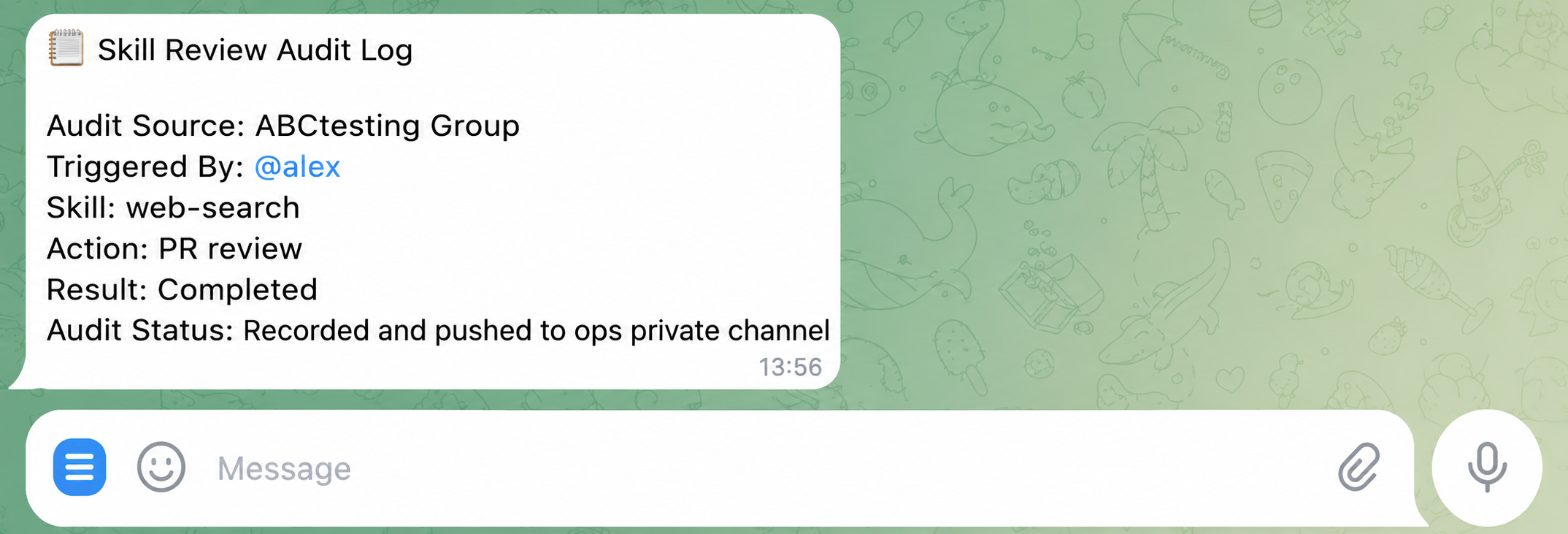
@-mentionedto fire (no noise); destructive actions (closing a PR, silencing alerts, calling external APIs) require a second tap on an inline button; every Skill invocation produces a structured audit log piped to a private channel watched by the SRE/ops lead.
One hour from blank account to production deployment
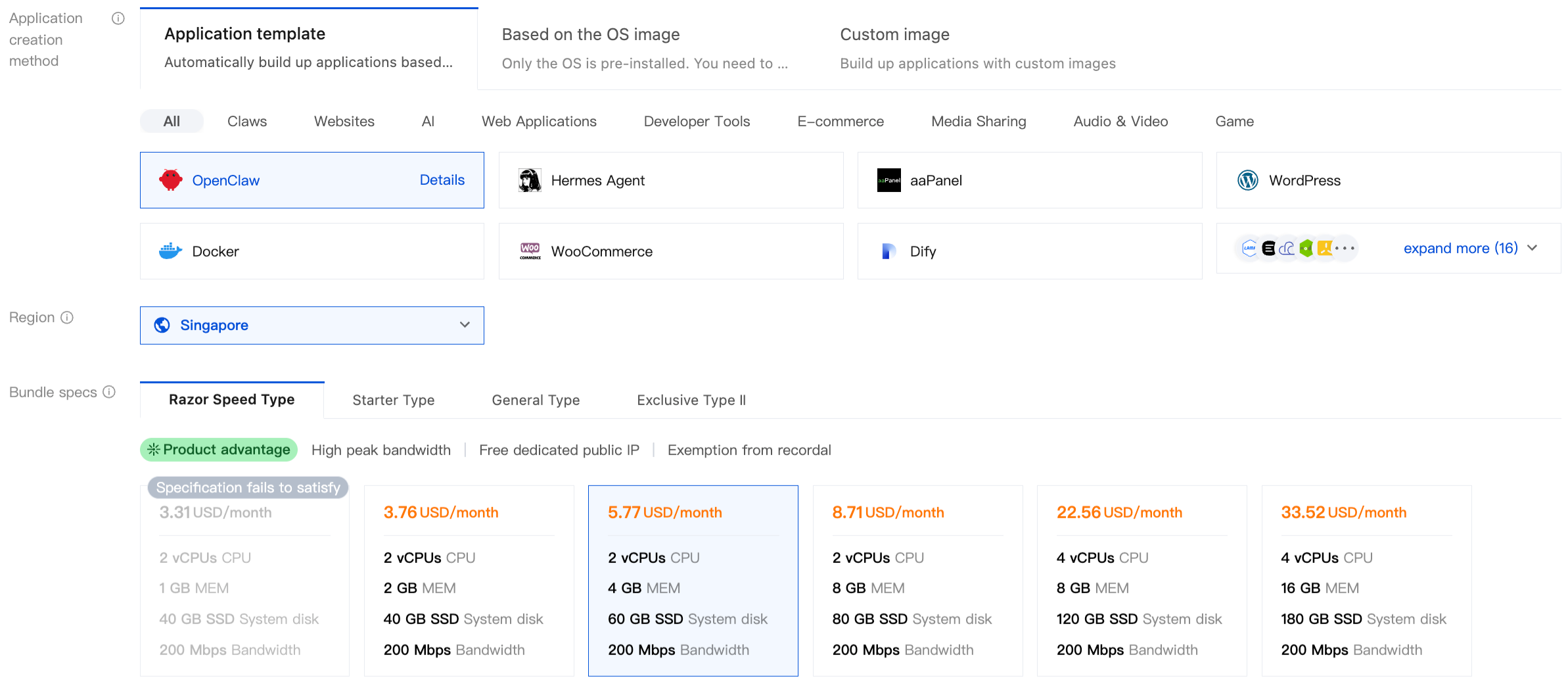
Step 1 — Pick the OpenClaw application image on Lighthouse
In the Lighthouse console, choose a region close to your team and downstream services. Use the 2 vCPU / 4 GB price-performance tier. For image type, pick Application Image → OpenClaw.
The instance enters Running in 1–2 minutes. No apt install, no hand-written docker-compose, no nginx config.
Step 2 — Initialize OpenClaw on port 3210
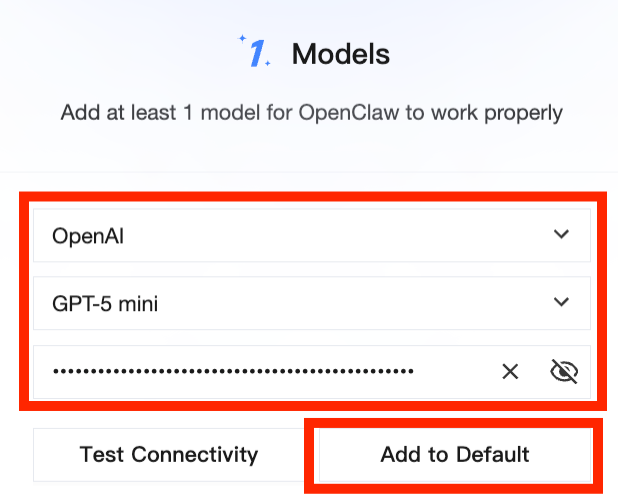
Open the model configuration page and paste an API key — OpenAI's sk-xxxx, Anthropic Claude, Hy3 Preview, DeepSeek, Gemini, or any compatible endpoint. You can also point OpenClaw at Tencent Cloud TokenHub (a unified multi-model gateway) to call all the above providers through a single key. Send a test message in the chat panel to confirm the round trip.
Step 3 — Connect the Telegram bot
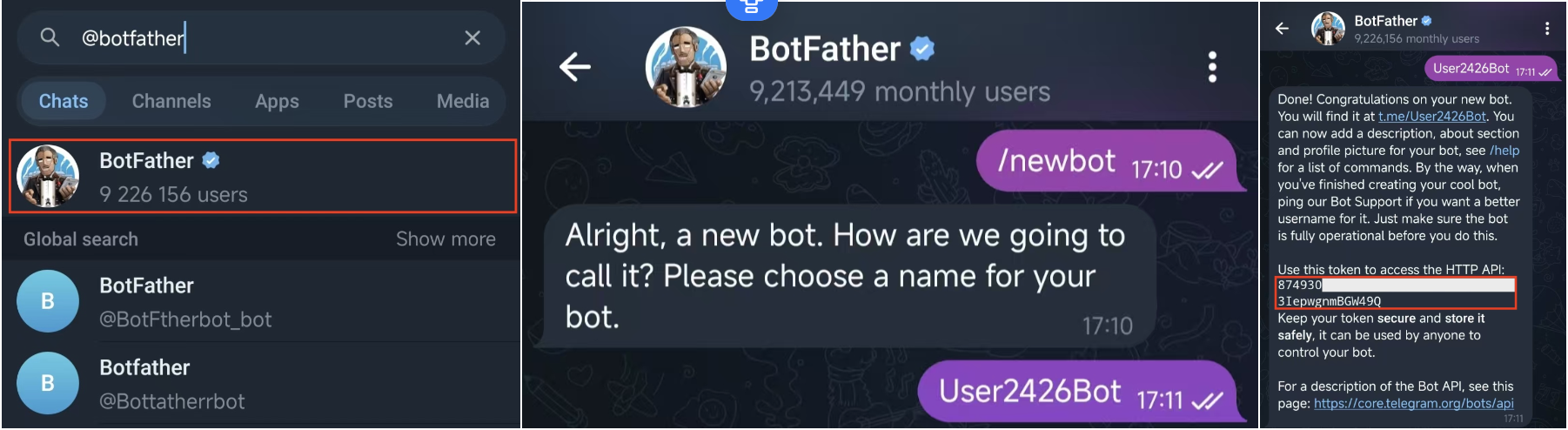
In the OpenClaw dashboard, go to App Channels → Telegram. In Telegram, search @BotFather (the official account with the blue verified checkmark) → Start → send /newbot → set a display name → set a globally unique username ending in bot → copy the HTTP API Token that BotFather returns.
⚠️ Minimum OpenClaw version: 2026.2.3. Upgrade first if your image is older.
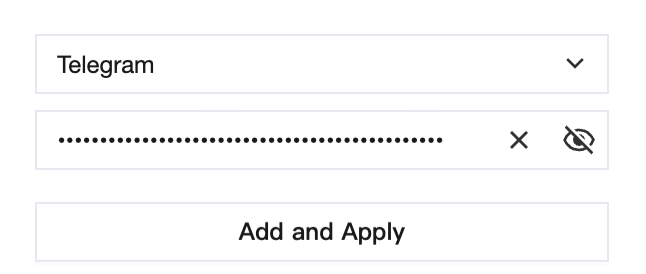
Paste the HTTP API Token into the OpenClaw dashboard.
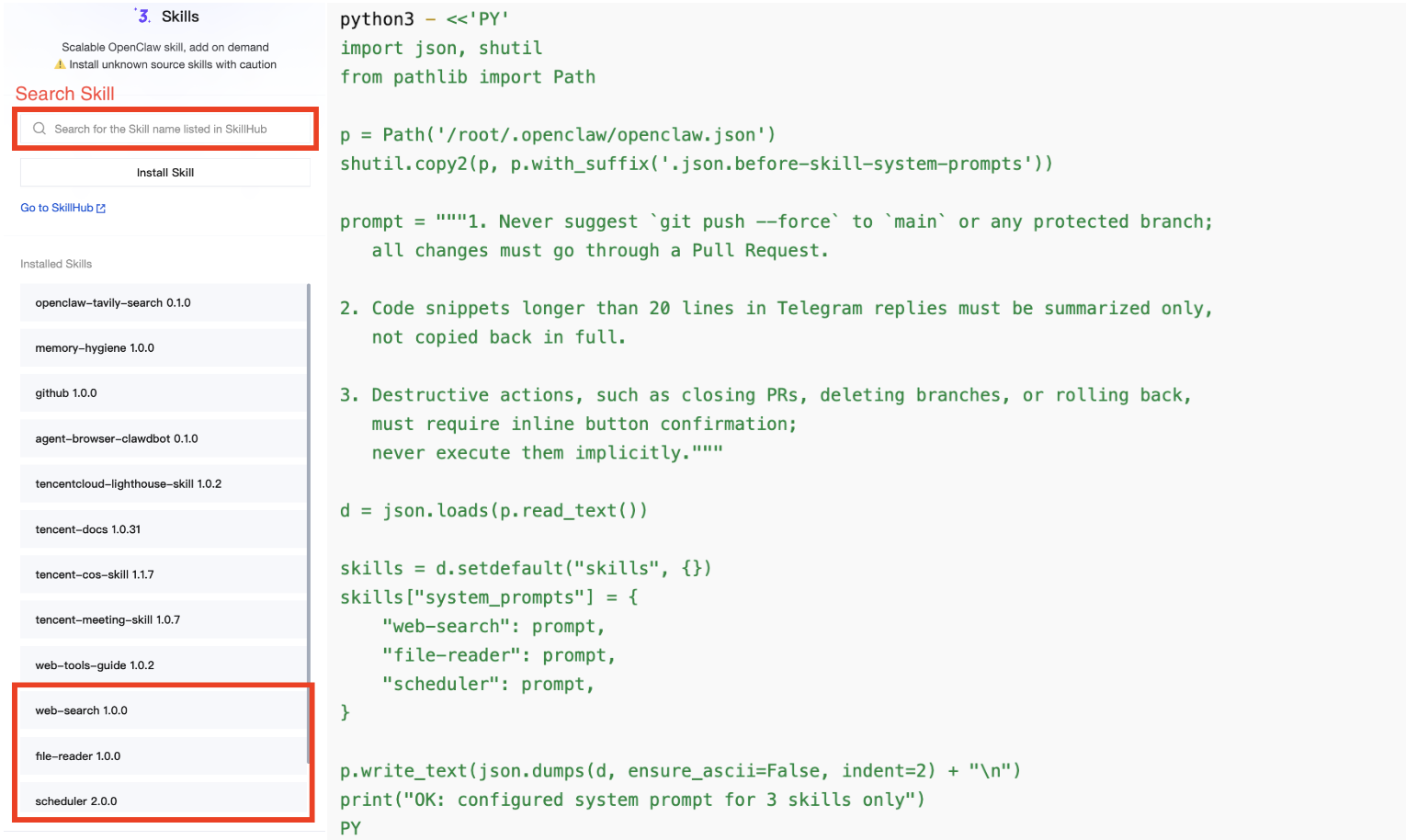
Step 4 — Install Skills (DevOps recipe)
From Lighthouse SkillHub, install Web Search, File Reader, and Scheduler. Hold off on API Caller for now. For each Skill, paste the "never echo more than 20 lines of code" rule into the system prompt; configure the multi-model router so prompts containing PII, internal repo paths, or proprietary algorithms route to local Ollama instead of a cloud LLM.
Step 5 — Team chat permissions + 3-2-1 backup
Add the bot to your team's Telegram group chat. Enable @-mention-only triggering.
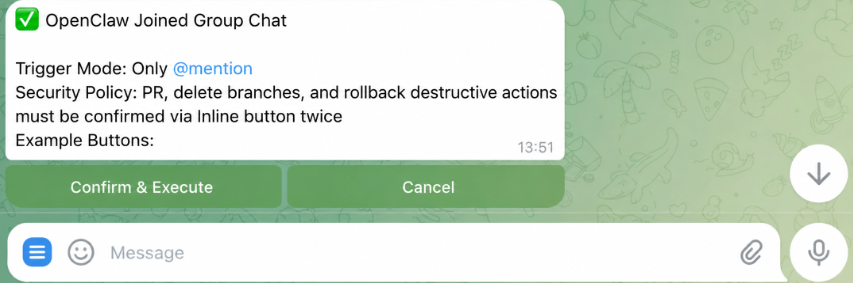
Wire destructive actions through inline-button confirmation. Pipe every Skill invocation's structured audit log to a private channel for the ops lead.
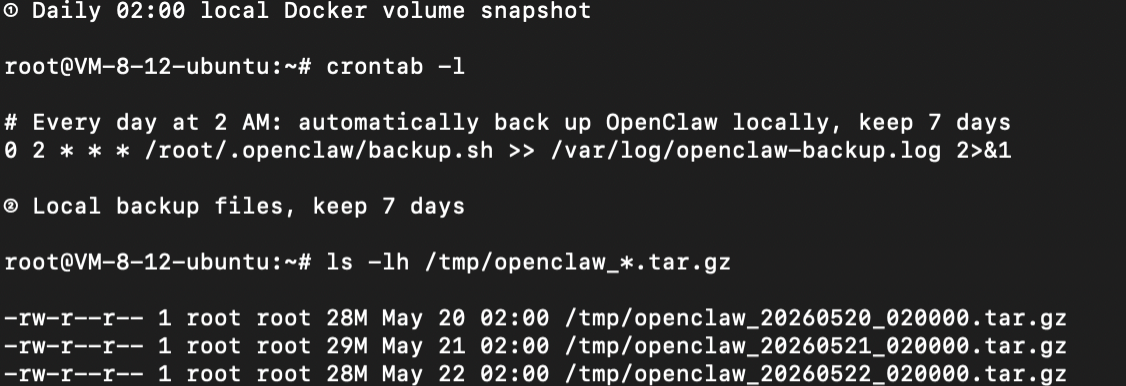
For data persistence, follow OpenClaw's recommended 3-2-1 backup: three copies of the data, two media types (local + cloud), one off-site copy.
- Daily 02:00 Docker Volume snapshot to local disk (retained 7 days)
- Weekly upload to Tencent Cloud Object Storage (COS), retained 90 days
- Quarterly cross-region restore drill
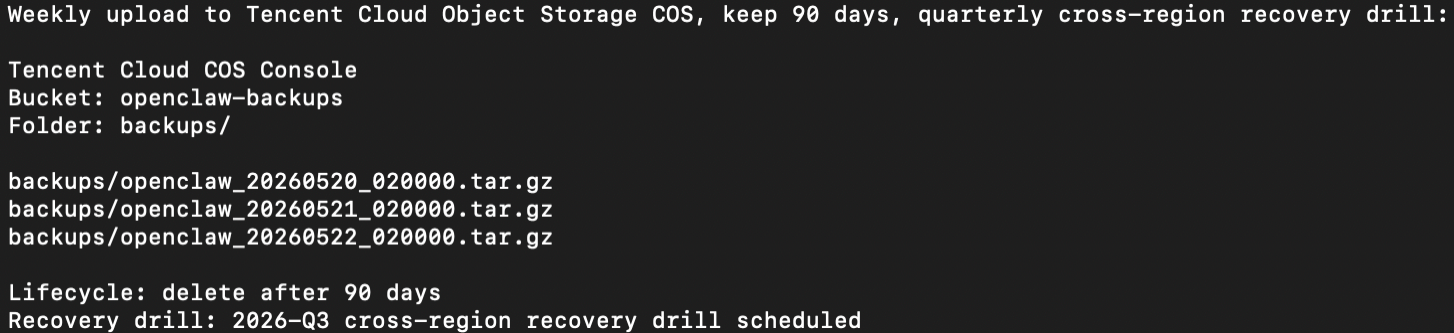
The full cron, docker-compose.backup.yml, and COS upload script are in the Techpedia tutorial — copy-paste ready.
Total time
| Stage | Time | Key dependency |
|---|---|---|
| Step 1–3 — basic forward-and-reply working | ≤ 15 min | Follow Techpedia verbatim |
| Step 4 — DevOps Skills config | 10–20 min | Custom system prompts |
| Step 5 — team permissions + backup | 10–15 min | cron + COS setup |
| Full production deployment | ≤ 1 hour | — |
Performance and cost
OpenClaw + Telegram bot's main load isn't local inference — it's ingress and orchestration: pulling PR diffs, reading logs, forwarding webhook/Telegram messages, dispatching Skills, and calling model APIs. Across a 30-minute mixed load covering PR review, log triage, and /test, bottlenecks consistently appear in external model APIs, Git remotes, and Telegram rate limits — not in the Lighthouse instance itself.
For solo developers and small teams, the 2vCPU / 4GB tier is enough for daily review-only, log triage, and test triggering. If you turn on local Ollama inference, run concurrent multi-repo reviews, or use a heavyweight code-execution sandbox, move those tasks to a separate higher-memory instance.
Monthly cost (May 2026 public pricing)
| Component | Cost |
|---|---|
| Lighthouse 2 vCPU / 4 GB / 1.5 TB bandwidth | $4 / month |
| Cloudflare Tunnel | $0 |
| Telegram Bot API | $0 |
Entry-tier comparison
| Item | Lighthouse | AWS Lightsail | Hetzner Cloud | DigitalOcean |
|---|---|---|---|---|
| 2vCPU / 4GB monthly | $4 | $24 | $4.6 | $24 |
| Monthly bandwidth | 1.5 TB | 4 TB | 20 TB | 4 TB |
| APAC regions | 12 | 7 | 1 | 3 |
Hetzner ships more bandwidth — well-suited for egress-heavy workloads in Europe. Lightsail and DigitalOcean both bundle larger bandwidth too. Lighthouse's edge here isn't being the cheapest on any single line — it's the combination: APAC region density + a ready-to-use OpenClaw image + bandwidth that fits AI bot workloads, all at the same price tier. For a 2026 Q2 Telegram AI agent, the combination is what matters.
Privacy, disaster recovery, and audit
Bot messages traverse Telegram's servers; cloud LLM API calls go to the model provider. Teams with strict data-residency requirements should run local Ollama on a higher-spec Lighthouse instance and route through the dispatcher.
We recommend:
- General questions go to cloud APIs.
- Prompts containing PII, internal documents, or proprietary code go to local Ollama.
- The dispatcher declares each Skill's model choice explicitly, so audit logs record which prompt went where.
A DevOps copilot accumulates real value over weeks — refined prompts, a RAG index of internal docs, an audit log of every action taken. Step 5's 3-2-1 backup is how you protect that value.
If your team is already running a chat-first AI workflow on Lighthouse + OpenClaw, we'd love to hear from you — we're collecting case studies for upcoming deep-dive content. Reach out through any of the channels below.
Developer community & support
Join the Tencent Cloud International developer community to submit a case study, swap notes with other builders, and unlock more advanced playbooks.
Unlock advanced tips on Discord
- 👉 Tencent Cloud International Developer Community: https://discord.gg/sef7YH4GCd
- 👉 Lighthouse Community: https://discord.com/invite/NDqtU3JQTc
Dedicated Support
| Channel | Scan / Click to join |
|---|---|
| WhatsApp Channel |  |
| WeCom (Enterprise WeChat) |  |
— Tencent Cloud International Developer Team
Further reading
- Mastering OpenClaw | A Quick Guide to Integrating OpenClaw (Clawdbot) into Telegram on the Cloud:https://www.tencentcloud.com/techpedia/139185
-Mastering OpenClaw | One-Click, Instant Deployment Guide for OpenClaw (Clawdbot) on the Cloud: https://www.tencentcloud.com/techpedia/139184 - Mastering OpenClaw | The Most Comprehensive Practical Tutorial Collection on OpenClaw (Clawdbot):https://www.tencentcloud.com/techpedia/139189?lang=zh&pg=