通过 Remote Read 读取云托管 Prometheus 实例数据
Download
聚焦模式
字号
操作场景
Prometheus 提供了 Remote read 接口,该接口支持将一系列 Prometheus 协议的数据源组织为单一数据源查询。本文介绍如何使用自建 Prometheus 通过 Remote read 读取云托管 Prometheus 实例的数据。
Remote Read 配置
推荐配置
prometheus.yml如下:remote_read:- url: 'http://prom_ip:prom_port/api/v1/read'read_recent: truebasic_auth:username: app_idpassword: token
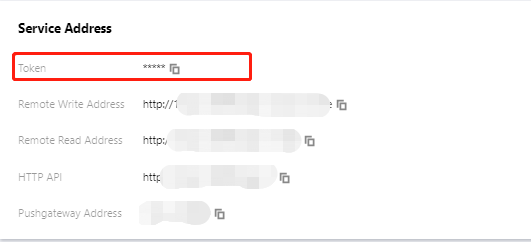
推荐使用 Basic Auth 方式访问云托管 Prometheus 实例,username 为账号 AppID ,password 为 Prometheus 控制台 > 基本信息 > 服务地址中获取的 Token。
注意事项
配置 Remote read 的 Prometheus 需谨慎配置
global:external_labels:
external_labels 会被附加在 Remote read 的查询条件中,不正确的 label 可能导致查询不到需要的数据。
filter_external_labels: false 配置项可以避免将 external_labels 加入查询条件(v2.34 版本以上支持)。避免出现相同的 series:
对于完全相同的两个 series,Prometheus 会在查询合并时在每个时间点在随机一个 series 取值组成新的 series 作为查询结果,这会导致查询结果不准确。
在 Prometheus 的设计理念中不存在多副本冗余存储的情况,所以不会对这种场景提供支持。
Remote read 完整配置项
说明:
# remote read 目标 prometheus 实例的 api 地址url: <string># 标识一个唯一的 remote read 配置名称[ name: <string> ]# 查询 promql 中必须包含以下 label 过滤条件才会进行 remote read 查询required_matchers:[ <labelname>: <labelvalue> ... ]# remote read 查询超时时间[ remote_timeout: <duration> | default = 1m ]# 自定义 remote read 请求中附带的 headers,无法覆盖 prometheus 原本添加的 headersheaders:[ <string>: <string> ... ]# 在本地有完整数据存储的时间范围是否进行 remote read 查询[ read_recent: <boolean> | default = false ]# 为每个 remote read 请求添加 Authorization header,password password_file 二选一basic_auth:[ username: <string> ][ password: <secret> ][ password_file: <string> ]# 自定义 Authorization header 配置authorization:# 认证类型[ type: <string> | default: Bearer ]# 认证密钥,credentials credentials_file 二选一[ credentials: <secret> ]# 密钥从文件中获取[ credentials_file: <filename> ]# OAuth2.0认证,不能与 basic_auth authorization 同时使用oauth2:[ <oauth2> ]# TLS 配置tls_config:[ <tls_config> ]# 代理 URL[ proxy_url: <string> ]# 查询请求是否接受3XX 跳转[ follow_redirects: <boolean> | default = true ]# 是否启用 HTTP2[ enable_http2: <bool> | default: true ]# 是否在 remote read 时附加 external_labels[ filter_external_labels: <boolean> | default = true ]
文档反馈