缓存 POST 请求
Download
聚焦模式
字号
该示例对 POST 请求 body 计算 SHA-256 签名,作为缓存 key 的一部分,并使用 Cache API 将响应内容进行缓存,若存在缓存,则使用缓存内容响应客户端,否则使用 Fetch API 发起子请求获取远程资源。实现了,使用边缘函数缓存 POST 请求。
示例代码
function uint8ArrayToHex(arr) {return Array.prototype.map.call(arr, (x) => (('0' + x.toString(16)).slice(-2))).join('');}// sha256 签名摘要async function sha256(message) {const msgBuffer = new TextEncoder().encode(message);const hashBuffer = await crypto.subtle.digest('SHA-256', msgBuffer);return uint8ArrayToHex(new Uint8Array(hashBuffer));}async function fetchContent(event, cacheKey) {const cache = caches.default;// 缓存没有命中,回源并使用缓存const response = await fetch(event.request);// 在响应头添加 Cahe-Control,设置缓存时长response.headers.set('Cache-Control', 's-maxage=10');event.waitUntil(cache.put(cacheKey, response.clone()));// 未命中缓存,设置响应头标识response.headers.append('x-edgefunctions-cache', 'miss');return response;}async function handleRequest(event) {const request = event.request;const body = await request.clone().text();// // 根据 request body 计算 hashconst hash = await sha256(body);// request body 计算的 hash 值作为 cacheKey 的一部分const cacheKey = `${request.url}${hash}`;const cache = caches.default;try {// 获取关联的缓存 Responselet response = await cache.match(cacheKey);if (!response) {return fetchContent(event, cacheKey);}// 命中缓存,设置响应头标识response.headers.append('x-edgefunctions-cache', 'hit');return response;} catch (error) {await cache.delete(cacheKey);// 缓存过期或不存在,重新获取远程资源return fetchContent(event, cacheKey);}return response;}addEventListener('fetch', (event) => {try {const request = event.request;// 处理 POST 请求if (request.method.toUpperCase() === 'POST') {return event.respondWith(handleRequest(event));}// 非post 请求return event.respondWith(fetch(request));} catch (e) {return event.respondWith(new Response('Error thrown ' + e.message));}});
示例预览
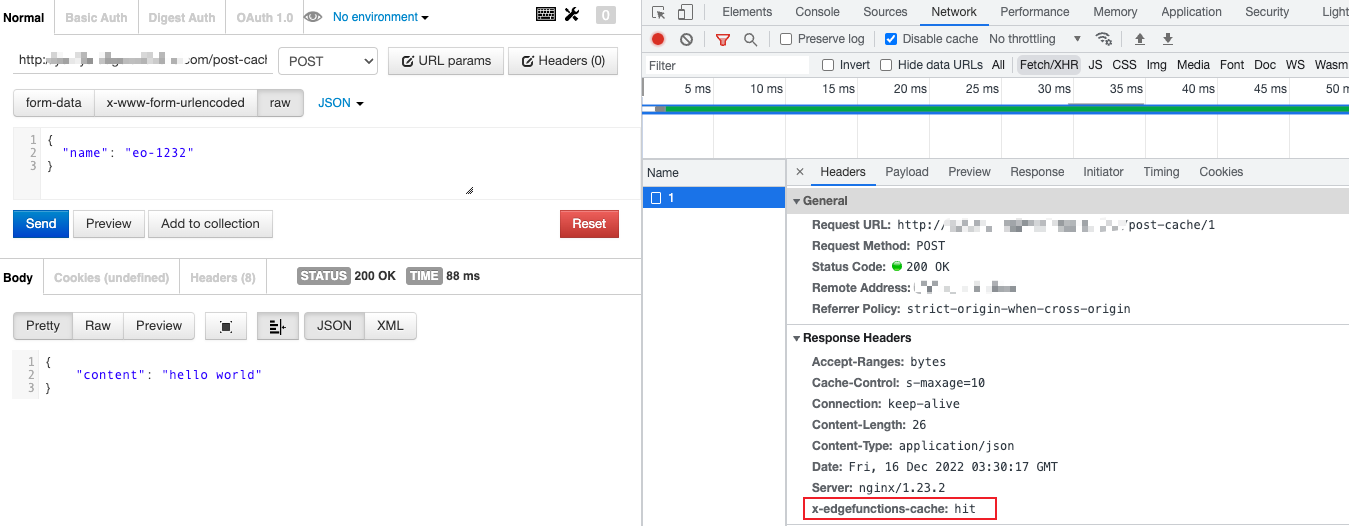
在浏览器地址栏中输入匹配到边缘函数触发规则的 URL,即可预览到示例效果。
未命中缓存。

命中缓存。
相关参考
文档反馈