Windows实例问题诊断及处理
Download
聚焦模式
字号
现象描述
Windows 实例通过自动化助手检查,检测结果中出现相关问题。
检测项分类
检测项 | 检测内容 |
操作系统环境相关 | |
| |
| |
| |
| |
| |
系统资源使用率相关 | |
| |
| |
| |
| |
远程连接相关 | |
| |
| |
| |
| |
| |
| |
| |
网络配置相关 | |
| |
| |
| |
| |
问题定位及处理
您可匹配具体检测项结果,参考以下步骤处理对应问题:
内存限制检查
现象描述
Windows 操作系统无法最大化使用内存,可能存在内存瓶颈导致不能充分发挥系统性能。
解决方法
1. 登录实例,详情请参见 使用标准方式登录 Windows 实例。
2. 在操作系统桌面左下角右键单击 
3. 在 PowerShell 窗口中输入
resmon 并按 Enter,打开资源监视器窗口。4. 在资源监视器窗口中,选择内存页签,并检查“为硬件保留的内存”是否大于512MB。
小于,则表示正常。
大于,请参考以下步骤进行修复。
5. 在 PowerShell 窗口中输入
msconfig 并按 Enter,打开“系统配置”窗口。6. 在系统配置窗口中,选择引导页签,并单击高级选项。
7. 在弹出的引导高级选项窗口中,取消勾选最大内存。
8. 单击确定。
9. 在操作系统桌面左下角右键单击 
10. 在设置窗口中选择更新与安全,并在左侧单击激活。
11. 检查系统是否已激活。
是,则进行下一步。
否,则请参见 系统激活 进行激活。
12. 通过控制台重启实例,使配置生效。详情请参见 重启实例。
CPU 限制检查
现象描述
Windows 操作系统无法最大化使用 CPU,可能存在 CPU 瓶颈导致不能充分发挥系统性能。
解决方法
1. 登录实例,详情请参见 使用标准方式登录 Windows 实例。
2. 在操作系统桌面左下角右键单击 
3. 在 PowerShell 窗口中输入
msconfig 并按 Enter,打开系统配置窗口。4. 在系统配置窗口中,选择引导页签,并单击高级选项。
5. 在弹出的引导高级选项中,取消勾选处理器个数。
6. 通过控制台重启实例,使配置生效。详情请参见 重启实例。
句柄泄露检查
现象描述
句柄泄露会导致系统资源浪费,严重时会导致系统功能异常,出现卡顿、无法登录、业务异常等情况。
解决方法
1. 登录实例,详情请参见 使用标准方式登录 Windows 实例(推荐)。
若无法登录实例,请 重启实例 后进行登录。
2. 在操作系统桌面左下角右键单击 
3. 在 PowerShell 窗口中输入
taskmgr.exe 并按 Enter,打开“任务管理器”窗口。4. 在任务管理器窗口中,选择详细信息并单击性能页签。可查看句柄总数。
5. 选择详细信息页签,并在详细信息首行右键单击,在弹出菜单中单击选择列。
6. 在弹出的选择列窗口中,勾选句柄并单击确定。
7. 单击行首的句柄,进行降序排列。
8. 在弹出的转储进程窗口中单击确定。
9. 按需更新系统补丁、安装杀毒软件,进行全盘病毒扫描。
系统暴力破解和攻击检查
现象描述
可能导致系统卡顿,严重时系统会被打挂,影响正常业务,甚至有丢数据风险。
解决方法
系统环境变量检查
现象描述
可能导致系统部分命令无法正常运行,提示命令不存在或运行后出现异常,例如不断弹窗等。
解决方法
1. 登录实例,详情请参见 使用标准方式登录 Windows 实例(推荐)。
2. 在操作系统桌面左下角右键单击 
3. 在 PowerShell 窗口中输入
sysdm.cpl 并按 Enter,打开“系统属性”窗口。4. 在系统属性窗口中,选择高级页签,并单击环境变量。
5. 双击系统变量中的
Path,检查环境变量。
请确保以下4个环境变量存在、顺序无误且位置处在最顶端。若您还有其他自定义环境变量,请尽量放至最底端。
若您的环境变量出现问题,请进行修复:%SystemRoot%\\system32%SystemRoot%%SystemRoot%\\System32\\Wbem%SYSTEMROOT%\\System32\\WindowsPowerShell\\v1.0\\内存使用率过高
现象描述
内存使用率过高,系统性能会降低,可用内存资源不足可能会导致系统变得卡顿。
解决方法
1. 登录实例,详情请参见 使用标准方式登录 Windows 实例(推荐)。
若因内存过高无法登录,请参考 Windows 实例:CPU 或内存占用率高导致无法登录 进行排查。
2. 通过检查结果,或任务管理器查看占用内存最高的进程。本文以使用任务管理器查看,步骤如下:
2.1 在操作系统桌面左下角右键单击 
2.2 在 PowerShell 窗口中输入
resmon 并按 Enter,打开资源监视器。2.3 在资源监视器窗口中,确认占用内存最高的进程运行是否正常。
若排查出的业务:
为业务自身需要,则请参见 调整实例配置 进行配置升级。
非业务自身进程,可优先通过更新系统补丁、安装杀毒软件进行全盘病毒扫描。
虚拟内存使用率高
现象描述
长期虚拟内存不足可能会导致 Windows 激活注册表损坏,出现内存被限制或登录受限制等问题。
解决方法
1. 登录实例,详情请参见 使用标准方式登录 Windows 实例(推荐)。
2. 在操作系统桌面左下角右键单击 
3. 在 PowerShell 窗口中输入
sysdm.cpl 并按 Enter,打开“系统属性”窗口。4. 在弹出的系统属性窗口中,单击性能下的设置。
5. 在弹出的性能选项窗口中,选择高级页签,并单击更改。
6. 在弹出的虚拟内存窗口中,进行以下设置。
7. 取消勾选自动管理所有驱动器的分页文件大小。
8. 选择磁盘空间充足的盘符,即将分页文件设置在该磁盘。本文以选择 C 盘为例。
9. 选择自定义大小,并自定义分页文件大小。
10. 单击设置。
11. 单击确定。
说明:
总 CPU 使用率过高
现象描述
CPU 使用率过高,系统性能会降低,可用 CPU 资源不足系统可能导致实例变得卡顿,甚至无法登录。
解决方法
1. 登录实例,详情请参见 使用标准方式登录 Windows 实例(推荐)。
若因内存过高无法登录,请参考 Windows 实例:CPU 或内存占用率高导致无法登录 进行排查。
2. 通过检查结果、任务管理器或资源监视器查看占用 CPU 最高的进程。本文以使用资源监视器查看,步骤如下:
2.1 在操作系统桌面左下角右键单击 
2.2 在 PowerShell 窗口中输入
resmon 并按 Enter,打开资源监视器。2.3 在资源监视器窗口中,选择 CPU 页签,确认占用 CPU 最高的进程运行是否正常。
若排查出的业务:
为业务自身需要,则请参见 调整实例配置 进行配置升级。
非业务自身进程,可优先通过更新系统补丁、安装杀毒软件进行全盘病毒扫描。
单 CPU 使用率过高
现象描述
单个逻辑 CPU 使用率过高,而其他逻辑 CPU 使用率较低,导致 CPU 资源分配不均,无法充分发挥系统性能。
解决方法
1. 请通过检查结果定位占用单 CPU 最高的进程名。
2. 确认该进程运行是否正常。
正常,则请忽略。
异常,若非特定设置则建议优化异常进程 CPU 使用,或请联系程序设计厂商进行优化适配。
Ntfs 文件系统元文件磁盘占用高
现象描述
Ntfs 文件系统隐藏的元文件总大小占用过高,导致系统可用空间不足。
解决方法
可确定是有超大量文件生成导致该问题。若偶然出现该问题,则建议备份数据后,使用格式化磁盘的方式进行恢复。若经常出现该问题,则建议检查业务程序是否有超大量文件生成,并优化业务程序。
远程桌面服务状态检查
现象描述
远程桌面服务状态异常,无法远程登录,只能通过 VNC 登录。
解决方法
2. 在操作系统桌面左下角右键单击 
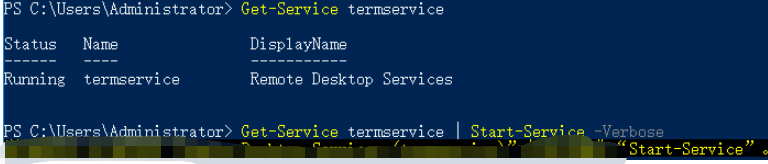
3. 在 powershell 窗口中执行以下命令,启动服务。
Get-Service termservice |Start-Service -Verbose
正确返回结果如下图所示:
若在服务重启过程中卡住,则参考以下步骤处理。
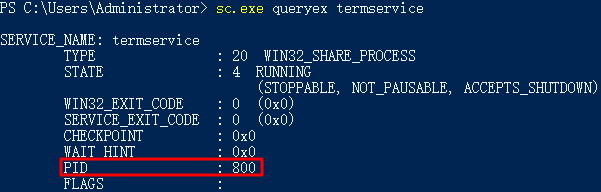
3.1 执行以下命令,获取 PID。
sc.exe queryex termservice
如下图所示,PID 值为800。
3.2 使用已获取 PID,执行以下命令强制结束进程。
taskkill.exe /f /pid “PID数字”
PID 值为800,则执行以下命令。
taskkill.exe /f /pid 800
3.3 执行以下命令,启动远程桌面服务。
Start-Service TermService
远程桌面服务端口检查
现象描述
远程桌面服务端口未监听,无法远程登录,只能通过 VNC 登录。
解决方法
说明:
执行以下步骤时,请在每执行完一步后检查一次问题是否修复,若未修复则继续执行步骤。
1. 执行命令恢复
1.1 使用 VNC 登录 Windows 实例。
1.2 在操作系统桌面左下角右键单击 
1.3 在 PowerShell 窗口中,执行以下命令进行恢复。
Set-ItemProperty 'HKLM:\\SYSTEM\\CurrentControlSet\\Control\\Terminal Server\\WinStations\\RDP-Tcp\\' -Name fEnableWinStation -Value "1" -Force
2. 检查系统是否激活
2.1 在操作系统桌面左下角右键单击 
2.2 在“设置”窗口中选择更新与安全,并在左侧单击激活。
2.3 检查系统是否已激活。若未激活,则请参见 系统激活 进行激活。
3. 重置 WinSock
3.1 执行以下命令,重置 WinSock。
netsh.exe winsock reset
3.2 执行该命令后需重启实例,使配置生效。详情请参见 重启实例。
4. 修复多用户登录远程
若您已安装多用户登录的远程桌面功能,建议先卸载,待排查后再安装。
请参考以下步骤,导出及备份问题实例的注册表文件,并将正常实例的注册表文件导入至问题实例。
4.1 在操作系统桌面左下角右键单击 
4.2 在 PowerShell 窗口中,输入
regedit 并按 Enter,打开“注册表编辑器”。4.3 在“注册表编辑器”左侧文件树中,根据 HKEY_LOCAL_MACHINE\\SYSTEM\\CurrentControlSet\\Control\\Terminal Server\\WinStations 路径找到
WinStations 文件。4.4 右键单击
WinStations 文件,在弹出菜单中选择导出。4.5 在弹出窗口中设置导出文件名,本文以
WinStations.reg 为例。4.6 单击确定,即可在已指定位置查看导出文件
WinStations.reg。4.7 备份完成后,请参考以上步骤导出正常实例的注册表
WinStations 文件,并将导出的 WinStations 文件导入异常实例。请双击需导入的 WinStations.reg 文件,并在弹出窗口中单击是即可完成导入。RDP-Tcp 连接检查
现象描述
远程桌面服务端口未监听,无法远程登录,只能使用 VNC 登录。
解决方法
2. 在操作系统桌面左下角右键单击 
3. 在 powershell 窗口中,执行以下命令进行恢复。
Set-ItemProperty 'HKLM:\\SYSTEM\\CurrentControlSet\\Control\\Terminal Server\\WinStations\\RDP-Tcp\\' -Name fEnableWinStation -Value "1" -Force
允许远程桌面连接检查
现象描述
无法远程登录,只能使用 VNC 登录。
解决方法
2. 在操作系统桌面左下角右键单击 
3. 在 powershell 窗口中,执行以下命令进行恢复。
Set-ItemProperty 'HKLM:\\SYSTEM\\CurrentControlSet\\Control\\Terminal Server\\' -Name "fDenyTSConnections" -Value 0 -Force
RDP 自签证书到期时间检查
现象描述
无法远程登录,只能使用 VNC 登录。
解决方法
2. 在操作系统桌面左下角右键单击 
3. 在 powershell 窗口中,依次执行以下命令进行恢复。
Remove-Item -Path 'Cert:\\LocalMachine\\Remote Desktop\\*' -Force -ErrorAction SilentlyContinue
Restart-Service TermService -Force
远程桌面服务角色安装及授权检查
现象描述
120天宽限期过后,还未导入 License 会导致无法远程登录,只能使用 VNC 登录。
解决方法
通常情况下,微软系统默认允许最多2个账号同时登录。若非必须,则建议您卸载远程桌面服务角色以快速修复问题。若需使用多用户同时登录,则需请联系微软购买 RDS CALs,详情请参见 设置允许多用户远程登录 Windows 云服务器。
卸载及修复步骤如下:
2. 在操作系统桌面左下角右键单击 
3. 在 powershell 窗口中,执行以下命令进行卸载。
Remove-WindowsFeature Remote-Desktop-Services
4. 重启实例,使配置生效。详情请参见 重启实例。
网络访问账户检查
现象描述
无法远程登录,只能使用 VNC 登录。
解决方法
2. 在操作系统桌面左下角右键单击 
3. 在 powershell 窗口中,依次执行以下命令进行恢复。
Set-ItemProperty HKLM:\\SYSTEM\\CurrentControlSet\\Control\\Lsa -Name forceguest -Value 0 -Force
远程桌面服务端口防火墙放通检查
现象描述
Windows 实例内部防火墙未放通远程桌面服务端口,无法远程登录,只能使用 VNC 登录。
解决方法
2. 在操作系统桌面左下角右键单击 
3. 在 powershell 窗口中,输入
wf 并按 Enter,打开“高级安全 Windows 防火墙”窗口。4. 在“高级安全 Windows 防火墙”中,单击“概述”中的 Windows 防火墙属性。
5. 在弹出的“本地计算机-属性”窗口中,分别切换至域配置文件/专用配置文件/公用配置文件页签,并将“防火墙状态”设置为“关闭”。
6. 单击确定保存设置。
关闭实例本身防火墙后,请通过控制台中的安全组放通实例远程桌面端口,详情请参见 添加安全组规则。
端口耗尽检查
现象描述
由于端口耗尽,导致机器网络不通。
解决方法
2. 在操作系统桌面左下角右键单击 
3. 在 powershell 窗口中,您可根据实际情况,选择以下方式:
扩容端口。优先快速恢复业务,无需重启实例。
netsh int ipv4 set dynamicport tcp start=10000 num=55536
netsh int ipv4 set dynamicport udp start=10000 num=55536
加快端口释放,同时扩容端口。推荐使用该方式,但需重启实例。
Set-ItemProperty HKLM:\\SYSTEM\\CurrentControlSet\\Services\\Tcpip\\Parameters\\ -Name TcpTimedWaitDelay -Value 30 -Force
Timewait/Closewait 连接数检查
现象描述
可能会导致无法远程登录,甚至出现端口耗尽网络不通现象 。
解决方法
2. 在操作系统桌面左下角右键单击 
3. 在 powershell 窗口中,执行以下命令,加快端口释放。
Set-ItemProperty HKLM:\\SYSTEM\\CurrentControlSet\\Services\\Tcpip\\Parameters\\ -Name TcpTimedWaitDelay -Value 30 -Force
建议优先使用安全组,仅放通必要的 IP 及端口号,以过滤部分恶意请求。同时按需更换 wait 连接数过多的默认业务端口号,例如远程桌面服务默认端口号3389。
网关状态检查
现象描述
网关异常可能会导致机器网络不通。
解决方法
2. 在操作系统桌面左下角右键单击 
3. 在 powershell 窗口中,输入
ncpa.cpl 并按 Enter,打开“网络连接”窗口。4. 在网络连接窗口中,重启网卡:
右键单击网卡,在弹出的菜单中选择禁用。
再次右键单击后,再选择启用,以尝试快速修复。
5. 若仍未修复,请确认网卡是否为自动获取 IP 地址。若非此设置,建议调整为自动获取 IP 地址。步骤如下:
5.1 在网络连接窗口中,右键单击网卡,在弹出的菜单中选择属性。
5.2 在弹出的以太网属性窗口中,选择 “Internet 协议版本 4(TCP/IPv4)”,并单击属性。
5.3 在弹出的 Internet 协议版本 4(TCP/IPv4)窗口中,选择自动获得 IP 地址。
5.4 单击确定,设置完成后再次检查网关状态。
MAC 地址检查
现象描述
MAC 地址异常可能会导致机器网络不通。
解决方法
2. 在操作系统桌面左下角右键单击 
3. 在 powershell 窗口中,输入
ncpa.cpl 并按 Enter,打开“网络连接”窗口。4. 在网络连接窗口中,右键单击网卡,在弹出的菜单中选择属性。
5. 在弹出的以太网属性窗口中,单击配置。
6. 在弹出的 Tencent VirtIO Ethernet Adapter 属性窗口中,选择高级页签,并选择属性中的 Assign MAC,设置其为“不存在”。
7. 单击确定,保存设置。
8. 在网络连接窗口中,重启网卡:
右键单击网卡,在弹出的菜单中选择禁用。
再次右键单击后,再选择启用。
内网域名解析检查
现象描述
无法 nslookup 和 ping 通内网,导致系统无法激活、无法进行时间同步等。
解决方法
2. 在操作系统桌面左下角右键单击 
3. 在 powershell 窗口中,输入
ncpa.cpl 并按 Enter,打开“网络连接”窗口。4. 在网络连接窗口中,右键单击网卡,在弹出的菜单中选择属性。
5. 在弹出的以太网属性窗口中,选择 “Internet 协议版本 4(TCP/IPv4)”,并单击属性。
6. 在弹出的 “Internet 协议版本 4(TCP/IPv4)” 窗口中:
建议使用“自动获得 DNS 服务器地址”设置,或者添加 CVM 默认 DNS 地址(私有网络通常是
183.60.83.19 和 183.60.82.98)。若实例为域环境,则请单击高级,在“高级 TCP/IP 设置”窗口中,建议将 CVM 默认 DNS 地址放置在域 DNS 后。
7. 在 powershell 窗口中,执行以下命令,检查永久路由。
route print
若返回结果中未包含 169.254.0.0 开头的路由信息,则建议执行以下命令进行添加。
route add 169.254.0.0 mask 255.255.128.0 $Gateway -p
注意:
$Gateway 需替换为您实际的网关地址。
文档反馈