iOS
Download
聚焦模式
字号
业务流程
本节汇总了电商直播场景中一些常见的业务流程,帮助您更好地理解整个场景的实现流程。
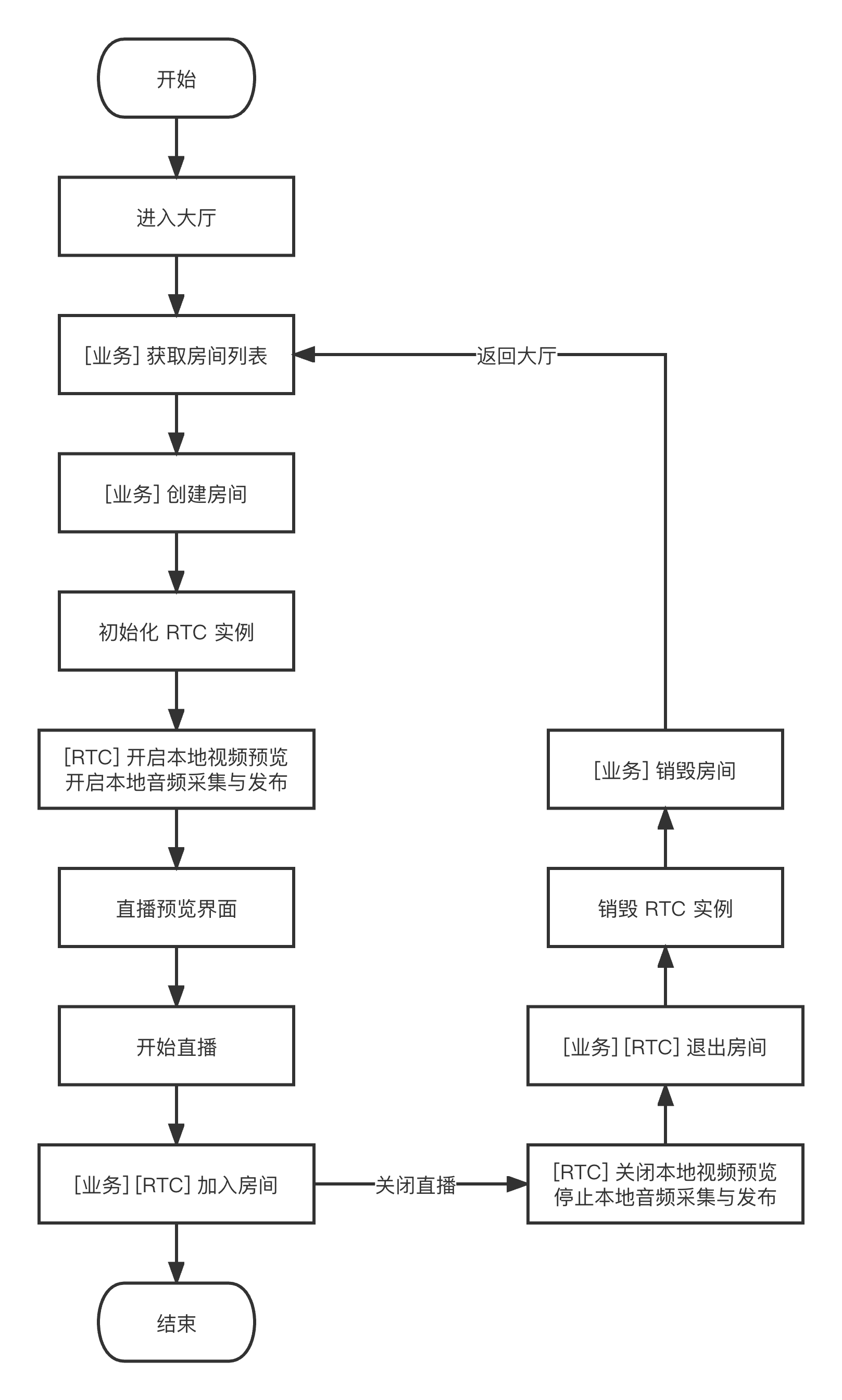
下图展示了主播(房主)本地预览、创建房间、进房开播、退房关播的流程。
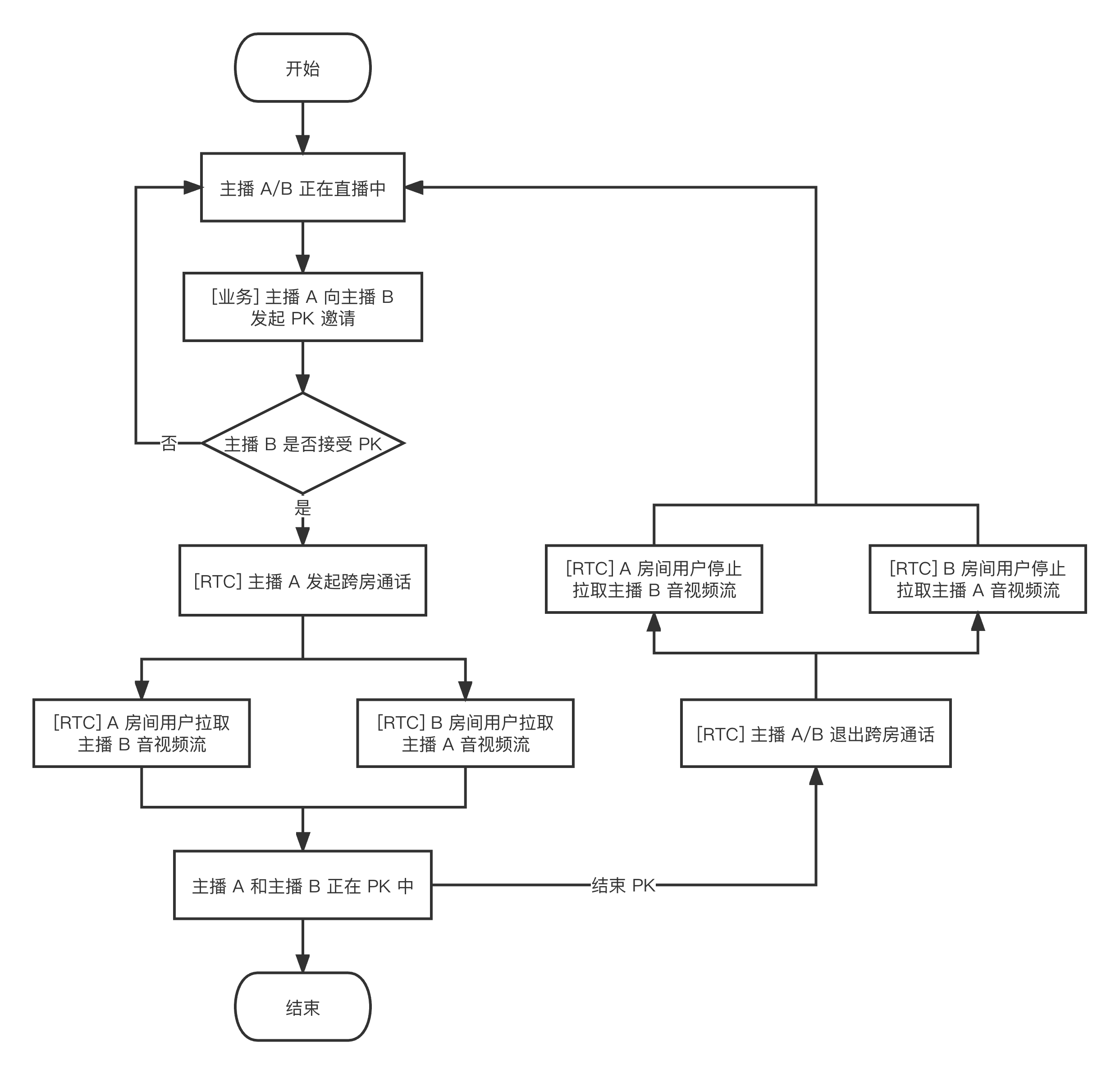
下图展示了主播 A 邀请主播 B 进行跨房 PK 连麦的流程。跨房 PK 过程中,两个房间内的观众都可以看到两个房主 PK 连麦直播的画面。
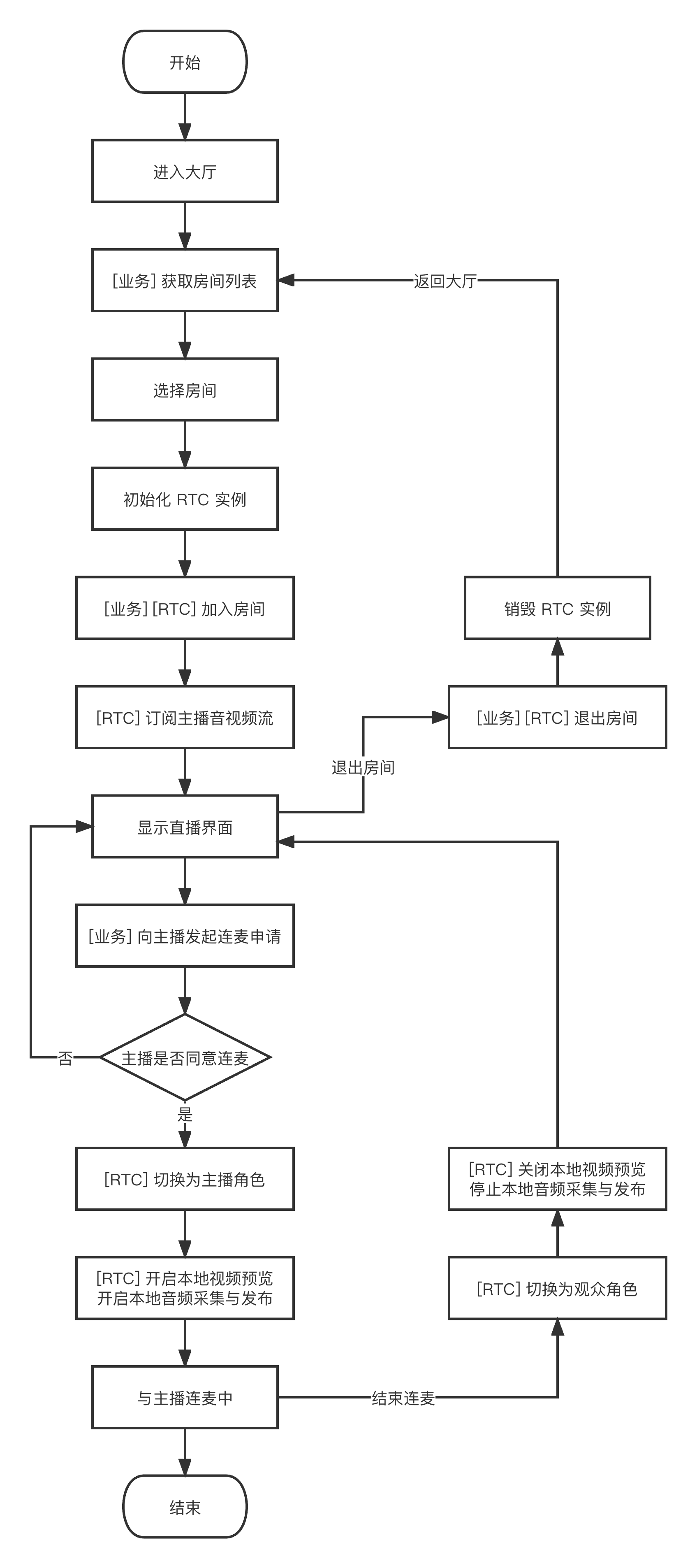
下图展示了 RTC 实时互动直播间观众进入房间、申请连麦、结束连麦、退出房间的流程。
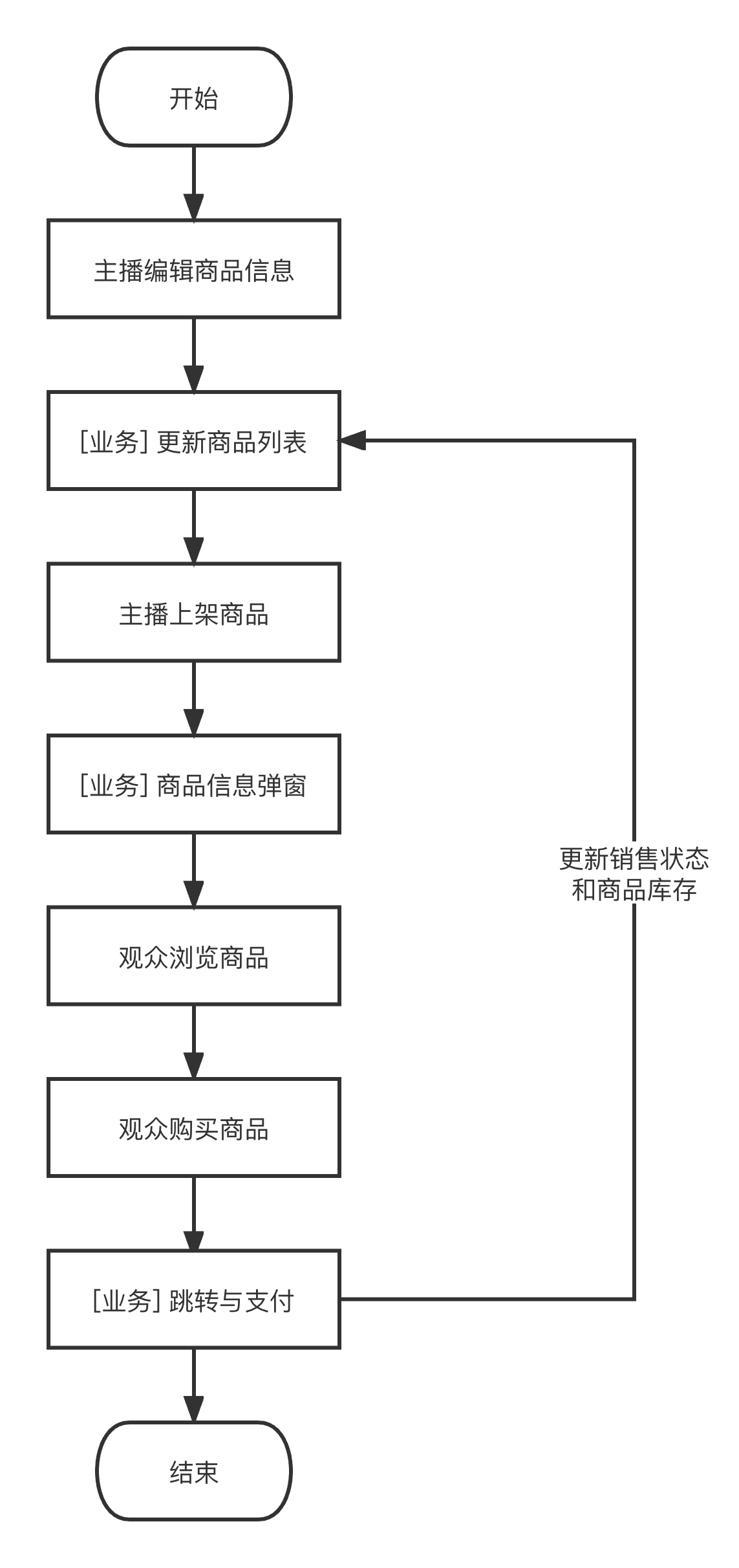
下图展示了直播带货场景中主播编辑、上架商品,观众浏览、购买商品的流程。
接入准备
步骤一:开通服务
电商直播场景通常需要依赖 RTC Engine、美颜 AR、播放器 SDK 等付费 PaaS 服务构建。其中,RTC Engine 负责提供实时音视频互动能力,美颜 AR 负责提供美颜特效能力,播放器负责提供直播和点播播放能力。您可根据实际业务需求自由选择开通上述服务。
1. 首先,您需要登录 RTC Engine 控制台 创建应用,您可根据需要选择升级 RTC Engine 应用版本,例如专业版可解锁更多增值功能服务。
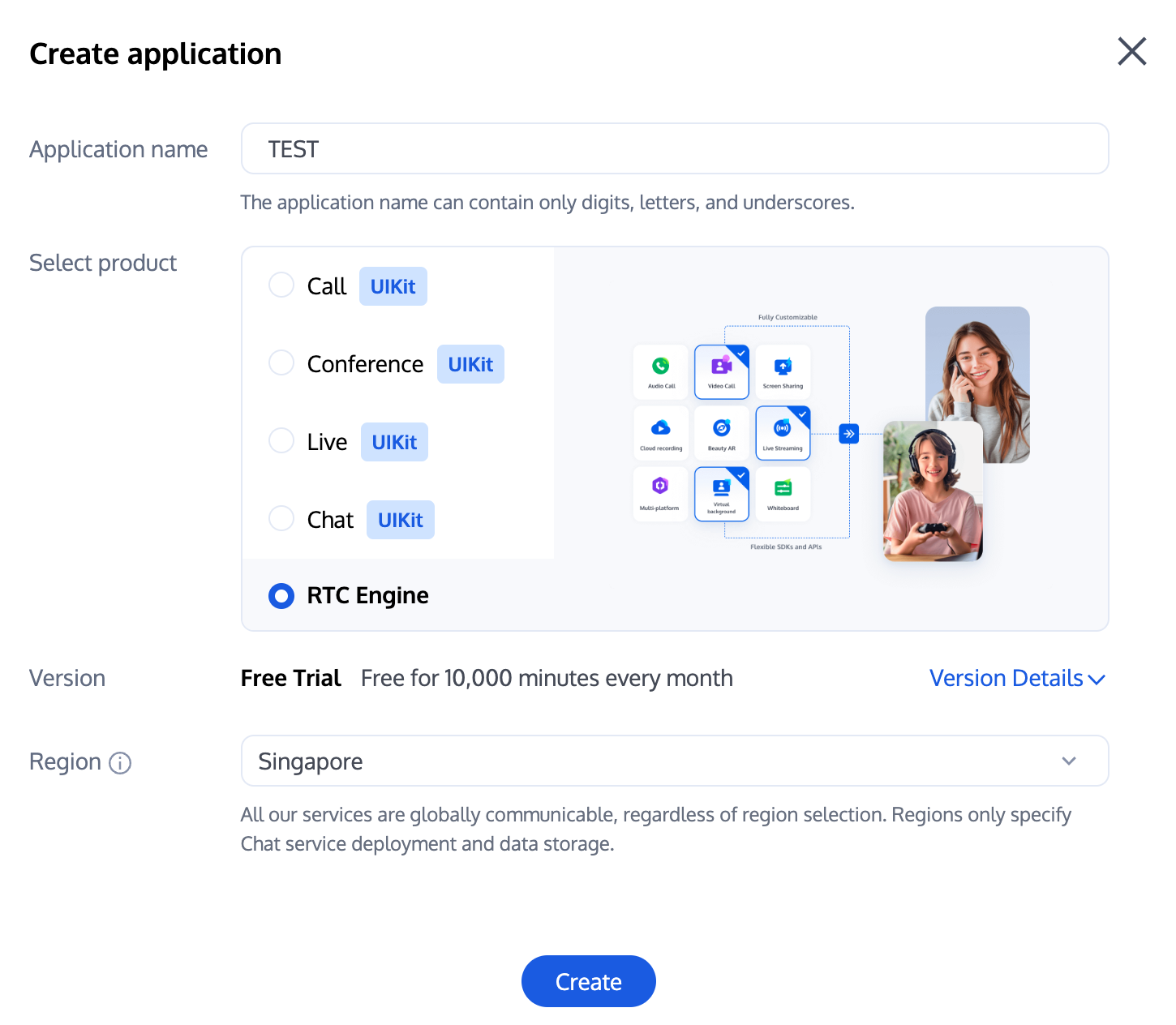
说明:
建议创建两个应用分别用于测试环境和生产环境,一年内每个腾讯云账号(UIN)每月赠送10,000分钟免费时长。
RTC Engine 包月套餐分为体验版(默认)、轻量版、标准版、专业版,可解锁不同的增值功能服务,详情可见 版本功能与包月套餐说明。
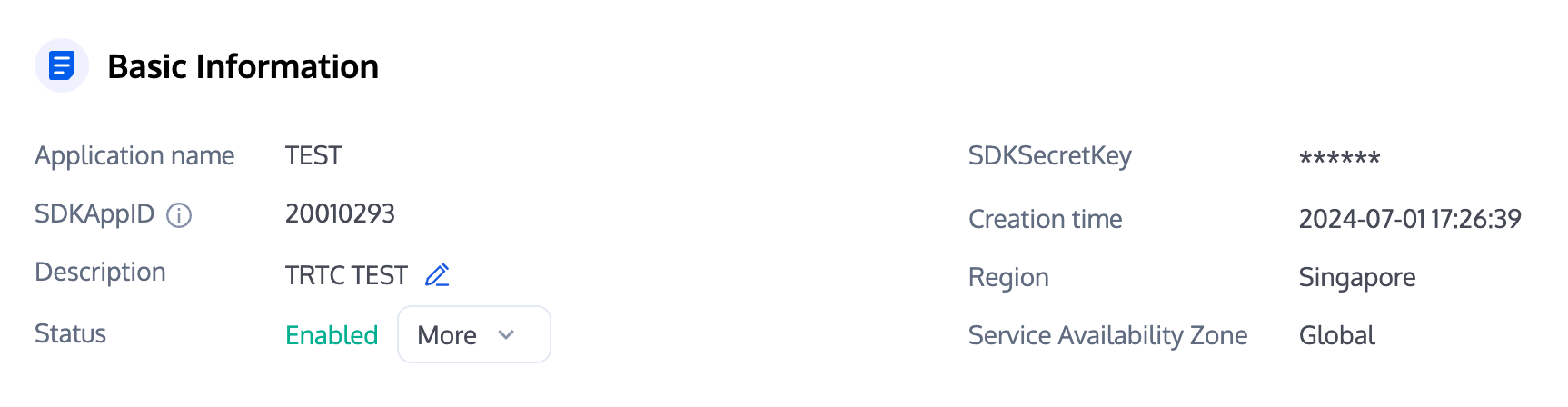
2. 应用创建完毕之后,您可以在应用管理-应用概览栏目看到该应用的基本信息,其中需要您保管好 SDKAppID、SDKSecretKey 便于后续使用,同时应避免密钥泄露造成流量盗刷。
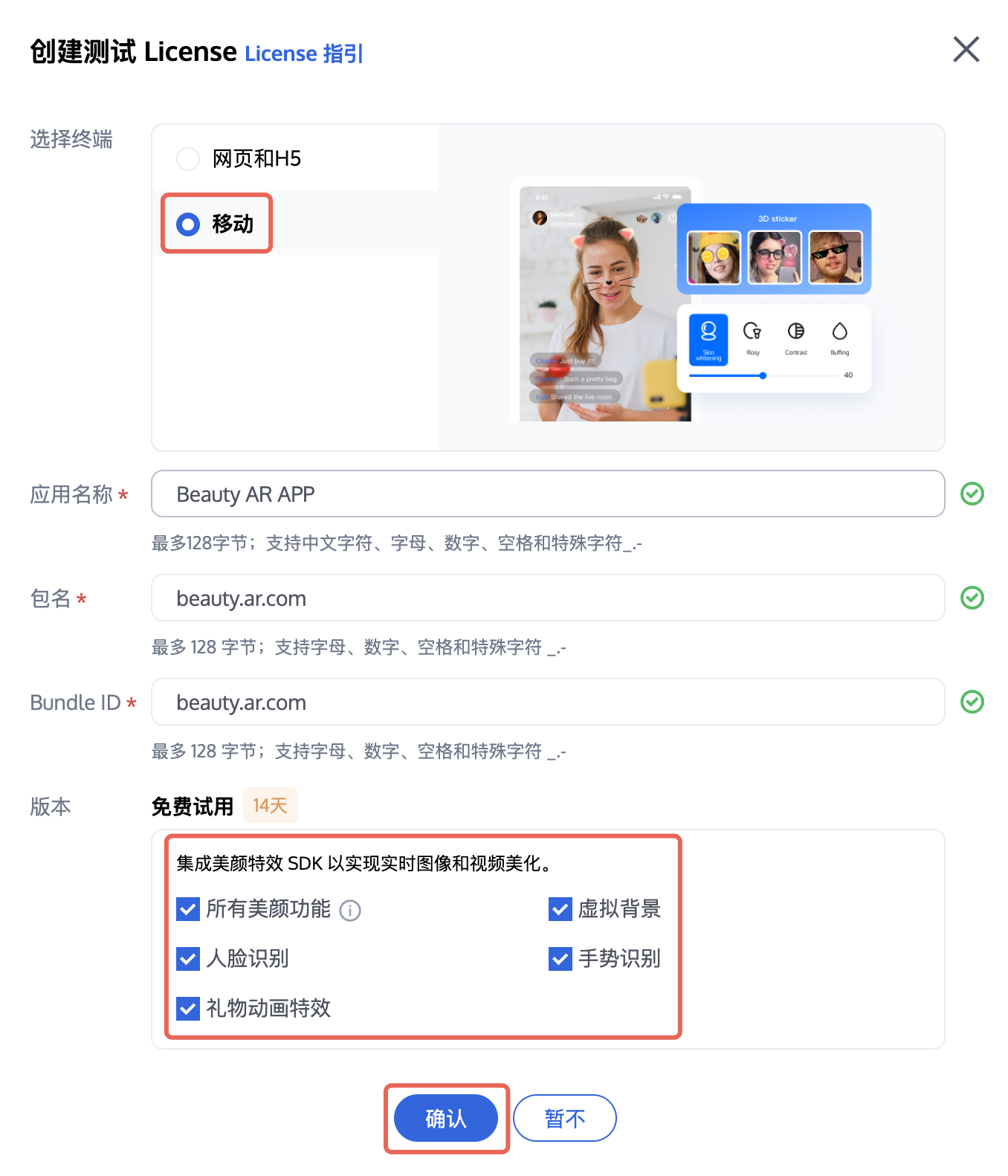
1. 登录 美颜 AR 控制台 > 移动端 License,单击新建测试 License(测试版 License 免费测试有效期为14天,可续期1次,共28天)。选择移动,并根据实际需要填写 App Name、Package Name 和 Bundle ID。勾选您想试用的功能:所有美颜功能、虚拟背景、人脸识别、手势识别、礼物动画特效,然后单击确认。
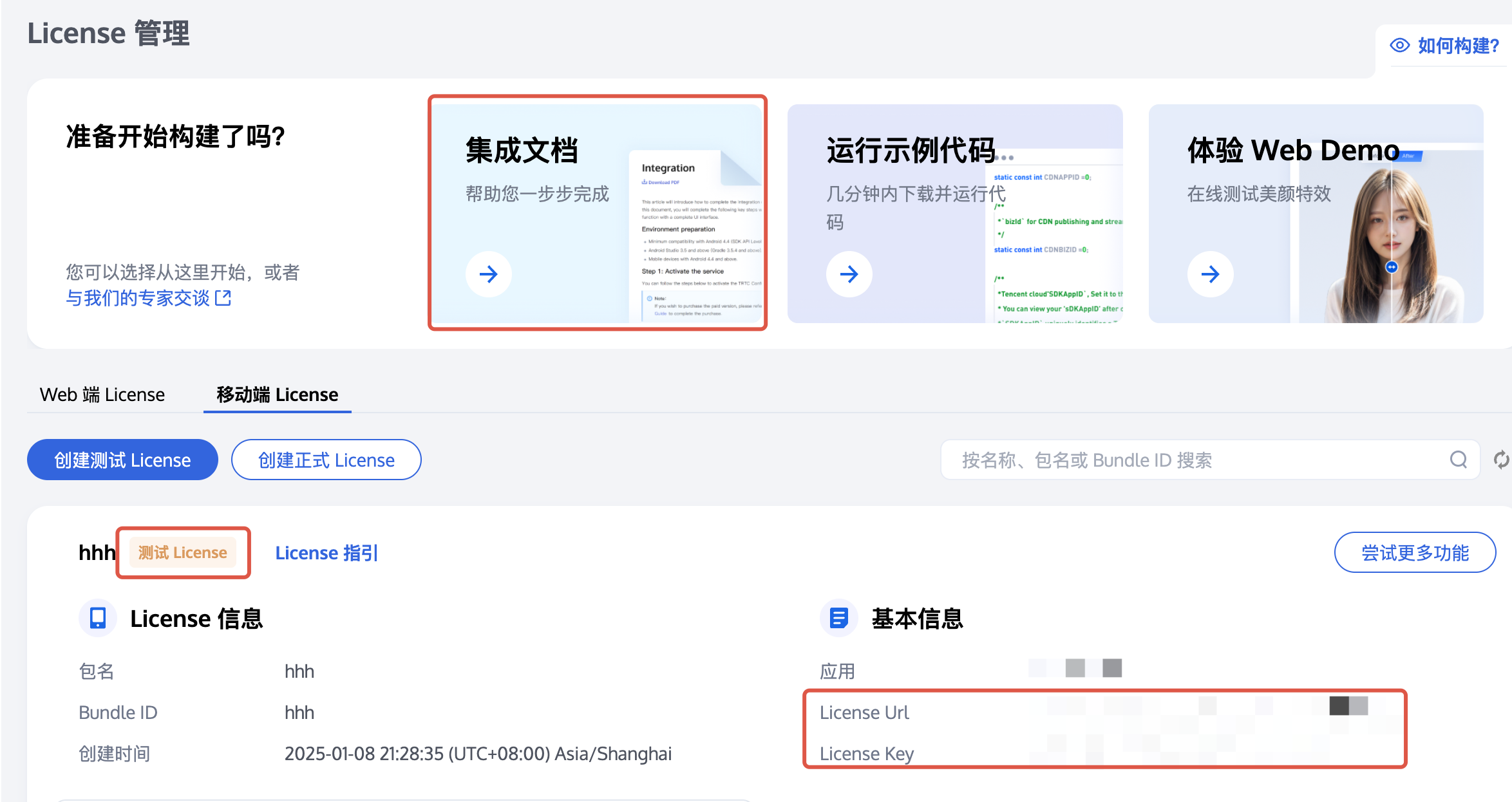
2. 激活后,您可以在当前页面查看您的信息,并参考上方集成指南进行集成。可在 集成指南 中查看 License Key 和 License URL 如何使用。

2. 根据实际需求填写
App Name、Package Name 和 Bundle ID,选择播放器高级版,单击创建。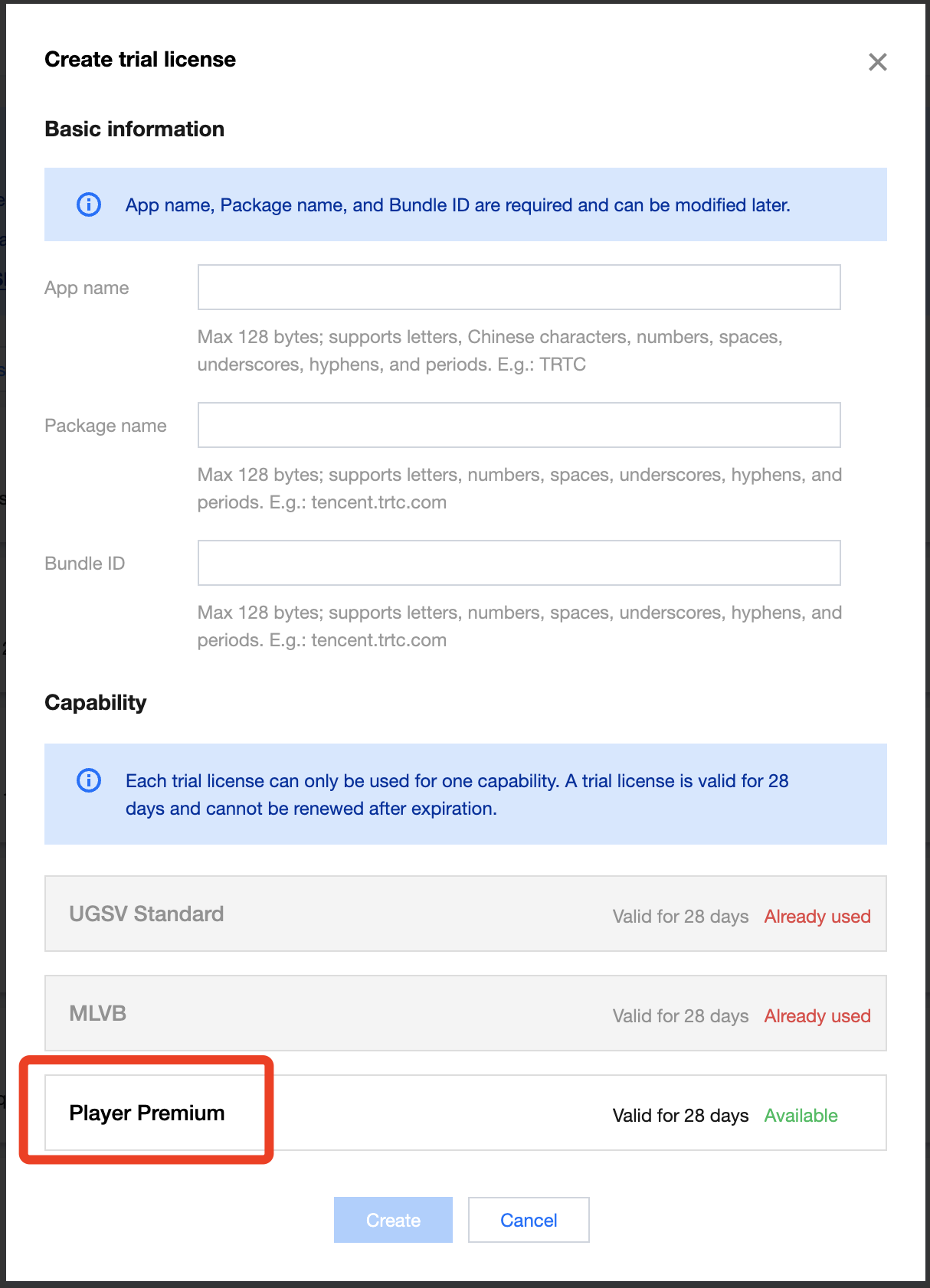
3. 测试版 License 成功创建后,页面会显示生成的 License 信息。在 SDK 初始化配置时需要传入 License Key 和 License URL 两个参数,请妥善保存以下信息。
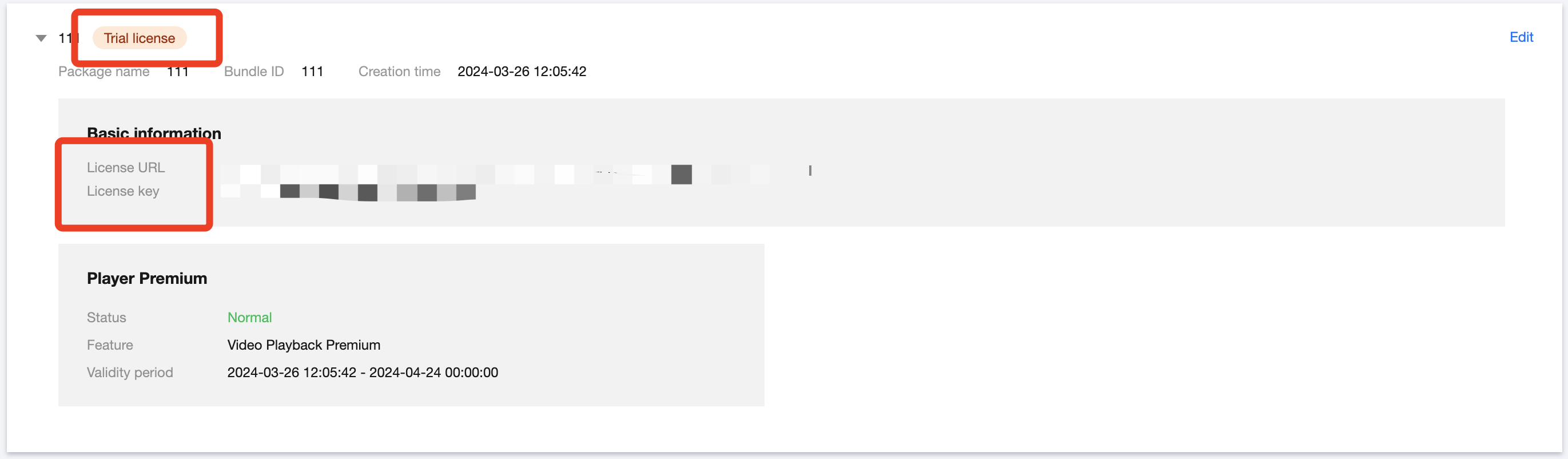
注意:
同一应用的 License URL 和 Key 唯一,测试版 License 升级为正式版后 License URL 和 Key 不变。
步骤二:导入 SDK
RTC Engine SDK 和美颜 AR SDK 已经发布到 CocoaPods 库,您可以通过 CocoaPods 集成。
1. 安装 CocoaPods。在终端窗口中输入如下命令(需要提前在 Mac 中安装 Ruby 环境):
sudo gem install cocoapods
2. 创建 Podfile 文件。进入项目所在路径,输入以下命令行之后项目路径下会出现一个 Podfile 文件。
pod init
3. 编辑 Podfile 文件。根据您的项目需要选择合适的版本,并编辑 Podfile 文件:
platform :ios, '8.0'target 'App' do# 全功能版 SDK# 包含实时音视频(RTC Engine)、直播播放器(TXLivePlayer)、RTMP 推流(TXLivePusher)、点播播放器(TXVodPlayer)和短视频录制和编辑(UGSV)等众多功能。pod 'TXLiteAVSDK_Professional', :podspec => 'https://liteav.sdk.qcloud.com/pod/liteavsdkspec/TXLiteAVSDK_Professional.podspec'# 腾讯特效 SDK 例如:S1-07套餐如下pod 'TencentEffect_S1-07'end
注意:
电商直播场景的实现通常需要依赖 RTC Engine、播放器等多项能力的组合,为避免单独集成的符号冲突问题,推荐您集成全功能版 SDK。
4. 更新并安装 SDK。
在终端窗口中输入如下命令以更新本地库文件,并安装 SDK:
pod install
或使用以下命令更新本地库版本:
pod update
pod 命令执行完后,会生成集成了 SDK 的 .xcworkspace 后缀的工程文件,双击打开即可。
说明:
若 pod 搜索失败,建议尝试更新 pod 的本地 repo 缓存,更新命令如下:
pod setuppod repo updaterm ~/Library/Caches/CocoaPods/search_index.json
除了推荐的自动加载方式,您还可以选择下载 SDK 并手动导入,详见 手动集成 RTC Engine SDK 和 手动集成美颜 AR SDK。
5. 添加美颜资源到实际项目工程中。
5.1 下载并解压对应套餐的 SDK 和美颜资源 ,将 resources/motionRes 文件夹下 bundle 资源添加到实际工程中。
5.2 在 Build Settings 中的 Other Linker Flags 添加
-ObjC。6. 将 Bundle Identifier 修改成与申请的测试授权一致。
步骤三:工程配置
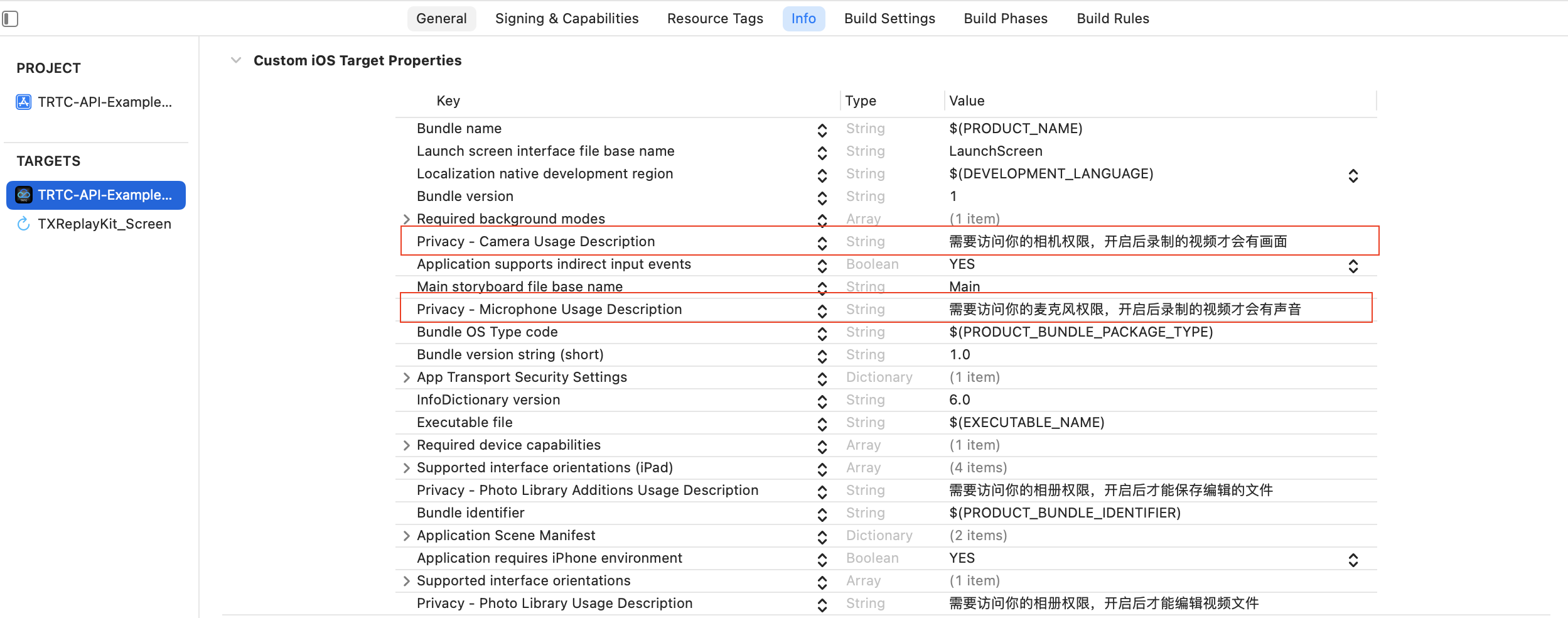
1. 权限配置。
电商直播场景下 LiteAVSDK 及腾讯特效 SDK 需要以下权限。在 App 的 Info.plist 中添加以下两项,分别对应麦克风和摄像头在系统弹出授权对话框时的提示信息。
Privacy - Microphone Usage Description,并填入麦克风使用目的提示语。
Privacy - Camera Usage Description,并填入摄像头使用目的提示语。
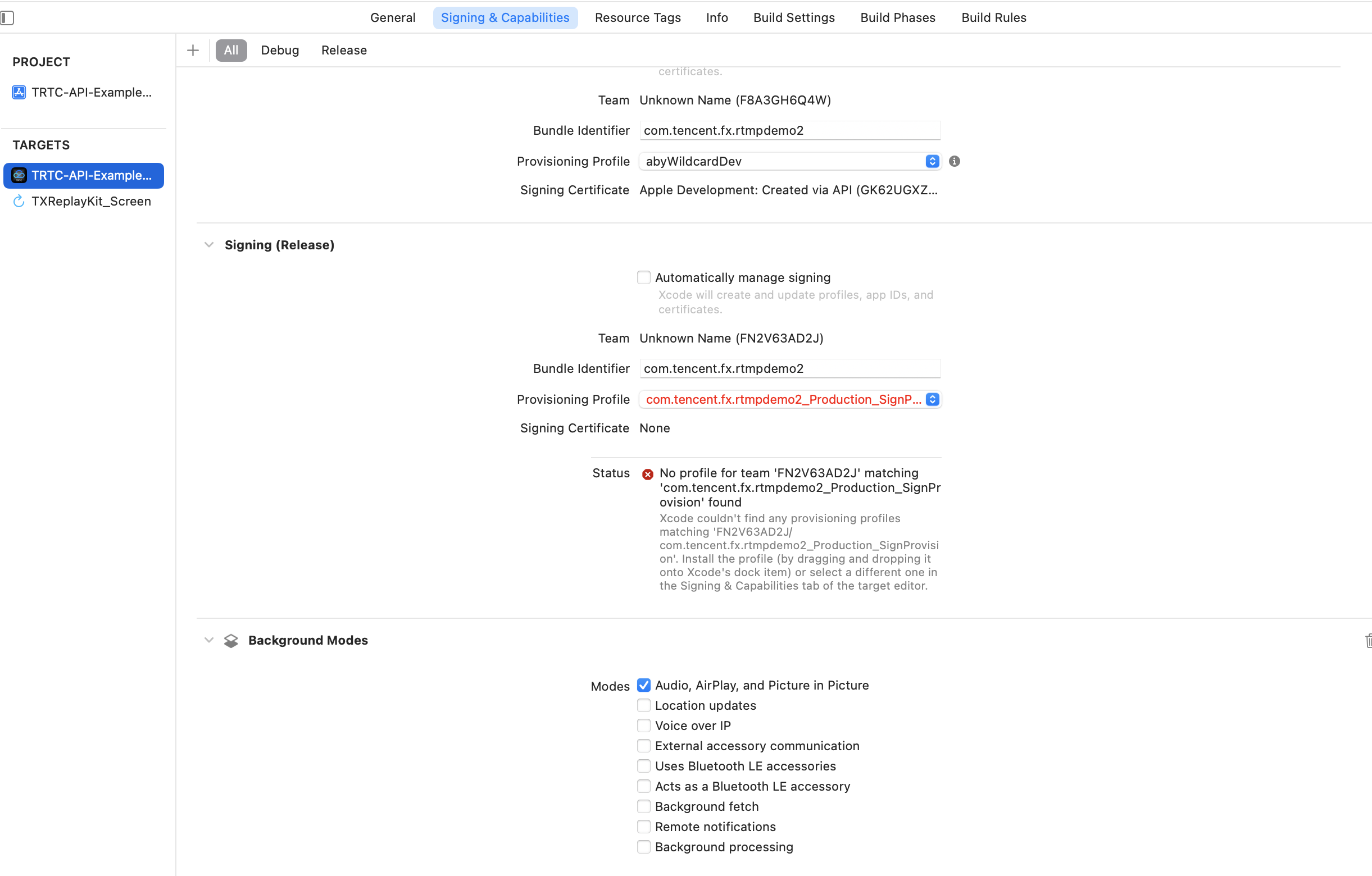
2. 如需 App 进入后台仍然运行相关功能,可在 XCode 中选中当前工程项目,并在 Capabilities 下将设置项 Background Modes 设定为 ON,并勾选 Audio,AirPlay and Picture in Picture,如下图所示:
步骤四:鉴权与许可
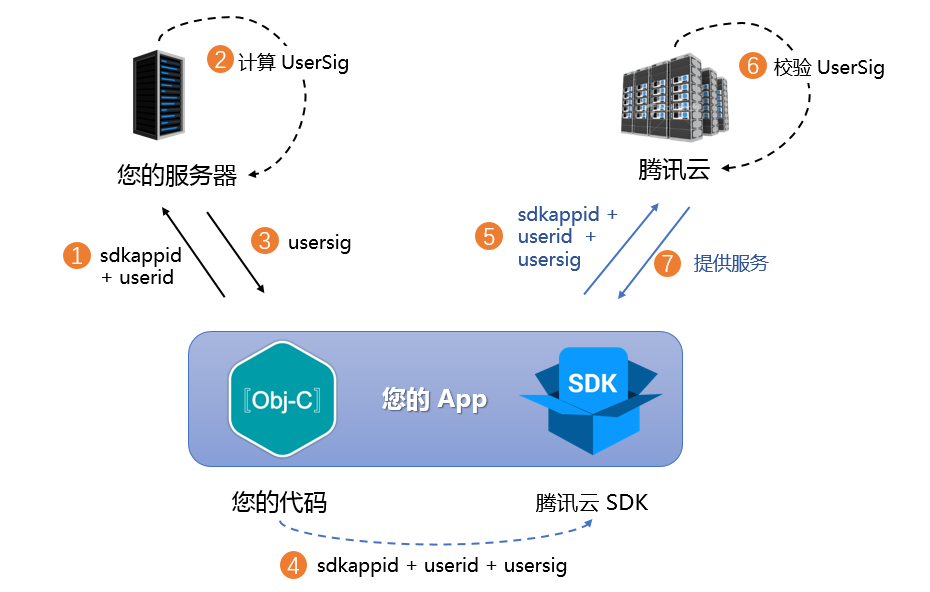
UserSig 是腾讯云设计的一种安全保护签名,目的是为了阻止恶意攻击者盗用您的云服务使用权,RTC Engine 在进房时校验该鉴权凭证。
正式运行阶段:推荐安全等级更高的服务端计算 UserSig 方案,防止客户端被逆向破解泄露密钥。
具体实现流程如下:
1. 您的 App 在调用 SDK 的初始化函数之前,首先要向您的服务器请求 UserSig。
2. 您的服务器根据 SDKAppID 和 UserID 计算 UserSig。
3. 服务器将计算好的 UserSig 返回给您的 App。
4. 您的 App 将获得的 UserSig 通过特定 API 传递给 SDK。
5. SDK 将 SDKAppID + UserID + UserSig 提交给腾讯云服务器进行校验。
6. 腾讯云校验 UserSig,确认合法性。
7. 校验通过后,会向 RTC Engine SDK 提供实时音视频服务。
注意:
调试跑通阶段的本地 UserSig 计算方式不推荐应用到线上环境,容易被逆向破解导致密钥泄露。
我们提供了多个语言版本(Java/Go/PHP/Node.js/Python/C#/C++)的 UserSig 服务端计算源代码,详见 服务端计算 UserSig。
使用美颜 AR 之前,需要向腾讯云校验许可凭证。设置 License 需要用到 License Key 和 License URL,示例代码如下。
[TELicenseCheck setTELicense:LicenseURL key:LicenseKey completion:^(NSInteger authresult, NSString * _Nonnull errorMsg) {if (authresult == TELicenseCheckOk) {NSLog(@"鉴权成功");} else {NSLog(@"鉴权失败");}}];
注意:
建议在相关业务模块的初始化代码中触发鉴权许可,避免在使用前才临时去下载 License,同时鉴权时应具有网络权限。
实际应用的 Bundle ID 必须和创建 License 时绑定的 Bundle ID 完全匹配,否则会导致 License 校验失败,详情可参见 鉴权错误码。
直播播放、点播播放功能需要配置播放器 License 授权后方可播放成功,否则将播放失败(黑屏),全局仅需设置一次即可。若您暂未获取 License,可 免费申请测试版 License 以正常播放,正式版 License 需 购买。申请 License 成功后,您将获得两个字符串:License URL 和 License Key。
在您的 App 调用 SDK 相关功能之前(建议在
- [AppDelegate application:didFinishLaunchingWithOptions:] 中)进行如下设置:- (BOOL)application:(UIApplication *)application didFinishLaunchingWithOptions:(NSDictionary *)launchOptions {NSString * const licenceURL = @"<获取到的licenseUrl>";NSString * const licenceKey = @"<获取到的key>";// TXLiveBase 位于 "TXLiveBase.h" 头文件中[TXLiveBase setLicence:licenceURL key:licenceKey];[TXLiveBase setObserver:self];NSLog(@"SDK Version = %@", [TXLiveBase getSDKVersionStr]);return YES;}#pragma mark - TXLiveBaseDelegate- (void)onLicenceLoaded:(int)result Reason:(NSString *)reason {NSLog(@"onLicenceLoaded: result:%d reason:%@", result, reason);// 如果 result 不为 0,表示设置失败,需要进行重试if (result != 0) {[TXLiveBase setLicence:licenceURL key:licenceKey];}}@end
License 设置成功后(需稍等一段时间,具体时间长短依据网络情况而定),您可以通过调用如下方法查看 License 信息:
NSLog(@"%@", [TXLiveBase getLicenceInfo]);
注意:
实际应用的 Bundle ID 必须和创建 License 时绑定的 Bundle ID 完全匹配,否则会导致 License 校验失败。
License 是强线上检验逻辑,应用首次启动后调用 TXLiveBase#setLicence 时,需确保网络可用。 在App首次启动时,可能还没有授权联网权限,则需要等授予联网权限后,再次调用 TXLiveBase#setLicence 。
监听 TXLiveBase#setLicence 加载结果:onLicenceLoaded 接口,如果失败要根据实际情况做对应重试及引导,如果多次失败后,可以限频,并业务辅以产品弹窗等引导,让用户检查网络情况。
TXLiveBase#setLicence 可以多次调用,建议在进入 App 主界面时调用 TXLiveBase#setLicence,确保加载成功。
对于多进程的 App, 确保每个使用播放器的进程启动时,都调用了 TXLiveBase#setLicence。例如: Android 端使用独立进程播放视频的 App, 后台播放时进程被系统 kill 掉重启时,也要调用 TXLiveBase#setLicence。
步骤五:初始化 SDK
// 创建 RTC Engine SDK 实例(单例模式)self.trtcCloud = [TRTCCloud sharedInstance];// 设置事件监听器self.trtcCloud.delegate = self;// 来自 SDK 的各类事件通知(比如:错误码,警告码,音视频状态参数等)- (void)onError:(TXLiteAVError)errCode errMsg:(nullable NSString *)errMsg extInfo:(nullable NSDictionary *)extInfo {NSLog(@"%d: %@", errCode, errMsg);}- (void)onWarning:(TXLiteAVWarning)warningCode warningMsg:(nullable NSString *)warningMsg extInfo:(nullable NSDictionary *)extInfo {NSLog(@"%d: %@", warningCode, warningMsg);}// 移除事件监听器self.trtcCloud.delegate = nil;// 销毁 RTC Engine SDK 实例(单例模式)[TRTCCloud destroySharedIntance];
说明:
// 加载美颜相关资源NSDictionary *assetsDict = @{@"core_name":@"LightCore.bundle",@"root_path":[[NSBundle mainBundle] bundlePath]};// 初始化腾讯特效 SDKself.beautyKit = [[XMagic alloc] initWithRenderSize:previewSize assetsDict:assetsDict];// 释放腾讯特效 SDK[self.beautyKit deinit];
说明:
点播播放场景 SDK 初始化。
// 1. 设置 SDK 接入环境// 若您服务全球用户, 配置 SDK 接入环境为全球接入环境[TXLiveBase setGlobalEnv:"GDPR"];// 2. 创建 PlayerTXVodPlayer *_txVodPlayer = [[TXVodPlayer alloc] init];// 3. 关联渲染 View[_txVodPlayer setupVideoWidget:_myView insertIndex:0];// 4. 播放器参数配置TXVodPlayConfig *_config = [[TXVodPlayConfig alloc]init];[_config setEnableAccurateSeek:true]; // 设置是否精确 seek,默认 true[_config setMaxCacheItems:5]; // 设置缓存文件个数为5[_config setProgressInterval:200]; // 设置进度回调间隔,单位毫秒[_config setMaxBufferSize:50]; // 最大预加载大小,单位 MB[_txVodPlayer setConfig:_config]; // 把 config 传给 _txVodPlayer// 5. 播放器事件监听- (void)onPlayEvent:(TXVodPlayer *)player event:(int)EvtID withParam:(NSDictionary*)param { if (EvtID == PLAY_EVT_VOD_PLAY_PREPARED) { //收到播放器已经准备完成事件,此时可以调用 pause、resume、getWidth、getSupportedBitrates 等接口 } else if (EvtID == PLAY_EVT_PLAY_BEGIN) { // 收到开始播放事件 } else if (EvtID == PLAY_EVT_PLAY_END) { // 收到开始结束事件 } }
直播播放场景 SDK 初始化。
// 1. 创建 PlayerV2TXLivePlayer *_txLivePlayer = [[V2TXLivePlayer alloc] init];// 2. 关联渲染 View[_txLivePlayer setRenderView:_myView];// 3. 播放器事件监听[_txLivePlayer setObserver:self];- (void)onVideoLoading:(id<V2TXLivePlayer>)player extraInfo:(NSDictionary *)extraInfo {// 视频加载事件}- (void)onVideoPlaying:(id<V2TXLivePlayer>)player firstPlay:(BOOL)firstPlay extraInfo:(NSDictionary *)extraInfo {// 视频播放事件}
接入过程
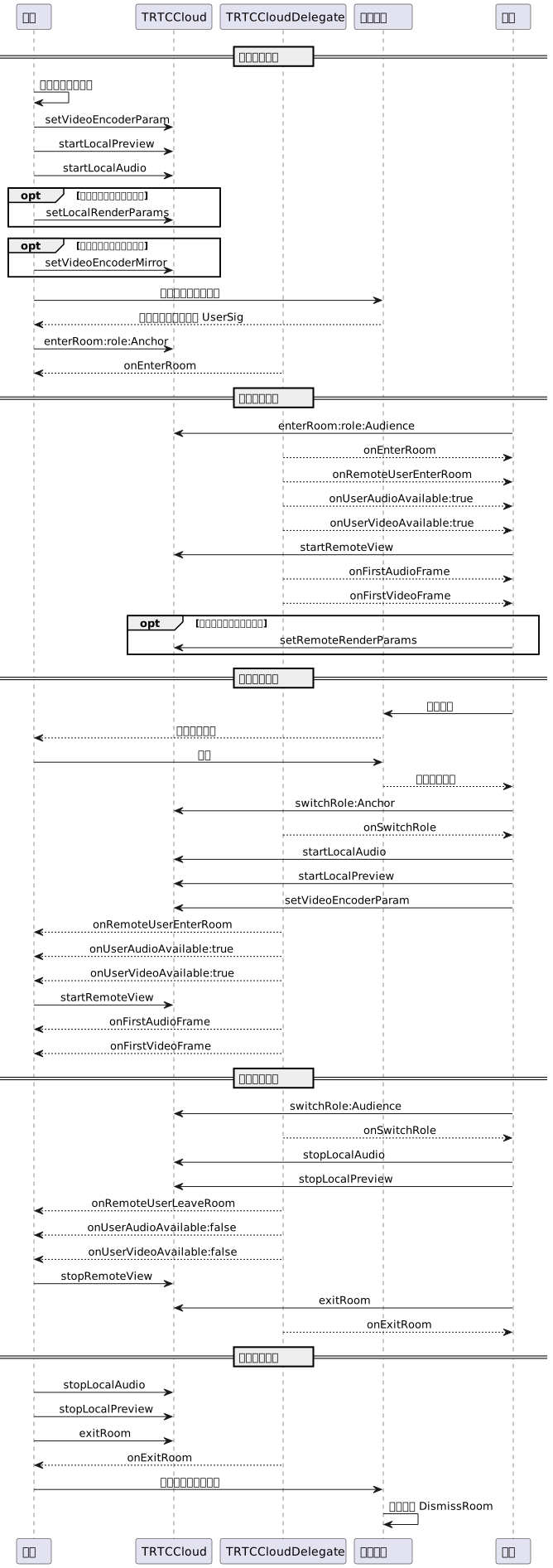
API 时序图
步骤一:主播进房推流
1. 主播进房前开启本地视频预览及音频采集。
// 获取用于展示主播本地画面预览的视频渲染控件@property (nonatomic, strong) UIView *anchorPreviewView;@property (nonatomic, strong) TRTCCloud *trtcCloud;- (void)setupTRTC {self.trtcCloud = [TRTCCloud sharedInstance];self.trtcCloud.delegate = self;// 设置视频编码参数,决定远端用户看到的画面质量TRTCVideoEncParam *encParam = [[TRTCVideoEncParam alloc] init];encParam.videoResolution = TRTCVideoResolution_960_540;encParam.videoFps = 15;encParam.videoBitrate = 1300;encParam.resMode = TRTCVideoResolutionModePortrait;[self.trtcCloud setVideoEncoderParam:encParam];// isFrontCamera 可指定使用前置/后置摄像头进行视频采集[self.trtcCloud startLocalPreview:self.isFrontCamera view:self.anchorPreviewView];// 这里可指定声音音质,从低到高分别为 SPEECH/DEFAULT/MUSIC[self.trtcCloud startLocalAudio:TRTCAudioQualityDefault];}
注意:
您可根据业务需求自行设置视频编码参数 TRTCVideoEncParam,各档位最佳分辨率和码率搭配详见 分辨率码率参照表。
在
enterRoom 之前调用以上接口,SDK 只会开启摄像头预览和音频采集,并一直等到您调用 enterRoom 之后才开始推流。在
enterRoom 之后调用以上接口,SDK 会开启摄像头预览和音频采集,并自动开始推流。2. 主播设置本地画面的渲染参数,以及编码器输出画面模式(可选项)。
- (void)setupRenderParams {TRTCRenderParams *params = [[TRTCRenderParams alloc] init];// 画面镜像模式params.mirrorType = TRTCVideoMirrorTypeAuto;// 画面填充模式params.fillMode = TRTCVideoFillMode_Fill;// 画面旋转角度params.rotation = TRTCVideoRotation_0;// 设置本地画面的渲染参数[self.trtcCloud setLocalRenderParams:params];// 设置编码器输出的画面镜像模式[self.trtcCloud setVideoEncoderMirror:YES];// 设置视频编码器输出的画面方向[self.trtcCloud setVideoEncoderRotation:TRTCVideoRotation_0];}
注意:
设置本地画面渲染参数仅影响本地画面的渲染效果。
设置编码器输出模式会影响房间中其他用户所观看到(以及云端录制文件)的画面效果。
3. 主播正式开始直播,进房推流。
- (void)enterRoomByAnchorWithUserId:(NSString *)userId roomId:(NSString *)roomId {TRTCParams *params = [[TRTCParams alloc] init];// 以字符串房间号为例params.strRoomId = roomId;params.userId = userId;// 从业务后台获取到的 UserSigparams.userSig = @"userSig";// 替换成您的 SDKAppIDparams.sdkAppId = 0;// 指定主播角色params.role = TRTCRoleAnchor;// 以互动直播场景进房[self.trtcCloud enterRoom:params appScene:TRTCAppSceneLIVE];}// 进房结果事件回调- (void)onEnterRoom:(NSInteger)result {if (result > 0) {// result 代表加入房间所消耗的时间(毫秒)NSLog(@"Enter room succeed!");} else {// result 代表进房失败的错误码NSLog(@"Enter room failed!");}}
注意:
RTC Engine 房间号分为整型
roomId 和字符串类型 strRoomId,两种类型的房间不互通,建议统一房间号类型。RTC Engine 用户角色分为主播和听众,只有主播才有推流权限,进房时需指定用户角色,如未指定则默认为主播角色。
电商直播场景下,进房模式建议选用
TRTCAppSceneLIVE。步骤二:观众进房拉流
1. 观众进入 RTC Engine 房间。
- (void)enterRoomByAudienceWithUserId:(NSString *)userId roomId:(NSString *)roomId {TRTCParams *params = [[TRTCParams alloc] init];// 以字符串房间号为例params.strRoomId = roomId;params.userId = userId;// 从业务后台获取到的 UserSigparams.userSig = @"userSig";// 替换成您的 SDKAppIDparams.sdkAppId = 0;// 指定观众角色params.role = TRTCRoleAudience;// 以互动直播场景进房[self.trtcCloud enterRoom:params appScene:TRTCAppSceneLIVE];}// 进房结果事件回调- (void)onEnterRoom:(NSInteger)result {if (result > 0) {// result 代表加入房间所消耗的时间(毫秒)NSLog(@"Enter room succeed!");} else {// result 代表进房失败的错误码NSLog(@"Enter room failed!");}}
2. 观众订阅主播音视频流。
- (void)onUserAudioAvailable:(NSString *)userId available:(BOOL)available {// 某远端用户发布/取消了自己的音频// 在自动订阅模式下,您无需做任何操作,SDK 会自动播放远端用户音频}- (void)onUserVideoAvailable:(NSString *)userId available:(BOOL)available {// 某远端用户发布/取消了主路视频画面if (available) {// 订阅远端用户的视频流,并绑定视频渲染控件[self.trtcCloud startRemoteView:userId streamType:TRTCVideoStreamTypeBig view:self.remoteView];} else {// 停止订阅远端用户的视频流,并释放渲染控件[self.trtcCloud stopRemoteView:userId streamType:TRTCVideoStreamTypeBig];}}
3. 观众设置远端画面的渲染模式(可选项)。
- (void)setupRemoteRenderParams {TRTCRenderParams *params = [[TRTCRenderParams alloc] init];// 画面镜像模式params.mirrorType = TRTCVideoMirrorTypeAuto;// 画面填充模式params.fillMode = TRTCVideoFillMode_Fill;// 画面旋转角度params.rotation = TRTCVideoRotation_0;// 设置远端画面的渲染模式[self.trtcCloud setRemoteRenderParams:@"userId" streamType:TRTCVideoStreamTypeBig params:params];}
步骤三:观众连麦互动
1. 观众切换为主播角色。
- (void)switchToAnchor {// 切换为主播角色[self.trtcCloud switchRole:TRTCRoleAnchor];}// 切换角色事件回调- (void)onSwitchRole:(TXLiteAVError)errCode errMsg:(NSString *)errMsg {if (errCode == ERR_NULL) {// 切换角色成功}}
2. 观众开始本地音视频采集和推流。
- (void)setupTRTC {// 设置视频编码参数,决定远端用户看到的画面质量TRTCVideoEncParam *encParam = [[TRTCVideoEncParam alloc] init];encParam.videoResolution = TRTCVideoResolution_480_270;encParam.videoFps = 15;encParam.videoBitrate = 550;encParam.resMode = TRTCVideoResolutionModePortrait;[self.trtcCloud setVideoEncoderParam:encParam];// isFrontCamera 可指定使用前置/后置摄像头进行视频采集[self.trtcCloud startLocalPreview:self.isFrontCamera view:self.audiencePreviewView];// 这里可指定声音音质,从低到高分别为 SPEECH/DEFAULT/MUSIC[self.trtcCloud startLocalAudio:TRTCAudioQualityDefault];}
注意:
3. 观众下麦停止推流。
- (void)switchToAudience {// 切换为观众角色[self.trtcCloud switchRole:TRTCRoleAudience];}// 切换角色事件回调- (void)onSwitchRole:(TXLiteAVError)errCode errMsg:(NSString *)errMsg {if (errCode == ERR_NULL) {// 停止摄像头采集推流[self.trtcCloud stopLocalPreview];// 停止麦克风采集推流[self.trtcCloud stopLocalAudio];}}
步骤四:退出与解散房间
1. 退出房间。
- (void)exitRoom {[self.trtcCloud stopLocalAudio];[self.trtcCloud stopLocalPreview];[self.trtcCloud exitRoom];}// 离开房间事件回调- (void)onExitRoom:(NSInteger)reason {if (reason == 0) {NSLog(@"主动调用 exitRoom 退出房间");} else if (reason == 1) {NSLog(@"被服务器踢出当前房间");} else if (reason == 2) {NSLog(@"当前房间整个被解散");}}
注意:
待 SDK 占用的所有资源释放完毕后,SDK 会抛出
onExitRoom 回调通知到您。如果您要再次调用
enterRoom 或者切换到其他音视频 SDK,请等待 onExitRoom 回调之后再执行相关操作。否则可能会遇到例如摄像头、麦克风设备被强占等各种异常问题。2. 解散房间
服务端解散房间
RTC Engine 提供了服务端解散数字类型房间 API
DismissRoom,以及解散字符串类型房间 API DismissRoomByStrRoomId,您可以通过调用服务端解散房间接口把房间内所有用户从房间移出,并解散房间。客户端解散房间
客户端没有直接解散房间的 API,需要各个客户端调用 exitRoom 退出房间,当房间内的所有主播和观众完成退房后,根据 RTC Engine 房间生命周期规则,房间将会自动解散,详情请参见 RTC Engine 退出房间。
注意:
当一次直播结束之后,建议您调用服务端解散房间 API 确保房间被解散,防止因部分用户未如期退房导致房间存续,从而产生非期望的费用。
高级功能
商品信息弹窗
自定义消息
1. 发送自定义消息。
方式一:主播在客户端发送商品弹窗相关的群组自定义消息。
// 构造商品弹窗消息体NSDictionary *msgDict = @{@"itemNumber": @1, // 商品编号@"itemPrice": @199.0, // 商品价格@"itemTitle": @"xxx", // 商品标题@"itemUrl": @"xxx" // 商品图片地址};NSDictionary *dataDict = @{@"cmd": @"item_popup_msg",@"msg": msgDict};NSError *error;NSData *data = [NSJSONSerialization dataWithJSONObject:dataDict options:0 error:&error];// 发送群自定义消息(商品弹窗消息建议设置为高优先级)[[V2TIMManager sharedInstance] sendGroupCustomMessage:data to:groupID priority:V2TIM_PRIORITY_HIGH succ:^{// 发送商品弹窗消息成功// 本地渲染商品弹窗效果} fail:^(int code, NSString *desc) {// 发送商品弹窗消息失败}];
方式二:后台运营在服务端发送商品弹窗相关的群组自定义消息。
请求 URL 示例:
https://xxxxxx/v4/group_open_http_svc/send_group_msg?sdkappid=88888888&identifier=admin&usersig=xxx&random=99999999&contenttype=json
请求包体示例:
{"GroupId": "@TGS#12DEVUDHQ","Random": 2784275388,"MsgPriority": "High", // 消息的优先级,商品弹窗消息建议设置为高优先级"MsgBody": [{"MsgType": "TIMCustomElem","MsgContent": {// itemNumber: 商品编号; itemPrice: 商品价格; itemTitel: 商品标题; itemUrl: 商品图片地址"Data": "{\\"cmd\\": \\"item_popup_msg\\", \\"msg\\": {\\"itemNumber\\": 1, \\"itemPrice\\": 199.0, \\"itemTitle\\": \\"xxx\\", \\"itemUrl\\": \\"xxx\\"}}"}}]}
2. 接收自定义消息。
房间内其他用户客户端收到群自定义消息回调,然后进行消息解析和商品弹窗效果渲染。
// 收到群自定义消息[[V2TIMManager sharedInstance] addSimpleMsgListener:self];- (void)onRecvGroupCustomMessage:(NSString *)msgID groupID:(NSString *)groupID sender:(V2TIMGroupMemberInfo *)info customData:(NSData *)data {if (data.length > 0) {NSError *error;NSDictionary *dataDict = [NSJSONSerialization JSONObjectWithData:data options:0 error:&error];if (!error) {NSString *command = dataDict[@"cmd"];NSDictionary *msgDict = dataDict[@"msg"];if ([command isEqualToString:@"item_popup_msg"]) {NSNumber *itemNumber = msgDict[@"itemNumber"]; // 商品编号NSNumber *itemPrice = msgDict[@"itemPrice"]; // 商品价格NSString *itemTitle = msgDict[@"itemTitle"]; // 商品标题NSString *itemUrl = msgDict[@"itemUrl"]; // 商品图片地址// 根据商品编号、商品价格、商品标题、商品图片地址渲染商品弹窗效果}} else {NSLog(@"解析错误: %@", error.localizedDescription);}}}
SEI 信息
SEI 信息会插入到主播视频流中进行传输,能够实现商品信息弹窗和主播直播画面的精准同步。
1. 发送 SEI 信息。主播在 RTC Engine 客户端发送商品弹窗相关的 SEI 消息。
// 构造商品弹窗消息体NSDictionary *msgDict = @{@"itemNumber": @1, // 商品编号@"itemPrice": @199.0, // 商品价格@"itemTitle": @"xxx", // 商品标题@"itemUrl": @"xxx" // 商品图片地址};NSDictionary *dataDict = @{@"cmd": @"item_popup_msg",@"msg": msgDict};NSError *error;NSData *data = [NSJSONSerialization dataWithJSONObject:dataDict options:0 error:&error];// 发送 SEI 信息[self.trtcCloud sendSEIMsg:data repeatCount:1];
2. 接收 SEI 信息。
观众在 RTC Engine 客户端接收 SEI 消息,然后进行消息解析和商品弹窗效果渲染。
// 设置 TRTC 事件监听器self.trtcCloud.delegate = self;// 收到 SEI 消息- (void)onRecvSEIMsg:(NSString *)userId message:(NSData *)message {if (message.length > 0) {NSError *error;NSDictionary *dataDict = [NSJSONSerialization JSONObjectWithData:message options:0 error:&error];if (!error) {NSString *command = dataDict[@"cmd"];NSDictionary *msgDict = dataDict[@"msg"];if ([command isEqualToString:@"item_popup_msg"]) {NSNumber *itemNumber = msgDict[@"itemNumber"]; // 商品编号NSNumber *itemPrice = msgDict[@"itemPrice"]; // 商品价格NSString *itemTitle = msgDict[@"itemTitle"]; // 商品标题NSString *itemUrl = msgDict[@"itemUrl"]; // 商品图片地址// 根据商品编号、商品价格、商品标题、商品图片地址渲染商品弹窗效果}} else {NSLog(@"解析错误: %@", error.localizedDescription);}}}
商品讲解回放
通过播放提前录制好的商品讲解视频,实现商品讲解回放功能。
// 播放 URL 视频资源NSString* url = @"http://1252463788.vod2.myqcloud.com/xxxxx/v.f20.mp4";[_txVodPlayer startVodPlay:url];// 播放沙盒本地视频资源// 获取 Documents路径NSString *documentPath = [NSSearchPathForDirectoriesInDomains(NSDocumentDirectory, NSUserDomainMask, YES) firstObject];// 获取本地视频路径NSString *videoPath = [NSString stringWithFormat:@"%@/video1.m3u8",documentPath];[_txVodPlayer startVodPlay:videoPath];
TXPlayerAuthParams *p = [TXPlayerAuthParams new];p.appId = 1252463788;p.fileId = @"4564972819220421305";// psign 即播放器签名,签名介绍和生成方式参见链接:https://www.tencentcloud.com/document/product/266/42436?from_cn_redirect=1p.sign = @"psignxxxxx"; // 播放器签名[_txVodPlayer startVodPlayWithParams:p];
播放控制:调整进度、暂停播放、恢复播放、结束播放。
// 调整进度(秒)[_txVodPlayer seek:time];// 暂停播放[_txVodPlayer pause];// 恢复播放[_txVodPlayer resume];// 结束播放[_txVodPlayer stopPlay];
注意:
结束播放时,如果要退出当前的 UI 界面,要记得用
removeVideoWidget 销毁 view 控件,否则会产生内存泄露或闪屏问题。// 销毁 view 控件[_txVodPlayer removeVideoWidget];
跨房 PK 连麦
1. 任意一方发起跨房 PK 连麦。
- (void)connectOtherRoom:(NSString *)roomId {NSMutableDictionary *jsonDict = [[NSMutableDictionary alloc] init];// 数字房间号为 roomId[jsonDict setObject:roomId forKey:@"strRoomId"];[jsonDict setObject:self.userId forKey:@"userId"];NSData *jsonData = [NSJSONSerialization dataWithJSONObject:jsonDict options:NSJSONWritingPrettyPrinted error:nil];NSString *jsonString = [[NSString alloc] initWithData:jsonData encoding:NSUTF8StringEncoding];[self.trtcCloud connectOtherRoom:jsonString];}// 请求跨房连麦的结果回调- (void)onConnectOtherRoom:(NSString *)userId errCode:(TXLiteAVError)errCode errMsg:(NSString *)errMsg {// 要跨房通话的另一个房间中的主播的用户 ID// 错误码,ERR_NULL 代表请求成功// 错误信息}
注意:
跨房 PK 连麦的本地用户和对端用户必须都为主播角色,且必须都有音频/视频上行。
可通过多次调用
ConnectOtherRoom() 来实现与多个房间主播跨房连麦,目前限制一个房间最多可以和其他三个房间的主播跨房连麦,一个房间中最多10个主播可与其他房间的主播跨房连麦。2. 两个房间中的所有用户都会收到来自另一个房间中的 PK 主播的音视频流可用回调。
- (void)onUserAudioAvailable:(NSString *)userId available:(BOOL)available {// 某远端用户发布/取消了自己的音频// 在自动订阅模式下,您无需做任何操作,SDK 会自动播放远端用户音频}- (void)onUserVideoAvailable:(NSString *)userId available:(BOOL)available {// 某远端用户发布/取消了主路视频画面if (available) {// 订阅远端用户的视频流,并绑定视频渲染控件[self.trtcCloud startRemoteView:userId streamType:TRTCVideoStreamTypeBig view:self.remoteView];} else {// 停止订阅远端用户的视频流,并释放渲染控件[self.trtcCloud stopRemoteView:userId streamType:TRTCVideoStreamTypeBig];}}
3. 任意一方退出跨房 PK 连麦。
// 退出跨房连麦[self.trtcCloud disconnectOtherRoom];// 退出跨房连麦的结果回调- (void)onDisconnectOtherRoom:(TXLiteAVError)errCode errMsg:(NSString *)errMsg {}
注意:
调用
DisconnectOtherRoom() 后,即退出与所有其他房间主播的跨房 PK 连麦。跨房 PK 连麦的发起端和接收端任意一端均可调用
DisconnectOtherRoom() 退出跨房 PK 连麦。第三方美颜接入
RTC Engine 支持接入第三方美颜特效产品,下面以美颜 AR 为例,展示第三方美颜接入流程。
1. 集成美颜 AR SDK、申请授权 License,详情请参照 接入准备 步骤实现。
2. 设置 SDK 素材资源路径(如有)。
NSString *beautyConfigPath = [NSSearchPathForDirectoriesInDomains(NSDocumentDirectory, NSUserDomainMask, YES) lastObject];beautyConfigPath = [beautyConfigPath stringByAppendingPathComponent:@"beauty_config.json"];NSFileManager *localFileManager=[[NSFileManager alloc] init];BOOL isDir = YES;NSDictionary * beautyConfigJson = @{};if ([localFileManager fileExistsAtPath:beautyConfigPath isDirectory:&isDir] && !isDir) {NSString *beautyConfigJsonStr = [NSString stringWithContentsOfFile:beautyConfigPath encoding:NSUTF8StringEncoding error:nil];NSError *jsonError;NSData *objectData = [beautyConfigJsonStr dataUsingEncoding:NSUTF8StringEncoding];beautyConfigJson = [NSJSONSerialization JSONObjectWithData:objectDataoptions:NSJSONReadingMutableContainerserror:&jsonError];}NSDictionary *assetsDict = @{@"core_name":@"LightCore.bundle",@"root_path":[[NSBundle mainBundle] bundlePath],@"tnn_"@"beauty_config":beautyConfigJson};// 初始化SDK:width和height分别是texture的宽高self.xMagicKit = [[XMagic alloc] initWithRenderSize:CGSizeMake(width,height) assetsDict:assetsDict];
3. 设置第三方美颜的视频数据回调,将美颜 SDK 处理每帧数据结果传入 RTC Engine SDK 内部做渲染处理。
// RTC Engine SDK 设置第三方美颜的视频数据回调[self.trtcCloud setLocalVideoProcessDelegete:self pixelFormat:TRTCVideoPixelFormat_Texture_2D bufferType:TRTCVideoBufferType_Texture];#pragma mark - TRTCVideoFrameDelegate// 构造 YTProcessInput 传入到 SDK 内做渲染处理- (uint32_t)onProcessVideoFrame:(TRTCVideoFrame *_Nonnull)srcFrame dstFrame:(TRTCVideoFrame *_Nonnull)dstFrame {if (!self.xMagicKit) {[self buildBeautySDK:srcFrame.width and:srcFrame.height texture:srcFrame.textureId];//初始化XMagic SDKself.heightF = srcFrame.height;self.widthF = srcFrame.width;}if(self.xMagicKit!=nil && (self.heightF!=srcFrame.height || self.widthF!=srcFrame.width)){self.heightF = srcFrame.height;self.widthF = srcFrame.width;[self.xMagicKit setRenderSize:CGSizeMake(srcFrame.width, srcFrame.height)];}YTProcessInput *input = [[YTProcessInput alloc] init];input.textureData = [[YTTextureData alloc] init];input.textureData.texture = srcFrame.textureId;input.textureData.textureWidth = srcFrame.width;input.textureData.textureHeight = srcFrame.height;input.dataType = kYTTextureData;YTProcessOutput *output = [self.xMagicKit process:input withOrigin:YtLightImageOriginTopLeft withOrientation:YtLightCameraRotation0];dstFrame.textureId = output.textureData.texture;return 0;}
注意:
步骤1、步骤2根据不同的第三方美颜产品实现方式有所不同,而步骤3是 RTC Engine 集成第三方美颜的通用且重要步骤。
双路编码模式
开启双路编码模式后,当前用户的编码器会同时输出【高清大画面】和【低清小画面】两路视频流(但只有一路音频流)。这样,房间中的其他用户就可以根据自身的网络情况或屏幕大小选择订阅【高清大画面】或是【低清小画面】。
1. 开启大小画面双路编码模式。
- (void)enableDualStreamMode:(BOOL)enable {// 小流的视频编码参数(可自定义)TRTCVideoEncParam *smallVideoEncParam = [[TRTCVideoEncParam alloc] init];smallVideoEncParam.videoResolution = TRTCVideoResolution_480_270;smallVideoEncParam.videoFps = 15;smallVideoEncParam.videoBitrate = 550;smallVideoEncParam.resMode = TRTCVideoResolutionModePortrait;[self.trtcCloud enableEncSmallVideoStream:enable withQuality:smallVideoEncParam];}
注意:
双路编码开启后,会消耗更多的 CPU 和 网络带宽,所以 Mac、Windows 或者高性能 Pad 可以考虑开启,不建议手机端开启。
2. 选择拉取远端用户视频流类型。
// 订阅远端用户视频流时可选视频流类型[self.trtcCloud startRemoteView:userId streamType:TRTCVideoStreamTypeBig view:view];// 亦可随时切换指定远端用户的大小画面[self.trtcCloud setRemoteVideoStreamType:userId type:TRTCVideoStreamTypeSmall];
注意:
双路编码开启后,可通过指定
streamType 视频流类型为 TRTCVideoStreamTypeSmall 来拉取低清小画面观看。视图渲染控件
如果您业务涉及到切换显示区域的交互场景,可以使用 RTC Engine SDK 更新本地预览画面、更新远端用户视频渲染控件功能实现。
// 更新本地预览画面渲染控件[self.trtcCloud updateLocalView:view];// 更新远端用户视频渲染控件[self.trtcCloud updateRemoteView:view streamType:TRTCVideoStreamTypeBig forUser:userId];
注意:
传参
view 为目标视频渲染控件,streamType 仅支持 TRTCVideoStreamTypeBig 和 TRTCVideoStreamTypeSub。异常处理
异常错误处理
1. UserSig 相关。
枚举 | 取值 | 描述 |
ERR_TRTC_INVALID_USER_SIG | -3320 | 进房参数 userSig 不正确,请检查 TRTCParams.userSig 是否为空。 |
ERR_TRTC_USER_SIG_CHECK_FAILED | -100018 | UserSig 校验失败,请检查参数 TRTCParams.userSig 是否填写正确或已经过期。 |
2. 进退房相关。
进房失败请先检查进房参数是否正确,且进退房接口必须成对调用,即便进房失败也需要调用退房接口。
枚举 | 取值 | 描述 |
ERR_TRTC_CONNECT_SERVER_TIMEOUT | -3308 | 请求进房超时,请检查是否断网或者是否开启 VPN,您也可以切换4G进行测试。 |
ERR_TRTC_INVALID_SDK_APPID | -3317 | 进房参数 sdkAppId 错误,请检查 TRTCParams.sdkAppId 是否为空 |
ERR_TRTC_INVALID_ROOM_ID | -3318 | 进房参数 roomId 错误,请检查 TRTCParams.roomId 或 TRTCParams.strRoomId 是否为空,注意 roomId 和 strRoomId 不可混用。 |
ERR_TRTC_INVALID_USER_ID | -3319 | 进房参数 userId 不正确,请检查 TRTCParams.userId 是否为空。 |
ERR_TRTC_ENTER_ROOM_REFUSED | -3340 | 进房请求被拒绝,请检查是否连续调用 enterRoom 进入相同 Id 的房间。 |
3. 设备相关。
可监听设备相关错误,在出现相关错误时 UI 提示用户。
枚举 | 取值 | 描述 |
ERR_CAMERA_START_FAIL | -1301 | 打开摄像头失败,例如在 Windows 或 Mac 设备,摄像头的配置程序(驱动程序)异常,禁用后重新启用设备,或者重启机器,或者更新配置程序。 |
ERR_MIC_START_FAIL | -1302 | 打开麦克风失败,例如在 Windows 或 Mac 设备,麦克风的配置程序(驱动程序)异常,禁用后重新启用设备,或者重启机器,或者更新配置程序。 |
ERR_CAMERA_NOT_AUTHORIZED | -1314 | 摄像头设备未授权,通常在移动设备出现,可能是权限被用户拒绝了。 |
ERR_MIC_NOT_AUTHORIZED | -1317 | 麦克风设备未授权,通常在移动设备出现,可能是权限被用户拒绝了。 |
ERR_CAMERA_OCCUPY | -1316 | 摄像头正在被占用中,可尝试打开其他摄像头。 |
ERR_MIC_OCCUPY | -1319 | 麦克风正在被占用中,例如移动设备正在通话时,打开麦克风会失败。 |
远端镜像模式无效问题
RTC Engine 设置画面镜像分为本地预览镜像
setLocalRenderParams 和视频编码镜像 setVideoEncoderMirror,两者分别影响本地预览画面镜像效果,以及视频编码输出画面的镜像效果(远端观众及云端录制的镜像模式)。如果希望本地预览的镜像效果同时在远端观众侧生效,请按照如下方法进行编码。// 设置本地画面的渲染参数TRTCRenderParams *params = [[TRTCRenderParams alloc] init];params.mirrorType = TRTCVideoMirrorTypeEnable; // 画面镜像模式params.fillMode = TRTCVideoFillMode_Fill; // 画面填充模式params.rotation = TRTCVideoRotation_0; // 画面旋转角度[self.trtcCloud setLocalRenderParams:params];// 设置编码器输出的画面镜像模式[self.trtcCloud setVideoEncoderMirror:YES];
摄像头缩放/对焦/切换问题
电商直播场景下,主播可能会对摄像头有自定义调整的需求,RTC Engine SDK 设备管理类下也有解决此类需求的相关接口。
1. 查询、设置摄像头的缩放倍数。
// 获取摄像头的最大缩放倍数(仅适用于移动端)CGFloat zoomRatio = [[self.trtcCloud getDeviceManager] getCameraZoomMaxRatio];// 设置摄像头的缩放倍数(仅适用于移动端)// 取值范围1-5,取值为1表示最远视角(正常镜头),取值为5表示最近视角(放大镜头);最大值推荐为5,若超过5,视频数据会变得模糊不清[[self.trtcCloud getDeviceManager] setCameraZoomRatio:zoomRatio];
2. 设置摄像头的对焦功能及位置。
// 开启或关闭摄像头的自动对焦功能(仅适用于移动端)[[self.trtcCloud getDeviceManager] enableCameraAutoFocus:NO];// 设置摄像头的对焦位置(仅适用于移动端)// 使用该接口的前提是先通过 enableCameraAutoFocus 关闭自动对焦功能[[self.trtcCloud getDeviceManager] setCameraFocusPosition:CGPointMake(x, y)];
3. 判断、切换前置或后置摄像头。
// 判断当前是否为前置摄像头(仅适用于移动端)BOOL isFrontCamera = [[self.trtcCloud getDeviceManager] isFrontCamera];// 切换前置或后置摄像头(仅适用于移动端)// 传入true: 切换为前置;传入false: 切换为后置[[self.trtcCloud getDeviceManager] switchCamera:!isFrontCamera];
文档反馈